In the last article, we discussed Angular controllers. In this article, we will add code to a controller to do 2-way data binding.

The $scope object exists to hold stateful data. To use it, we add this object to the arguments of our controller, as shown in Listing 1.

app.controller("mainController", function($scope) {
...
} 

Because JavaScript is a dynamic language, we can create new properties on an object simply by assigning values to those properties. We can maintain state by adding properties to to the $scope object. For example, in Listing 2, we add the FirstName and LastName properties and assign the values "David" and "Giard", respectively.

app.controller("mainController", function($scope) {
  $scope.firstName = "David";
  $scope.lastName = "Giard"; 
}

Now that we have these values assigned, we can bind HTML elements to these properties in our web page, using the ng-bind attribute, as shown in Listing 3.

First: <input type="text" ng-model="firstName" />
<br /> 
 
Last: <input type="text" ng-model="lastName" /> 

We don't need to add the "$scope." prefix because it is implied. In this example, we bind these properties to 2 text boxes and the browser will display the property values.  But unlike the {{}} data binding syntax, this binding is 2-way. In other words, changing the values in the textbox will also change the value of the properties themselves. We can demonstrate this by adding a

element to the page to output the current value of these properties, as shown in Listing 3.

<div>Hello, {{$scope.FirstName}} {{$scope.LastName}}!div> 

When the user modifies the text in the 2 textboxes, the text within the div immediately changes because both are bound to the same properties.

We can do the same with objects and their properties, as in the following example:

JavaScript:

$scope.customer = {
  firstName: "David",
  lastName: "Giard"
}; 

HTML:

First: <input type="text" ng-model="customer.firstName" />
<br /> 

        Last:
By adding and manipulating properties of the $scope object and using the ng-model directive, we can implement 2-way data binding in our Angular applications.


In the last article, I showed you how to set up your page to use Angular and do simple, one-way data binding.

In this article, I will describe modules and controllers.

A module is a container for the parts of an Angular application, including its controllers. This helps provide a separation of concerns, which helps us organize large, complex applications.

We create a controller in JavaScript with the following syntax:

app.controller("mainController", function() {
  ...
});

In the example above, we named the controller "mainController", but we can give it any name we want. The function argument contains the controller's code and we can pass into this function any Angular objects that we want the function to use.

One common parameter to pass to a controller function is $scope. $scope is a built-in object designed to hold stateful data. We can attach properties to $scope and they will be available in both the view (the web page) and the controller.

The ng-controller directive is an attribute that identifies which controller is available to a page or a section of a page. We can add this attribute to any element, but the controller is only available to that element and the objects contained inside it. If we add it to the body tag, it is available to anything within the body, as in the following example:

<body ng-controller="MyController"> 

which points to the MyController controller and makes it available to everything in the page body.

Once I do this, I can write JavaScript in this controller to add and update properties of the $scope object and those properties become available to the affected part of my page, as in the following example:

JavaScript:

var app = angular.module("myApp", []); 
 
app.controller("mainController", function($scope) {
  $scope.message = "Hello";
  $scope.customer = {
    firstName: "David",
    lastName: "Giard"
  }; 

HTML:

<body ng-controller="mainController">
  <h3>
    {{message}}, {{customer.firstName}} {{customer.lastName}}!
  h3>
body> 

In the above example, we use the one-way data binding to display the properties of $scope set within the controller. The output of this is:

Hello, David Giard

This is a simple example, but you can do what you want in a controller and anything created or manipulated in that function is availabe to your web page.

In this article, we introduced Angular controllers and showed how to use them in an Angular application.


AngularJS is a popular framework that takes care of many common tasks, such as data binding, routing, and making Ajax calls, allowing developers to focus on the unique aspects of their application. Angular makes it much easier to maintain a large, complex single page application.

Angular is an open source project that you can use for free and contribute to (if you are skilled and ambitious).

As of this writing, AngularJS is on version 1.x. The Angular team is still actively working on the 1.x version; but they have already begun work on AngularJS 2.x, which is a complete rewrite of the Angular framework. AngularJS 2 is currently in beta and features some different paradigms than AngularJS 1. This series will initially focus on AngularJS 1, which has been out of beta for many months. In the future, after AngularJS is out of beta, I hope to write more about that version.

To get started with Angular 1, you need to add a reference to the Angular libraries.

You can either download the Angular files from http://angularjs.org or you can point your browser directly to the files on the Angular site. In either case, you need to add a reference to the Angular library, as in the examples shown below.

<script 
src="https://code.angularjs.org/1.5.0-rc.0/angular.js">script> 

or

<script src="angular.js">script> 

Angular uses directives to declaratively add functionality to a web page. A directive is an attribute defined by or within Angular that you add to the elements within your HTML page.

Each Angular page requires the ng-app directive, as in the examples below.

<html ng-app>

or

 
<html ng-app="MyApp"> 

The second example specifies a Controller, which is a JavaScript function that contains some code available to the entire page. We'll talk more about Controllers in a later article.

You can add this attribute to any element on your page, but Angular will only work for elements contained within the attributed element, so it generally makes sense to apply it near the top of the DOM (e.g., at the HTML or BODY tag). If I add ng-app to the HTML element, I will have Angular available throughout my page; however, if I add ng-app to a DIV element, Angular is only available to that DIV and to any elements contained within that DIV. Only one ng-app attribute is allowed per page and Angular will use the first one it finds, ignoring all others.

Once you have the SCRIPT reference and the ng-app attribute, you can begin using Angular. A simple use of Angular is one-way data binding. There are several ways to perform data binding in Angular. The simplest is with the {{}} markup. In an AngularJS application, anything within these double curly braces is interpreted as data binding. So, something like

The time is {{datetime.now()}} 

will output the current date and time. Below are a few other examples.

<h3>{{"Hello" + " world"}}h3>
<div>{{5+2+3}}div> 

which will output the following:

Hello World
10

If your controller contains variables, you can use those as well, such as:

<div>{x} + {y} = {x+y}! div>

Although working with AngularJS can be complex, it only takes a small amount of code to get started.

You can see a live example of the concepts above at this link.

In this article, we introduced the Angular JavaScript framework; then, showed how to add it to your web application and perform simple, one-way data binding.


User expectations for web applications have increased exponentially the past few years. Users now expect applications to respond quickly to their interactions and to render appropriately for different size devices. In addition, users have pushed back against using browser plug-ins, such as Flash and Silverlight.

Developers can meet these expectations by writing an application that performs much of its activity on the client, rather than on the server. The default browser client languages are HTML, JavaScript, and CSS. But these are relatively small languages and they were not originally developed with the idea of building large, complex applications.

Enter: Frameworks. A framework is a combination of pre-built components and utilities that sit on top of HTML, JavaScript, and CSS to manage some of the complexity of large applications.

Some frameworks are very specific, such as jQuery which eases the process of selecting and acting on the DOM elements of a browser; and MustacheJS, which provides automatic data binding. And some are very general frameworks, such as Knockout, Ember, Angular, and React, that provide complex functionality for most aspects of your application and allow you to build custom modules of your own.

Of course, the frameworks themselves add overhead - both in terms of learning time for the developer and download time for the user.  For very simple pages, this overhead might not be worthwhile; but for even moderately complex applications, a framework can manage said complexity, making your code easier to maintain, deploy, debug, and test; and freeing you up to focus less on the application plumbing and more on the code that is unique to your application.

Choosing a framework can be overwhelming. You can find a list of hundreds of JavaScript frameworks and Plug-Ins at http://www.javascripting.com/. Some factors to consider when choosing a framework are:

Does it meet the needs of my application

Do you need a do-everything framework or just data binding. Is the User Interface the most important thing or is synchronizing with backend data more important. Each framework has its strengths. Determine what you need; then find the framework that suits you.

How difficult is it to learning

Look for a framework with good documentation and tutorials. Often, ease of learning is a function of your current knowledge. If you are already familiar with the Model-View-Controller pattern, it may make sense to use a framework that implements this pattern.

How popular is it?

This may strike you as a frivolous criterion, but a popular framework will have more people blogging about it; more people answering forum questions; and bugs will get found and fixed more quickly.

Will it be popular next year?

Future popularity is difficult to predict; but it may be more important than current technology. You are likely to keep this framework for a long time - possibly the life of your application and you want your technologies to remain relevant and supported.

Whichever framework you choose, you will learn it best by diving in and beginning your project.


Seth Juarez on Channel 9

Comments [0]

Project Oxford offers a set of APIs to analyze the content of images. One of these APIs is a REST web service that can determine the words and punctuation contained in a picture. This is accomplished by a simple REST web service call.

To begin, you must register with Project Oxford at http://www.projectoxford.ai.

Then, get the key at https://www.projectoxford.ai/Subscription

Thu04-ShowKey
Figure 1: Subscription key

To call the API we send a POST request to https://api.projectoxford.ai/vision/v1/ocr

If you like, you may add optional querystring parameters to the URL, language and detectionOrientation to have the service determine automatically whether the text is tilted. If you omit those parameters, Oxford will make an effort to determine these values on its own. As you might guess, it is faster if you provide this information to Oxford.

In the header of the request, you must provide your key as in the following example:

Ocp-Apim-Subscription-Key:15e24a988a179f13a25aac4713aec800

Optionally, you can provide the content-type of the data you are sending. To send a URL, use

Content-Type: application/json

To send an image stream, you can set the Coneplication/octet-stream orten-Type to application/octet-stream or multipart/form-data.

In the body of POST request, you can send JSON that includes the URL of the image location. Here is an example:

{ "Url": "http://media.tumblr.com/tumblr_lrbhs0RY2o1qaaiuh.png"}

This web service returns a JSON object containing an array of regions, each of which representing a block of text found in the image. Within each region is an array of lines and within each line is an array of words.

Region, line, and word objects contain a boundingBox object with coordinates of where to find the corresponding object within the image. Each word object contains the actual text detected, including any punctuation.

The beauty of a REST web service is that you can call it from any language or platform that supports HTTP requests (which is pretty much all of them).

The following example uses JavaScript and jQuery to call this API. It assumes that you have a DIV tag on the page with id="OutputDiv" and that you have a reference to jQuery before this code.

var myKey="";
var url="http://media.tumblr.com/tumblr_lrbhs0RY2o1qaaiuh.png";
$.ajax({
    type: "POST",
    url: "https://api.projectoxford.ai/vision/v1/ocr?language=en",
    headers: { "Ocp-Apim-Subscription-Key":myKey },
    contentType: "application/json",
    data: '{ "Url": "' + url + '" }'
}).done(function (data) {
    var outputDiv = $("#OutputDiv");
    outputDiv.text(""); 
 
    var linesOfText = data.regions[0].lines;
    // Loop through each line of text and create a DIV tag 
    // containg each word, separated by a space
    // Append this newly-created DIV to OutputDiv
    for (var i = 0; i < linesOfText.length; i++) {
        var output = "";
        var thisLine = linesOfText[i];
        var words = thisLine.words;
        for (var j = 0; j < words.length; j++) {
            var thisWord = words[j];
            output += thisWord.text;
            output += " ";
        }
        var newDiv = "
" + output + "
"
;
        outputDiv.append(newDiv);
    }
}).fail(function (err) {
    $("#OutputDiv").text("ERROR!" + err.responseText);
}); 

The call to the web service is done with the line

$.ajax({
    type: "POST",
    url: "https://api.projectoxford.ai/vision/v1/ocr?language=en",
    headers: { "Ocp-Apim-Subscription-Key":myKey },
    contentType: "application/json",
    data: '{ "Url": "' + url + '" }' 

which sends a POST request and passes the URL as part of a JSON object in the request Body.

This request is Asynchronous, so the "done" function is called when it returns successfully.

            }).done(function (data) {

The function tied to the "done" event parses through the returned JSON and displays it on the screen.

If an error occurs, we output a simple error message to the user in the "fail" function.

}).fail(function (err) {
    $("#OutputDiv").text("ERROR!" + err.responseText);
}); 

Most of the code above is just formatting the output, so the REST call itself is quite simple. Project Oxford makes this type of analysis much easier for developers, regardless of their platform.

You can find this code at my Github repository.

In this article, you learned about the Project Oxford OCR API and how to call it from a JavaScript application.


Speech recognition is a problem on which computer scientists have been working for years. Project Oxford applies the science of Machine Learning to this problem in order to recognize words spoken and determine their probable meaning based on context.

Project Oxford exposes a REST web service so that you can add speech recognition to your application.

Before you can use the Speech API, you must register at Project Oxford. and retrieve the Speech API key

SpeechKey
Figure 1: Speech API Key

The easiest way to use this API in a .NET application is to use the SpeechRecognition library. A NuGet package makes it easy to add this library to your application. In Visual Studio 2015, create a new WPF application (File | New | Project | Windows | WPF Application). Then, right-click the project in the Solution Explorer and select Manage NuGet Packages. Search for and add the "Microsoft.ProjectOxford.SpeechRecognition" package. Select the "x64" or "x86" version that corresponds with your version of Windows.

NuGet
Figure 2: NuGet dialog

Now, you can start using the library to call the Speech API.

Add the following using statement to the top of a class file:

using Microsoft.ProjectOxford.SpeechRecognition; 

Within the class, declare a private instance of the MicrophoneRecognitionClient class

MicrophoneRecognitionClient _microphoneRecognitionClient; 

To begin listening to speech, instantiate the MicrophoneRecognitionClient object by using the SpeechRecognitionServiceFactory.CreateMicrophoneClient method and pass and pass in  the Speech Recognition Mode, the language to listen for, and your Speech Subscription Key.

The Speech Recognition Mode is an enum that can be either ShortPhrase or LongDictation. These are optimized for shorter or longer voice messages, respectively. Below is an example of this creating a new MicrophoneRecognitionClient instance:

var speechRecognitionMode = SpeechRecognitionMode.ShortPhrase;
string language = "en-us";
string subscriptionKey = ConfigurationManager.AppSettings["SpeechKey"].ToString(); 
 
_microphoneRecognitionClient
        = SpeechRecognitionServiceFactory.CreateMicrophoneClient
                        (
                        speechRecognitionMode,
                        language,
                        subscriptionKey
                        ); 

Now that you have a MicrophoneRecognitionClient object, wire up the OnPartialResponseReceived and the OnResponseReceived events to listen for speech and call the API to turn that speech into text.

_microphoneRecognitionClient.OnPartialResponseReceived += OnPartialResponseReceivedHandler;
_microphoneRecognitionClient.OnResponseReceived += OnMicShortPhraseResponseReceivedHandler;

The MicrophoneRecognitionClient object calls the web service frequently - often after every word - to interpret what words has heard so far. When it makes this call, its OnPartialResponseReceived event fires. 

The signature of OnPartialResponseReceivedHandler is:

void OnPartialResponseReceivedHandler(object sender, PartialSpeechResponseEventArgs e)

and you can retrieve Oxford's text interpretation of the spoken words from e.PartialResult. Oxford may revise its interpretation of words spoken at the beginning of a sentence when it receives more of the sentence to provide some context.

After a significant pause, the MicrophoneRecognitionClient object will decide that the user has finished speaking. At this point, it fires the OnResponseReceived event, giving you a chance to clean up. The EndMicAndRecognition method of the MicrophoneRecognitionClient stops listening and severs the connection to the web service.

Here is some code that may be appropriate in the OnResponseReceived event handler:

_microphoneRecognitionClient.EndMicAndRecognition();
_microphoneRecognitionClient.Dispose();
_microphoneRecognitionClient = null; 

I have created a sample WPF app with a single window containing the following XAML:

<StackPanel Name="MainStackPanel" Orientation="Vertical" VerticalAlignment="Top">
    <Button Name="RecordButton" Width="250" Height="100" 
            FontSize="32" VerticalAlignment="Top" 
            Click="RecordButton_Click">
        Start!
    Button>
    <TextBox Name="OutputTextbox" VerticalAlignment="Top" Width="600" 
        TextWrapping="Wrap" FontSize="18">TextBox>
StackPanel> 

The code-behind for this window is listed below. It includes some visual cues that the app is listening and displays the latest text returned from the Speech API.

using System;
using System.Configuration;
using System.Threading;
using System.Windows;
using System.Windows.Media;
using Microsoft.ProjectOxford.SpeechRecognition; 
 
namespace SpeechToTextDemo
{
    /// 
    /// Interaction logic for MainWindow.xaml
    /// 
    public partial class MainWindow : Window
    {
        AutoResetEvent _FinalResponseEvent;
        MicrophoneRecognitionClient _microphoneRecognitionClient; 
 
        public MainWindow()
        {
            InitializeComponent();
            RecordButton.Content = "Start\nRecording";
            _FinalResponseEvent = new AutoResetEvent(false);
            OutputTextbox.Background = Brushes.White;
            OutputTextbox.Foreground = Brushes.Black;
        } 
 
        private void RecordButton_Click(object sender, RoutedEventArgs e)
        {
            RecordButton.Content = "Listening...";
            RecordButton.IsEnabled = false;
            OutputTextbox.Background = Brushes.Green;
            OutputTextbox.Foreground = Brushes.White;
            ConvertTextToSpeech();
        } 
 
        /// 
        /// Start listening. 
        /// 
        private void ConvertTextToSpeech()
        {
            var speechRecognitionMode = SpeechRecognitionMode.ShortPhrase;
            string language = "en-us";
            string subscriptionKey = ConfigurationManager.AppSettings["SpeechKey"].ToString(); 
 
            _microphoneRecognitionClient
                    = SpeechRecognitionServiceFactory.CreateMicrophoneClient
                                    (
                                    speechRecognitionMode,
                                    language,
                                    subscriptionKey
                                    ); 
 
            _microphoneRecognitionClient.OnPartialResponseReceived += OnPartialResponseReceivedHandler;
            _microphoneRecognitionClient.OnResponseReceived += OnMicShortPhraseResponseReceivedHandler;
            _microphoneRecognitionClient.StartMicAndRecognition(); 
 
        } 
 
        void OnPartialResponseReceivedHandler(object sender, PartialSpeechResponseEventArgs e)
        {
            string result = e.PartialResult;
            Dispatcher.Invoke(() =>
            {
                OutputTextbox.Text = (e.PartialResult);
                OutputTextbox.Text += ("\n"); 
 
            });
        } 
 
        /// 
        /// Speaker has finished speaking. Sever connection to server, stop listening, and clean up
        /// 
        /// 
        /// 
        void OnMicShortPhraseResponseReceivedHandler(object sender, SpeechResponseEventArgs e)
        {
            Dispatcher.Invoke((Action)(() =>
            {
                _FinalResponseEvent.Set();
                _microphoneRecognitionClient.EndMicAndRecognition();
                _microphoneRecognitionClient.Dispose();
                _microphoneRecognitionClient = null;
                RecordButton.Content = "Start\nRecording";
                RecordButton.IsEnabled = true;
                OutputTextbox.Background = Brushes.White;
                OutputTextbox.Foreground = Brushes.Black; 
 
            }));
        }
    }
}

You can download this project from my GitHub repository.

In this article, you learned how to use the Project Oxford Speech Recognition .NET library to take advantage of the Oxford Speech API and add text-to-speech capabilities to your application.


In the last article, we showed how to call the Project Oxford Emotions API via REST in order to determine the emotions of every person in a picture.

In this article, I will show you how to use a .NET library to call this API. A .NET library simplifies the process by abstracting away HTTP calls and providing strongly-typed objects with which to work in your .NET code.

As with the REST call, we begin by signing up for Project Oxford and getting the key for this API, which you can do at https://www.projectoxford.ai/Subscription?popup=True.

Em01-GetKey
Figure 1: Key

To use the .NET library, launch Visual Studio and create a new Universal Windows App (File | New | Project | Windows | Blank (Universal Windows))

Add the Emotions NuGet Package to your project (Right-click project | Manage NuGet Packages); then search for and install Microsoft.ProjectOxford.Emotion. This will add the appropriate references to your project.

In your code, add the following statement to top of your class file.

using Microsoft.ProjectOxford.Emotion;
using Microsoft.ProjectOxford.Emotion.Contract; 

To use this library, we create an instance of the EmotionServiceClient class, passing in our key to the constructor.

var emotionServiceClient = new EmotionServiceClient(emotionApiKey);

The RecognizeAsync method of this class accepts the URL of an image and returns an array of Emotion objects.

Emotion[] emotionResult = await emotionServiceClient.RecognizeAsync(imageUrl); 

Each emotion object represents a single face detected in the picture and contains the following properties:

FaceRectangle: This indicates the location of the face

Scores: A set of values corresponding to each emotion (anger, content, disgust, fear, happiness, neutral, sadness, and surprise) with a value indicating the confidence with which Oxford thinks the face matches this emotion. Confidence values are between 0 and 1 and higher values indicate a higher confidence that this is the correct emotion.

The code below returns a string indicating the most likely emotion for every face in an image.

var sb = new StringBuilder();
var faceNumber = 0;
foreach (Emotion em in emotionResult)
{
    faceNumber++;
    var scores = em.Scores;
    var anger = scores.Anger;
    var contempt = scores.Contempt;
    var disgust = scores.Disgust;
    var fear = scores.Fear;
    var happiness = scores.Happiness;
    var neutral = scores.Neutral;
    var surprise = scores.Surprise;
    var sadness = scores.Sadness; 
 
    var emotionScoresList = new List();
    emotionScoresList.Add(new EmotionScore("anger", anger));
    emotionScoresList.Add(new EmotionScore("contempt", contempt));
    emotionScoresList.Add(new EmotionScore("disgust", disgust));
    emotionScoresList.Add(new EmotionScore("fear", fear));
    emotionScoresList.Add(new EmotionScore("happiness", happiness));
    emotionScoresList.Add(new EmotionScore("neutral", neutral));
    emotionScoresList.Add(new EmotionScore("surprise", surprise));
    emotionScoresList.Add(new EmotionScore("sadness", sadness)); 
 
    var maxEmotionScore = emotionScoresList.Max(e => e.EmotionValue);
    var likelyEmotion = emotionScoresList.First(e => e.EmotionValue == maxEmotionScore); 
 
    string likelyEmotionText = string.Format("Face {0} is {1:N2}% likely to experiencing: {2}\n\n", 
        faceNumber, likelyEmotion.EmotionValue * 100, likelyEmotion.EmotionName.ToUpper());
    sb.Append(likelyEmotionText); 
 
}
var resultsText = sb.ToString(); 
 

This will return a string similar to the following:

Face 1 is 99.36% likely to experiencing: NEUTRAL

Face 2 is 100.00% likely to experiencing: HAPPINESS

Face 3 is 95.02% likely to experiencing: SADNESS

You can download this Visual Studio 2015 Universal Windows App project from here.

Full documentation on the Emotion library is available here. You can find a more complete (although more complicated) demo of this library here.

In this article, you learned how to use the .NET libraries to call the Project Oxford Emotion API and detect emotion in the faces of an image.


It's difficult enough for humans to recognize emotions in the faces of other humans. Can a computer accomplish this task? It can if we train it to and if we give it enough examples of different faces with different emotions.

When we supply data to a computer with the objective of training that computer to recognize patterns and predict new data, we call that Machine Learning. And Microsoft has done a lot of Machine Learning with a lot of faces and a lot of data and they are exposing the results for you to use.

The Emotions API in Project Oxford looks at pictures of people and determines their emotions. Possible emotions returned are anger, contempt, disgust, fear, happiness, neutral, sadness, and surprise. Each emotion is assigned a confidence level between 0 and 1 - higher numbers indicate a higher confidence that this is the emotion expressed in the face. If a picture contains multiple faces, the emotion of each face is returned.

The API is a simple REST web service located at https://api.projectoxford.ai/emotion/v1.0/recognize. POST to this service with a header that includes:
Ocp-Apim-Subscription-Key:xxxxxxxxxxxxxxxxxxxxxxxxxxxxxxxxx

where xxxxxxxxxxxxxxxxxxxxxxxxxxxxxxxxx is your key. You can find your key at https://www.projectoxford.ai/Subscription?popup=True

and a body that includes the following data:

{ "url": "http://xxxx.com/xxxx.jpg" }

where http://xxxx.com/xxxx.jpg is the URL of an image.
The full request looks something like:
POST https://api.projectoxford.ai/emotion/v1.0/recognize HTTP/1.1
Content-Type: application/json
Host: api.projectoxford.ai
Content-Length: 62
Ocp-Apim-Subscription-Key: xxxxxxxxxxxxxxxxxxxxxxxxxxxxxxxxx

{ "url": "http://xxxx.com/xxxx.jpg" }

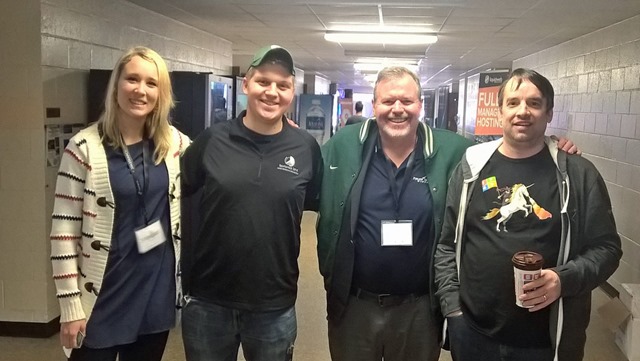
This will return JSON data identifying each face in the image and a score indicating how confident this API is that the face is expressing each of 8 possible emotions. For example, passing a URL with a picture below of 3 attractive, smiling people

SpartaHack-068-X2[1] 
(found online at https://giard.smugmug.com/Tech-Community/SpartaHack-2016/i-4FPV9bf/0/X2/SpartaHack-068-X2.jpg)

returned the following data:

[
  {
    "faceRectangle": {
      "height": 113,
      "left": 285,
      "top": 156,
      "width": 113
    },
    "scores": {
      "anger": 1.97831262E-09,
      "contempt": 9.096525E-05,
      "disgust": 3.86221245E-07,
      "fear": 4.26409547E-10,
      "happiness": 0.998336,
      "neutral": 0.00156954059,
      "sadness": 8.370223E-09,
      "surprise": 3.06117772E-06
    }
  },
  {
    "faceRectangle": {
      "height": 108,
      "left": 831,
      "top": 169,
      "width": 108
    },
    "scores": {
      "anger": 2.63808062E-07,
      "contempt": 5.387114E-08,
      "disgust": 1.3360991E-06,
      "fear": 1.407629E-10,
      "happiness": 0.9999967,
      "neutral": 1.63170478E-06,
      "sadness": 2.52861843E-09,
      "surprise": 1.91028926E-09
    }
  },
  {
    "faceRectangle": {
      "height": 100,
      "left": 591,
      "top": 168,
      "width": 100
    },
    "scores": {
      "anger": 3.24157673E-10,
      "contempt": 4.90155344E-06,
      "disgust": 6.54665473E-06,
      "fear": 1.73284559E-06,
      "happiness": 0.9999156,
      "neutral": 6.42121E-05,
      "sadness": 7.02297257E-06,
      "surprise": 5.53670576E-09
    }
  }
]

A high value for the 3 happiness scores and the very low values for all the other scores suggest a very high degree of confidence that the people in this photo is happy.

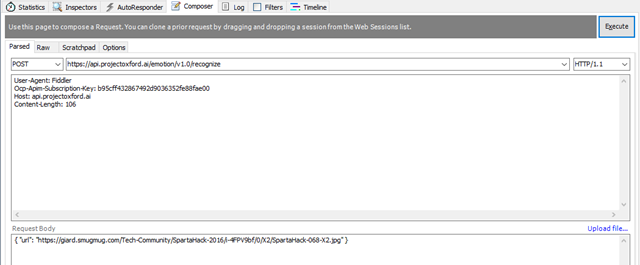
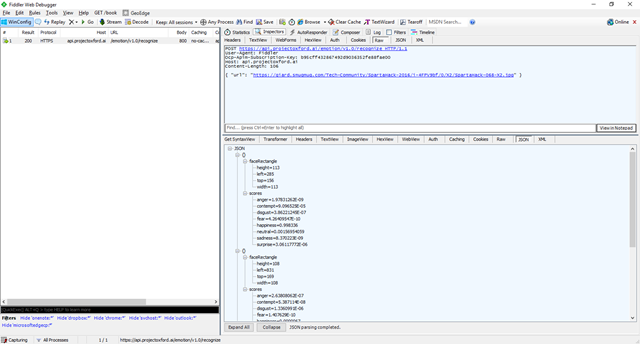
Here is the request in the popular HTTP analysis tool Fiddler [http://www.telerik.com/fiddler]:

Request

Em01-Fiddler-Request

Response:

Em02-Fiddler-Response

Sending requests to Project Oxford REST API makes it simple to analyze the emotions of people in a photograph.


Generating a thumbnail image from a larger image sounds easy – just shrink the dimensions of the original, right? But it becomes more complicated if the thumbnail image is a different shape than the original. In this case, we will need to crop or distort the original image. Distorting the image tends to look very bad; and when we crop an image, we will need to ensure that the primary subject of the image remains in the generated thumbnail. To do this, we need to identify the primary subject of the image. That's easy enough for a human observer to do, but a difficult thing for a computer to do, which is necessary if we want to automate this process.

This is where machine learning can help. By analyzing many images, Machine Learning can figure out what parts of a picture are likely to be the main subject. Once this is known, it becomes a simpler matter to crop the picture in such a way that the main subject remains.

Project Oxford uses Machine Learning so that you don't have to. It exposes an API to create an intelligent thumbnail image from any picture.

You can see this in action at www.projectoxford.ai/demo/vision#Thumbnail.


Thu01-LiveDemo
Figure 1

With this live, in-browser demo, you can either select an image from the gallery and view the generated thumbnails; or provide your own image - either from your local computer or from a public URL. The page uses the Thumbnail API to create thumbnails of 6 different dimensions.

Thu02-LiveDemo-2
Figure 2

For your own application, you can either call the REST Web Service directly or (for a .NET application) use a custom library. The library simplifies development by abstracting away HTTP calls via strongly-typed objects.

To get started, you will need a free Project Oxford account and you will need to sign into projectoxford.ai with a Microsoft account.

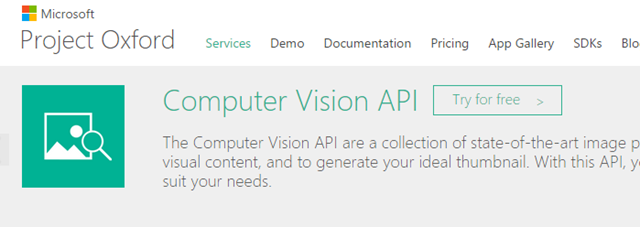
For this API, you need a key. From the Computer Vision API page, (Figure 3); click the [Try for free >] button; then, click the "Show" link under the Primary key of the "Computer Vision" section (Figue 4).

Thu03-ComputerVisionApiPage
Figure 3 

Thu04-ShowKey
Figure 4 

To use the SDK, add the Microsoft.ProjectOxford.Video NuGet package to your project: Right-click on your project, select Manage NuGet Packages, search for "ProjectOxford.Video", select the package from the list, and click the [Install] button, as shown in Figure 5

Thu05-NuGet
Figure 5

This adds a reference to Microsoft.ProjectOxford.Vision.dll, which contains classes that make it easier to call this API.

Add the following statement to the top of a class file to use this library.

using Microsoft.ProjectOxford.Vision;

Now, you can use the methods in the VisionServiceClient class to interact with the API.

Create a VisionServiceClient with the following code:

string subscriptionKey = "15e24a988f484591b17bcc4713aec800";
IVisionServiceClient visionClient = new VisionServiceClient(subscriptionKey);

where “xxxxxxxxxxxxxxxxxxxxxxxxxxx” is your subscription key.

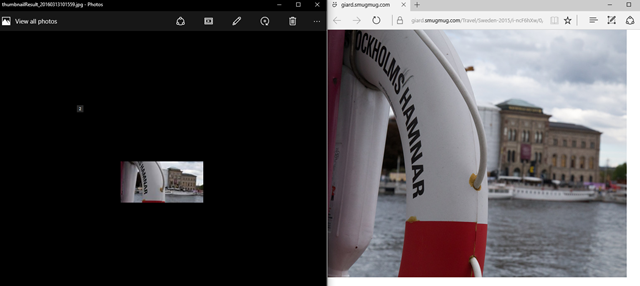
Next, use the GetThumbnailAsync method to generate a thumbnail image. The following code creates a 200x100 thumbnail of a photo of a buoy in Stockholm, Sweden.

string originalPicture = @"https://giard.smugmug.com/Travel/Sweden-2015/i-ncF6hXw/0/L/IMG_1560-L.jpg";
int width = 200;
int height = 100;
bool smartCropping = true;
byte[] thumbnailResult = null;
thumbnailResult = visionClient.GetThumbnailAsync(originalPicture, width, height, smartCropping).Result;

The result is an array of bytes, but you can save the corresponding image to a file with the following code:

string folder = @"c:\test";
string thumbnaileFullPath = string.Format("{0}\\thumbnailResult_{1:yyyMMddhhmmss}.jpg", folder, DateTime.Now);
using (BinaryWriter binaryWrite = new BinaryWriter(new FileStream(thumbnaileFullPath, FileMode.Create, FileAccess.Write)))
{
    binaryWrite.Write(thumbnailResult);
}

Below is the full listing in a Console App to generate a thumbnail; then open both the original image and the saved thumbnail image for comparison.

using System;
using System.Diagnostics;
using System.IO;
using Microsoft.ProjectOxford.Vision;
 
namespace ThumbNailConsole
{
    class Program
    {
        static void Main(string[] args)
        {
 
            string subscriptionKey = "15e24a988f484591b17bcc4713aec800";
            IVisionServiceClient visionClient = new VisionServiceClient(subscriptionKey);
 
            string originalPicture = @"https://giard.smugmug.com/Travel/Sweden-2015/i-ncF6hXw/0/L/IMG_1560-L.jpg";
            int width = 200;
            int height = 100;
            bool smartCropping = true;
            byte[] thumbnailResult = null;
            thumbnailResult = visionClient.GetThumbnailAsync(originalPicture, width, height, smartCropping).Result;
 
            string folder = @"c:\test";
            string thumbnaileFullPath = string.Format("{0}\\thumbnailResult_{1:yyyMMddhhmmss}.jpg", folder, DateTime.Now);
            using (BinaryWriter binaryWrite = new BinaryWriter(new FileStream(thumbnaileFullPath, FileMode.Create, FileAccess.Write)))
            {
                binaryWrite.Write(thumbnailResult);
            }
 
            Process.Start(thumbnaileFullPath);
            Process.Start(originalPicture);
 
            Console.WriteLine("Done! Thumbnail is at {0}!", thumbnaileFullPath);
        }
    }
}

The result is shown in Figure 6 below.

Thu06-Output

One thing to note. The Thumbnail API is part of the Computer Vision API. As of this writing, the free version of the Computer Vision API is limited to 5,000 transactions per month. If you want more than that, you will need to upgrade to the Standard version, which charges $1.50 per 1000 transactions.

But this should be plenty for you to learn this API for free and build and test your applications until you need to put them into production.

The code above can be found on GitHub.


Project Oxford is a set of APIs that take advantage of Machine Learning to provide developers with

These technologies require Machine Learning, which requires a lot of computing power and a lot of data. Most of us have neither, but Microsoft does and has used it to create the APIs in Project Oxford.

Project Oxford provides APIs to analyze pictures and voice and provide intelligent information about them.

There are three broad categories of services: Vision, Voice, and Language.

The Vision APIs analyzes pictures and recognizes objects in those pictures.  For example, several Vision APIs are capable of recognizing  faces in an image. One analyzes each face and deduces that person's emotion; another can compare 2 pictures and decide whether or not 2 photographs are the same person; a third guesses the age of each person in a photo.

The Speech APIs can convert speech to text or text to speech. It can also recognize the voice of a given speaker (if you want to use that for authentication in your app, for example) and infer the intent of the speaker from his words and tone.

The Language APIs seem more of a grab bag to me. A spell checker is smart enough to recognize common proper names and homonyms.

All these APIs are currently in Preview but I've played with them and they appear very solid. Many of theme even provide a confidence factor to let you know how confident you should be in the value returned. For example, 2 faces may represent the same person but it helps to know how closely they match.

You can use these APIs. To get started, you need a Project Oxford account, but you can get one for free at projectoxford.ai.

Each API offers a free option that restricts the number and/or frequency of calls, but you can break through that boundary for a charge.

You can also find documentation, sample code, and even a place to try out each API live in your browser at projectoxford.ai.

You call each one by passing and receiving JSON to a RESTful web service, but some of them offer an SDK to make it easier to make that call from a .NET application.

You can see a couple of fun applications of Project Oxford at how-old.net (which guesses the ages of people in photographs) and what-dog.net (which identifies the breed of dog in a photo).

Sign up today and start building apps. It’s fun and it’s free!


SpartaHack 2016

Comments [0]

The auditorium darkened. The music began and a small light appeared at the front of the room; then more. Students on stage danced and waved lanterns on ropes for an impressive musical light show to kick off the 2016 SpartaHack hackathon.


Students came from all over the world to attend this hackathon on the East Lansing campus. Over 200 universities were represented among the applicants. In addition to a number of international students studying on American campus, I met students who traveled to the hackathon from India, Russia, Germany, and the Philippines.

AnnaMattDavidBrian My colleague Brian Sherwin arrived in East Lansing the day before the hackathon to host an Azure workshop for 30 students - showing them how to use the cloud platform to enhance their applications. Ann Lergaard joined us a day later and we did our best to answer student questions and help them build better projects. Late Friday night, I delivered a tech talk showing off some of the services available in Azure.

Microsoft offered a prize for the best hack using our technology. It was won be 2 students who built an application that allowed users to take a photo of text with their iPhone and, in response to voice commands, read back any part of that text. The project combined Microsoft's Project Oxford OCR API with an Amazon Echo and its Alexa platform, an iPhone app, and a Firebase database.

A couple other cool hacks were:

  • ValU, an app that used Microsoft Excel to analyze historical stock price data using Excel VBA scripts.
  • Spartifai, which modified a driver, allowing a Kinect device to be used with a MacBook.

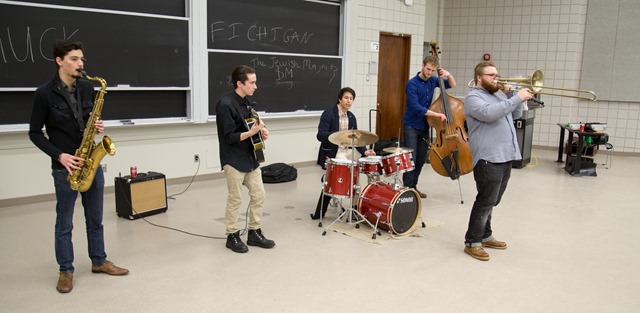
JazzBand A hackathon is an event at which students and others come together and build software and/or hardware projects in small teams over the course of a couple days. I attend a lot of hackathons and SpartaHack was one of the better organized that I've seen. Over 500 students spent the weekend building a wide variety of impressive projects - often with technology they had not touched prior to that weekend. The organizers also did a great job of providing fun activities beyond just hacking. A jazz band and a rock band each performed a set for students to enjoy during a break; a Super Smash Brothers tournament was scheduled; and a Blind Coding Contest challenged students to write code without compiling or testing to see if it would run correctly the first time in front of an audience. 

Snowman As sponsors of the event, we tried to provide some fun as well. We gave away prizes for building a snowman and for tweeting about open source technology. We also provided some loaner hardware for students; and we spent a lot of time mentoring students, which resulted in a lack of sleep this weekend.

The MSU campus has changed a great deal since I earned my undergraduate degree there decades ago. It has even changed since my son graduated from there 4 years ago. But it still felt like a homecoming for me.


February 2016 Gratitudes

Comments [0]

3/6
Today I am grateful to unexpectedly run into Jody​ and David in Chicago yesterday.

3/5
Today I am grateful for new shelves and less clutter in my apartment.

3/4
Today I am grateful for a home-cooked dinner last night.

3/3
Today I am grateful for dinner last night with Kevin.

3/2
Today I am grateful for:
-an overwhelming number of kind messages on Facebook yesterday.
-a birthday lunch with Chris in Grand Rapids yesterday.

3/1
Today I am grateful for my first visit to ann arbor, MI since I sold my house, including: -A personal tour of The Forge by Jeeva -Coffee with Velichka -A great crowd to attend my Azure Mobile Apps talk at Mobile Monday.

2/29
Today I am grateful to the SpartaHack organizers and hackers who contributed to a successful hackathon this past weekend.

2/28
Today I am grateful that this parking ticket was thrown out by the local police.

2/27
Today I am grateful for a day in East Lansing, MI and at Michigan State University.

2/26
Today I am grateful for a good crowd at our Azure Workshop last night at MSU.

2/25
Today I am grateful for the technology that allows me to watch TV and movies when and where I want.

2/24
Today I am grateful to Michael, Chris, Chris, and Murali for helping make yesterday's Cloud Camp a success by bringing real world experience to the presentations.

2/23
Today I am grateful to be able to ride my bike in February in Chicago.

2/22
Today I am grateful to the organizers and participants at HackIllinois who made this weekend's hackathon so successful.

2/21
Today I am grateful to Vanessa, who brought me espresso yesterday each time my energy ran low.

2/20
Today I am grateful for the hundreds of students who came to my Azure talk last night that I re-wrote yesterday afternoon.

2/19
Today I am grateful for this excellent and unexpected moving gift from Betsy

2/18
Today I am grateful for unsolicited praise from a co-worker yesterday.

2/17
Today I am grateful for an unexpected call from my cousin Kevin yesterday.

2/16
Today I am grateful for dinner with Christina last night.

2/15
Today I am grateful for a pristine blanket of snow covering downtown Chicago this morning.

2/14
Today I am grateful for Nyquil, Dayquil, and a Neti Pot.

2/13
Today I am grateful for finally paying off some sleep debt.

2/12
Today I am grateful for: -Lunch yesterday with Matt -A chance to present to a group of University of Chicago students

2/11
Today I am grateful for: -My first day with a personal trainer at the new gym -Attending Founder Institute graduation

2/10
Today I am grateful for my first game at Purdue's Mackey Arena.

2/9
Today I am grateful for the help I received yesterday unpacking dozens of boxes from my move.

2/8
Today I am grateful for an excellent week in Seattle.


semjs-large When I lived in Michigan, I was a regular attendee of the Southeast Michigan JavaScript meetup – a local user group that attracted close to a hundred attendees each month and excellent speakers from all over the country.

One thing I admired about this meetup is their habit of recording meeting presentations. 

Those recordings are now available on Microsoft’s Channel 9 site. You can view dozens of these presentations at https://channel9.msdn.com/Blogs/semjs.

In the past 2 weeks, over 50,000 people have watched these videos on Channel 9.

Below are some of the more popular presentations:


I spent years as a software consultant and I wrote a lot of web applications during that time.

I remember when I first discovered Active Server Pages  (which we now call "Classic ASP") and I remember how excited I was by this technology. It empowered me to write dynamic applications that the whole world could see.

When Microsoft introduced ASP.NET, I quickly embraced it and when ASP.NET evolved to MVC, I was excited to move to this new paradigm.

I even wrote a bit of JavaScript, enhancing my web applications with client-side validation and interactivity. I wrote even more JavaScript after discovering how jQuery made the DOM manipulation easier to write, debug, and maintain.

But, about 5 years ago, I stopped writing web applications. It wasn't because I disliked anything about them; it was only because my customers were looking for different solutions. So, for a few years, I wrote middleware services and web services and rich client applications and I built databases and I set up continuous integrations systems and I barely looked at web development.

But Web Development technologies did not stand still; if anything, they changed faster than almost any other area of software.

Web Development has moved largely from the server to the client. Interactions that were once handled by a form post and full page refresh are now done using Ajax calls to a web service and client-side DOM manipulation. An asynchronous callback from the server to client triggers a JavaScript function to update elements on the page, eliminating the need for a disruptive repainting of an entire page.

The user experience of a Single Page Application tends to be far superior to the older multi-page applications, so users are demanding more and developers are now writing large, complex applications that run almost entirely inside a browser.

JavaScript wasn't designed with this complexity in mind, so a number of JavaScript frameworks emerged to help developers manage this complexity. These frameworks take care of things like data binding, DOM manipulation, input validation, and separation of concerns, freeing developers to focus their efforts on business logic and other features unique to their own applications.

These frameworks help, but they come at a cost. It takes time to learn a new framework and each framework has its own set of rules and idiosyncrasies.

Even more challenging is the speed at which these frameworks are released. A year after the popularity of ember.js and backbone.js peaked, developers began flocking to Angular.js. Last year, Angular seemed to lose ground to React.js. It's hard to tell what will be the next hot JavaScript framework (Angular 2.0? Aurelia? Something else?), but the rate at which new frameworks appear is accelerating.

Of course, it is not practical to re-write every application every year, simply because you discover a new framework - even one with advantages over your existing framework of choice. And most of us don't have the time to become familiar with a new framework every few months. We have to balance the increased productivity of a new framework against the time spent learning (as opposed to building).

This is the world in which I now find myself as I return to Web Development after a half decade absence. Everything has changed and continues to change at a startling rate.

In many ways this constant innovation is exciting and energizing. But it can also be overwhelming as I try to select the appropriate tools from a plethora of options and as I spend the time and effort learning how to use these tools.

meerkats I feel like I'm in a science fiction movie where the hero departs the Earth at light speed; then returns to discover the planet is ruled by talking meerkats: All the rules have changed while I was gone and I need to adapt. Quickly.

The approach I've taken is to pick a JavaScript framework, learn it, and build an application with it. I chose Angular to start - partly because I had heard good things about it and partly because its popularity ensured I would be able to find samples, tutorials, videos, and other reference materials to assist me. Next, I'll rebuild this functionality in ReactJs, followed by some other framework, until I have a feel for the paradigms involved in JavaScript development and for the relative strengths of each framework.

You can track my progress at https://github.com/DavidGiard/tvdg and on this blog.

So far, I'm enjoying the ride.


At CodeMash last month, I was interviewed for Channel 9 about Azure Mobile Apps.

You can watch the interview below:


January 2016 Gratitudes

Comments [0]

2/7
Today I am grateful for yesterday's Hackathon.

2/6
Today I am grateful for my first time recording in the Microsoft Channel 9 studios.

2/5
Today I am grateful for yesterday's highlights:
-Coffee with Suzanna
-Lunch with Glenn
-TechReady party at Century Link Field

2/4
Today I am grateful for lunch with Tim yesterday.

2/3
Today I am grateful for dinner last night with Ted and his family.

2/2
Today I am grateful for a rare evening, hanging out with much of my team in-person.

2/1
Today I am grateful for an evening watching Improv comedy last night.

1/31
Today I am grateful I was able to finally make it to Seattle last night.

1/30
Today I am grateful for lunch with Nick yesterday.

1/29
Today I am grateful for my first ever Illinois basketball home game at Assembly Hall.

1/28
Today I am grateful for coffee with Chris yesterday.

1/27
Today I am grateful to the neighbor who stopped by while I was moving yesterday and offered to go grocery shopping for me.

1/26
Today I am grateful for lunch with Kristen yesterday.

1/25
Today I am grateful for the ribs at Twin Anchors.

1/24
Today I am grateful for the Microsoft Holiday Party at the Mid-America Club high above Chicago last night.

1/23
Today I am grateful for coffee with Manohar yesterday.

1/22
Today I am grateful that Marc, my personal trainer is still working with me, even though we were supposed to finish in December.

1/21
Today I am grateful that my calendar is mostly clear the next 2 days, so I can get some actual work done.

1/20
Today I am grateful for dinner last night with Paul and Jeremy. .

1/19
Today I am grateful I was able to find the packages this morning that FedEx lost yesterday.

1/18
Today I am grateful for Dr. Martin Luther King, Jr., who confronted hatred, violence and racism; and responded with peace and the word of God.

1/17
Today I am grateful for all the independent coffee shops in Chicago.

1/16
Today I am grateful that the story of my friend Bill was told during an executive meeting with the Microsoft CEO yesterday.

1/15
Today I am grateful for a chance to use the new MTC studio for the first time.

1/14
Today I am grateful to chat with Becky last night.

1/13
Today I am grateful for dinner last night with Adam at the Old Town Pub.

1/12
Today I am grateful to all the guests and viewers who made it possible for #TechnologyAndFriends to reach 400 episodes.

1/11
Today I am grateful for: -The strangers who helped push my car out of a snow bank yesterday. -Watching my first game at IU's Assembly Hall.

1/10
Today I am grateful for an afternoon and evening with my son Tim.

1/9
Today I am grateful to Brian Prince and the other organizers of #CodeMash, who worked so hard to put on another excellent conference this week.

1/8
Today I am grateful for: -all those who helped us build toys for special needs children yesterday. -a party at a water park last night.

1/7
Today I am grateful for an excellent steak dinner last night with friends, courtesy of Betsy.

1/6
Today I am grateful that Best Buy exchanged my broken SD card, even though I didn't have the receipt.

1/5
Today I am grateful to see so many old friends last night in Sandusky - many for the first time in a long time.

1/4
Today I am grateful for this large latte that Sarah just bought me.


My Common Git Commands

Comments [0]

I admit that I am a novice when it comes to Git. But I recognize the importance of this version control system, so I documented the most important commands.

Git is a distributed version control system, so it is necessary to commit changes to a local repository (a repository on your local computer) before pushing those changes to a central repository that can be shared by others.

Commands

My needs are simple. In the vast majority of cases, I want only to get the latest code, make my changes, save them to a local repository, and share those changes with others. Git contains a lot of commands, but the following git commands suffice for most of my needs:

  • git init
  • git config
  • git add .
  • git pull
  • git commit
  • git push

Here is a brief description of each command:

git init

Intialize an empty Git repository

git config

Store information, such as username and email address in a local config file, so you don't need to re-type it later.

git remote add

Associate the local git repository with a remote repository

git add

Adds files in the current folder to the git repository

git commit –m “Comment about change”

Commits changed files to the local repository. The “-m” switch allows you to provide a comment describing the code you are committing.

git pull repositoryname branch

Retrieves code from the remote repository and merges it with your local code

git push repositoryname branch

Pushes any changes from your local repository to a central repository

Workflow

My usual workflow is below. It assumes my code is in the local directory c:\development\MyProject and that the remote repository is named “myproj”.

Starting a new project

At github.com, create a new repository

cd \development\MyProject
git init
git config --global user.name "David Giard"
git config --global user.email djgiard@hotmail.com
git remote add origin https://github.com/DavidGiard/nameofmynewrepository.git
git add .

git commit -m "Initial revision"
git push origin master 

After I make a change and test it and it seems to work:

git pull origin master
// Test that the application still works after pulling and merging other developers’ changes
git add .
git commit -m "My change"
git push origin master


I moved to Chicago in 2014. Although I had spent a lot of time in this city prior to my move, much of Chicago was a mystery to me. I knew a few square miles of the Loop and the area just to north of the Loop; and I was sure I would become familiar with Old Town, where I rented an apartment.

But Chicago has 77 Community Areas and over 200 neighborhoods. And I knew little or nothing about most of them. I wanted to get to know them better.

My first thought was to take some time driving around the city - either randomly or in an organized pattern, but that would have given me only a view from my car and no taste of the actual neighborhoods, so I rejected this idea.

Heritage General Store

One day, I happened upon a list of the best coffee shops in Chicago.  Those who know me, know my fondness for fine coffees and will not be surprised that I was drawn into this list.  I formed a plan.

I decided to visit each coffee shop on the list and use this journey as a way to explore the neighborhoods of Chicago. Every cafe except Hard Boiled Coffee offered a latte on its menu, so that’s what I ordered. Sometimes I accompanied the caffeine with food. Mostly I went alone, but my brother Dan and I visited 2 places in Pilsen when he was visiting from Australia. I also visited a few places that were not on the list but that were close to my home or where I happened to be on a given day.

Kristoffer's

The coffee shops themselves were just a means to an end. My goal was to see the city.  While visiting each cafe, I was able to also visit a new neighborhood and absorb its charm. I experienced the family atmosphere of Ravenswood and the bustle of Wicker Park. I spent time walking around the Mexican culture of Pilsen and the stylish area of Boys' Town. I found areas filled with artists, with rushing businessmen, and with working class people.

The Perfect Cup

As for the cafes themselves, the decor ranged from the simplicity of Big Shoulders Coffee to the hodgepodge of Jackalope Coffee and Tea. A giant cat painted on a garage door looms over the backyard of Dark Matter Coffee at the Star Lounge, while I found a man repairing a bicycle in the back of the Heritage General Store. I don't have a favourite coffee or cafe, but I will say that all were good and I would recommend any of them.

Dark Matter Coffee at Star Lounge

If you decide to make this same journey, be aware that 2 of the coffee shops on the list (Bad Wolf Coffee and Knockbox Cafe) have closed and that Hard Boiled Coffee now exists only inside the Horse Thief Hollow Restaurant in Beverly.

Ipsento

And I feel now like I know Chicago a little bit more for having experienced her neighborhoods.

I'm still deciding what my next urban journey will be. I may explore the top Chicago Style Hot Dogs.

More photos


CodeMash 2016

Comments [0]

CodeMash2016-03  CodeMash2016-59

For me, CodeMash is like a family reunion.

CodeMash2016-46 Even though the event has grown to 2500 attendees, I still look forward to seeing people that I've got to know at previous CodeMashes - many of them have been coming every year.

CodeMash2016-83Sure, there are over 200 great sessions and I was proud to be asked to deliver one of them ("A Hitchhiker's Guide to Azure Mobile Apps"); and there are plenty of great workshops and I was pleased to help out at a couple of those presented by my colleagues; and there were sponsors (including Microsoft) happy to share information about their company and talk with potential customers or recruits or just about anyone; and there were numerous activities organized by volunteers, sponsors, and others, including cocktail parties, charity events, a record-breaking Pong game (the Guinness Book folks were there to confirm this), and a game room, and a jam session, and... well, you get the picture.

CodeMash2016-52 But, for me, the conversations with speakers and attendees are what make an event special. And CodeMash is even more special to me because I was attending for the 9th consecutive year. I still kick myself for declining an invitation to the first CodeMash. I learn so much from these conversations and there are so many experts to learn from at this event. I worked as a sponsor at the Microsoft booth for most of the event, so people were coming to me to talk. CodeMash2016-22 Highlights of the week included:

  • A charity event organized by Microsoft in which attendees adapted toys so they could be used by special needs children. Over 100 participants adapted dozens of toys.
  • A conversation with Mark Miller about UX design principles
  • My own session, for which I received some positive feedback.
  • The CodeMash Factory, where numerous people came to learn about and hack on IoT and other topics and build some amazing projects.

CodeMash2016-01 This was the 10th anniversary of CodeMash and it shows no signs of slowing down. It was an excellent way to kick off 2016.


More photos


Recently, I chatted with Oisin Kim, CEO webdoctor an online prescription and medical service. We talked about Azure and BizSpark and their market.

You can watch the interview below.


2015 in Review

Comments [0]

2015 was the year my son Nick completed his Masters degree at the University of South Florida, He is now the Director of Basketball Operations at Southern Illinois University - Edwardsville. I was able to attend 2 SIUE games in December - at Wisconsin-Milwaukee and at Northwestern (both losses by the Cougars).

2015 was the year my son Tim decided to pursue Informatics - a field of applied Computer Science - as a major at Indiana University. He is currently halfway through his third year of college.

2015 was the year I finally got serious about my health. It had been years since I had a medical checkup so I scheduled one, along with a long-overdue colonoscopy. I had not been to the dentist since the Reagan administration so I scheduled a checkup and a series of teeth cleanings. Miraculously, I had no health issues and only one small cavity. The doctors did not point it out, but I was aware that I had been steadily gaining wait over the past few years. So I began a serious exercise program and cut my calorie intake dramatically. As a result, I lost about 45 pounds and I've kept it off for 4-5 months now. I hired a personal trainer and worked with him to increase my stamina and core strength and I began riding my bicycle all over downtown until the weather dropped below freezing.

2015 was the summer I finally sold my house in Michigan, closing an unpleasant chapter in my life. My drivers license now reads "Illinois" and I have very nice home in urban Chicago. More importantly, for the first time in over a decade, I was able to choose where I want to live.

2015 was the year that my friend Jay lost his wife to an automobile accident and my friend Bill lost his life to cancer. It was also the year my cousin Sharon successfully made it through her cancer treatments.

2015 was a busy year for me professionally. I delivered well over 100 presentations at user groups, conferences, universities, and startup incubators; mentored at 7 student hackathons; held monthly office hours at 2 startup incubators; staffed the Office 365 booth at the Ignite conference; and attended countless user group meetings. I delivered 9 Cloud Camps and 14 Dev Camps during the year. I traveled around the country from Miami to Seattle to San Diego. I made my first trip ever to Alabama when I spoke at the DevSpace conference in Huntsville. I delivered 2 keynote presentations: One at Detroit Dev Day at Cobo Hall and one at GR DevNight in Grand Rapids, MI.

2015 was the year I accelerated my practice of producing online videos. I released a new episode of Technology and Friends ever Monday (Episode 400 aired in early 2016) and I recorded and released 15 DevRadio episodes; I also began a new series - GCast - featuring short educational screencasts.

2015 included a trip to Europe. In May, I flew to Romania to speak at the IT Camp (my second time speaking at the this conference); then to Stockholm, Sweden to speak at DevSum. I spent a few extra days in Stockholm visiting friends and exploring the region. This is by far the farthest north I have ever been. Although most days were partly cloudy, the sun set after I went to bed at night and rose before I awoke in the morning. I highly recommend a visit to Stockholm.

2015 was an excellent year for my favourite sports teams - the Michigan State Spartans. Both the basketball team and the football team advanced to the national Final Four - an unexpected and amazing accomplishments. I was blessed to see a few games, including the Big 10 Championship football game in Indianapolis last month.

In 2015, I continued my practice of beginning each day thinking of something for which I am grateful.

It's hard to believe 2015 consisted of only 12 months. I packed a lot into this time. On the other hand, it feels like I wrote a retrospective of 2014 just a few weeks ago. 2016 is beginning strong. I've already attended one excellent conference and I have some adventures planned for the first month. I approach this coming year with much optimism and much anticipation.


December 2015 Gratitudes

Comments [0]

1/3
Today I am grateful for unbound optimism for the coming year.

1/2
Today I am grateful for the progress I made on my software project yesterday.

1/1
Today I am grateful for an amazing season by the Michigan State Spartans football team. ‪#‎GoGreen

12/31
Today I am grateful for 2015 - all the good times and all the challenges and opportunities to learn and become better.

12/30
Today I am grateful for a hot tea in a warm room on a cold morning.

12/29
Today I am grateful that Matt and Tim made it back to Michigan yesterday, despite the bad weather and hazardous road conditions.

12/28
Today I am grateful for a couple days in Chicago with my son Tim and my nephew Matt.

12/27
Today I am grateful for a visit to Shedd Aquarium yesterday with my son and my nephew.

12/26
Today I am grateful for Christmas with my family.

12/25
Today I am grateful for Christmas Eve dinner with Nick and Tim last night.

12/24
Today I am grateful to re-start my Personal Trainer sessions after a long hiatus.

12/23
Today I am grateful for a morning exploring Chicago's South Loop yesterday.

12/22
Today I am grateful to those who donated over $800 to the Fink family in the first couple hours the donation page was online.

12/21
Today I am grateful to win a bottle of wine at a Christmas party raffle last night.

12/20
Today I am grateful for a rare day of relaxing and doing almost nothing.

12/19
Today I am grateful for: -Seeing "The Force Awakens" yesterday morning. -Watching a 4-overtime victory by the Pistons last night at the United Center.

12/18
Today I am grateful for the empathy shown by friends, colleagues, and strangers.

12/17
Today I am grateful to know William Fink as a friend and a colleague and that I had a chance to spend time with him the last few months of his life.

12/16
Today I am grateful for inspiration and education from those around me.

12/15
Today I am grateful to be able to ride my bike in the middle of December. In Chicago!

12/14
Today I am grateful I live in a neighborhood with beautiful churches.

12/13
Today I am grateful for dinner with Kate last night.

12/12
Today I am grateful that my car is now fixed.

12/11
Today I am grateful to J. for inviting me to speak at GRDevNight in Grand Rapids and allowing me to stay at his house last night.

12/10
Today I am grateful for: -A chance to teach young children to code yesterday -A holiday party at 1871 last night

12/9
Today I am grateful for God's grace that shines on me every day.

12/8
Today I am grateful for dinner with my team last night.

12/7
Today I am grateful to arrive home safely yesterday morning after driving all night.


Eric Potter on Canopy

Comments [0]

Remembering Bill Fink

Comments [0]

Last week, my friend and colleague Bill Fink passed away. He was 46 years old.

DavidBill A few months ago, Bill went to the hospital complaining of a severe pain in his side. He was fearful it was a gall bladder problem but it turned out to be much worse. Bill was diagnosed with stage 4 cancer in his pancreas. The outlook was bleak and his chance of recovery was small, but he underwent treatment anyway. The treatment did not work. In September, Bill was placed in hospice care. All treatment was stopped and his caregivers focused only on managing the pain that inevitably comes with this disease. On December 16, Bill succumbed to the cancer. He weighed about 120 pounds at the time of his death.

Bill and I were both Technical Evangelists on the same team at Microsoft. He joined the company in late 2014 - about a month after I did. A few years ago, we both worked for the small consulting company GA Sullivan. We never met during this time because he lived near St. Louis and I lived near Cincinnati, but we shared many common friends and acquaintances.

BillOnTechnologyAndFriends We finally met when we shared a room at a team off-site in Scottsdale, AZ in early 2014. I found Bill, intelligent and easygoing and funny and silly and very passionate about technology. Bill loved tinkering with hardware and writing software. Earlier this year, he missed his flight home from Seattle because he was so engrossed in writing software for a Hololens. One of his most impressive projects was a photo booth application that used the depth sensing technology in a Microsoft Kinect device instead of a green screen to replace the backgrounds in photographs.

Bill loved being a Technical Evangelist and he wrote about that last December after a year on the job. Bill spent much of his life and his career helping others. Whatever knowledge he had, he was always happy to share it with others. I have encountered many people who learned from Bill’s teachings.

I was lucky. I had a chance to spend some time with Bill these past few months. I visited him 4 times since Labor Day and we spoke on the phone between visits. Because our team is so spread out geographically, it was difficult for most colleagues to travel often to St. Louis. I was only a 6 hour drive away, so it fell to me to keep everyone updated on his status. Some people have asked if this made it more difficult to deal with Bill's death; but for me, connecting with him at the end, has made it easier for me to deal with his death. We had a chance to talk and I had a chance to say goodbye. And I had a chance to see the best in him.

Bill faced his illness with great courage and grace. He never denied its seriousness and he was not afraid to talk about it. But I never heard him complain about the hand he was dealt.

BillDavidJenniferEven in death, Bill is making an impact on the technology world. Bill’s brother wrote an obituary that described Bill’s demise using computer terminology, such as "...encountered an unhandled exception in his core operating system, which prematurely triggered a critical ‘STOP’ condition" and "Bill’s application has been migrated to the Cloud". The obituary began to trend on Reddit and many newspapers, including the Chicago Tribune, the Miami Herald, and the Washington Post, wrote about it.

I will miss Bill's humor and his passion but I will carry part of him with me until I encounter a critical 'STOP' condition and my applications are migrated to the cloud. I hope I do so with courage that Bill Fink showed.


If you would like to make a donation to help Bill's family, you can do so at https://www.gofundme.com/BillFink.


Last night, I attended a Founder Institute session for the first time. I was invited to tell members about the BizSpark program, but I stuck around after my presentation was done.

Founder Institute is an organization designed to assist people start a new company - helping them through every aspect of the startup process. At last night's meeting, members practiced pitching their startup idea to potential investors. Three experienced entrepreneurs listened to each 3-minute pitch and provided feedback on the presentation. It was good practice for the startup and it was educational for me.

Here are a few of the things I learned last night

What problem are you solving?

Identify this early in your presentation. Why do customers need your product or service? Who will potentially buy it?

Compare to something they know

Investors are unlikely to have heard your idea before. Make it easy for them by comparing it to things with which they are familiar. If your sales model uses contract salespeople who reach out to individual consumers, compare it to Avon. One startup proposed providing practical tests for companies hiring electrical engineers. Remind the audience that similar tests are now used successfully by companies hiring software engineers.

Identify your market

Not everyone is a potential customer. Identify what you are selling and who will buy it. If this is an established market, what are the current revenues - both worldwide and in your local area. One startup mentioned that the current market was in the trillions, but provided no context for that number, making it difficult to digest such a large number. Filter those customers to those who might reasonably consider your product and define who those customers are and how much they spend.

Stress your credibility

One hopeful startup was planning to sell wedding dresses online. At the end of his presentation, he casually mentioned that he owned a store that sells wedding dresses. Each of the panelists told him to lead with that information as it established his credibility. He was already familiar with the marketplace and the potential customers. In his case, it was even more important to establish this credibility because he is a man and his target audience is mostly female.

Focus

Startup pitches tend to be short (each pitch last night was limited to 3 minutes), so focus on the things that will make your startup successful. It doesn't help to list dozens of features your product will eventually have. It does help to list those features you plan to include in the first release of your product and why those features will resonate with potential users.

In my job as a Technical Evangelist, I work with many startups, often providing mentoring to them. Listening to experienced entrepreneurs last night will help me to serve as a better mentor in the future.


Douglas Starnes on Python

Comments [0]

A couple years ago, J Tower and his team noticed attendance at the Grand Rapids .NET User dwindling. This trend was in stark contrast to the annual GR DevDay conference that attracted hundreds of attendees each year.

Tower came up with a novel approach - he discarded the idea of a monthly user group meeting and replaced it with a quarterly meeting that more resembled a conference than a user group. Because the quarterly meeting took place on a weekday evening and was patterned after GR DevDay, he dubbed it "GR DevNight."

Each GR DevNight begins with a keynote presentation delivered in front of all attendees. After the keynote, attendees can choose from among 3 different presentations - each lasting about an hour.

Each GR DevNight is assigned a theme and all presentations relate to that theme.

GRDevNightKeynote

At this week's meeting, the theme was Cloud Computing and I was excited to deliver the keynote address. I showed off many of the Open Source and non-Microsoft technologies supported by Microsoft Azure in a presentation titled "Microsoft Azure Without Microsoft."

While driving from Detroit to Grand Rapids, J called me to tell me that a medical emergency forced a late cancellation by one of the speakers that evening. He asked if I could deliver a breakout session in addition to the keynote. I had been working on a presentation about Azure Mobile Apps so I offered to premiere it that evening. GRDevNightBreakout3

It was an excellent event. A hundred attendees packed into a room at Cornerstone University to hear the keynote and they split pretty evenly between the three breakout sessions.

If you run a user group that is struggling to maintain interest month in and month out, a model similar to this might help you to revitalize your group as it did for the the group in Grand Rapids.

photos by J Tower


I recently interviewed Wunderflats CEO Jan Hase for DevRadio. Wunderflats is an online service allowing users to search for furnished apartments.


November 2015 Gratitudes

Comments [0]

12/6
Today I am grateful for:
-Watching the Big10 Championship Game in Indianapolis with college friends last night.
-A Spartan victory and championship
-Post-game drinks with friends from Cincinnati
-A chance to see Nick's team play at Northwestern yesterday afternoon.

12/5
Today I am grateful for a walk around downtown Chicago yesterday with Nick​.

12/4
Today I am grateful to see Nick and his new team in Milwaukee yesterday.

12/3
Today I am grateful that someone found my ID card that has been lost for weeks.

12/2
Today I am grateful for:
-Breakfast with Mike
-Coffee with Patty
-An afternoon and evening at the University of Cincinnati

12/1
Tuesday, December 1, 2015 at 6:28am EST
David Giard updated his status.
Today I am grateful for dinner in northern Kentucky last night with David, Sue, and Debora.

11/30
Today I am grateful for
-The hospitality and generosity of Sherree and Doug.
-A week with my family in Michigan.

11/29
Today I am grateful for a day in East Lansing seeing old friends and watching the Spartans dominate.

11/28
Today I am grateful for yesterday afternoon with my mother.

11/27
Today I am grateful for:
-A Lions game (my first-ever Thanksgiving game) with my 2 brothers and my son Tim
-Thanksgiving dinner with all my siblings, their spouses, and their kids.

11/26
Today I am grateful for an afternoon at the Art Institute of Chicago.

11/25
Today I am grateful for a double cheeseburger (cheezborger cheezborger), a coke (no Pepsi), and chips (no fries) at the Billy Goat Tavern yesterday.

11/24
Today I am grateful for an afternoon exploring Chicago neighborhoods with Dan.

11/23
Today I am grateful for:
-My brother finally arriving in Chicago after flight cancellations
-An excellent hackathon at Northwestern
-A very funny show at Second City last night.

11/22
Today I am grateful for a second Spartan victory over a top-4 team this week - this time in football! #GoGreen

11/21
Today I am grateful for a snowy evening with Kate.

11/20
Today I am grateful for a chance to teach a workshop in Evanston last night and students who are eager to learn.

11/19
Today I am grateful for:
-My first time speaking at the Chicago .NET User Group in Downers Grove.
-The stranger who gave me a ride from the gas station yesterday, so I wouldn't be late for my meeting

11/18
Today I am grateful to watch the Champions Classic basketball games (MSU defeated Kansas; Kentucky defeated Duke) at the United Center last night.

11/17
Today I am grateful that I finally got my car repaired. It has been randomly stalling for months.

11/16
Today I am grateful for an amazing day yesterday:
-A visit with my mother
-Dinner with my nieces
-Mass at 150-year-old St. Mary's Church
-Lunch in Greektown
-A drive around Belle Isle
-Cruising down Lake Shore Drive in Grosse Pointe
-A First Class upgrade on my flight home

11/15
Today I am grateful for:
-A chance to deliver the keynote presentation at Detroit Dev Day yesterday morning.
-Dinner with Jay and J. last night.

11/14
Today I am grateful to the organizers and volunteers of the St. Louis Day of .NET - great conference!

11/13
Today I am grateful to meet up with old friends.

11/12
Today I am grateful for:
-Time with William Fink and Michele Gardiner-Fink
-A trip to the top of the St. Louis arch with Jennifer Marsman

11/11
Today I am grateful to all this nation's veterans, especially my Dad.

11/10
Today I am grateful for the energy I gather from the local startup community.

11/9
Today I am grateful that much of my job is stuff that I would be doing anyway.

11/8
Today I am grateful for a chance to edit months worth of photographs yesterday.

11/7
Today I am grateful to turn off my alarm and pay off some sleep debt last night.

11/6
Today I am grateful for:
-a visit to the Denver Art Museum
-a Nuggets game at the Pepsi Center last night

11/5
Today I am grateful that the back pain I experienced yesterday is almost completely gone this morning.

11/4
Today I am grateful for a few days in San Francisco - one of the great cities of the US.

11/3
Today I am grateful for:
-Lunch with Jerry and Jenelle yesterday
-Watching the Warriors - Grizzlies game live in Oakland last night.

11/2
Today I am grateful for:
-a visit with Sharon and her family last night
-a Raiders game at the Coliseum yesterday


Detroit Dev Day 2015

Comments [0]

IMG_3589_edited-1 Originally, it was 1DevDayDetroit - a multi -platform developer conference in do wntown Detroit; then came some specialized version of the conference, named "CloudDevDay" and  "MobiDevDay", focused on cloud computing and mobile technologies, respectively. 

IMG_3604_edited-1A couple years ago, the organizers changed the name to "Detroit Dev Day" and that has stuck! The conference takes place at Cobo Hall in the heart of downtown Detroit and attracts hundreds of attendees from the .NET, Java, JavaScript, Open Source, and other communities.

I was invited to deliver the opening keynote, so I spoke about the Technical Community, how it has benefited me personally, and professionally, and how others could benefit from being more engaged in their local community.

IMG_3606_edited-1I also delivered a breakout session titled "Microsoft Azure Without Microsoft" in which I demonstrated many of the open source and competing technologies supported on Microsoft Azure.

IMG_3611_edited-1In addition, Jennifer Marsman delivered a presentation titled "Introduction to Azure Machine Learning: Predict Who Will Survive the Titanic".

I attended sessions on Testing Android Applications, Visual Studio Diagnostic Tools, Developers working with QA Teams, Web Development Workflow, and Azure Machine Learning.

IMG_3608_edited-1

In addition, I had a chance to interact with many folks from the Detroit Development community - a treat for me as I spent many years living and working in this area and I even ran a user group in suburban Detroit for years.

The feedback I heard from attendees was overwhelmingly positive.

Detroit Dev Day was entirely run by volunteers and has continued as a strong presence in Detroit through its various name changes for the past 5 years. Based on this year's success, I expect it to continue well into the future.


Detroit Dev Day keynote

More Photos

Detroit Dev Day Home


Sam Basu on NativeScript

Comments [0]

In my role as a Technical Evangelist, I attend and mentor at a lot of hackathons. I did not attend Hack The North in Waterloo, Ontario earlier this fall, but I heard about an incident and it caught my attention.

On the hackathon Facebook page, one student posted "Anyone building a clock for the haack?" Two students replied - one said he was building a bomb that looked like a clock; the other replied "My clock is the bomb."  This exchange was an obvious joke referring to the Texas 14-year-old, Ahmad Mohamed, who was recently arrested and suspended from his high school officials believed his homemade clock looked like a bomb.

HackTheNorth

Major League Hacking (MLH) was an organizer of Hack Up North and they took quick action after one attendee reported feeling "unsafe" due to the posts.

MLH kicked all three students out of the hackathon, sending them home - presumably to a different city.

I believe that some of you reading this believe that MLH took appropriate action and some of you do not. I won't share here my opinion on MLH's actions, but I will say this: It doesn't really matter!

I attend Hackathons as a guest of the organizers and as a representative of my employer. I've established limited agreements with both of these organization that I will abide by their rules.

In this case the rules were set by the hackathon's code of conduct and interpreted by MLH.

Some will look at this as a free speech issue, as if free speech were an absolute right, which it is not. Even setting aside the fact that this hackathon took place in Canada where the US Constitution's First Amendment holds no weight, our rights of free speech are limited by the rights of others and by agreements into which we enter. Also, free speech only protects us from the law - not from social consequences that our words trigger. If you visit my house and say something offensive to me, I'm well within my rights to kick you out of my house.

The lesson here is a simple one: Think before you post something in a public forum. How will it be interpreted? Will others feel threatened by it? How will you be perceived by those who read it?

At a minimum, pausing to consider your next public post may save you from embarrassment. It may even save you an early and unexpected trip home.


The nice thing about Fundamentals of Azure: Microsoft Azure Essential by Michael Collier and Robin Shahan is that it assumes no prior knowledge of Azure or cloud computing. Each chapter describes the technology and walks the user through how to implement that technology using Microsoft Azure.

The step-by-step instructions are very explicit, even including screenshots of each step. Collier and Shahan take you through the process of the most common Azure tasks, including creating Web Apps; setting up Virtual Machines and Virtual Networks;

Of course, the Azure team is adding new features very quickly; so occasionally, you will run into instructions that do not exactly match the portal. But Collier and Shahan do a good job of explaining the concepts, so the user can often find their way through any inconsistencies.

If you are new to Azure and want an overview of the platform or if you want help with specific features, Fundamentals of Azure will help.

WP_20151023_13_06_14_Pro
Michael Collier and David


© 2026 - David Giard