Parent Pathway lets you record information about your child throughout his or her life. You begin by listing vital information, such as name, weight, height about the child and information about you - the child's caregiver. You even list allergies and medication dosages and frequencies. The app will remind you when it is time to give the next dose.

Then, you can add notes every day. This can serve as a journal if you want to remember your thoughts as you watch your child grow. Or you can use it to record daily information about your child's health - There are event categories, such as Medication and Diet to track how your child is doing and what he or she is consuming.

Parent Pathway is free and would be a good app to keep track of your child's health and activities. You can use it to monitory medications, diet, and the effects of these or you can go back and read what you wrote about the child as he or she was growing up.

You can install Parent Pathway from here.


Yesterday, I attended the Pittsburgh Tech Fest for the second time. The first time was 4 years ago, when the event was still known as The Pittsburgh Code Camp.

It’s always a pleasure for me to return to Pittsburgh. I worked for a commodity trading advisor in downtown Pittsburgh for a few months during graduate school; I had a chance to visit some college friends who have settled in Pittsburgh; and I had a chance to drive through the Fort Pitt Tunnel. If you have never been through the Fort Pitt Tunnel, I can tell you that the exit from the tunnel into downtown Pittsburgh is an amazing sight. It reminds me of the scene in the Wizard of Oz when Dorothy opens her door to reveal the land of Oz in full Technicolor.

I was originally scheduled to deliver one presentation – Effective Data Visualization. But there was a cancellation, so I was asked to give a second talk on Azure Mobile Services. The room was full for my Data Visualization talk and the audience seemed to enjoy it. This was the first time I gave the Azure Mobile Services talk and it was not as polished as I would like it, but I will give it 3 more times this week, so I have time to work on any shortcomings.

I watched a presentation on Xamarin that highlighted the new features of version 3; and a presentation on Building an API that gave some advice on how to approach a API development. I liked the presenter’s idea of writing client code before you begin writing the API itself.

The event was well-organized and attracted 2-300 attendees, most from western Pennsylvania and eastern Ohio. Everyone seemed to enjoy it. There was no dominant platform, but it seemed that .NET and JavaScript were more popular than the other platforms discussed.

If you are a software developer near Pittsburgh, I recommend you check out the Pittsburgh Tech Fest next year.


For decades, The Onion has poked fun at the stories in newspapers, TV news, and online news sources. This is the newspaper that has published headlines like the following:

  • Expert On Anteaters Wasted Entire Life Studying Anteaters
  • Powerful ‘His And Hers’ Towel Lobby Stalls Gay Marriage Legislation
  • Zombie Nutritionist Recommends ‘All-Brain Diet’
  • Rotation Of Earth Plunges Entire North American Continent Into Darkness
  • Casual Friday Claims Lives of 13 Nuclear-Waste-Disposal Technicians
  • 450,000 Unsold Earth Day Issues Of Time Trucked To Landfill

The project began as a print newspaper in Madison, WI, before moving to the web, so it’s only natural that a rich client would emerge to automatically deliver daily content to users.

The Onion Windows 8 app automatically refreshes each day with fake news stories for your entertainment.

Download the Onion Windows 8 app here.

Screenshot.317747.100000[1]


May 2014 Gratitudes

Comments [0]

6/1
Today I am grateful for lunch with my son yesterday.

5/31
Today I am grateful for a great experience at ‪#‎selfconference‬ yesterday.

5/30
Today I am grateful to Jose Mojica for letting me keep his car at his house while I was out of the country and to Jennifer Marsman for picking me up from the airport. You guys saved me hundreds of dollars.

5/29
Today I am grateful to Mihai Tataran for inviting me to ‪#‎ITCamp14‬ and to Diana Tataran for arranging my travel to Romania.

5/28
Today I am grateful for 3 amazing days in Budapest.

5/27
Today I am grateful to Adam Granicz and Magdolna for taking me to dinner and showing me around Budapest. They made my visit here so much better. I hope I can return the favour one day.

5/26
Today I am grateful to all the men and women who gave their lives in defense of our country.

5/25
Today I am grateful to the 2 young ladies who rescued me when I was lost miles from my hotel in downtown Budapest.

5/24
Today I am grateful for those who organized an excellent IT Camp here in Cluj-Napoca and made me feel so welcome. ‪

5/22
Today I am grateful for all the new people I've met and talked with the past 24 hours.

5/21
Today I am grateful for 2 days of a guided tour of Transylvania by Adela Dadu. ‪

5/20
Today I am grateful that my luggage was finally returned to me and the cameras appear to be in working order.

5/19
Today I am grateful for the hospitality of Tiberiu Covaci and his wife Nicoleta.

5/18
Today I am grateful for my first trip to Europe in 26 years.

5/17
Today I am grateful for all the people who came out to the //PUBLISH hackathon this weekend and those who worked hard to organized it.

5/16
Today I am grateful I was able to celebrate my niece's college graduation with her and her sister.

5/15
Today I am grateful for:
1. A successful Dev Day yesterday;
2. My new camera;
3. Jose Mojica and his son for helping me choose the camera
5/14
Today I am grateful for lunch with my son yesterday.

5/13
Today I am grateful for the pond in my backyard, especially on a sunny day like this.

5/11
Today I am grateful for my mother, who has shown amazing strength through the past few years.

5/10
Today I am grateful to have my son home for the summer.

5/9
Today I am grateful that my son has completed his Freshman year at Indiana University!

5/8
Today I am grateful for the hospitality and generosity of Nickolas Landry.

5/7
Today I am grateful to those who have helped me greatly as my workload has increased. There are too many to mention here and I would probably leave out someone if I tried.

5/6
Today I'm grateful for the inspiration from meeting so many entrepreneurs last night with so many great ideas and so much energy.


Glorious Maximus features cartoon landscapes and cute characters that battle one another to the death, bludgeoning, spearing, and decapitating their enemies.

To score, you must block your enemy’s attacks and attack him without running out of stamina (making you a helpless victim).

This game usually costs money but it is free until June 9. You can install Glorious Maximus here.

Glorious Maximus screensho


Starting a software company involves a lot of risk, including (but not limited to) financial risk, technology risk, market risk, and timing risk. Microsoft is actively trying to remove at least some of the risk for startup companies who are developing a software product or service. Because the first few years of a company tend to have the highest risk, Microsoft is offering the BizSpark program to mitigate that extra risk until a company stabilizes. The BizSpark program is designed to provide free software, free cloud computing hour, and free access to technical resources to qualified startups.

Specific benefits of the BizSpark program are:

  1. Free Microsoft software, including Windows, Visual Studio, SQL Server, Office, and many more. BizSpark members can download many thousands of dollars worth of software for free for 3 years
  2. $150 a month of Microsoft Azure cloud computing hours. If you are not familiar with Azure, check out http://azure.microsoft.com/en-us/ to see all the services that are available. There are too many Azure services to describe here, but startups often find Web Sites, Virtual Machines, and Azure Mobile Services useful in promoting or integrating with their products. If your demand increases, beyond this, there is even a chance to increase this to $5000 per month for one year.
  3. Free access to technical resources, such as Microsoft Technical Evangelists. Your local evangelist likely has regular office hours and can help you troubleshoot some of your technical issues.

There is absolutely no obligation or cost to joining the BizSpark program. At the end of the 3 years, you keep the software you have installed. There is no fee for the program and obligation to buy more software or Azure hours (although, we certainly hope that you do.)

To qualify, the company must meet the following criteria

  1. The company must be engaged in building a software product or service
  2. The company must be privately held
  3. The company must be less than 5 years old
  4. Annual revenues must not exceed $1 million.

More details about the BizSpark program are available at http://www.microsoft.com/bizspark/.

In the past, a startup was required to apply to the BizSpark program and wait for a response from Microsoft (sometimes for over a week). Now, however, I can provide a code to eligible startups that registers them in the BizSpark program immediately.

If you meet the above criteria and you would like to take advantage of the program, reach out to to your local Technical Evangelist (If you are in Wisconsin, Illinois, or Indiana, that is me) and describe your startup’s product.


Chili’s Restaurants can be found across America and now they are easier to find with the Chili’s Windows Phone app. From your phone, you can now search for the Chili’s closest to your current location or a specific address. You can also view the menu and even place an order directly from your phone. You can share the love by buying a gift card from the app.

Above are the most useful features (to me) but there are a few other features, such as links to Facebook and Twitter, the ability to sign up for a newsletter, and a few videos.

Install the Chili’s phone app at http://www.windowsphone.com/en-us/store/app/chili/10632f07-b076-46e2-9660-18ac4572d69f.

6433ddc9-a26b-46ca-b75d-ec4ffd014072[1]


Dev Days 2014 is a free Microsoft coming soon to a city near you (hopefully).

This event will present some of the content from the Build Conference last month.

Here is the agenda:

Time

Session

8:30-8:45 AM

Welcome and logistics

8:45-9:00 AM

Overview of the day

9:00-10:30 AM

What’s new on Windows Phone and Window 8

10:30-10:45 AM

Break

10:45-12:15 PM

What’s new in Windows Azure

12:30-1:00 PM

Lunch

1:00-2:45 PM

What’s new in Visual Studio and Team Foundation

2:45-3:15 PM

Close and raffle

The first of these events was Friday in Chicago, where over 100 people registered. The upcoming schedule and registration links are below:

Event Date

Location City

14-May-14

Southfield, MI

Register

16-May-14

Austin, TX

Register

19-May-14

Irving, TX

Register

23-May-14

Edina, MN

Register

23-May-14

St. Louis, MO

Register

11-Jun-14

Columbus, OH

Register

Meanwhile, there is still one more Enterprise Developer Boot Camp scheduled in Edina, MN. You can register for this free event at this link.


April 2014 Gratitudes

Comments [0]

5/4
Today I am grateful I had a chance to see my nephew Dylan receive his First Communion yesterday.

5/3
Today I am grateful for a nice lunch with Velichka yesterday.

5/2
Today I am grateful that my summer schedule is shaping up so nicely.

5/1
Today I am grateful for:
1. The great job that Michael S. Collier did yesterday at the Chicago Azure Dev Camp, which made me look good.
2. Drinks with Douglas Leung, before he left for Hong Kong.

4/30
Today I am grateful for these amazing views from my office.

4/29
Today I am grateful I crossed so many items off my To-Do list yesterday.

4/28
Today I am grateful for no early morning meetings or calls.

4/27
Congratulations to the MSU Women's Golf Team, who won their 3rd conference championship in the last 4 years! ‪#‎GoGreen‬

4/26
Today I'm grateful I was able to this blog post.
/2014/04/25/AYearOfGratitudeOutLoud.aspx

4/24
Today I am grateful that Tom Bruns, who I haven't seen in years, drove up to Columbus to attend my class yesterday.

4/23
Today I am grateful to those who step up and help when things seem overwhelming.

4/22
Today I am grateful for lunch with John and the awesome gift he brought with him.

4/21
Today I am grateful for
1. Spending Easter with family
2. My son Tim was home this weekend and we spent a large part of it together.
3. Seeing Deepak last night for the first time since last year and hearing about all that's happening in his life.

4/20
Today I am grateful I will be seeing my siblings and their kids this afternoon.

4/19
Today I am grateful to God, who gave his only son to save the world and me.

4/18
Today I am grateful for lunch with Christine, who I haven't seen in far too long.

4/17
Today I am grateful for the Great Lakes Area .NET User Group and all that I gained from working with this group these past 6 years. ‪#‎MIGANG‬

4/16
Today I am grateful for the stranger at Biggby yesterday who returned the $60 that fell out of my jacket. He wouldn't accept a reward, so I dropped some of it in the tip jar.

4/15
Today I am grateful for my mother Joyce Giard, who celebrates her 81st birthday today.

4/14
Today I am grateful I was able to introduce my niece Amanda to the MSU Dairy Store, which serves the best ice cream in the world!

4/13
Today I am grateful for drinks with friends last night at an outdoor café in downtown Chicago.

4/12
Today I am grateful for the empathy and kindness that I witness every day - online and in-person.

4/11
Today I am grateful for the great turnout and enthusiasm by students on my Indiana college tour this week.

4/10
Today I am grateful that I was in Bloomington only 2 days and I had lunch with my son twice and he even came to my workshop Tuesday night.

4/9
Today I am grateful I had the privilege to know Dave Bost for few years before he went to heaven.

4/8
Today I am grateful that I will see my son in a few hours.

4/7
Congratulations to Nick Giard, who coaches in the conference that just won the national championship! :D


I know that Dave Bost touched many people in the developer community through his work as a Microsoft Technical Evangelist. If you are one of them, please sign this card for Dave’s family. http://www.groupcard.com/c/YqOV2EsDu-s

Shortly after Dave’s death, I wrote about him and the impact he had on my life in this post: /2014/04/11/RememberingDaveBost.aspx 

Dave’s friend Clark will print the card and deliver it to Dave’s family on May 9. Please pass on this information to anyone who knew Dave or benefited from his work.

DaveBostCard


Simple Music Player is an easy-to-use player for your music collection. It can play mp3, mp4, m4a, aac, wma and wav files in your collection and it allows you to filter by Genres, Artists, Albums and Playlists. It even looks up album art and displays it while songs play.

The interface is clean and easy to use. The authors offer a free version or an ad-free version for $1.49.

You can install Simple Music Player at http://apps.microsoft.com/windows/en-us/app/simple-music-player/88602e49-e240-4254-9aa2-39ba85b8afe5

Screenshot.260479.1000005[1]


I will be out speaking quite a bit this summer. Here is my schedule so far:

Date Topic Event Location
Apr 26 Build and Publish a Windows 8 Game in 1 Day, even without Windows 8 Chicago Code Camp Grayslake, IL
Apr 26 Windows 8 / Windows Phone 8 Cross-Platform Development Chicago Code Camp Grayslake, IL
Apr 30 Azure Fundamentals Azure Dev Camp Chicago, IL
May 6 1-day workshop Enterprise Developer Boot Camp Southfield, MI
May 12 Game Development Workshop Devry - Tinley Park workshop Tinley Park, IL
May 14 Refactor Your Dev Skills Enterprise Dev Day 2014 Columbus, OH
May 22 Effective Data Visualization IT Camp Cluj-Napoca, Romania
May 23 Build and Publish a Windows 8 Game in 1 Day, even without Windows 8 IT Camp Cluj-Napoca, Romania
May 30 Own Your Own Career – Advice from a Veteran Consultant Self.Conference Detroit, MI
June 7 Effective Data Visualization Pittsburgh Tech Fest Pittsburgh, PA
June 11 Refactor Your Dev Skills Enterprise Dev Day 2014 Southfield, MI
June 19 A Hitchhiker's Guide to Azure Mobile Services Greater Lansing .NET User Group Okemos, MI
July 11-12 TBD Codestock Knoxville, TN
Aug 28 Build and Publish a Windows 8 Game in 1 Day, even without Windows 8 DevLink Chattanooga, TN
Sep 20 Cloud and Azure and Rock and Roll FalafelCON San Francisco, CA
Sep 21 A Hitchhiker's Guide to Azure Mobile Services FalafelCON San Francisco, CA
Sep 23 A Hitchhiker's Guide to Azure Mobile Services Northern Illinois Coders Rockford, IL

Not every good idea has to be original.

I began executing on a good idea one year ago today - on April 24, 2013. I know the date because the day before was the 25th anniversary of my failed marriage and I was feeling sorry for myself, so I posted on Facebook something negative

Posting did not help. I sank into self-pity and embraced my sorrow and I began to think about my life and my attitude and the attitude I projected through social media. Like many people, I used Twitter and Facebook to vent - to express frustration with my life and to whine about my circumstances.  I never had trouble thinking of things to complain about - some of them recent and some (like my memories of my marriage) from a past I could not release.

I took the time to read through a few months of my writings on Twitter and Facebook and I did not like the person I saw. That person was very negative, which was odd, because I did not perceive myself this way and I don't think people who know me personally person perceive me this way.

I resolved to change how I projected myself on social media and (hopefully) to change my outlook on life.

I was inspired by presentations I had recently seen. At Stir Trek, Elizabeth Naramore gave a very personal talk, describing how she rebounded from a low point in her life to a much more positive space. One of her techniques was to write in a notebook every morning something for which she was grateful. Day 1 was difficult for her. All she could think of was that her kids were not fighting and it was not raining. But she showed us the notebook entry from a few months later and she was filling entire pages with paragraphs of gratitude.

Not long after Stir Trek, I heard Layla Driscoll (now married and re-branded as "Layla Sells") gave a talk titled "Find Your Happy" in which she encouraged us to look for something positive every day. Every day, Layla shared these gratitudes on Facebook.

I've know Elizabeth and Layla for years and I've always admired how they approach life with such a positive attitude. I took Elizabeth and Layla's advice and I ran with it.

On April 24, 2013, I posted "Today I am grateful that I have friends who are willing to pick me up when I am feeling down."

That was the start.

Every morning, I wake up and try to think of something for which I am grateful. Sometimes, it's a good thing that happened yesterday; sometimes it's something I'm excited about that is scheduled for today; sometimes it's just a general positive aspect of my life or the world around me.

At the end of a month, I compiled the previous month's gratitude posts into a single blog post - an idea I stole from Jeff Yates.

As you might expect, some days, I struggle to come up with something positive. Some mornings, I wake up with a dark cloud - usually the same one that covered me the night before. Some mornings, I dwell on bad news from yesterday or last week or from years ago. But this exercise helps me to move past that bad news and that dark cloud.

Do I still get depressed these days? Of course. But less often than before. And later in the day. My outlook has improved and the world around me has improved.

I'm happy that others found inspiration in my posts - in the same way that I was inspired by Elizabeth and Layla and Jeff. Facebook and Twitter often seems to be filled with negativity and avarice.  A few people have told me they look forward to my posts which motivates me to keep doing them.

So I've accomplished a few things. I'm projecting a much more positive image to the world, but the very act of posting positive messages has magically brought up my own attitude; and I've inspired others, who are, in turn taking a more positive attitude out into their own days.

Today I'm grateful to those who inspired me and the changes that inspiration brought about.


I am involved in a number of first-party events from Microsoft over the next few weeks. Many people have contributed to the content of these events and they should be very educational. All events are free and last a full day. The dates and registration links are below:

Date Event Location Link
April 23 Enterprise Developer Boot Camp Columbus, OH link
April 30 Windows Azure Developer Camp: Make It Happen In The Cloud Chicago, IL link
May 6 Enterprise Developer Boot Camp Southfield, MI link
May 14 Dev Days 2014 Southfield, MI link
June 11 Dev Days 2014 Columbus, OH link

Below are the official descriptions of these events.

Enterprise Developer Camp

Do you have existing .NET client line of business (LOB) applications? Join Microsoft developer experts, and see how to modernize these applications and move them forward. Learn what the Microsoft devices and services strategy is and how existing applications fit in. See demos, and work through hands-on labs to learn how and why to move your LOB applications to Windows Azure, how to use third-party controls to add a modern look and feel, and how to provide your users the ability to use LOB apps on a variety of devices, including Windows 8 and Windows Phone. And do all of this using Visual Studio 2013 and your existing XAML skills!

Agenda Topics:

· Overview

o Get an overview of the Microsoft platform, and discover the main reasons why developers (and businesses) should build on it. Learn what we mean when we talk about devices and services and the opportunities they present.

· Adopt a Services Architecture

o Learn about best practices for building WPF LOB applications that are based on a services architecture. Review the Expenses app that serves as foundation for the session, and explore a number of coding topics.

· Move to the Cloud

o Find out how to cloud-enable the Expenses app so users can access expense data on-premises and off-premises. Walk through the steps, including configuring the WCF service to use SQL Azure, deploying the WCF service to an Azure Web Site, and configuring the Expenses app to use the cloud service.

· Lunch

· Modernize Your App

o Explore new features in Visual Studio 2013 that make XAML development easier. Learn about controls provided by third-party vendors, and see how they can be used to build WPF apps that have a more modern look and feel.

· Build for Multiple Devices

o See how you can take your existing skills and build Windows 8 and Windows Phone apps. Get a basic overview, and then see how to build an Expenses app for both of these platforms to provide users the ability to manage their expenses on additional devices.

Dev Days 2014

Microsoft’s Refactor Your Dev Skills at Dev Days 2014 is a conference where Microsoft shares the latest Operating System, cloud, device, development and developer tools. Much of the material is inspired from the 2014 Build Conference, with exciting announcements expected in all of the categories above. If you didn’t have time to view as many build sessions as you would have liked, and didn’t have time to pull together the key developments, this is the conference for you. These events are meant to distill an overview of the latest developments on Microsoft platforms and highlight some of the best new capabilities coming in each areas below:

Agenda

  • An overview of what was announced at Build
  • What’s new in the cloud platform?
  • What’s new in building web technology native apps?
  • What’s new in .NET Language apps?
  • What’s new in Visual Studio and Application Lifecycle Management?
  • How to get started using new capabilities.

Windows Azure Developer Camp: Make It Happen In The Cloud

Join a Microsoft Azure Developer Camp and leave with code running in the cloud! This is a free, one-day Microsoft Azure Instructor led Workshop where you roll up your sleeves and get hands-on with the latest Microsoft Azure development tools and technologies.
We will start with the basics and build on to more advanced topics, featuring instructor led
hands-on labs for:
-  Learn how to build infrastructure at the speed of code with Virtual Machines in the cloud
-  Build your first cloud native application, and deploy it into an auto-management environment
-  Easily configure single sign-on for your ASP.NET application, and learn how to extend your corporate identity store to apps in the cloud.
Throughout the day, you’ll hear from local Microsoft Azure Partner specialists and Microsoft product team members. We’ll talk about how Microsoft Azure, Microsoft’s open and flexible cloud platform, enables you to quickly build, deploy or move existing applications to the cloud. And don't worry, we speak your development language, .NET, node.js, PHP, Python, and all developers are welcome!
Be fully prepared for this hands-on day of coding by bringing your laptop and signing up for the free Microsoft Azure trial


This Windows 8 app made me smile. Open the app and touch an icon and your PC plays a recording that sounds like you have an emergency in your house, giving you the opportunity to politely hang up on a telemarketer or other annoying-but-difficult-to-get-rid-of caller.

Sounds include Doorbell, Crying Baby, Gunshot, and CSI, which plays a voice saying "Get off the phone. We need to clean the blood out of the carpet." That last one is my favourite.

Download Anti-telemarketer Soundboard at
http://apps.microsoft.com/windows/en-us/app/anti-telemarketer-soundboard/595568f0-bb7c-4530-adb2-3751abae5c90

Screenshot.319636.100000[1]


Remembering Dave Bost

Comments [0]

On March 7, Tim Benham and I made plans to meet Dave Bost for lunch. Dave cancelled at the last minute. His e-mail is below. It breaks my heart to read it today.

"I'm sorry guys. I'm going to have to take a rain check. I'm out of commission today at home with a debilitating migraine headache.
I'm really sorry.
How's next week?."

2 days later, Dave was in the hospital and doctors were operating on his brain; 3 days and 2 surgeries later , he was in a coma. He never awoke from that coma. 

Monday evening – about a month after he checked into the hospital - Dave passed away.

I don't know his age, but I know he was younger than me and I know he left behind a wife and daughters.

For years, I have been part of the developer community and Dave, in his role as a Developer Evangelist, was charged with helping to build and support this community. But it was always clear that this was never just a job to Dave. He genuinely wanted to help people and to teach people. I never saw him talk down to anyone, regardless of their skill level. He was one of the most personable people I've known. When I think of Dave now, I always think of his smile, his positive attitude, and his relaxed, disarming manner. I think these attributes shine through in this interview I recorded in 2010: /2010/02/10/DaveBostOnTheThirstyDeveloper.aspx

My first week at Microsoft was Dave's last with the company. It was his job to train me. He took the time to show me how he approached the job, where to find everything and what I needed to be successful.  We stayed in touch after he left the company, but we never got together for lunch as we planned.

Tomorrow, Dave's body will be buried and we will miss him and remember how much brighter the world was with him and his smile in it. I’ve taken comfort these past few days in reading all the tributes to Dave and seeing all the photos of him posted on social media by those who knew him better and longer than I did. It’s clear he touched many lives during his time on Earth.

The lessons from tragedies like this are almost always the same: Life is precious; tomorrow is not promised to you; appreciate those around you while they are here. Sometimes it takes a tragedy to remind us of these truths.

When I get home, I’m going to call an old friend and schedule lunch.

IMG_9255-X2[1]


March 2014 Gratitudes

Comments [0]

4/6
Today I am grateful for students who are so passionate about learning that they are willing to stay up all night finishing a cool project.

4/5
Today I am grateful for those people with the talent, time and willingness to work to make outstanding movies for me to enjoy.

4/4
Today I am grateful for the amazing tools I work with every day.

4/3
Today I am grateful for all the time I spent with my son this week while he was in town.

4/2
Today I am grateful that I'm getting paid to watch the #BLDWIN keynote address.

4/1
Today I am grateful for this sunburn and this cold and this back pain and this heartache and a sleepless night and my inability to stop breaking wind.

3/31
Today I am grateful I am taking my son to his first Detroit Tigers Opening Day!

3/30
Today I am grateful I was able to spend time last night with old friends I hadn't seen in years - Pat and Joe in the early evening; and John and Melissa after dinner.

3/29
Today I am grateful for all those who donated their time to host a local edition of the Global Windows Azure Boot Camp all over the world.

3/28
Today I am grateful for the dozens of people who gave up their evenings to hear me speak in Bloomington, Cincinnati, Dayton, and Columbus this week.

3/27
Today I am grateful for lunch with friends yesterday and a great turnout at the Dayton .NET Developers Group last night.

3/26
Today I am grateful for

  1. Lunch with Barry Fridley, whom I haven't seen in years.
  2. A great audience at the Cincinnati .NET User Group last night.
  3. Going to the pub with the local Cinci devs.
  4. Hanging out with Nino late into the night.

3/25
Today I am grateful for the hospitality and generosity of Nino Benvenuti and his wife Shannon.

3/24
Today I am grateful that I spent nearly all my waking hours yesterday with my son.

3/23
Today I am grateful for excellent community events like #GrDevDay and for those work to put them on.

3/22
Today I am grateful that Lino told me he looks forward to my daily gratitude posts.

3/21
Today I am grateful for a long phone call with my sister, who I only see every few months.

3/20
Today I am grateful that the Great Lakes Area .NET User Group is still going strong years after I stepped away from leading it.

3/19
Today I am grateful for my first nerd lunch in a long time. It was good to see everyone again.

3/18
Today I am grateful for a few days at home before I hit the road again.

3/17
Today I am grateful for the Michigan State Spartans, who won a Big 10 basketball championship game in Indianapolis, just like the MSU football team in November!

3/15
Today I am grateful that, even though I am only home for a few hours, I get to spend much of it with my son.

3/14
Today I am grateful to #VSLive for inviting me to speak here. I had a great time!

3/13
Today I am grateful for 11 hours sleep and no morning commitments.

3/12
Today I am grateful for those who trust me enough to share their secrets with me..

3/11
Today I am grateful for a few days in the desert to recover from a brutal Michigan winter.

3/10
Today I am grateful that I am on my way to VSLive for the first time.

3/9
Today I am grateful I was finally able to resolve my e-mail client issues of the past week.

3/8
Today I am grateful for all this great recorded music from which I can choose.

3/7
Today I am grateful for a large and enthusiastic crowd for my presentation in Chicago last night.

3/6
Today I am grateful for the cartoonist Herge and the pleasure his character Tintin brought to so many of his fans, including me.

3/5
Today I am grateful for a packed room at the Findlay Area .NET User Group last night and for the the guy in the front row who helped me troubleshoot my failing demo.

3/4
Today I am grateful for my 8 apps that were approved for the Windows 8 and Windows Phone store this past week.

3/3
Today I am grateful for the 12 books I sold on eBay this weekend.

3/2
Today I am grateful for all the kind birthday wishes yesterday.

3/1
Today I am grateful I made it safely to Columbus last night, despite driving while exhausted.


Like Day 1, there were a number of big announcements from Microsoft during the Day 2 keynote at the Build conference. The most exciting parts were the new features of Windows Azure (now “Microsoft Azure”), as that team continues to push out new features at an impressive rate.

My notes from the Day 2 Keynote are below. Just like yesterday, these are just my raw notes and it’s possible I missed or misheard or mistyped something. So back off, ok? ;)

Azure
    Create, Delete, Manage Azure VMs from within Visual Studio
    Enable Remote .NET Debugging on VM
    Use Puppet to manage Azure VMs
    Intelligent Routing with Traffic Manager
        Route user to closest data center
        Manage failover
    Provision Azure from Visual Studio
    Powershell editor in Visual Studio
        Azure deployment scripts
    Browser Link
        2-way communication between VS and any web browser
    Web Jobs
        Run Background tasks
        Web Jobs SDK
    Free SSL certificate with every web site instance
    Publish code from VS to Azure Mobile Services
    Single Sign on with Active Directory
    Enable Java on Azure
    SQL Azure
        Max SQL Database size 500GB (was 150GB max)
        Automatic backups
        Self-service restore
            roll back db to point in time
            Built-in feature. On by default
        Active geo replication
            Primary DB in read-write mode
            Secondary in Read-only mode
            In case of catastrophe, you can initiate failover
.NET and C#
    Visual Studio suggests refactoring
    Roslyn project is now Open Source
    Xamarin can use Roslyn Compiler
New Azure Portal
    Service Health
        Snapshot of global health of data centers
        Drill down via "blades" - flyout panels
    Visual Studio online integrated into Azure portal
        Team project
        Automated builds
        Source control
        Edit code in browser (syntax highlighting)
        Check in changed code
        Azure Resource Manager


Day 1 of the Microsoft Build conference is in the books. The keynote included some exciting announcements. The most significant changes were about Windows Phone 8.1, however there were also some interesting upgrades to Windows 8.1 and Microsoft office, along with a look at new phones from Nokia.

Below are the notes I took during the keynote. I learned most of this information at the same time as the rest of the world. If my notes contain any errors or important omissions, it’s because they are just that – raw notes.

Windows Phone 8.1
    Action Center
        Accessible from anywhere
        Show important apps and settings
    Customize lock screen (personalize)
    start screen
        Show more tiles (High-density)
        Background
    Cortana
        Digital assistant
        Powered by bing
        Replaces WP8 Search button
        Quiet hours
        Infers places and interests, but you can override or add to these
        Personal assistant:
            "What's on my calendar for Saturday?" "Wake me up at 7AM" "Put dentist appointment on my calendar for August first at 10AM"
            Lets you know about conflict
            Cortana is currently in BETA!
        "Next time I talk with X, remind me to talk about Y"
            Sets reminder. Reminds during next phone call, chat, or e-mail with X.
    Enterprise VPN on phone
    S-MIME E-mail
        Digitally signed e-mail
    MDM Policy: Workplac settings: workplace apps; restrict apps or saving to phone by role
    Workflow keyboard
        drag finger across letters
        Set Guiness record for fastest phone typing
    IE11
        Reading mode
        In-private browsing
    Availability
        Rolling out to consumers in next few months
        On new phones in late April / Early May
Windows 8.1 Update
    Mouse and Keyboard users
        Minimize Modern app
        User can make taskbar visible
        Switch between Win32 and Modern apps
        Power, Search, and Settings on-screen (top-right)
        Right-click menu on Metro side
        CTRL+Click
        New apps highlighted
    Availability
        April 8

App Dev
    Universal Windows apps
    Same code to produce apps for phone, tablet, and client
    Migrate existing app
        Drag common code to "Shared" node in Project Explorer
        Create custom controls for each platform
    Common app experience across devices
        Shared App Identities
        Customers can buy 1 app and it will work on phone and PC
        In-app purchaces cross platforms (e.g., buy sword)
        Devs can choose different experience if desired
    Submitting app to store now 50x faster

Office
    Optimized for touch
        Larger ribbon icons
    Galleries
    Faster - more responsive
    Unlimited Undo & Redo
    Automatically saving Office docs to OneDrive
    Pinch to zoom
    Same office version runs on PC, Tablet, and Phone
Phone
    Silverlight apps still run on WP8.1
WinJS = cross-platform


The 2014 Microsoft Build Conference takes place April 2-4 at the Moscone Center in San Francisco. Build has been sold out for months and I am not going. However I can still attend the sessions of this conference because Microsoft will be streaming them live from http://channel9.msdn.com/?wt.mc_id=build_hp.

I intend to watch the keynote. It begins at 8:30AM San Francisco time, which is 11:30AM at my house, which means I can sleep in a bit. Other sessions are available live on Channel 9. Even if you miss one (if you have to work or if it takes place at the same time as another session you want to see), you can view a recording shortly after the session ends. The conference schedule is available at http://channel9.msdn.com/?wt.mc_id=build_hp.

Microsoft has a history of making major announcements at Build. Although I have no inside information, I expect the same thing to happen this year. If you are in the tech world, it’s worth your time to at least watch the keynote.

I would like to attend next year’s Build Conference (Boss, that’s a hint, if you are reading), but I can still view the content from my own living room.

You should too.


I am home after touring around Indiana and Ohio this past week, speaking at student groups and user groups.

You can find below my slides and demos for each presentation

Date Event Slides /Demos
Mar 24 Indiana University student meetup download
Mar 25 Cincinnati .NET User Group download
Mar 26 Dayton .NET Developers Group download
Mar 27 Central Ohio .NET Developers Group download

SpinachTopBanner[1]

This is the second time, I’m going to promote my own apps in this space.

I’ve written a series of games based on a green-haired cartoon character I created named “Spinach Top”.

So far, I’ve published 4 of these games, described below.

Spinach Top Climbs the Sky
In this game, you can use the keyboard arrows or on-screen arrows to make Spinach Top jump from platform to platform until he reaches the smiling sun at the top of the sky. The trick is that the platforms change their speed each time they change direction. Bonus points for getting to the top faster.
Install this game here.

Spinach Top In Space
Spinach Top flies through a meteor shower hunting down little green men in flying saucers who are bent on destroying him. He must also avoid colliding with the meteors.
Install this game here.

Spinach Top Drives Fast
A racing game, in which Spinach Top must navigate a track that spells out his name, while other cars pass him and collide with him.
Install this game here.

Whack-A-Spinach-Top
My take on the classic Whack-A-Mole game. Each time Spinach Top pops out of a hole, touch him to make his head explode and score points.
Install this game here.

I’ve created a web page where you can download all the Spinach top games, plus a few other games at http://spinachtop.azurewebsites.net/.


Nik Molnar on Glimpse

Comments [0]

Hidden Garden is a series of children games apps in which the user is presented with a picture and must find a number of objects hidden in that picture. Examples include butterflies, teacups, and birds. Find all the hidden objects in a picture to advance to the next level which shows a different picture with even more objects hidden. Most of the pictures focus on a fantasy scene, such as fairies in an idyllic garden. The artwork is very well done and so is the music that plays during each game. The game is addictive and looks like a fun puzzle for children.

Pig Out Productions - the makers of these games - typically charge for them, but they are free for a limited time. Most games are available for Windows 8 and other platforms.

You can see a complete list at http://pigoutproductions.com/hidden-garden-series.html 

 3cdea5cece21f976037fb396dd89d3df[1]


I was invited to host the DevRadio show on Channel 9, so I scheduled an interview with Paul DeCarlo, author of the Cross-Platform Cloud Kit. I’m a big fan of this framework and I’ve used it to author 14 apps for Windows Phone and Windows 8 (which you can find here), so I was excited to talk with him about his framework. Paul shows the kit’s code and explains how it works and how to use it. Click the link below to watch and listen.

Link to the Show

8eb921fc8a0ad5b91482f83028345630[1]

Paul DeCarlo


"Windows Store App Development" by Pete Brown takes the reader through all aspects of building a Windows 8 application using C# and XAML.

The first two chapters describe the UI principles that make a successful Windows 8 application - an app that works for both touch and keyboard input; and an app that provides a good experience for the user.

The book is broken into 23 chapters - most of which cover some specific development concept or how to use a set of controls. For example, there is an entire chapter on various available text controls and how to use them to render great-looking text in your application.

My favourite chapter is "Controls, binding, and MVVM", which breaks down the Model-View-View Model pattern into easy-to-understand terms and shows how to apply this pattern in an Windows 8 application.

Overall, the book does an excellent job covering the key concepts of XAML development and diving deep into the use of the tools. It serves as both a reference book and as a manual to get started on this platform. I have used it as each of these.

The only drawback is that this book is specific to Windows 8 and does not cover any of the updates introduced in Windows 8.1. I don't know if Brown is planning an update to cover these. However, the vast majority of the book is still relevant, even if you are developing for Windows 8.1.

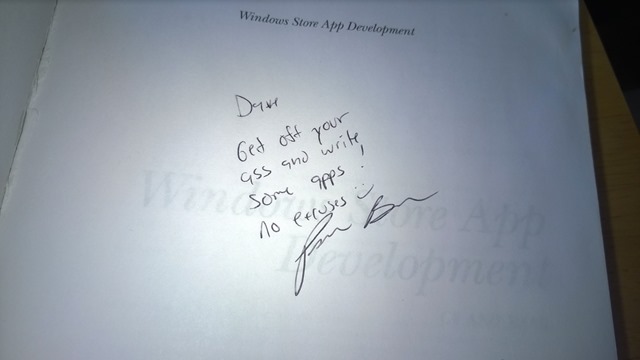
Review-Windows Store App Development by Pete BrownShortly after I acquired this book, Pete was kind enough to sign it for me. He preceded his autograph with the challenge: "Get off your ass and write some apps!" And I did. Thanks in part to Brown's inspiration, I now have 14 apps in the Windows Store.

If you are new to Windows 8 development, Brown's book is a good one to get started with.


This week, I'm breaking form. I am going to feature multiple apps (which I’ve done before) and I’m going to feature apps written by me (which I have not done before).

For the past few months, I’ve been creating Windows 8 and Windows Phone apps that feature videos of a sports team. The apps are all branded with the prefix “SportsTube”, such as “SportsTube – Michigan Sate Football” or “SportsTube – Michigan State Basketball”.  So far, I’ve created apps for 7 teams and I have a few more in the works.

I’ve been using Paul DeCarlo’s excellent Cross-Platform Cloud Kit, which makes it easy to create an app for each platform simultaneously.

I’ve created a page to make it easy for users to find all my SportsTube apps: http://sportstube.azurewebsites.net

MSUFootball[1] IUBasketball[1]


February 2014 Gratitudes

Comments [0]

3/2
Today I am grateful for all the kind birthday wishes yesterday.

3/1
Today I am grateful I made it safely to Columbus last night, despite driving while exhausted.

2/28
Today I am grateful to see so many old friends and to meet so many new people this week.

2/27
Today I am grateful for the amazing job that @ChadGreen and his team did in making my first CodePaLOUsa a great success. #cpl14

2/26
Today I am grateful I was able to finish all the training, scheduling, expense reports, travel booking and other required administrivia yesterday so I can now focus on important things.

2/25
Today I am grateful that I am attending CodePaLOUSa for the first time.

2/24
Today I am grateful for audiobooks, which make a long drive more pleasant.

2/23
Today I am grateful for a trip back to Louisville, KY.

2/22
Today I am grateful for a couple days at home to catch up on things.

2/21
Today I am grateful I was able to spend half the week in and around my old Kentucky home.

2/20
Today I am grateful for 1. Lunch with my old friend Patricia Desmarais 2. A packed classroom last night for my workshop at the University of Cincinnati. 3. Reality Tuesday Coffee House in Park Hills, KY. 4. The opportunity to know Jim Weirich and those whose lives he touched these past few years.

2/19
Today I am grateful for 1. Spending an afternoon with my son Nick. 2. A front-row ticket to the Louisville-USF game 3. Lunch with Jonathan Hunt whom I haven't seen in over a year 4. Skyline Chili

2/18
Today I am grateful for a successful workshop last night. It was the first time I demoed App Studio.

2/17
Today I am grateful to learn something new every day.

2/16
Today I am grateful for the opportunity to be a Lector and Eucharistic Minister at St. Francis Catholic Church these past 10 years. Today is my last scheduled day as a Lector.

2/15
Today I am grateful for 1. A great crowd to hear my presentation at Avanade. 2. Discovering, on my way out of Chicago, that downtown Portillo's has a drive thru.

2/14
Today I am grateful to John for last night's basketball ticket and to Patrick and Susan for a place to stay last night.

2/13
Today I am grateful for 1. Great student groups who came out to hear me yesterday at the University of Toledo and at Eastern Michigan University 2. Lunch with my old team in Toledo.

2/12
Today I am grateful for the anticipation of a full day.

2/11
Today I am grateful for the flexibility to attend conference calls while sitting in my living room, sipping coffee in my pajamas.

2/10
Today I am grateful that I found 3 unused gift cards in my desk.

2/9
Today I am grateful for a night in my own bed and a chance to catch up on things at home.

2/8
Today I am grateful for: 1. Lunch with Joseph Guadagno and his brother; 2. A Coyotes hockey game last night; 3. An unexpected Alice Cooper concert between periods

2/7
Today I am grateful that my recent travels have allowed me to avoid a couple weeks of sub-freezing temperatures back home.

2/6
Today I am grateful for my cousin Sharon, whose positive attitude in the face of ovarian cancer and chemotherapy is humbling.

2/5
Today I am grateful that my mother is heading home after weeks in a hospital and a rehab center following her recent back injury.

2/4
Today I am grateful for the diversity of cultures, colors, and ideas that makes my country great.

2/3
Today I am grateful for the opportunity to pay off a large amount of sleep debt the past 2 nights.


Windows Phone Screen Capture

Comments [0]

Here's something I just learned.

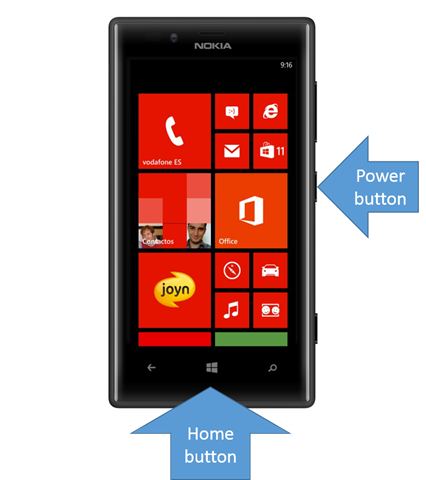
You can take a screen capture of a your Windows 8 phone by simultaneously pressing the Windows Home key (at the bottom center, on the front of the phone) power button (at the center of the right edge on my phone). When the screen is captured, you will hear the sound of a camera shutter, similar to when you take a photograph. For me, it usually takes several attempts in order to hold down the buttons simultaneously.

PhoneScreenCapture-Fig1

After you take the screen capture, you will find the captured image in the phone’s Photos application – in an album titled “Screenshots”.


App of the Week - Tweetium

Comments [0]

I've never found a Windows 8 Twitter client that I like (I've been using the default web site or the in-browser Tweetdeck), but I've been giving Tweetium a try and I like it. It allows you to view your timeline; "Connect" tweets - directed about or to you; "News" tweets - tweets on popular topics; Direct Messages; and each of your Lists. The interface is intuitive and I displays many tweets at once, including attached twitpics.

Today's "News" section features tweets about comedian Harold Ramis, who passed away yesterday, including many by his friends.

My favourite feature is when you click an embedded hyperlink, it launches Internet explorer in two-thirds-screen docked mode, but keeps Tweetium on left third of the screen, so you can still see your tweet and maintain your current position in the Twitter list.

I'm testing the free trial version, but you can upgrade to the full version for $2.99.

Links

TweetiumOnSurface[1]


For Jim Weirich, 1956-2014

Comments [0]

I didn't know Jim Weirich well. But I knew of him. And I knew the impact he had on others.

Those of us who have been engaged in the community could not help but be aware of Jim.

Jim had a reputation as an excellent Ruby developer; but, more than that, he had a reputation for sharing his knowledge with others. At conferences, he would explain Ruby concepts to experienced and novice developers alike and taking the time to make sure you understood it. I first met Jim when I attended his "Ruby Koans" session at CodeMash 5 years ago. Most people worked the Koans in either the morning or the afternoon session, but I was a slow learner and I stayed for the entire day, trying to figure them out. Jim was patient and answered all my newbie questions.

Jim also had a reputation for being friendly to everyone he met. Some people called him "Ruby Santa Claus" - partly because of his large size and his thick white beard, but also because of his quick smile and friendly outlook. I last saw Jim on the final day of CodeMash this past January. Walking past the Neo booth, I shouted "Hi, Jim." He smiled and asked how I was doing. It was a brief interaction, but I'm glad I have this as my final memory of the man who touched so many lives with his smile and his teachings.

We lost Jim earlier this week. He collapsed at work Tuesday evening and died shortly afterward.

To Jim's family and to those  closest to him - especially Joe, Leon, and Doug - I send my prayers and my condolences. To the rest of you, I send this challenge: No matter how well you knew Jim Weirich, take his life as an inspiration to share knowledge and joy with those around you.

IMG_1674-M[1]
Jim Weirich at CodeMash 2009


Eric Lawrence on Fiddler

Comments [0]

Spelling Champion is the first app written by my former colleague Peter Lu. It makes clever use of the voice API, reading a word and a sample sentence using that word; then asking the student to spell the word with his or her keyboard. It keeps track of right answers and offers a second chance if you get it wrong. The words are simple and aimed at beginning readers.

When I first saw the app, my only criticism was a lack of pictures, which I felt would help to draw the interest of a young child. Peter promised to add this in his next release.

There is a free version and a paid ($2.99) version. The paid version includes many more lessons than the free version.

You can download Spelling Champion from this link and you can read details about the app at http://spellingchampionapp.blogspot.com. 


<< Older Posts | Newer Posts >>