Want to learn how to use Powershell to manage your Azure IAAS assets, such as Virtual Machines and Virtual Networks?

Brian Lewis and I are recording a series of videos that walk you through a set of Hands-On Labs. These are the same labs I used to learn how to automate Azure with Powershell and Brian is the man who taught me.

So far, we have over 2 hours of content with more to come.

Check out this 3-part series by clicking the links below.

Part 1

Part 2

Part 3


I move around quite a bit and my laptop connects to Wi-Fi networks all over the world. Sometimes I return to those places and re-connect to the same network weeks or months later.

Once in a while, this causes a problem when a Wi-Fi network security credentials change and laptop's saved Wi-Fi settings continue to use the credentials I entered last time, without allowing me to enter the new credentials.

The simplest solution to this problem is to remove the Wi-Fi network from my laptop's list of saved networks Wi-Fi networks; then, re-add it. If it's not a hidden network, it should automatically appear when you are in range, even if it is not "saved".

But the option to remove a saved Wi-Fi network changes with each version of Windows and it may even be missing in some versions (I still can't find it in the Windows 10 preview I'm currently running).

However, you can use the command line to accomplish this. Here are the steps.

Open a command prompt as an Administrator. This is an option when you right-click the command prompt shortcut. It requires confirmation because you can wreak a lot of havoc as an administrator.

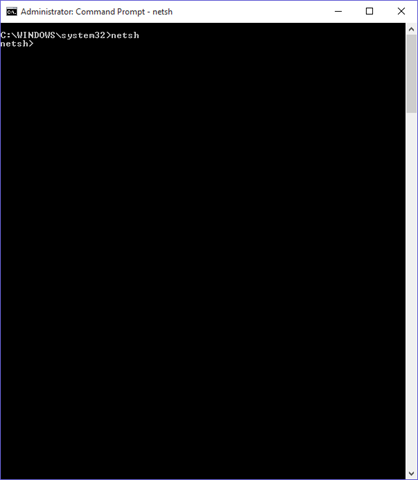
At the command prompt, type "netsh" and press ENTER to go into
network shell mode. The command prompt changes to
netsh>
as shown in Figure 1.

Forget-Fig1-netsh
Figure 1

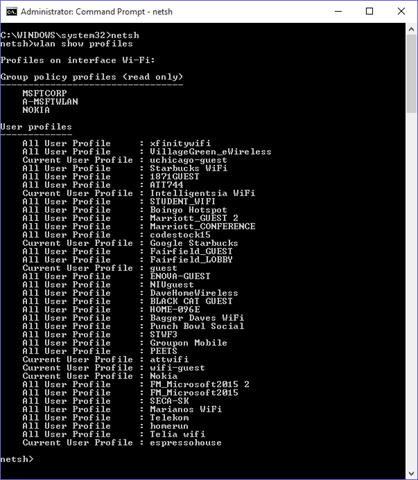
At the netsh prompt, type "wlan show profiles" and press ENTER to display a list of all saved Wi-Fi networks, as shown in Figure 2.

Forget-Fig2-ShowProfiles
Figure 2 

Find the network you want to remove; then type "wlan delete profile name=", where network name is the network as listed in the last command. This must be surrounded by quotes. Spelling is important but capitalization is not. Press ENTER to remove this network, as shown in Figure 3.

Forget-Fig3-DeleteProfiles
Figure 3

That's it. You can close the command prompt or type "exit" and press ENTER to leave Network Shell Mode. I recommend not leaving and Administrator-level command prompt open in case you forget the power you have.

Here’s a summary of the steps:

netsh
 
wlan show profiles
 
wlan delete profile name=”<network name>”
 

This method appears to work for Windows 7, 8, 8.1, and 10. Don’t get caught unable to connect to a wi-fi network again.


Last night, I was the guest on the Azure podcast. The show is hosted by Cale Teeter, Evan Basalik and Sujit D'Mello and they have been recording since October 2013 – coincidentally, the same week that I joined Microsoft.

We talked about a number of topics, including education, startups, and Azure’s support for open source software. It was my first time on this podcast and I really enjoyed it.

You can listen the show by clicking this link.


Codestock 2015

Comments [0]

Two hours after Codestock ended, I sat at a local restaurant enjoying dinner with Tennessee friends. I was tired and mostly listened to the conversation around the table.

I decided only recently to attend Codestock this year - primarily to help manage Microsoft's sponsorship of the event - but I ended up participating in 4 different presentations.

IMG_2511 Scott Hanselman delivered the keynote address at the beginning of Day 1 and we were allowed to introduce him to the audience and speak for about 15 minutes. Jennifer Marsman and I decided to highlight a golf scoring application created by Knoxville developer Wally McClure. We chose this app because it used many features of Azure and ran on multiple devices, including an iPad. Rather than simply talking about the app, we wrote a short skit in which Jennifer and I bragged about how much we knew about golf and Wally patiently explained how much more complicated golf scoring was than we understood. Performing a skit is a different way of delivering a message like this, but based on the feedback I received afterward, most people seemed to enjoy it. DavidWallyJennifer

On Day 1, I was asked to sit on a "Mobile Strategy Panel" because one of the panelists cancelled at the last minute. Sam Basu of Telerik asked each panelist questions about the state of various mobile platforms and took questions from the audience. The session was recorded by Ed Charbeneau (one of the panelists) for his podcast, so this recording should be publicly available soon.

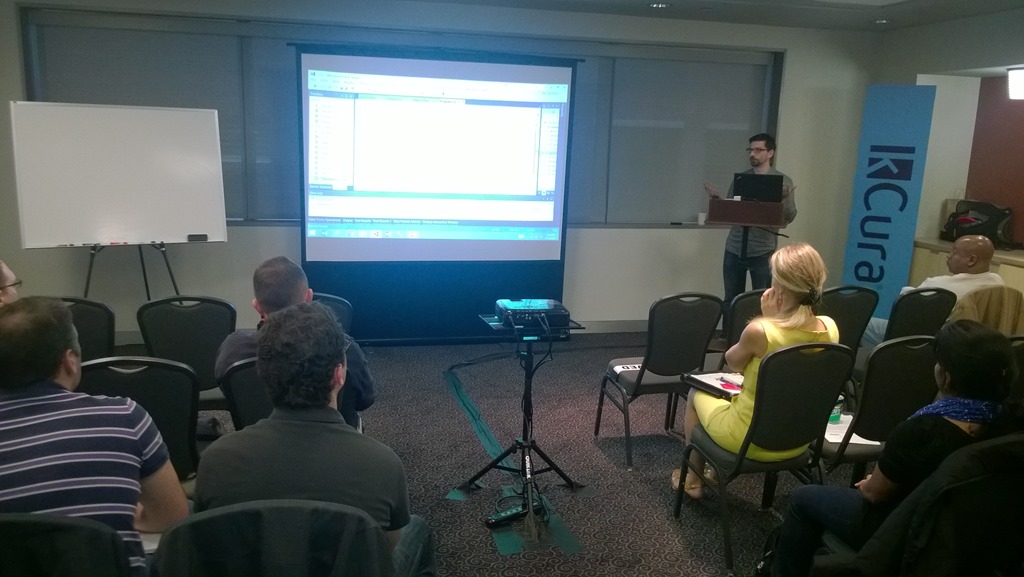
I also signed up to deliver a 20-minute Lightning Talk titled "Microsoft Azure Without Microsoft" in which I described many of the open source technologies and alternate platforms that are supported on Microsoft Azure.

On day 2, I delivered a presentation: "I Did Not Know Microsoft Did That". This presentation was created and submitted by my colleague Bill Fink, but Bill fell ill and could not make it. The organizers liked Bill's topic and asked if I could deliver it. I used Bill's slides to talk about free programs offered by Microsoft, such as BizSpark, Dreamspark, and Microsoft Virtual Academy. Everyone in the audience I spoke with told me they were unaware of more than 2 of the dozen or so programs I covered and wanted to explore at least one of them more.

IMG_2521 The local Microsoft store was on-site with several tables full of PCs, laptops, tablets, phones, and even a 3D printer. This was an idea I pitched to Codestock last year and it was so well-received that the organizers contacted the store themselves this year.

I had a chance to attend a few sessions as well. Jennifer Marsman gave an excellent demonstration in which she used a device to measure EEG brain patterns and fed data into Azure Machine Learning to determine how the brain reacts when lying versus telling the truth; David Neal gave a very good overview of node.js for .NET developers; and Jeff Fritz showed off the features coming in ASP.NET 5.

WP_20150711_14_50_27_Pro_edited-1 I love attending Codestock because it gives me a chance to connect with people in a different part of the country than I normally interact with. I spoke with people about F# and video production and web development and cloud computing. I even captured a few video interviews, which I've already started sharing online.

Attendance nearly doubled this year over last year with nearly 900 developers making the trek. The organizers moved it to a much larger venue and may grow it even more in the future.

I think you can tell now why I was so tired following the conference. Luckily, I’m home now and I’ve already started to re-energize. For next year.

Photos

Codestlock.org


June 2015 Gratitudes

Comments [0]

7/5
Today I am grateful for impressive fireworks at Navy Pier last night.

7/4
Today I am grateful to be an American.

7/3
Today I am grateful I attended a very good Pokey LaFarge concert last night.

7/2
Today I am grateful for an afternoon in East Lansing, MI.

7/1
Today I am grateful for a visit with my mother and sister last night

6/30
Today I am grateful for 3 offers on my house the past 3 days.

6/29
Today I am grateful to finally have a chance to celebrate Father's Day yesterday with my son Tim.

6/28
Today I am grateful for an evening with my classmates at our high school reunion last night in Detroit.

6/27
Today I am grateful for a chance to spend a few days back in Michigan visiting family and old friends.

6/26
Today I am grateful for the ability to stay in touch with distant friends via social media.

6/25
Today I am grateful to Brian, who made himself immediately available to answer my Powershell questions.

6/24
Today I am grateful there is a gym in my building - right down the hall from my apartment.

6/23
Today I am grateful that I live within walking distance of so many places I want and need to get to.

6/22
Today I am grateful to my Dad, who showed me what it is like to be a good father. I pray I made him proud.

6/21
Today I am grateful for an evening at Ravinia watching A Prairie Home Companion live for the first time.

6/20
Today I am grateful for my new Chicago Public Library card.

6/19
Today I am grateful for all the free food I keep receiving at these events.

6/18
Today I am grateful for an Architectural boat tour of Chicago yesterday.

6/17
Today I am grateful I built my first node.js project yesterday.

6/16
Today I am grateful for my balcony, this chair, and nice weather nice enough to sit outside in the morning.

6/15
Today I am grateful for 2 different festivals this weekend.

6/14
Today I am grateful for a chance to see and hear blues legend Buddy Guy last night.

6/13
Today I am grateful for those who worked to make the local Toastmasters club a success this past year.

6/12
Today I am grateful for a day with no appointments, so i could catch up on stuff.

6/11
Today I am grateful for a successful BuildChicago event yesterday at the Field Museum.

6/8
Today I am grateful for a weekend in Michigan.


I am here today to urge you to use the "Tentative" response in your calendar program when it is appropriate.

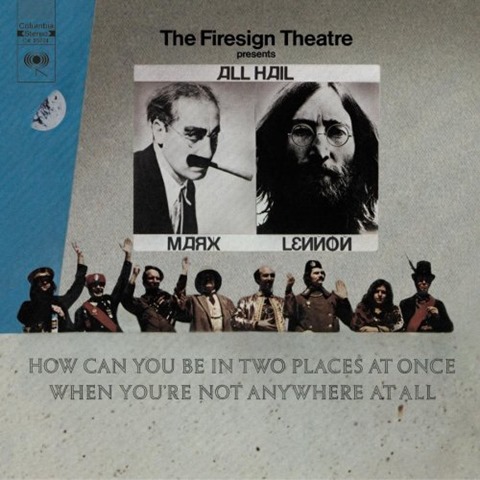
Firesign I see too many people blindly accepting every meeting request they receive - even those they know they will not attend. Many of you - and you know who you are - have multiple meetings booked for the exact same time. As the philosophers at Firesign Theater so eloquently put it: How can you be in two places at once when you're not anywhere at all?

There are 3 primary advantages of using the Tentative response:

  • Organize your time better
  • Courtesy to the meeting organizer
  • Assist others in finding free time on your calendar

Organize your time better

This should be enough reason for you to use "Accept" when you mean "Accept" and "Tentative" when you mean "Tentative".

Each morning (and often the night before), I check my calendar to see what my schedule holds for the day. My calendar is often full, but not every event on it requires my attendance. Knowing which ones I need to attend and which ones I might attend makes it far easier for me to plan my day.

Accepting an appointment marks it as "Busy" on my calendar, while tentatively accepting an appointment marks it as "Tentative" on my calendar. In the Outlook calendar, each status displays with a different pattern (solid for Busy; hashed for Tentative). These patterns make it easy to see at a glance where I'm required to spend my time and where my attendance is optional, which helps me to set priorities.

OutlookCalendar

Courtesy to the meeting organizer

Meeting organizers often rely on your response to determine whether or not you will attend. Sometimes, they are counting on you to share your insights with the rest of the group or to answer one or more specific questions. If they expect you to attend and you do not, it may throw off their agenda. They may need to schedule another meeting as a result or get your information via a series of (inefficient) emails or phone calls. It's common courtesy to be honest about whether or not you intend to be at a meeting. If you are unsure, let them know via the "Tentative" response.

Assist others in finding free time on your calendar

I recently tried to find time on a manager's calendar but I was frustrated that her entire calendar was marked "Busy" for every working hour of every day of the next 5 days. Of course, this person wasn't committed to all those meetings and did not intend to attend them all; but she didn't distinguish between required and optional meetings, which made it more difficult for me to find free time on her calendar. Marking your calendar honestly makes it easier to collaborate with others in your organization.

Sometimes, I still double-book time on my calendar. But when I do, I never make both appointment "Busy" or "Accepted".

My company offers a lot of online "meetings" that are actually training sessions, where one of my colleagues will show the rest of us how to use a cool technology. I want to attend as many of these as I can, so I want them on my calendar. But I recognize that a higher-priority meeting may force me to skip a session and watch the recording later.

The "Tentative" status works for these scenarios. Use it. You'll be glad you did. And so will your colleagues.


Recently, I interviewed Jeawy Jang and Tae Tongnussock, two students from Thailand who built Den-Lin  - a mobile application designed to test the composition of soil. The application placed in the Imagine Cup competition last year.

Here is that interview on DevRadio.


Mark Rendle on C# 6

Comments [0]

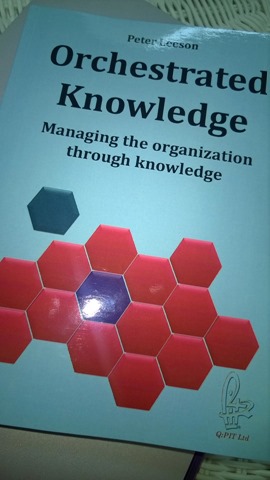
With a mere 135 pages, Orchestrated Knowledge by Peter Leeson doesn't appear very substantial at first glance. But Leeson packs a lot into a small package. The book describes ways that companies can improve their quality and productivity. Leeson distills his decades of management consulting into a set of brief chapters describing the mistakes he has witnessed at various companies and recommendations for correcting these mistakes.

Leeson talks a lot about quality. He writes:

"The first thing that we need to consider in any organization is that quality is the most important thing. The quality of your work defines you. Whoever you are, whatever you do, I can find the same products and services cheaper somewhere else. But your quality is your signature."

PeterLeeson According to Leeson, Quality is achieved by people - not by tools, as so many believe. He urges organizations to empower their employees by listening to their ideas and allowing them apply their own creativity in performing their jobs and directing changes about their area. Employees will be happier and happier employees tend to be more productive and produce higher quality goods and services. Most organizations avoid this because they fear the risk of exposing flaw in their system and because they don't trust their employees.

OrchestratedKnowledge Communication is a large focus of this book. Employees lose motivation when they don't know why changes are implemented, what goals the company hopes to achieve, and what projects are coming in the future. Communicating with employees not only empowers them, but allows them to focus their energies on the best way to solve problems, rather than on performing a set of rote tasks.

The largest chapter describes what Leeson calls the "Orchestrated Knowledge Organization", which breaks the company into cells - each with a specific set of responsibilities and an area of quality on which to focus.

Leeson advocates evolutionary change over revolutionary change - keep what works in your organization and build on it, rather than reconstructing everything - a high-risk strategy that is difficult to adopt.

Orchestrated Knowledge does not provide many step-by-step instructions for your company to follow. But it does provide a lot of guidance that you can apply to your own organization to avoid mistakes and make it more successful.


Links

My interview with Peter Leeson, May 2014

Peter Leeson’s blog


The past few years, I've heard a lot about something called NoSQL. Some people really love it. Those who love it, talk about its lack of ceremony and the speed with which you can develop and the speed with which it reads and writes and its scalability. It sounds all sounds so awesome!

But I grew up on relational databases. My first computer language was FoxPro, which included a relational database and supported a powerful version of SQL. From there, I graduated to SQL Server and I've dabbled occasionally in Microsoft Access. I've even worked with Oracle and MySQL and, as a developer, I find them intuitive. Should I abandon the databases with which I am familiar and travel to this brave, new world of NoSQL? Is NoSQL the best solution for every project? For some projects? How do I know?

Let's start with a definition for NoSQL. This is harder than you might think, because NoSQL databases are basically defined by what they are not. The only real definition is that they are not SQL databases. They tend not to have pre-defined schemas; they tend not to enforce relationships; and they tend to be able to store hierarchical data; and, of course, they tend not to support the SQL language (although some support syntaxes similar to SQL, such as LINQ). These are broad definitions and only address things that NoSQL databases don't do. There is no standard language, syntax, storage mechanism, or API for addressing NoSQL databases.

For purposes of this article, I'll define SQL databases as those in which the database engined provides the following features:

  1. Supports SQL
  2. Enforces pre-defined schemas
  3. Enforces referential integrity among related, normalized tables

This includes database engines supported by large companies, such as Microsoft SQL Server and Oracle, as well as Open Source databases, such as MySQL.

I'll lump all other persistent storage technologies as NoSQL databases. This includes MongoDB, RavenDB, Azure table storage, and DocumentDB.

So when should we choose good old SQL databases and when should we use this newfangled NoSQL thing?

Let's start with SQL databases. They have a few advantages:

SQL databases

Advantages of SQL DBs

First, they are relational, so they make it easy to normalize your database into a set of related tables. This almost always saves disc space and often makes your data more consistent (e.g., you can change the name of a product in one table and it changes throughout your entire application). Databases like this also allow you to create persistent relationships between these tables and these relationships enforce referential integrity, ensuring that we are not left with orphaned records (Who wants an order line without a corresponding order?)  You can set up cascading deletes or force users to create and delete records in an order that will never have inconsistent data.

The SQL language itself is very flexible, allowing users to create either pre-defined or ad-hoc queries against a relational database. This makes SQL databases great for reporting.

The schema in a SQL database helps catch errors in almost the same way that a compiler or a unit test does. If you want to capture a customer's last name and you create a “LastName” column, but one time you accidentally misspell it as "LastNmae", the database will catch this and throw an exception which should be early and obvious enough for you to fix the error.

Disadvantages of SQL DBs

But these features come at a price. There is overhead in enforcing database schemas and referential integrity. As a result, saving to a SQL database tends to be slower.

Also, when developers build an application intended for human interaction, they almost never structure normalize the application's objects in the  way that they normalize the data in their relational database. An entire class of Object Relational Mapper (ORM) software exists simply to deal with this mismatch. It requires code, time, and CPU cycles to map between objects in an application and data in a database.

NoSQL databases

Advantages of NoSQL DBs

Because NoSQL databases don't need to enforce schemas or relationships, they tend to perform faster than their SQL cousins.

Database development tends to be faster because developers and DBAs are not required to pre-define the columns in each table.

The lack of database relationship enforcement also makes it easier to move parts of a database to another server, which makes it easier to support very large data sets. Relational databases can move across servers, but it tends to be more difficult because of their need to enforce referential integrity.

The lack of schema also adds flexibility, especially if you are capturing data in which different objects may have different properties. For example, a product catalogue table may contain some items (such as computer monitors) for which diagonal size in inches is an important property, and other items (such as hard drives) for which capacity in GB is an important property. Mapping these disparate needs to a relational database table would be add complexity to your data model.

Finally, it is possible to serialize and de-serialize objects in the same format that they are used in an application's user interface. This eliminates the need for an ORM, which makes applications simpler and faster.

Disadvantages of NoSQL DBs

When reading data, NoSQL databases tend to be very fast, as long as you are looking up rows by an index or key. If you want to look up a row by any other property or filter your data by a property, this often requires a full table scan, which is very slow. Some NoSQL databases allow you to create index on non-key rows, which speeds up such searches but slows down data writes - decreasing one of the advantages of NoSQL.

Other factors

It's worth looking at the cost of any database solution. For example, Azure provides both SQL and NoSQL databases as a service. If we compare the cost of Azure SQL Database with Azure table storage (a NoSQL option), we can see that the price of table storage is far less than the cost of SQL Server. Table storage might not be the answer for your application, but it's worth examining whether some of your data can work with Azure table storage.

Conclusion

As with most questions facing IT developers, architects and managers, there is no clear-cut answer to whether to use SQL or NoSQL databases. SQL databases tend to be better when ad-hoc reporting is required, while NoSQL databases tend to shine when saving and retrieving transactional data from a user application. Many applications take advantage of the features of both database types by creating a NoSQL database with which their application interacts; then transforming and regularly copying this data into a relational database, which can be queried and reported on.

There are many options for your persistent storage needs. Choose the right one for your application.

At IT Camp in Romania last month, I delivered a session on Azure Mobile Services and I sat on panel titled “Cloud for Business”. The conference recorded each of these sessions and made them available online. You can view them below:

ITCamp 2015 - The Hitchhiker's Guide to Azure Mobile Services (David Giard) from ITCamp on Vimeo.


ITCamp 2015 - Cloud & Azure Open Panel (Andy Cross, David Giard, Radu Vunvulea, Petru Jucovschi, Mihai Tataran) from ITCamp on Vimeo.

You can view all the sessions from IT Camp here.


The Null Coalescing operator has been around since the early days of C#. Yet it still remains unused by most developers. I'm guessing this is because they are unaware of it, rather than deliberately rejecting it.

The operator is simply a double question mark ("??"). Some people refer to it as the "Elvis Operator" because, if you squint your eyes just right, the curvy parts of each question mark resemble the waves of singer Elvis Presley's famous pompadour-style hair while the dots resemble his eyes.


The King

The operator takes 2 arguments and returns a single value. If the first argument is not null, the null coalescing operator returns that argument; otherwise, it returns the second argument.

This is clarified by the following 2 examples

String a = "first";
String b = "second";
String c = a ?? b;
Console.WriteLine(c);
// Output: first 
 
String d = null;
String e = "second";
String f = d ?? e;
Console.WriteLine(f);
// Output: second 
 

Of course, the code snippet

String f = d ?? e;

is identical to the following:

String f = "";
if (a == null)
    f = e;
else
    f = d; 

The arguments must be nullable and the examples above work because "string" is nullable by default. You may need to use the nullable version of other data types as in the example below that features integers.

int? g = 1;
int? h = 2;
int? i = g ?? h;
Console.WriteLine(i);
// Output: 1 
 
int? j = null;
int? k = 2;
int? l = j ?? k;
Console.WriteLine(l);
// Output: 2 
 

You can even use this operator with custom classes and objects, as in the following example.

public class Person
{
    public string FirstName { get; set; }
    public string LastName { get; set; }
} 
 
class Program
{
    static void Main(string[] args)
    {
        Person m = null;
        Person n = new Person() { FirstName = "David", LastName = "Giard" };
        Person o = m ?? n;
        Console.WriteLine(o.FirstName);
        Console.ReadLine();
    }
} 
 

So why bother using the null coalescing operator? Why not continue to use the longer "if/else" version if the results are the same. There are a couple reasons to use the null coalescing operator: Converting Nullable properties to Non-Nullable properties and Ease of Reading.

Converting to Non-Nullable Properties

The Null Coalescing operator is useful for converting a nullable property into a non-nullable property.

For example, the following example, returns "N/A" for the FavoriteColor property if none is assigned. This assures that FavoriteColor will never return Null.

private string _favoriteColor;
public string FavoriteColor
{
    get { return _favoriteColor ?? "N/A"; }
    set { _favoriteColor = value; }
}

Ease of reading

The single line of a code allowed by the Null coalescing operator tends to be much more terse and more clear than the multiple lines of an IF/ELSE construct. This is particularly true if you have a lot of similar checks in a row. Given the following examples, it is much easier to read the first than the second. Once you are comfortable with the syntax, it is easy to see what the code is doing. Even though you are almost certainly familiar with the syntax of an "if" construct, you still must pause to step through the code and think about what the second example is doing.

Some will argue that the Null Coalescing operator is more difficult to read because so many are unfamiliar with it. This seems a weak argument to me, given how long it has been in the language and how useful it is. As a developer, we owe it to ourselves to become familiar with the core structures of our language of choice and this includes the operators.

So don’t be cruel, Hound Dog! Ignore those suspicious minds and check out of Heartbreak Hotel!

Make your code more concise and readable by using the Null Coalescing operator.


C# contains a single operator that handles conditional logic in a single statement. It is generally written as "?:" (making it difficult to find using a search engine) and it is often referred to as the conditional operator, although the official documentation does not give it this name.

I write about it here, not because it is new or extra cool, but because I believe it is underused by C# developers.

The syntax is:
condition ? ValueIfTrue : ValueIfFalse;

where

  • condition is a boolean expression to test
  • ValueIfTrue is the value to return if the condition expression is true
  • ValueIfFalse is the value to return if the condition expression is false

An example should clarify this:

   1: int x;
   2: string y;
   3: x = 1;
   4: y = x >= 0 ? "Positive" : "Negative";
   5: Console.WriteLine(y); 
   6:  
   7: x = -1;
   8: y = x >= 0 ? "Positive" : "Negative";
   9: Console.WriteLine(y); 

The output of this code snippet is:

Positive
Negative

The expression

x >= 0 ? "Positive" : "Negative";

returns the string "Positive" if x is at least 0 and "Negative" if x is less than 0.

Of course the same expression could be written like the following:

   1: x = 1;
   2: if (x >= 0)
   3: {
   4:     y = "Positive";
   5: }
   6: else
   7: {
   8:     y = "Negative";
   9: }
  10: Console.WriteLine(y);
  11: 
  12: x = -1;
  13: if (x >;= 0)
  14: {
  15:     y = "Positive";
  16: }
  17: else
  18: {
  19:     y = "Negative";
  20: }
  21: Console.WriteLine(y);

But this requires more typing (which provides more changes for errors); and (more importantly), it takes more time to read, so it cannot be digested as quickly by someone reviewing the code later. Of course, I'm assuming that the code reviewer is familiar with this operator, but I don't think that's an unreasonable expectation, given that it has been in the C# language over 10 years.

Many developers are not familiar with ?: operator, but they should be. It simplifies code and makes it easier to read.


Here is the full code of a console application demonstrating these concepts:

   1: class Program
   2: {
   3:     static void Main(string[] args)
   4:     {
   5:         int x;
   6:         string y;
   7:         x = 1;
   8:         y = x >= 0 ? "Positive" : "Negative";
   9:         Console.WriteLine(y);
  10: 
  11:         x = -1;
  12:         y = x >;= 0 ? "Positive" : "Negative";
  13:         Console.WriteLine(y);
  14: 
  15:         x = 1;
  16:         if (x >;= 0)
  17:         {
  18:             y = "Positive";
  19:         }
  20:         else
  21:         {
  22:             y = "Negative";
  23:         }
  24:         Console.WriteLine(y);
  25: 
  26:         x = -1;
  27:         if (x >;= 0)
  28:         {
  29:             y = "Positive";
  30:         }
  31:         else
  32:         {
  33:             y = "Negative";
  34:         }
  35:         Console.WriteLine(y);
  36: 
  37:         Console.ReadLine();
  38:     }
  39: }


There is a myth that Microsoft Azure is only of use to people work primarily with Microsoft technologies. One can understand how this confusion occurs – the product has the word “Microsoft” in its name, after all. But this simply is not true.

Microsoft Azure is a cloud computing platform built by Microsoft. As you would expect, you can host in Azure Windows Virtual Machines, ASP.NET applications, back-end services written in C#. These are all Microsoft technologies, so it's not surprising that Microsoft Azure is built to handle them.

But what if you are not a Microsoft technologist? What if you work with Linux or write in Java or Python or PHP? What if you build applications that run on an iPhone, iPad or an Android device? Is Microsoft Azure relevant to you? are non-Microsoft operating systems, languages, and platforms supported on Microsoft Azure? You may be surprised that the answer is a definite "Yes".

Here is a list of some of the non-Microsoft technologies supported in Azure.

Virtual Machines

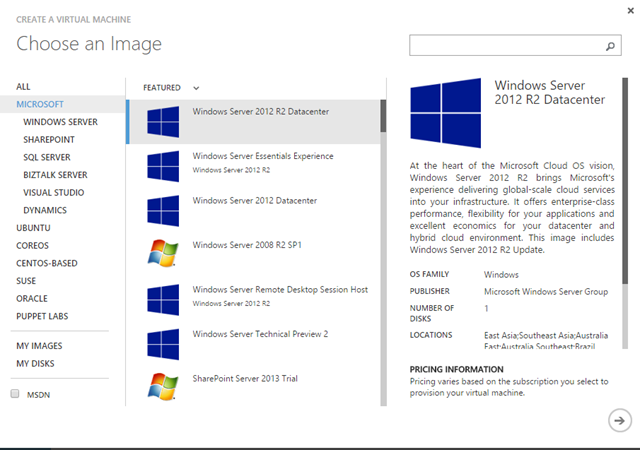
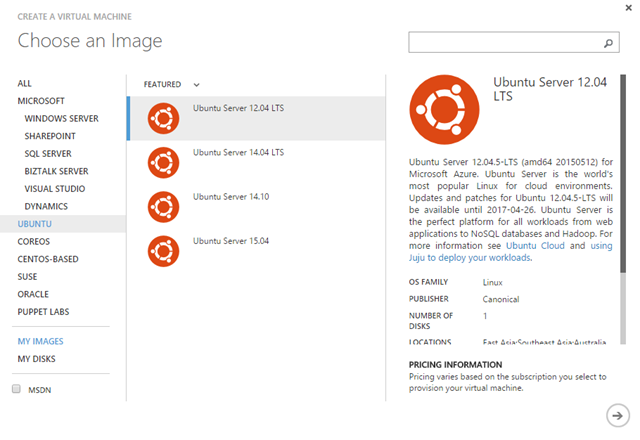
You can install any operating system or software you like onto an Azure Virtual Machine (provided you have the proper licensing, of course). There is a Gallery of images with pre-installed software that you can uses as a template for quickly creating a new Virtual Machine. Of course, you'd expect to find images with Microsoft Windows pre-installed (Fig 1).

NewVM-Microsoft
Fig 1

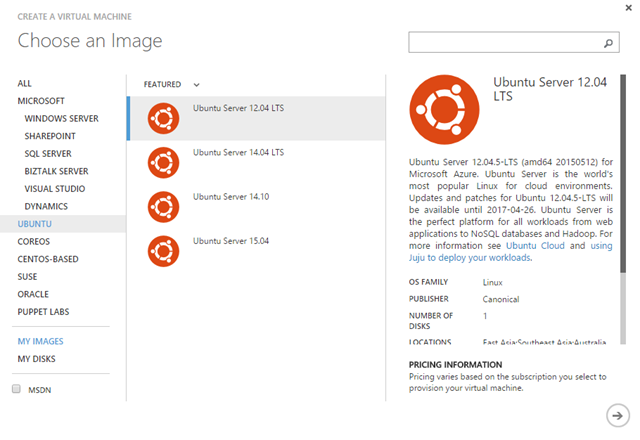
but you may be surprised to see a number of flavours of Linux (e.g., Ubuntu, Suse, and Oracle) represented in this gallery (Fig 2, 3).

NewVM-Ubuntu
Fig 2

NewVM-Ubuntu  
Fig 3

Web Apps

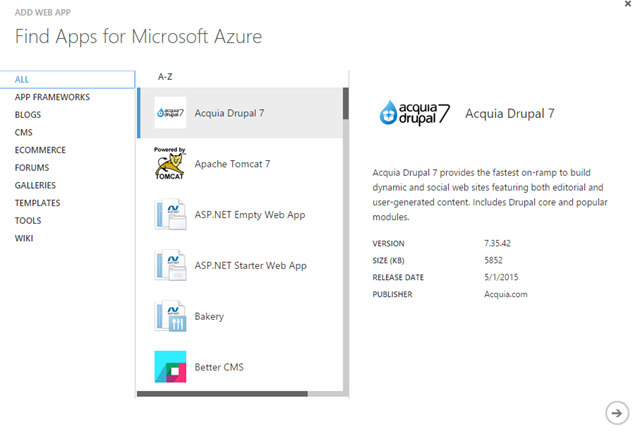
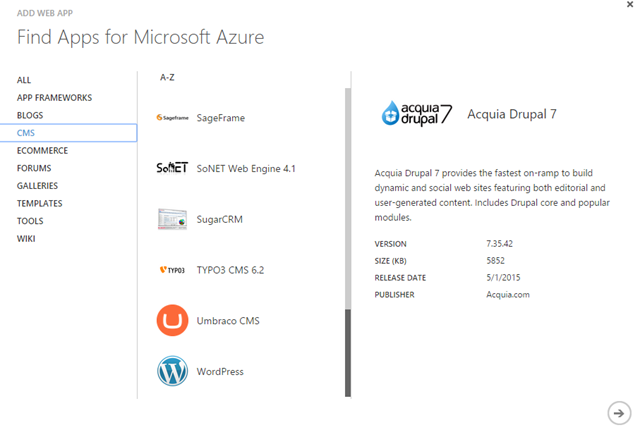
Web Apps (formerly known as "Azure Web Sites") are a simple way to build a web site or application on Azure. These applications typically run on Windows and on IIS, but IIS is a flexible web host capable of supporting many different languages and platforms. As a result, you can write your server-side code in Java, Python, PHP, or JavaScript (using node.js) and it will work on an Azure Web App. There are even pre-built templates in the Web App Gallery built on top of non-Microsoft technologies. With a few clicks, you can create a new site built on WordPress, Drupal, or Joomla (Fig 4, 5), even though these content management systems are built with PHP, Python, and MySQL.

NewWebAppGallery
Fig 4

NewWebAppGallery-2
Fig 5 

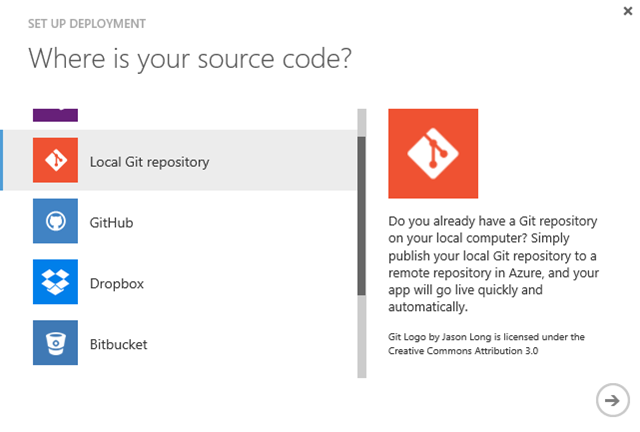
Web Apps also support automated deployment from a variety of source control systems. Click the Set up deployment from source control link on your web app's dashboard and select from GitHub, a local Git repository, BitBucket, or even Dropbox to configure automated deployments from your source control repository, as shown in Fig 6.

Deployment
Fig 6

Mobile Services

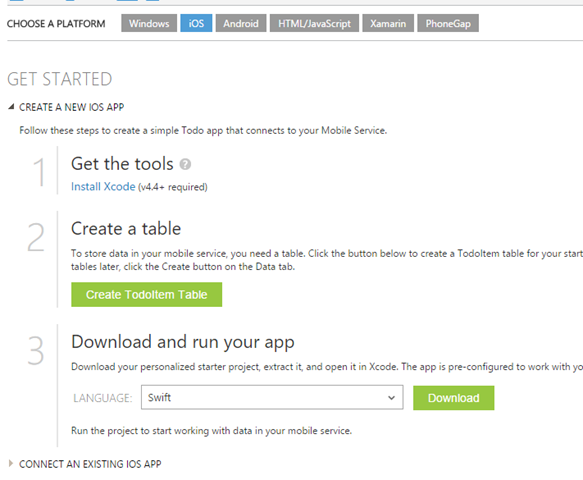
Azure Mobile Services provide a simple way to create a back-end data service for your mobile application. Reading and Writing capability to this data store is exposed via a REST interface, which is exposed through HTTP and JSON. Because HTTP and JSON are web standards, these services can be called by virtually any client. Mobile Services will even generate sample code to access a Mobile Service so you can use it as a starting point in your mobile application. Select the generated code for Windows (in C# or JavaScript); for iOS (in Objective-C or Swift); for Android (in Java); for a single-page application (in JavaScript); or for a Xamarin or PhoneGap application, as shown in Fig 7.
MobileServiceClients
Fig 7

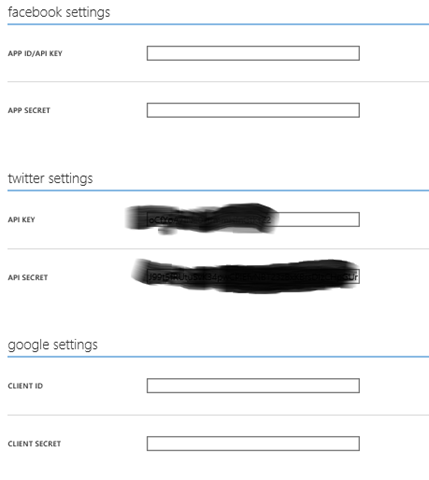
Mobile Services also supports single-sign-on through a variety of Authentication Providers. Most of the work is done through configuration, meaning you don't need to write much code. Google, Facebook, and Twitter are among the authentication providers supported out of the box (Fig 8).

SingleSignOn
Fig 8

Cross-Platform Command-Line Tools

If you do a lot of work with Azure, you will find yourself wanting to automate some of tasks, such as creating and deploying virtual machines, configuring storage accounts, and setting security on services. For years, the best ways to do this were via a REST API or a set of Powershell commandlets that call those APIs. Now, a set of cross-platform command line tools allow you to write bash scripts on Mac or Linux to perform these same automation tasks.

Management Tools

Azure supports a number of management tools that are popular in the Linux world. Among these are Chef, Puppet, and Docker. VM Images and add-ins make it easier to use these tools.

Caching

A caching service was one of the first services built for Azure. But now that service has been deprecated in favor of the popular Open Source Redis Caching Service.
Marketplace

Azure supports a number of third-party offerings in the Azure Marketplace. Here, you can find tool, such as Mongo and Raven as a service; or data feeds, such as address or phone number verification services. Items listed in the Marketplace are offered by third party companies, so some are free; some cost money; and some offer a free version that you can upgrade to a paid version. This list is growing every month.

Finally…

Azure might or might not be the perfect solution for your application or data. But, if you are considering a cloud platform, do not exclude Azure simply because you aren't using any Microsoft technologies. Azure is flexible enough to support a wide range of technologies - even those that compete directly with Microsoft.


May 2015 Gratitudes

Comments [0]

6/7
Today I am grateful for an evening with my mother yesterday.

6/6
Today I am grateful for dinner with my son Tim yesterday.

6/5
Today I am grateful for a chance to hear Microsoft CEO Satya Nadella talk with a small group of startups yesterday in Chicago.

6/4
Today I am grateful I was able to lose 25 pounds in the past 5 months.

6/3
Today I am grateful for my camera.

6/2
Today I am grateful for all the items I crossed off my "To Do" list yesterday.

6/1
Today I am grateful for a Mass yesterday at St. Michael filled with amazing music.

5/31
Today I am grateful for an amazing trip to Europe, the things I saw, and the people I met there.

5/30
Today I am grateful for a day in Uppsalla, Sweden with Tiberiu and his family.

5/29
Today I am grateful for an excellent dinner last night in Stockholm with Julie, Ward, and Patricia.

5/28
Today I am grateful for a chance to explore Stockholm yesterday with Jimmy.

5/26
Today I am grateful for a visit to the Vasa Museum, a walk through Stockholm, and end-of-day dinner&drinks.

5/25
Today I am grateful for the men and women who gave their lives in defense of my country.

5/24
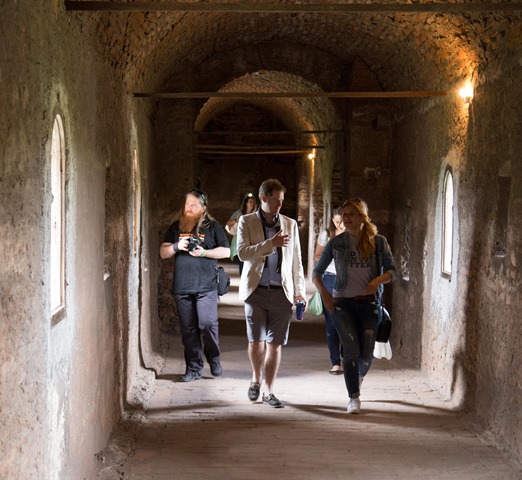
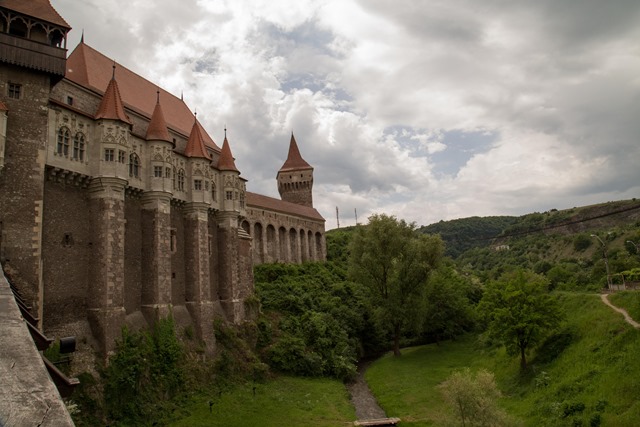
Today I am grateful for a tour of Corvin Castle yesterday in Hunedoara, Romania.

5/23
Today I am grateful to be part of an excellent IT Camp this year.

5/22
Today I am grateful to re-connect up with so many speakers that I met last year in Romania and haven't seen since.

5/21
Today I am grateful I am back in Romania for the second year in a row.

5/20
Today I am grateful for the stranger who picked up my cab fare in Munich.

5/19
Today I am grateful that my back pain subsided enough that I could go to the gym yesterday for the first time in weeks.

5/18
Today I am grateful that I found 2 videos that I thought were lost forever.

5/17
Today I am grateful for: A moving, very personal eulogy by Jay yesterday about his wife Amy, that brought all of us to tears. The fact that I live close enough to attend Amy's funeral yesterday. Seeing Scott drive 16 hours in 1 day to say goodbye to a friend. Jason, who shared his umbrella with me when it rained at the grave site.

5/16
Today I am grateful to all who made the Chicago Coder Conference this week a success.

5/15
Today I am grateful for dinner last night with Jason, James, Oksana, and Krystin.

5/14
Today I am grateful for the inspiration I draw from the strength displayed by my friends who are struggling with tragedies in their lives.

5/13
Today I am grateful for dinner with my son Tim last night.

5/12
Today I am grateful for an evening with the folks at the SE Michigan JavaScript group, helping them celebrate their second anniversary.

5/11
Today I am grateful I was able to make it back to Michigan yesterday to spend Mother's Day with my mom.

5/10
Today I am grateful for my mother Joyce Giard, for all she has done and for all she has come through.

5/9
Today I am grateful for all the old friends who are in town this week for #MSIgnite.

5/8
Today I am grateful to attend the Fall Out Boy concert last night.

5/7
Today I am grateful for an evening at the Vertigo Sky Club.

5/5
Today I am grateful for dinner last night with Betsy Weber and the folks at TechSmith.

5/4
Today I am grateful for a chance to help at the INTX Hackathon this past weekend. #INTXHack


Swedish Rhapsody 2015

Comments [0]

DevSum

This was my first time at DevSum and my visit to Sweden. In its tenth year, the conference topped 600 attendees. I was surprised by the number of speakers from America, but this fact was a big help to me because many of the Americans introduced me to other speakers, allowing me to expand my professional and personal network.

Patrik Löwendahl, CTO of Avanade Sweden, kicked off the conference with a thought-provoking talk about the challenges facing the software industry.

IMG_1528 I had a chance to see a few other presentations, including Mike Wood's Azure tools talk (condensed to 50 minutes from its usual 90 minutes); a security presentation by Niall Merrigan, in which he pretended to hack into a bank; and a very entertaining rant by Hadi Hari about "Silver Bullet Syndrome" in which he warned that there  are no easy solutions (such as new frameworks or methodologies )to software problems.

Monday afternoon, I gave a talk on Data Visualization. It's a talk I've given many times before, but I added a few new slides for this presentation and it was very well received. Several people approached me after to tell me they enjoyed it and learned from it.

I also was able to squeeze in an interview with Mark Rendle about the new features of C#.

Stockholm

IMG_1547 I spent a lot of time walking around Stockholm. The day before the conference, a group of conference speakers went to the Vasa Museum, which tells the story of the 17th century Swedish warship inside that sank on its maiden voyage and was recovered 3 centuries later. Tuesday afternoon, Chris Woodruff and I explored Old Town - the oldest part of the city - and took a guided tour of the Nobel Museum.

IMG_1599 Wednesday, Jimmy Bogard and I spent the entire day walking around Stockholm. We toured the museums of the Royal Palace and we visited Skansen - an open air museum, featuring reconstructed buildings from various periods of Swedish history and animals from all around Sweden.

Thursday, I bought a pass for the tourists buses and boats. The bus drove around the city while a recording described each landmark as we passed, telling a bit of the history and culture of the landmark. The boat ride gave a similar tour for the waterways around Stockholm. The city is located on a waterway containing an archipelago of over a hundred islands. These tours gave me a brief overview of the city highlights and also provided respite for the blister that had formed on the bottom of my foot. Following the tours, I went to the Gondolan - a restaurant suspended hundreds of meters above Stockholm that provided spectacular views of the city; then to the Photography Museum, where I saw 4 excellent exhibits. I ended the day, sharing an excellent meal with Ward Bell, Julie Lerman, and Julie’s friend Tricia.

Uppsalla

IMG_1775 Friday I took a train to Uppsalla, a university city north of Stockholm, where Tibi Covaci and his family met me and we explored the local church - a beautiful building from the 15th century and walked around the town. A local priest told us that university students were graduating today and that we could expect to hear cannons firing in their honor.

Final Hours

Friday evening, I went for a long walk north and west of my hotel - a neighborhood I had not yet explored. It was good to explore the city, even though I got lost a couple times.

This was, by far, the farthest north I've travelled in my life. The daylight hours in Stockholm are surprisingly long this time of year. The sun rises at 3:50AM and did not set until 9:40PM. This is part of the reason I did not get as much sleep as I should have.

I will carry this trip with me the rest of my life. I visited with old friends, saw a new part of the world, and met many smart people.

WP_20150527_11_52_15_Panorama_edited-1


More photos

DevSum


IMG_1422

I spoke last year at IT Camp in Cluj, Romania and my friend Mihai invited me back again this year. The IT Camp organizers treated me so well last year, I felt I must return this year.

Getting from Chicago to Cluj was an adventure lasting almost 20 hours. I left Chicago Tuesday evening at 9PM and arrived in Cluj at 1AM Thursday morning (local time).

My itinerary included a 9-hour layover in Munich, so I decided to leave the airport and visit downtown Munich. Luckily, a train runs directly from the airport to the city. Unluckily, the train  was out of service because the local workers were on strike. Luckily, I shared a taxi with a woman travelling to Munich from Heidelberg and she picked up the fare. Unluckily, the weather in Munich was cold and rainy. I had been to Munich a quarter century earlier and I remembered its pedestrian area filled with shops, cafes, and beer gardens. I had lunch and a beer at the famed Munchen Hofbrauhaus and a coffee at a local cafe. But I grew tired of walking around in the bad weather, so I returned to the airport to await the next leg of my flight.

I finally arrived in Cluj around 1AM the morning of the conference. Conference organizers came to the airport to pick me up (one of the many ways they spoil their speakers).

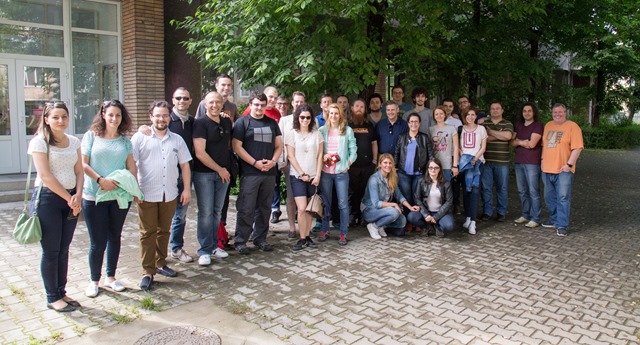
IT Camp was as good as I remembered from last year. In 2014, I was one of three Americans but this year no one else came from the US to speak. I remembered many from last year and they made me feel welcome.  Speakers came from all over Europe. Much of the conference content focused on Security and on Azure and I was able to learn quite a bit from the other speakers.

IMG_1367 Unlike most conferences, IT Camp opened with multiple keynotes. Organizers Mihai and Tudor kicked things off and quickly introduced the mayor of Cluj, who boasted of the emerging technology industry in his city.  The first keynote was an excellent talk on security by Paula Januszkiewicz, which focused more on human issues than on technology. Peter Leeson returned as a keynoter to talk about Organizational Sociology and Anthropology in Tech Companies. Peter’s talk was also not technical (Peter is a business anaylyst, not a technologist) but was very informative.

My presentation on Azure Mobile Services was well-received, even though one of my demos inexplicably failed. I participated in a Panel to answer audience questions about Azure. This inspired a lively discussion from the audience about some of the challenges of adopting cloud computing.

We stayed at the Hotel Grand Hotel - a 5-star hotel overlooking Cluj; the organizers treated us to excellent dinners every night; and IT Camp has a tradition of taking speakers on a cultural excursion the day after the conference. This year, we all travelled to Corvin Castle for a tour of this castle built in the 15th century.

IMG_1466

The castle was a 3-hour bus ride from our hotel and we all went for a gourmet dinner in downtown Cluj after returning, which meant that I didn't get to sleep until nearly 2AM. This was a problem because I had to wake up at 4AM for an early-morning flight to Stockholm. My band tracks my sleep patterns and it announced (rudely) that I only slept 93 minutes that night. But I made it and napped on the plane and arrived tired at the hotel in Stockholm, ready for my next adventure. You can read about that trip here.

IMG_1499

Links

More photos

IT Camp Site


Sometimes, my job throws me an unexpected and pleasant curve. After spending a few months, travelling the country and teaching the fundamentals of Web Development and Cloud Development, I was asked to join my team in Redmond, where we would spend a couple days building some cool projects.

As is true with most trips I make, I arrived without a plan. Fortunately, I was assigned to a team and some of my teammates had been planning what we would build. Jennifer Marsman has been researching the Big Data capabilities within Azure for months, so she suggested that we build something that will utilize these tools. Tim Benroeck suggested an idea that would integrate social media with TV watching, so we did that.

Tim noticed that many people enjoy watching a live TV event while interacting with others over social media. But that experience is nearly impossible if you record the TV show and watch it the following day - Twitter has moved on and it's difficult to go back into the Twitter stream and find Tweets that are relevant for each point in the show (especially if you want to avoid spoilers).

So we built a system that would save to Azure storage all tweets for a set of hashtags during a given time and capture the time of the tweet, along with other relevant metadata. A user could then play back the show later and immediately start the relevant saved Twitter stream at the same point. Tweets would flow by in simulated real time, so the viewer could read social media reactions to The Bachelor's choices or to the death of someone's favorite Game of Thrones character.

The system used HDInsight STORM technology from Azure to retrieve Tweets containing a given set of Hashtags (e.g., "#GameOfThrones" and "#GoT") and push them into a Hadoop HBASE database, saving all metadata about each tweet, including the time and source. Tweets were imported in real time and in "archive" mode (we queried old tweets) using the TweetInvi API. We then allowed users to start "Playing" the tweets at a given time and displaying them in the same order and with the same delay as they were originally tweeted. Viewers could then start watching last night's show and begin the archived Twitter stream at the time the show originally aired and enjoy the social media experience along with the show.

I spent most of my time working on the user interface - a Windows 10 application built with HTML5 and WinJS. It gave me my first experience writing a Windows 10 app and my first significant experience with WinJS.

Many people from the product teams were on hand to help us.

This was a great learning experience for me personally and for the rest of my team.

We dubbed our creation "TweetDVR".  You can view the source code at  https://github.com/jennifermarsman/TweetDVR


In 2048, historians are not content to study history by reading old documents and visiting ruins. The historians in Oxford have developed a time machine and they use this machine to travel back in time and observe historic events first-hand. 

In Connie Willis's The Doomsday Book, young historian Kivrin travels to the 14th-century to view life in the Middle Ages. The Time Travel technology has built-in safeguards to prevent time paradoxes, but 2 crises strike shortly after Kivrin goes back in time:
An influenza epidemic strikes 21st-century Oxford, prompting government officials to quarantine the city and debilitating many working on the time-travel project and prompting the department head to shut down the time machine, preventing anyone from rescuing Kivrin. 
An error in the time calculations has placed Kivrin 2 decades later than they planned, leaving her in the path of the bubonic plague, just as it reaches the region of England she is exploring.

The story follows 2 parallel paths - Kivrin interacting with the locals in the 14th Century and her mentor Mr. Dunworthy trying to engineer her rescue.  Time seems to move at the same rate in both periods and both protagonists face similar challenges - a mysterious disease disrupting their society., ignorant authority figures obstructing their efforts, and the illness and deaths of those who might help them.

The book has some flaws. Kivrin's story in the 14th century is much more compelling than the 21st century story. The characters are more real and more tragic. And the science doesn't hold up as well as I would like - the 21st century protagonists have discovered the secrets of time travel but struggle to communicate because the land lines are not working properly.

But I liked it.

I liked the historical perspective of The Doomsday Book; I liked the interweaving of the characters; I liked the plausible descriptions of the physical rules of time travel (a technology that might or might not be possible); I liked the fact that the protagonist was female (rare in time travel stories); and I liked the way Willis drew parallels between the two stories taking place "simultaneously" in different centuries.

For a story with sympathetic characters, suffering a crisis of medicine and a crisis of faith, Doomsday Book holds up very well.


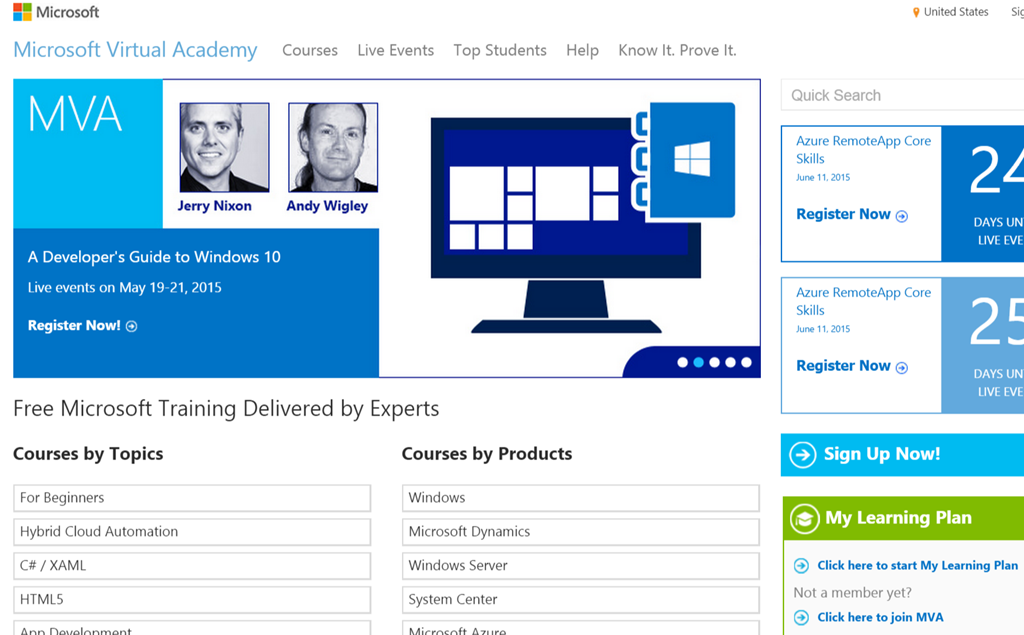
Are you looking for training on software, but are on a limited budget? You are in luck. Microsoft Virtual Academy has free training on everything from Azure to Windows 10 development to Exchange Administration.

The courses are delivered by Microsoft engineers or partners - many of them leaders in the software industry. The courses I looked at ranged in length from 5 minutes to 8 hours and combine lecture, slides, and demos.

You can browse courses by topic (such as HTML5, App Development, or DevOps) or by a specific product (such as Windows Server, Microsoft Azure, or SharePoint). Of course, there is also a search box where you can enter a word or phrase in the title of the course you are seeking.

There are two ways to watch an MVA course - live or archived. Watching a course live has the advantage that you can ask questions during the broadcast. The presenters and a few others are available in a chat room to answer your questions.  Archived courses are nice because you can pause them and even download them to your PC or mobile device in the format of your choice. Want an idea of the quality of the course before you watch it? Viewers rating scores are published, along with the number of people who rated the course to give you an idea of the validity of each rating.

Each course is assigned a level (100 for content targeting Beginners up to 400 for Expert content); and each course is dated, which makes it easy to decide if it may be obsolete (an important consideration when talking about fast-moving technology like Microsoft Azure).

If you make it through a course, you can earn “points” but I have not figured out what these points are good for. I think they are kind of like the points on Whose Line Is It Anyway?

The biggest problem with Microsoft Virtual Academy is that there is so much material. There is literally more content than you can possibly watch. So the challenge becomes trying to find the courses most relevant to you. As of this writing, there are over 80 courses just on Visual Studio 2013 and nearly 70 on Microsoft Azure.

You can find these hundreds of online courses at http://www.microsoftvirtualacademy.com. Did I mention they are all free?
MVA


A year ago, the Chicago Coder Conference was a popular conference with presentations on Java development. This year, the organizers reached out to the local .NET community to expand the conference to include Microsoft technologies. Local user group leaders and Microsoft Evangelists (including me) found speakers to deliver content on .NET, Azure, and mobile development to complement the Java presentations.

The resulting conference took place Thursday and Friday May 14 and 15 in the Chicago Loop. Over 400 attendees showed up to hear presentations on everything from Cryptography to Exception Handling to software testing. It was impressive to see attendees from the Java and .NET communities exchanging ideas.

Many Java developers stopped by the Microsoft booth to share their impressions of the Redmond-based company - some positive and some negative. Many were appreciative of the fact that Microsoft was sponsoring what had been a Java-only conference and still contained more Java than .NET content.

It was good for me to hear the ideas of Java developers - one presenter passionately lamented the absence of a free tool to test static .NET methods.

And it was good for them to learn about some of the open source and cross-platform technologies available from Microsoft - most were unaware that you could deploy Linux, MySQL, and Oracle to Azure.

The event was a great success and everyone seemed to enjoy it. Next year should be even better.
TimB
Tim Bedrock

EricB
Eric Boyd

 David2
me


Xamarin is a familiar name to mobile developers. The company is known for its tools that allow developers to build applications that will run the same code-base on Windows, Android, and iOS devices, making it easier and faster to build cross-platform applications. This spring, the folks at Xamarin are travelling across America delivering a series of Dev Days - a combination of classroom training and hacking.

The tour kicked off Saturday in Chicago, where I was happy to attend and participate; and Microsoft was happy to sponsor by providing the space.

James Montemagno of Xamarin began with an introduction Xamarin development, followed by an introduction to Xamarin forms. Afterwards, I showed the audience how to use Azure Mobile Services build a backend data store for a Xamarin app. Finally, Michael Stonis - a local Xamarin MVP and instructor at Xamarin University - delivered a presentation on applications for wearable devices.

Of course, there was plenty to eat - most notably Chicago-style stuffed pizza.

You can learn more about Xamarin Dev Days, see in which cities they are scheduled, register for these events, and even request a Dev Days event in your town at http://xamarin.com/dev-days.

Most of the afternoon was spent hacking. Attendees could either build an app of their choice or they could work through a set of labs provided by Xamarin. A few people left after the lectures ended, but many stuck around until the end of the day to put to use what they learned in the morning.  About 70 people attended and most came away with an improved understanding of the platform. And with a full belly.


Fired Up About Ignite

Comments [0]

The first Ignite conference was not what I expected - at least my experience was unexpected.

Ignite is a a new conference that  replaces Tech Ed North America and a few other national technical conferences. In its inaugural year, it was scheduled at the McCormick Place convention center in Chicago, which was lucky for me because I recently moved to Chicago.

I wanted to attend and I tried everything I could think of to get a ticket to Ignite (short of actually buying one, of course); but I had resigned myself to watching from the sidelines. However, the evening before Ignite began, I received an email asking if I could work the Office 365 booth at Ignite. I accepted and was excited to attend. I spent Sunday night learning all I could about Office 365,

I was overwhelmed by the interest in Office 365. The steady stream of attendees did not trail off until Wednesday afternoon. Serving 5 hours a day on booth duty made it difficult to attend any sessions before Friday morning; but I did get a chance to explore the Expo area, where dozens of companies and organizations showed off their products and services.

The Expo ended Thursday, so I was able to attend a few sessions on Friday. I saw presentations on Windows 10 management, ASP.NET 5, and Automated Testing.

By one measure, I missed much of the conference because I wasn't able to attend any sessions Monday through Thursday. But I spoke with a number of smart people in the Expo Area and exchanged quite a few ideas, which was a big success. And I was forced to ramp up quickly on Office 365 development in order to perform my role as a booth babe. They even let me wear a shirt with the word "Expert" on the back.

Overall, I learned a lot this week, which is the primary reason I attend these concerts. Oh, and also Fall Out Boy. The Fall Out Boy concert Thursday night was pretty good.

INETA
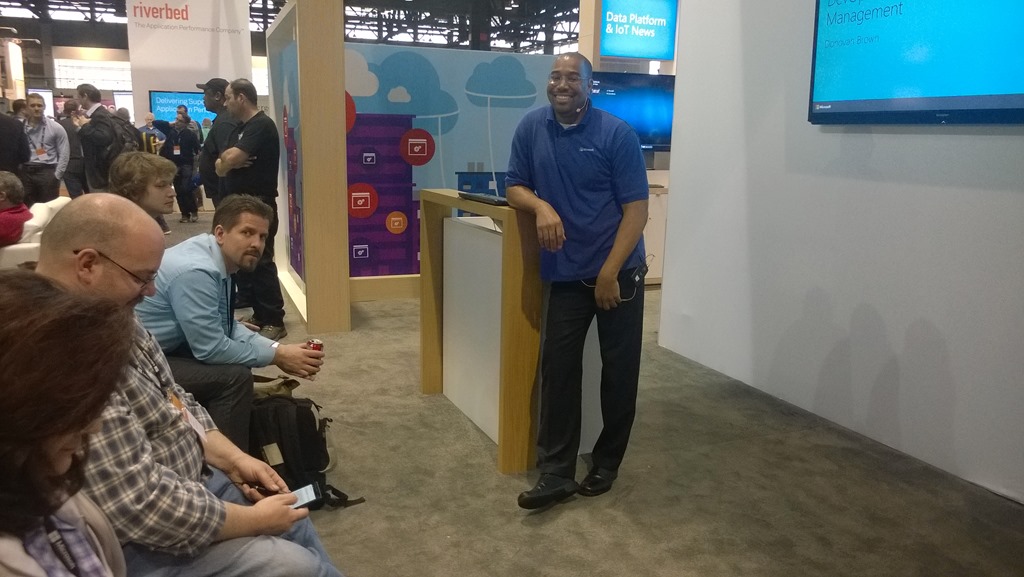
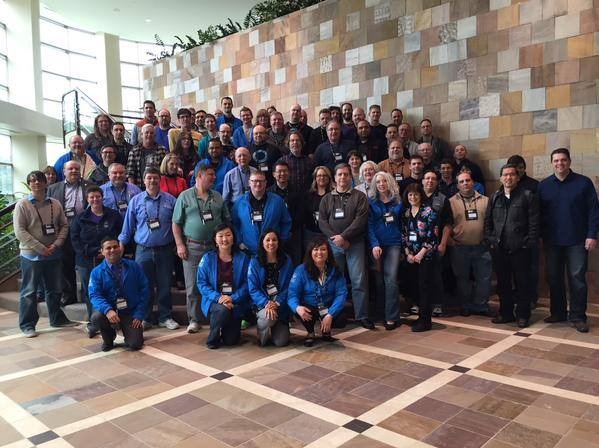
Current and INETA board members at the Ignite Expo

Donovan
Donovan Brown speaking at Ignite.

FallOutBoy
Fall Out Boy in concert at the Ignite conference


I first became aware of INETA – the International .NET Association - when I was running a .NET user group in the Detroit area. Every once in a while, they would offer us some free books, software, t-shirts, and other prizes to give away to our members.

Later, I was asked to become a Regional Mentor for INETA, which meant that I approved new user groups for membership (mostly just verifying that the group actually existed and held regular meetings) and that I provided advice for user group leaders and new groups in my region. For about a year, I hosted a monthly call with local user group leaders and I corresponded frequently with new leaders, giving them advice on running a group or find speakers. At one time, I covered Ohio, Michigan, West Virginia, and Pennsylvania, but I later delegated some of those states to others who wanted to be involved.

In 2012, I joined the INETA Board of Directors, where I served for about 2 years. I was impressed with the dedication of a team that volunteered so much time to help out the developer communities spread across the US and world. It was a great experience.

My point is that INETA has touched my life in significant ways. I was a beneficiary, then a proponent, then an active member of the leadership team. I learned a great deal; I made many friends and contacts; I and my user group benefited from their programs; and I contributed in a small way to the success of the organization. Their speaker program has helped me to travel to a number of user groups and helped me bring to my group speakers who might not be able to travel as far.

Last week, I learned that INETA is coming to an end. President Julie Yack announced on the organization's blog that, after 13 years, they would close down at the end of 2015. With no steady stream of revenue, the group could no longer afford to finance the programs they wanted to. I was saddened to hear this news but I'm happy that INETA was so successful for so long.

I'm grateful to all those who volunteered to make it so successful for so long - particularly those with whom I worked directly. And I'm grateful that INETA helped so many people who went on to volunteer and help others, which magnified their efforts.

And I'm glad I was a part of INETA. It's a badge I wear proudly.


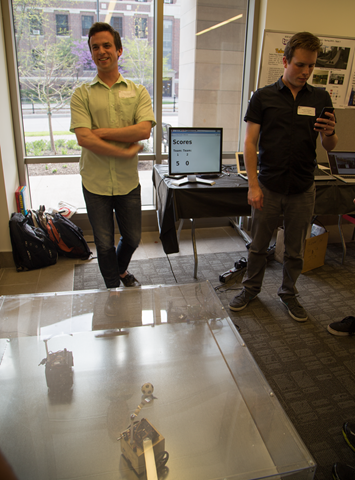
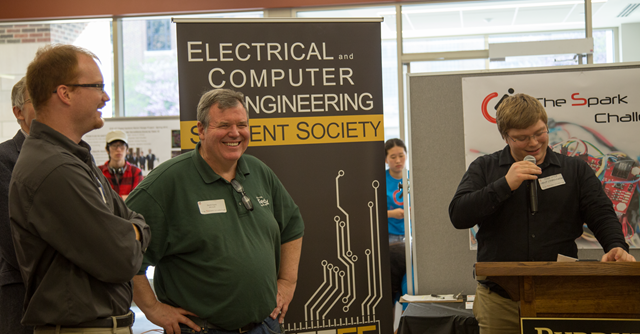
Throughout this past semester, teams of Purdue University students built projects with controllers, circuit boards, and other hardware. On Friday May 1, the teams gathered at Wang Hall on Campus to show off their finished projects. I was invited to be one of six judges to select the best projects.

I got to see some amazing projects. For example:

  • 2 robots playing soccer controlled via multiple users on the Internet.
  • An unmanned tank-like vehicle with sensors to map out walls and terrain (this could be sent into a disaster area that is too dangerous for people).
  • An electric car that automatically followed a light path and stopped and whistled at any object that interrupted that path.
  • A motorized reclining chair for the lazy person on the go.
  • First place ($1000 cash)went to a student who created a custom keyboard as a controller to play his game "TagPro".

Much of the funding came from General Motors, but Microsoft Recruiting sponsored as well.

I didn't see a lot of Microsoft technology but I saw some very clever ideas for both hardware and software.

This was the first Spark Challenge and the organizers were confident that it was successful enough to justify planning more.

Overall it was a great opportunity for me to see the potential of these college students.

IMG_1184
Robots playing soccer

IMG_1205
A car that follows a beam of light

IMG_1224   
The winners are announced


April 2015 Gratitudes

Comments [0]

5/3
Today I am grateful for a late dinner last night with Dave​, David​, and Anna.

5/2
Today I am grateful for all the cool student projects at Purdue's Spark Challenge yesterday.

5/1
Today I am grateful for lunch with Mike yesterday in the Loop.

4/30
Today I am grateful that my mother is now living in Michigan close to my siblings.

4/29
Today I am grateful for a long walk and a sushi dinner with Oksana last night

4/28
Today I am grateful for my new mattress. And a good night sleep.

4/27
Today I am grateful for a tour of historic St. Michael Catholic Church in Old Town yesterday.

4/26
Today I am grateful to spend time with old friends at MSU yesterday.

4/25
Today I am grateful to spend yesterday with my mother.

4/24
Today I am grateful I have time this week to catch up on some long-overdue items.

4/23
Today I am grateful for a safe drive to Michigan late last night.

4/22
Today I am grateful I passed my first Microsoft certification exam in over 6 years.

4/21
Today I am grateful for 5 miles of walking yesterday.

4/20
Today I am grateful to see so many cool projects at MadHacks in Madison, WI this weekend.

4/19
Today I am grateful for the Chicago Code Camp yesterday and all who made it happen.

4/18
Today I am grateful for an evening at the movies last night.

4/17
Today I am grateful for dinner last night in Dallas with Anna and Elizabeth.

4/16
Today I am grateful for a first-class upgrade on yesterday's 4-hour flight.

4/15
Today I am grateful for all the WinJS and Azure Big Data stuff I learned yesterday.

4/13
Today I am grateful for a nice weekend with pleasant company.

4/12
Today I am grateful for an evening at the spa last night.

4/11
Today I am grateful I was in town yesterday and able to attend my first ToastMasters meetings in months.

4/10
Today I am grateful for lunch yesterday with Manohar.

4/9
Today I am grateful to spend an evening with Oksana.

4/8
Today I am grateful for dinner last night with Cory in Kansas.

4/7
Today I am grateful for a chance to attend Royals Opening Day at Kauffman Stadium yesterday.

4/6
Today I am grateful for Easter dinner with my family yesterday.


Build 2015 Day 1 Keynote

Comments [0]

The Microsoft Build conference kicked off this morning with a keynote that lasted nearly 3 hours and included announcements on Azure, Office 365, Windows 10, and HoloLens.

Personally, I was most excited to hear about Azure SQL database pool and Data Warehouse, the Cortana integration on Windows 10, support for Chrome extensions in Microsoft Edge (formerly "Project Spartan") and the potential of virtual reality apps with HoloLens.

The keynote was recorded and will be available soon (along with all Build sessions) http://www.buildwindows.com/. I encourage you to watch for yourself, determine the topics that most interest you, and watch breakout sessions that dive deeper into those topics.

Below are notes I took during the keynote. This is by no means an official list and I may have misheard some things. But I think it will give you an idea of where Microsoft is headed the next few months.

Azure
    Docker for Windows
        Multi-containers
        Mix and match Windows & Linux containers. Run on any server
        NEW: Ability to debug .NET app in Linux deployed in Docker
    Azure App Service
    Logic Apps
        In Preview Portal
        Uses "Swagger" applications
        Visual workflow? Similar to ITTT?
    Visual Studio Code
        Lightweight IDE
        Version of VS that runs on Mac and LINUX
        free
        Available today
    SQL Azure
        Elastic database pool
            combine multiple "databases" into 1 db pool
            Manage all databases together
                Modify schema of every db
                Update statistics of every db
        SQL Data Warehouse
            Quick and easy to create
            Import data from any data source
                e.g., SQL DB, Hadoop, SAP
                From Azure or on-premises data
            Create reports with Power BI
            Use Azure Machine Learning to analyze data
            Auto-Scale in seconds
            Can independently adjust compute & storage
        Azure Data Lake Service
            store and manage infinite data
            saved in original form
            exposes data using Hadoop HDFS API
Office
    Sway
        Tell a story with Office documents
    Outlook plug-ins
        SAP and Linkedin: Look up info on contact & their companies
        Schedule plug-in from Uber
    Unified Office365 API Endpoint
https://graph.microsoft.com
        Returns data as JSON
        Drill into details of "graph"
    Web SDK for Skype
        Embed Skype into your app
Windows 10
    Easier to discover apps in store
    Windows Store for Business
        For customers or students
        Supports other payment methods (e.g., Purchase Orders)
    Win10 was a free upgrade for 1st year
    Goal: 1 billion Windows 10 device in 2-3 years
    1 binary and 1 code base on multiple platforms (Phones, tablets, PCs, Xbox)
    Web Sites can use Windows 10 tools (e.g., Live Tiles, Toast)
    .NET and Win32 apps in Windows store
    Android apps on Windows Phone
    Objective-C code will compile in Visual Studio on Windows
    Windows Spotlight
        On lock screen
        Learn of new features
    Cortana
        Natural language
    Microsoft Edge
        Windows 10 browser
        Formerly Project Spartan
        Written as a Universal App
        Runs Chrome extensions
    Continuum for Phones
        Any screen can be a PC (e.g., Phone)
    Hololens
        Windows Holographic
            Universal apps in Hololens
            Pin apps to walls in virtual world
        Makers can integrate HoloLens virtual world with real-world devices
Satya Nadella: Our goal is to move users from needing Windows to choosing Windows to loving Windows


Almost everyone (including me) will agree that it is a good idea to back up your Web App. Azure makes it very easy to do so.

Azure allows you to manually back up your Web App and any linked database or to schedule a regular automated backup. Azure backups are stored to Azure storage.

To begin, you must have an Azure Storage account. If you have not yet created one, see my post on creating a new Azure Storage Account.

Navigate to your Web App by selecting the WEB APPS icon in the left menu; then, selecting your Web App.

Note that these features are only available if your Web App is using the STANDARD Pricing Plan Tier. You can modify your Pricing Plan Tier on the SCALE tab of your Web App.

Click the BACKUPS tab (Figure 1)of your web app to start managing your backups.

Backup01-BackupTab
Figure 1

Manual Backup

To Manually backup your Web App, do the following

1. Select an account from the STORAGE ACCOUNT dropdown list, as shown in Figure 2.

Backup02-StorageAccount
Figure 2

2. If your Web App has one or more linked databases and you would also like to back up those databases, expand the INCLUDED DATABASES dropdown and check all the databases you would like to backup. An example is shown in Figure 3.

Backup03-IncludeDatabases
Figure 3

3. Click the BACKUP NOW icon at the bottom of the screen (Figure 4).

Backup04-BottomMenu
Figure 4

Azure will back up all the files (and optionally any associated databases) of your Web App at the time specified and afterwards at the frequency specified.  The files in your Web App will be zipped and stored into a Blob Storage account of the selected Storage Account.

Automated Backup

Manual backups are great if you want to backup your app right now; but, chances are that you will want to back it up on  a regular basis so you don't have to worry about it. Use the same BACKUPS tab to schedule a backup at regular intervals.  To do this, you will perform the 3 steps above in addition to a few others.

To schedule an automated backup, do the following:

1. At the AUTOMATED BACKUP toggle switch, select "ON", as shown in Figure 5.

Backup05-BackupOn
Figure 5

2. Select an account from the STORAGE ACCOUNT dropdown list, as shown in Figure 6.

Backup06-StorageAccount
Figure 6

3. At the FREQUENCY field, enter the number of days between each scheduled backup, as shown in Figure 7.

Backup07-Frequency
Figure 7

4. At the START DATE fields, select the date and time to perform the first backup, as shown in Figure 8.

Backup08-StartDate
Figure 8

5. If your Web App has one or more linked databases and you would also like to back up those databases, expand the INCLUDED DATABASES dropdown and check all the databases you would like to backup (Figure 9).

Backup09-IncludeDatabases
Figure 9

6. Click the SAVE icon at the bottom of the screen (Figure 10).

Backup10-BottomMenu
Figure 10


Azure will back up all the files (and optionally any associated databases) of your Web App at the time specified and afterwards at the frequency specified.


Azure Storage consists of Tables, Queues, and Blobs. To use any of these features, you must first create a Storage Account. This article describes how to use the Azure Portal to create an Azure Storage Account.

Sign into your Azure account and navigate to the Azure Management Portal (https://manage.windowsazure.com).

A list of Azure service categories displays on the left. Select the STORAGE category (Figure 1)

Storage01-StorageButton
Figure 1

Click the [+NEW] button (Figure 2) at the bottom left of the Portal page.

Storage02-NewButton 
Figure 2

The New Item menu (Figure 3) expands with DATA SERVICES and STORAGE already selected.

Storage03-NewAccount
Figure 3

Select QUICK CREATE to display the CREATE STORAGE ACCOUNT dialog as shown in Figure 4.

Storage04-QuickCreateDialog
Figure 4

At the URL field, enter a name for your new storage account. This name must consist only of numbers and lowercase letters and it must be unique among storage accounts.

At the LOCATION/AFFINITY GROUP, select a region in which to store this account. Generally, in order to minimize latency, you should create your storage account close to whatever clients will be accessing data from this account.

At the REPLICATION field, select a replication option. You can select Locally Redundant, Geo-Redundant, Read-Access Geo-Redundant (the default), or Zone Redundant. A description of each option is below.

Locally Redundant

Select this option to create 3 copies of your data within a single data center. External users will only access one copy of the data.

Geo-Redundant

Select this option to create 6 copies of your data – 3 within a data center in the region you selected and 3 within a different data center in another region. External users will only access one copy of the data.

Read-Access Geo-Redundant

This option is identical to the Geo-Redundant option, except that external users can access in read-only mode the data stored in the secondary region.

Zone Redundant

Select this option to create 3 copies of your data within multiple data centers. External users will only access one copy of the data.

A Note on Pricing

The cost of each option is reflective of the durability and availability of your data, so Read-Access Geo-Redundant is more expensive than Geo-Redundant, which is more expensive than Zone Redundant, which is more expensive than Locally Redundant. You can view the current pricing at http://azure.microsoft.com/en-us/pricing/details/storage/.

Click the CREATE STORAGE ACCOUNT icon to create your new storage account.


Chicago Code Camp recap

Comments [0]

This was the 7th Chicago Code Camp and the first time in years that it took place in the city of Chicago. The multi-platform conference had been held in Grayslake, IL the past few years but returned to the city that bears its name as the Illinois Institute of Technology hosted this weekend's event.

About 350 attendees showed up to see talks covering languages, tools, DevOps, and soft skills.

I delivered 2 presentations: The Hitchhiker's Guide to Azure Mobile Services and Effective Data Visualization.

I was able to hear MVP Michael Blumenthal talk about Powershell; Matt Stratton describe the Chef tools;  Angela Dugan talk about fear and self-doubt among software developers; and some advice on project recovery from DevMynd CEO JC Grubbs.

The Chicago Code Camp was the first conference I attended in Illinois (back in 2011) and it remains a strong voice in the community. I love the fact that it has returned to the city. The high turnout is an indication of the strong developer community here in Chicago.

At least half a dozen of the conference organizers stopped me during the day to thank me for Microsoft's sponsorship of the event.

WP_20150418_14_40_17_Pro

WP_20150418_17_17_12_Pro


Matt Stratton on Chef

Comments [0]

Dave Voyles on WebGL

Comments [0]

Episode 361

Dave Voyles on WebGL


March 2015 Gratitudes

Comments [0]

4/5
Today I am grateful to watch the game and have dinner last night in Indianapolis with Nick Giard.

4/4
Today I am grateful that my taxes are completed and filed early this year.

4/3
Today I am grateful to Jesus Christ, who died for my sins.

4/2
Today I am grateful for an afternoon yesterday walking around Chicago acting like a tourist. I visited the Chicago Temple - a church sanctuary 23 floors above the Loop - and I rode the water taxi up and down the Chicago River.

4/1
Today I am grateful for dinner and ice cream with the Kevin and Darlene last night in St. Louis.

3/31
Today I am grateful to attend a .NET User Group in St. Louis last night.

3/30
Today I am grateful for a brief visit yesterday in New Jersey with my cousin Linda and her family, who I haven't seen in years.

3/29
Today I am grateful to Rowena, Esther, Fernanda, Brian, and all who made the US MVP Open Days a success!

3/28
Today I am grateful for the toughness shown by the Spartans in the last few games.

3/27
Today I am grateful for dessert with Oksana last night.

3/26
Today I am grateful that my cousin Kevin - who has been a widower for years - found someone to share the rest of his life with.

3/25
Today I am grateful I got to witness an exciting 4th-quarter comeback and a last-second victory by the Bucks last night at the Bradley Center.

3/24
Today I am grateful I finally got my Illinois driver's license yesterday.

3/23
Today I am grateful for an exciting Spartan victory over an excellent opponent, sending MSU to yet another Sweet 16!

3/22
Today I am grateful to those who suggested that my illness yesterday was due to dehydration. They were right and I am better.

3/21
Today I am grateful for an active crowd full of questions at yesterday's Cloud Dev Camp in Denver.

3/20
Today I am grateful my car was not towed yesterday in Michigan.

3/19
Today I am grateful I got to hang out with Leon last night.

3/18
Today I am grateful for a phone call from Adriana - our first conversation in 35 years.

3/17
Today I am grateful for a chance to get back to Michigan for a few days.

3/16
Today I am grateful to spend most of Saturday with my son Tim.

3/15
Today I am grateful for a chance to learn and to be inspired and to see old friends at the KalamazooX conference yesterday. #kalx15

3/14
Today I am grateful for unexpectedly running into Paul at dinner last night.

3/13
Today I am grateful for my first time speaking at the Houston .NET User Group.

3/12
Today I am grateful for dinner last night with Paul, Brad, and Janet.

3/11
Today I am grateful for my first trip ever to Austin, TX.

3/10
Today I am grateful I made it safely to Austin yesterday after 1 flight, 2 Uber rides, a cab ride, & a 3-hour Greyhound bus ride.

3/9
Today I am grateful I slept almost the entire 3-hour flight from Chicago to Houston.

3/8
Today I am grateful for a hot shower and a hot latte to partially offset a lack of sleep this weekend.

3/7
Today I am grateful for all the Purdue students who showed up for this weekend's hackathon.

3/6
Today I am grateful I was able to catch up on some things yesterday that I can only get done in my office.

3/5
Today I am grateful for a few days in Miami in the middle of winter.

3/4
Today I am grateful for Yelp, which helps me find tasty and interesting meal choices in a strange city.

3/3
Today I am grateful for a chance to watch the Heat play the Suns in Miami last night.

3/2
Today I am grateful for all the birthday wishes yesterday.


US MVP Open Days

Comments [0]

The MVP team is now part of DX and we are actively working together to connect with MVPs. One step toward this was the

The event was organized by Esther Lee, Rowena Branch, Fernanda Saraiva, Brian Prince, and others.

Registration was capped at 100 and about 90 MVPs attended for 2 days of technical content, roundtable discussion, and providing feedback.

The content was mostly presented under NDA, but a few of the presentations were:
•    "What's Next for Developers?" presented by NuGet PM Jeff Fritz
•    "Overview of Microsoft's Digital Crime Unit" presented by Tim Pash of the Philadelphia MTC
•    "Working with your Evangelist: Understanding DX priorities" presented by DX Audience TE Nick Landry. I really liked Nick’s analogy of Evangelists as sherpas, helping to guide others to greatness (I hope I’m not violating any NDA by repeating that).
•    I gave an overview of Universal Apps.

Dave Voyles and Shahed Chowdhuri of the DX Audience team also presented, as did NuGet PM Jeff Fritz and CVP Brian Harry.

MVP Open Days have taken place in other parts of the world, but this was the first one in the US. The reception was very positive by the attending MVPs with many expressing a desire to see more events like this in the future.

Another Open Days event seems likely in the future, but the location is currently undecided.

USMVPOpen
MVPs and blue badges at the US MVP Open Days

USMPVOpen-2
A packed room

USMPVOpen-3 
Me and Esther Lee – one of the event organizers

USMPVOpen-4
Hanging out with some of the organizers after the event


Kalamazoo X 2015 recap

Comments [0]

Years ago, Brian Prince became famous for a talk on developer soft skills. This presentation resonated with developers at technology conferences and user groups because so few people were talking about this subject. Michael Eaton - a regular at technical conferences - recognized this lack of speakers addressing this topic and decided to create an entire conference focused on soft skills. This was how the Kalamazoo X conference began in Kalamazoo, MI in 2009.

Many tech leaders from around the region and the country converge on Kalamazoo, MI to lend their knowledge, including Cory House (Kansas City, KS), Alan Stevens (Knoxville, TN), Jim Holmes (Dayton, OH), Jay Harris (Hartland, MI), Cori Drew (Dallas, TX), Jeff Blankenburg (Columbus, OH), and Elizabeth Naramore (Cincinnati, OH).

I’ve been a fan of KalamazooX from the beginning and I’ve spoken at the conference twice. Those who follow me on social media will know that I begin each day by completing the sentence "Today I am grateful for...". That tradition was inspired by a couple of presentations at KalamazooX 2 years ago.

I've attended all but one KalamazooX conference, so I made a point to make it this year, even though my flight from Houston arrived in Chicago the morning of the conference and I had to drive to Kalamazoo. The morning flight meant that I could only attend the afternoon sessions this year; but they did not disappoint.

Elizabeth Naramore and Microsoft's Jeff Blankenburg each spoke about capturing the spirit of a novice, when you are driven by curiosity and unafraid to fail - before expectations make you think that there is something wrong with risking failure.

Dawn Kuczwara in her presentation titled "Give It Up" told managers that it is necessary to relinquish control and allow your subordinates to manage their own work in order for most projects and teams to succeed.

Cori Drew spoke of ways she inspires her daughter to develop a passion for technology in her talk on "Geek Parenting".

Although primarily attended by software professionals, KalamazooX is very different from any other technical conference - it focuses on the parts of our career that is important - but ignored at most conferences. I've heard many people describe how inspired and energized they are by this conference.

I woke up in Houston at 3 AM and flew/cabbed/drove over 1300 of miles to attend. And it was worth it. I'm looking forward to next year.

kalx15-15-L[1]
Kalamazoo X speakers and organizers

kalx15-01-L[1]
A full room listens to Dawn Kuczwara

kalx15-09-L[1]
Elizabeth Naramore presenting “The Beauty of a Beginner’s Mind”

kalx15-06-L[1]
Conference organizer Michael Eaton introduces the next speaker.

View more photos at http://giard.smugmug.com/Tech-Community/KalamazooX-2015/.


Mike Pintar on NETEnergy

Comments [0]

A number of friends and colleagues had recommended Uber and insisted it was better than taxi services. So I decided to try Uber for a few weeks while I was traveling out of state (Florida, Texas, and Colorado) these past few weeks.

My first ride took place because I was stranded in downtown Miami about 2 miles from my hotel. I was carrying a suitcase and a laptop bag and no taxis passed by. So I downloaded the Uber app to my phone and I requested an Uber pickup. Of course, as soon as I submitted the request 3 taxis appeared out of nowhere.

Here are my impressions after 3 weeks of using Uber.

The good.

The Uber app is very simple to use. Just click "Request driver" and set your pickup location. Your phone's GPS should determine where you are right now and set a default location. When a driver responds to your pickup request, the app displays an estimated time of arrival and texts you when the driver is arriving. The driver receives your phone number, so he may even call you if he cannot find you.
Every driver I rode with was courteous and some were interesting conversationalists.

Every driver drove a nice car. They were all late-model vehicles and they were all very clean.

Uber charges my credit card through its system. This means that I never have to worry if the driver accepts credit cards.

Uber automatically emails me a receipt. This is convenient because most of my travel is for business purposes.

Calling a driver is very easy. Outside of a major city's downtown area, it's usually necessary to make a phone call in order to request a taxi. The app is much simpler than a phone call.

Every driver spoke and understood English. If you've ridden a cab in a large city, you know that not all cab drivers speak English well enough to understand your instructions.

Most of the time UberX is cheaper than a taxi.

The Uber app offers multiple services - UberX, UberXL, Black Car, SUV - in case you want a larger or nicer car. Uber is not allowed at some airports, so the app allows you to call a taxi instead.

The Bad

Most of the time, the arrival estimates were optimistic. I only requested in a big city and each time, the estimate was less than 10 minutes - often less than 5. But about half the time, it took them at least twice that time to arrive. Only once did a driver arrive early.

When I opened the Uber app at my Chicago apartment, it notified me that, due to high demand, prices would be 1.3 times the normal rate. But just before I got into the car, I received a text message informing me that the price would be 2.3 times the normal rate. By then, it was too late to make alternate plans.

On my Windows Phone, the Uber app crashed. A lot.

One morning in Dallas, I requested an Uber and the driver went to the wrong place. He insisted he was at "the address I texted him"; but of course I had not texted him any information - I simply used the app. He had no idea how to get to my hotel and I was running late so I told him to cancel my request. When he charged me anyway, I gave him a 1-star rating. Uber later refunded the money (it was only about $5) and I replaced the low rating.

I received a very high bill when traveling from Midway airport to a location in suburban Chicago. Apparently, Chicago taxis charge 50% extra when traveling from the city to the suburbs. This was not Uber's charge, but it came as a surprise when I received the bill.

For taxis, Uber automatically adds a 20% tip by default. Although you can change this, I didn't learn of it until I was charged.

Lessons Learned

Always double-check the pickup location because they app can be wrong. This can be difficult to do if you are in a strange city, but look for nearby street signs and other landmarks to verify you are standing at the pickup location.

Prices are different for each service. UberX tends to be the cheapest. At the bottom of the app screen is the option to select from the available services (not all are always available). I wasn't aware of this and once selected the more-expensive Black Car service.
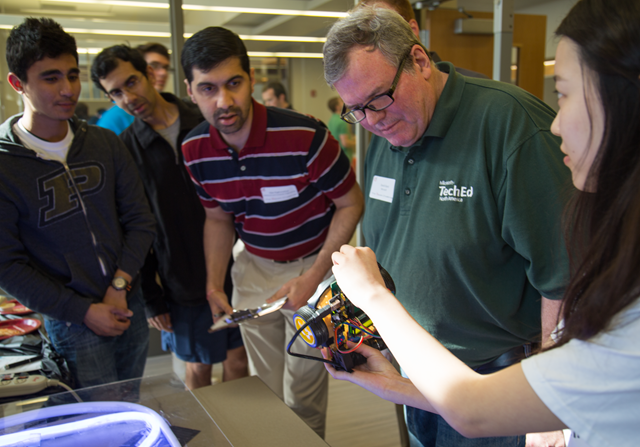
If possible, get a quote in advance. The Uber app allows this for most services. If the app won't give you a quote, ask the driver for an estimate. Don't be surprised.

Log into http://uber.com and verify all the options on the Profile and Payment screens.

My verdict

Overall, I had a good experience with Uber. I can avoid many of the problems i experienced now that I understand the system better. I think I will continue to use Uber in the future.


<< Older Posts | Newer Posts >>