There are three ways to create a new web site from the Azure portal: Quick Create; Custom Create; and From Gallery. To launch any of them, navigate to the Azure management portal and select "Web Sites" from the list of services along the left side of the portal [Fig 1].
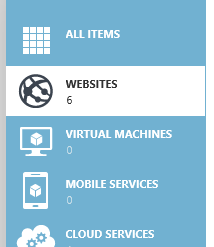
CAWS01-SideMenu
Fig 1 

Then click the "New" button at the bottom left (Fig 2).

CAWS02-NewButton
Fig 2

This displays the New Website menu(Fig 3)
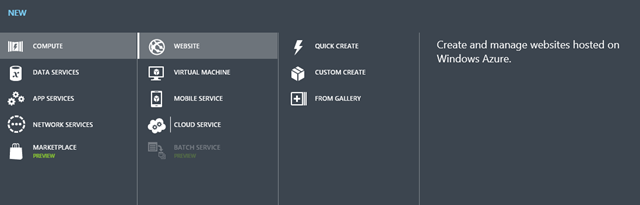
CAWS03-NewWebSiteDialog
Fig 3

Because we were in the "Web Sites" section when we clicked the "New" button, the categories: "COMPUTE" and "WEBSITE" are selected for us. We need to select from the three ways to create a web site within the Portal. They are: "QUICK CREATE", "CUSTOM CREATE", and "FROM GALLERY". Let’s go through each scenario.

QUICK CREATE

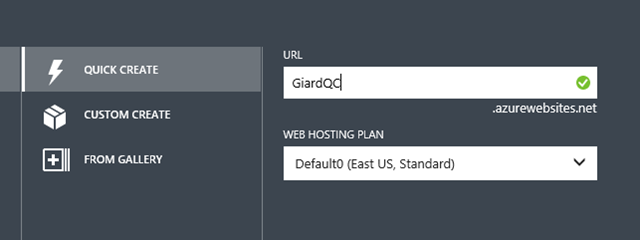
The simplest way to create a web site is with the QUICK CREATE option. With the NEW WEBSITE menu expanded, select QUICK CREATE (Fig 4).
CAWS04-QuickCreate1
Fig 4

The QUICK CREATE dialogue displays, as shown in Fig 5.

CAWS05-QuickCreate2
Fig 5

At the URL textbox, enter the name of your site. The full URL to access this new site will be  
    http://sitename.azurewebsites.net
where sitename is the name you typed into this field.

At the WEB HOSTING plan dropdown, you can either select an existing plan or select "Create new web hosting plan", in which case you will need to select a region in which to create the plan. The Web Hosting plan allows you to configure, manage, and scale a group of sites together.

Click the CREATE WEBSITE check button (CAWS-Check) to create the site. Typically it takes Azure less than a minute to create the site.

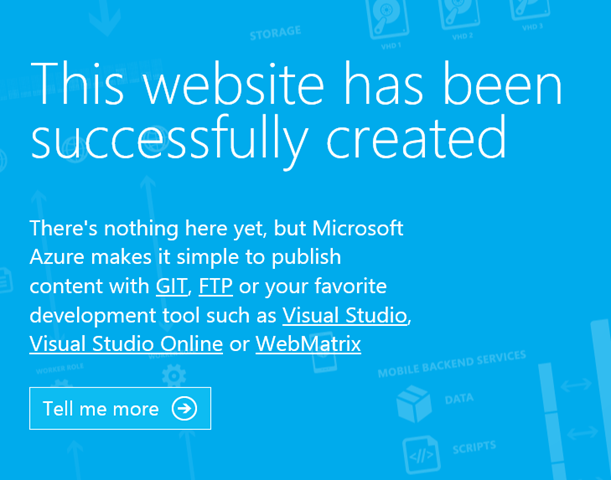
Once the site is created, you can navigate to the site's URL and you will see a default page (hostingstart.html) displayed in your browser, as shown in Fig 6.
CAWS06-hostingstart
Fig 6

This is the only file deployed to your site. You will need to use FTP, set up source control deployment or deploy your site content in some other way in order to get your web application into this web site.

CUSTOM CREATE

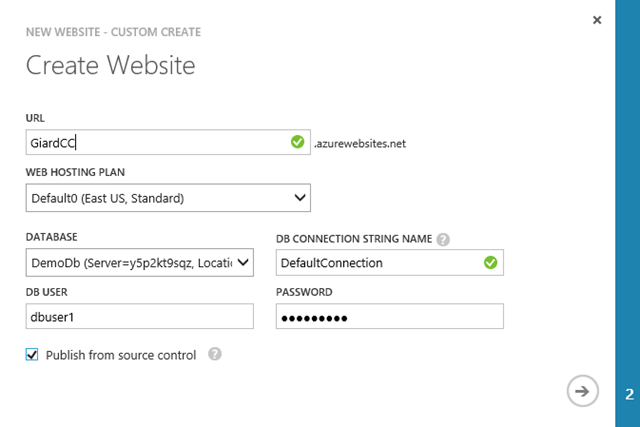
The CUSTOM CREATE option is similar to the QUICK CREATE, but it adds a few options on site creation. With the CUSTOM CREATE option, it is possible to associate a database with your site and set up Source Control publishing at the time you create your site.

With the NEW WEBSITE menu expanded, select CUSTOM CREATE. The CUSTOM CREATE dialogue displays, as shown in Fig 7.
CAWS07-CustomCreate1
Fig 7

At the URL textbox, enter the name of your site. The full URL to access this new site will be 
                  http://>.azurewebsites.net
where is the name you typed into this field.

At the WEB HOSTING plan, you can either select an existing plan or select "Create new web hosting plan", in which case you will need to select a region in which to create the plan.

Select or create a database to associate with this site. Enter a connection string name and credentials of the SQL Server account used by the web site to connect with the database. This database will appear under the LINKED RESOURCES tab of your website. Linking a database to a website makes it easier to manage them together, such as when you are backing up both your site and the database.

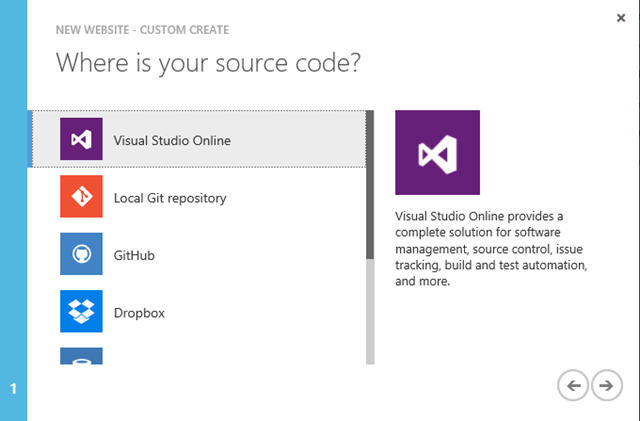
If you want to set up publishing from a source control repository, you can do so during site creation by clicking the "Publish from source control" checkbox (It is possible to skip this step and set up source control publishing later). Checking this checkbox adds a second page to the dialogue. Click the right arrow button (CAWS-RightArrow) to advance to the second page (Fig 8), where you can select the type of source control you are using. For some repositories, you will be prompted for more information.
CAWS08-CustomCreate2
Fig 8

When you are finished configuring everything, click the right arrow to create your new site.

As with the QUICK CREATE option, only one file (hostingstart.html) is deployed to your site. You can navigate to the site URL to view this file in your browser.

FROM GALLERY

Unlike the QUICK CREATE and CUSTOM CREATE options, the FROM GALLERY option provides more than just a single page in your website. This option tends to be the fastest way to get a fully-functional web site up and running. It is also an excellent option for those without coding or HTML experience.

With the NEW WEBSITE menu expanded, select FROM GALLERY.

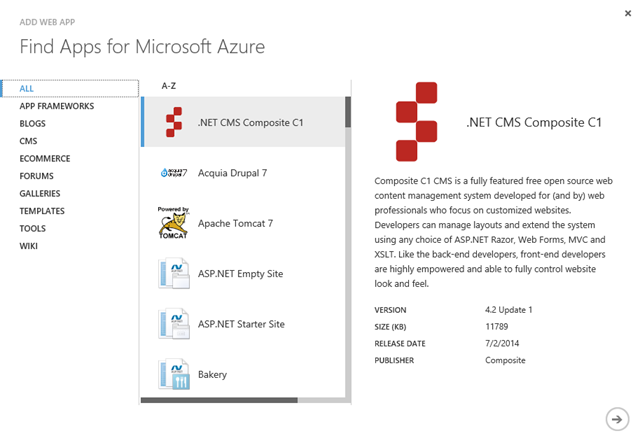
The ADD WEB APP dialogue displays, as shown in Fig 9.
CAWS09-FromGallery1
Fig 9

This list displays a list of templates, frameworks, and web site engines from which to choose. Notice that you can filter this list by selecting a category on the left, such as BLOGS, or CMS (Fig 10).

CAWS10-FromGallery2
Fig 10

Notice also that many of the options are based on non-Microsoft technologies. WordPress, for example, is written in PHP and stores data in a MySQL database. Select the template, framework, or web site engine on which you want to base your site and click the Right Arrow button.
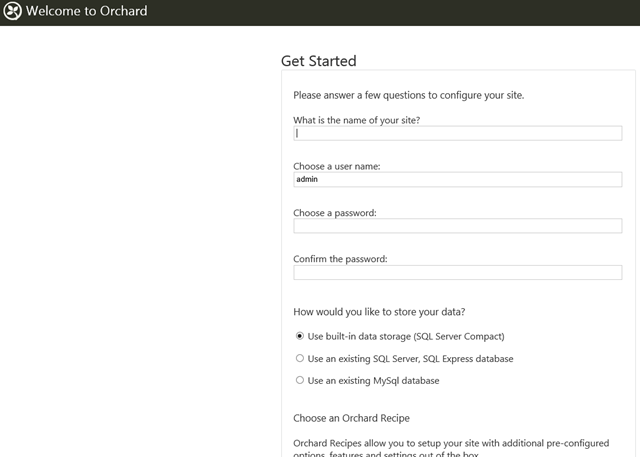
A configuration dialogue displays that is appropriate for the option you selected. At a minimum, you will need to provide a name for your web site, which will take the default form http://>.azurewebsites.net; but there may be other required information, such as selecting or creating an associated database. The dialogue for Orchard CMS is shown in Fig 11.

Click the Check button (CAWS-Check) to create your site. This generally takes longer than creating a site with either the QUICK CREATE or CUSTOM CREATE options because Azure will build an entire site for you. For many of the Blog and CMS templates, you will be prompted for some more information, such as a site name and an admin account the first time you navigate to the site. The "Get Started" page launched the first time you connect to a new Orchard CMS site is shown in Fig 11.
Orchard Setup
Fig 11

CONCLUSION

In this article, we showed the three ways to create a Web Site using the Azure Management Portal and walked you through the steps to create a web site with each method.

March 9 was International Women's Day. To commemorate this event, Dev Radio decided to publish a series of interview last week, drawing attention to successful female entrepreneurs. 

We kicked off the series by talking with Microsoft Partner Business Evangelist Tereza Nemessanyi - a former entrepreneur herself. Tereza talked about BizSpark and other things that Microsoft is doing to help entrepreneurs in general and women in particular.

Then, we interviewed 4 women who are guiding successful tech startups around the world. You can watch all 5 interviews at the links below:

Microsoft for Startups: (Part 1) Women Building the Future – An Interview with Tereza Nemessanyi

Microsoft for Startups: (Part 2) Women Building the Future – An Interview with Bernadine Brocker, CEO of Vastari

Microsoft for Startups: (Part 3) Women Building the Future – An Interview with Diana Paredes, CEO of Suade

Microsoft for Startups: (Part 4) Women Building the Future – An Interview with Jennifer Whaley, CEO of Pose a Pet

Microsoft for Startups: (Part 5) Women Building the Future – An Interview with Luan Cox, CEO of Crowdnetic

This series was featured in a recent Microsoft News Center article celebrating International Women's Day and female entrepreneurs. You can read that article here: Technology disrupted: Meet 11 women leaders changing the innovation ecosystem.


I'm a little surprised I enjoyed this book as much as I did. Other than a brief period in my teens when I was obsessed with Asteroids and Defender, I've never been much into video games; My kids kicked my butt at Halo and various EA Sports games for years until I finally stopped playing; And, although I created a few computer games last year - including the unforgettable Spinach Top series, I've spent only a small percentage of my life creating video games.

But I admire those who can create these games - the people with enough imagination to conceive of a great game idea and enough technical skills to execute that idea.

Honoring the Code: Conversations with Great Game Designers put me in touch with those people. Video game enthusiast Matt Barton sought out the programmers and artists who worked on many of his favourite games and he asked them about their lives and their work. This book is primarily a transcript of those interviews.

Interviews include:

George Sanger, who composes and compiles music for video games, including 7th Guest. His main advice: "Be nice to each other".

John Romero, who built the influential first-person-shooter game Doom. Romeros was hailed as a rock star in the industry until his marketing department published a poorly-thought advertisement with the text: "John Romero is about to make you his bitch", which turned many fans against him.

The reclusive Rebecca Heineman, who was born William Heineman, but changed her name when she transgendered to a female as an adult. Heineman earned the nickname "Burger" by a habit of buying a sack of hamburgers, storing them in her desk, and eating them over the course of several days.

My favourite interview is in the last chapter - Paul Reiche and Fred Ford seem to be having the most fun.  For example, they started a company named "Toys for Bob" and they chose that name only because they liked the sound of it.  Although there is no actual "Bob", everyone in the company had to make up a story about who the "Real Bob" was.

One can read this book to learn and copy the habits of great games designers. Although there is a wide spectrum of personalities among the interviewees, most of them share a passion for video games that drives them to work long hours designing, building, and playing these games. And most of them began this passion early in life - well before high school.

One nice thing about this book is that you can read the chapters in any order - each interview stands on its own.

The author provides an introduction to the book - describing his motivation for conducting and publishing these interviews. I was surprised he did not end it with a conclusion - summarizing all he had learned.

For me, the book was interesting because I enjoyed a peek into the lives of people who have a passion for what they do for a living.


Hack The Anvil

Comments [0]

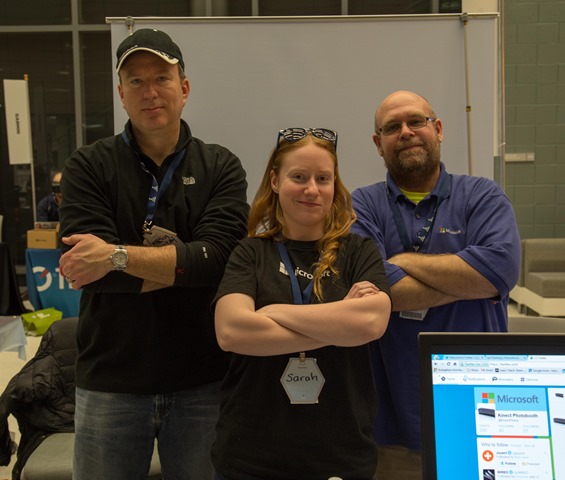
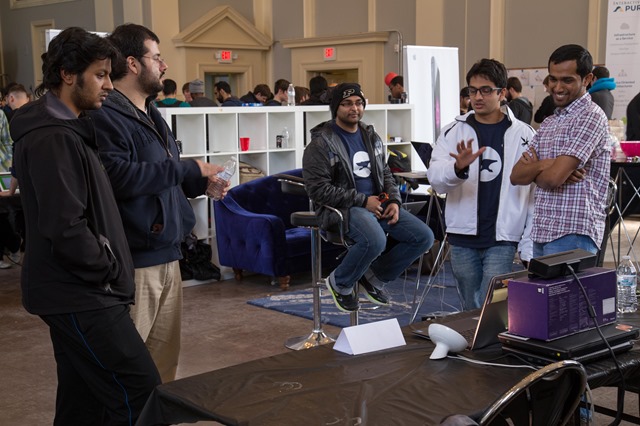
March 6-8, I attended Hack The Anvil hackathon at Purdue University. About 350 student hackers - all from Purdue - attended this hackathon. I was joined by my colleague Brian Sherwin for most of the event and by Sarah Sexton on Sunday.

IMG_0996

Following the opening ceremony, I delivered a 30-minute tech talk describing cloud computing and Microsoft Azure I showed how to use Azure Web Sites, Azure Virtual Machines, and Azure Mobile Services. Although we didn’t offer a prize (as Microsoft often does at these events), a number of teams decided to incorporate Azure into their projects.

IMG_1006

We spent much of the weekend helping people debug their code. In addition to questions about Kinect and Azure, students asked questions about JavaScript and interfaces and HTTP, updating the Java SDK on a MacBook. 3 different teams set up node on Azure used Brian Sherwin's blog post (http://briansherwin.com/blog/2015/03/hack-tools-1-node-js-on-azure-with-linux-vm/) as a reference.

  • The best projects I saw using Microsoft projects were:
    An application that used Kinect to change the color and intensity of lights based on the user's hand gestures. This project integrated Python code with the C# code using the Kinect SDK. Brian Sherwin this team use the Kinect SDK and requested a copy of their source code. David Giard recorded an interview with the team.
  • A portal that allows video game enthusiasts to find other players with similar interests and to schedule multi-player games with one another. The portal was built on Azure Web Sites, the data was stored in SQL Azure and exposed via Azure Mobile Services
  • A Tampermonkey Chrome plugin built on Azure web sites that displays the text of a linked page below the link.

IMG_0999

Some other interesting projects were:

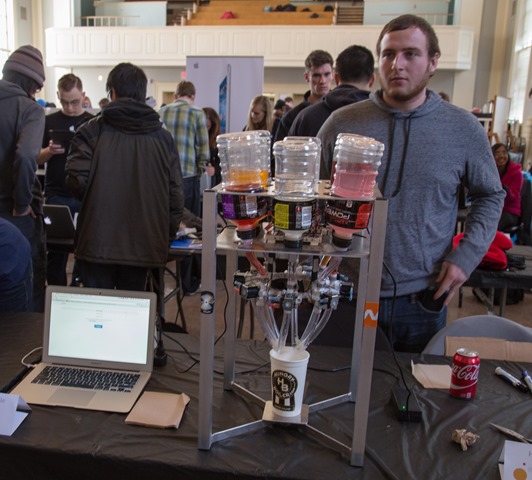
  • "ShotBot" - a robot bartender
  • Gloves that interact with a Wii remote to allow users to control mouse pointer movements from across the room.
  • "SmartFridge" - an Android application that allows users to scan the bar codes of the items in your refrigerator and keep track of when each item expires and when it is time to buy a new item.
  • A Java-based app to assist Dungeons & Dragons "Dragonmasters" to create the environments used in D&D.

IMG_1001

Many students integrated .NET or Azure into their application because we were there to help them.

IMG_0990

Purdue will be hosting a multi-school hackathon (BoilerMake) in the fall and I hope to attend this as well.

HackTheAnvil Photos


HackIllinois 2015

Comments [0]

Microsoft sponsored the HackIllinois hackathon held at the University of Illinois February 27-March 1, 2015. Approximately 900 students attended. The following people from Microsoft worked on site:

  • Bill Fink, Technical Evangelist
  • David Giard, Technical Evangelist
  • Martin Schray, Technical Evangelist
  • Sarah Sexton, Technical Evangelist
  • Paul Sledd, Recruiter

IMG_0968

Of course, students love free stuff, so we came armed with some prizes: We gave away a t-shirt to anyone who completed a brief survey. When we ran out of t-shirts, we gave away books, stencils,mugs, and stickers. From those who completed the survey, we drew a name to win a Surface Pro 2.  William Su of Ga Tech won this drawing. We offered a HoodiePillow and a free Azure pass to anyone who wanted to incorporate Azure into their weekend hack. 42 people took advantage of this offer.

Throughout the weekend, the four evangelists answered questions from teams using Azure and other Microsoft technologies.

On the final day, we offered a Dell Venue 8 Pro to each member of the team with the best use of Azure. 18 teams completed an application with an Azure component.

It was a difficult choice and we debated for some time. One team hosted an impressive translation application on Azure; another created a GPS application that displayed the location of the user's dog and whether it had left their yard.

IMG_0981

We awarded the prize to a team from Rose-Hulman Institute of Technology for their Flock application - a system built on a Pebble watch to communicate restaurant recommendations to friends. Most of the application logic was in an Azure web service that called out to APIs exposed by Twillio and MailJet. The Pebble watch called to the Azure API. This team spent some time at our booth asking questions of Bill and Martin. You can watch an interview with this team at Technology and Friends.

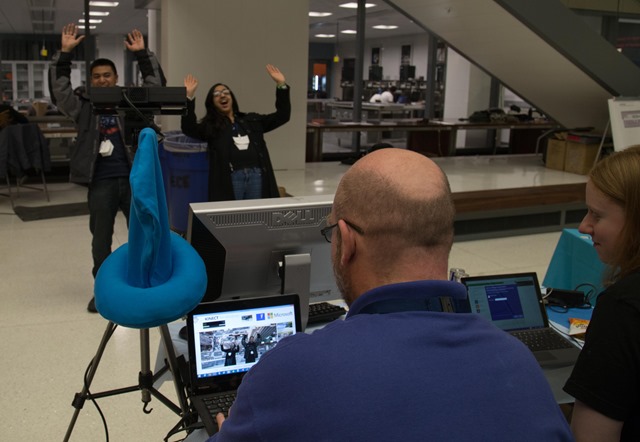
Bill Fink brought his Kinect Photo Booth and it was a big hit. Many students were drawn to our booth when they walked past and saw themselves in front of a dinosaur or live volcano on the giant monitor at our table. The Photo Booth sent out 102 emails over the weekend.

IMG_0962

Overall, the event was a great success - Students came away with a positive impression of Microsoft and many used Azure and Kinect that probably would not have had we not been there. Many students were unaware what Azure even is. They were excited when they found out how it could help them and their projects. One team planned to use IBM for their back-end data storage; but after struggling with the IBM service and talking with Bill, they switched to Azure and completed their project successfully.

HackIllinois Photos


This is the fifth in a series we are doing at DevRadio on female entrepreneurs. I interviewed Luan Cox of Crowdnetic – a global crowdfinancing platform.

Watch episode at DevRadio


This is the fourth in a series we are doing at DevRadio on female entrepreneurs. I interviewed Jennifer Whaely and Jeff Everett of Pose-a-Pet, a Chicago-based company that helps find homes for animals.

Watch episode at DevRadio


This is the third in a series we are doing at DevRadio on female entrepreneurs. I interviewed Diana Paredes, CEO of Suade - an open regulatory financial platform.

Watch episode at DevRadio


The second interview in the Microsoft for startups series is with Bernadine Brocker, CEO of Vastari - a company that matches art collectors and museums.

Watch episode at DevRadio


At DevRadio, we are starting a new series on Microsoft for Startups.

In this recent episode, I spoke with Microsoft Startup Evangelist Tereza Nemessanyi about her history as an entrepreneur, what she and Microsoft are doing for startups, and what it's like as a female entrepreneur.

Watch episode at DevRadio


NickZackTimmy

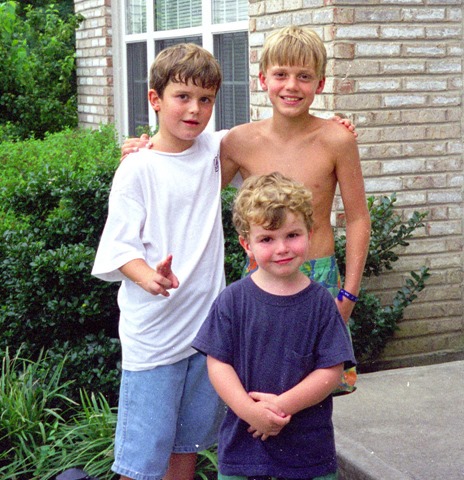
This is a photo of Zech. He's the one with no shirt. The other two are my sons. When he was a boy, Zech lived next door to us. All 3 boys have grown to adulthood since I took this photo.

Zech was close friends with my boys, even though he was a bit older. There was a time when Nick and Zech were inseparable during the daylight hours. I remember Zech as quiet and polite. He always addressed me as "Mr. Dave".

I haven't seen Zech in years. He had a tough life. His parents were not around for much of his childhood; When he was my neighbor, his aunt and uncle were raising him; and I am told that, as an adult, he struggled with a heroin addiction and spent some time in jail.

A month ago, Zech was reported missing. This weekend, his body was found in a snow bank in Cincinnati. He was 27 years old.

I grieve for Zech and for a young life that was cut short; I grieve for the life and childhood he should have had but did not; I grieve for his family, who are suffering a tragedy I pray I never experience; and I grieve for myself because I was not there to help someone who could have used a role model and maybe just a little more guidance.

If you are reading this, call your kids and tell them you love them.

If you are reading this, call your siblings and ask them how their week is going.

If you are reading this, call you mother and listen to whatever she feels like talking about.

If you are reading this, hold tightly to someone special in your life.  Tomorrow is not promised to either of you.

Today, my prayers and thoughts are with Zech's family. I hope that they remember him as I do - a quiet, polite boy who was kind to my sons.

Rest in peace, Zech.


The Flock team on Flock

Comments [0]

3/1
Today I am grateful that my boys are safe and healthy.

2/28
Today I am grateful for a trip to the University of Illinois.

2/27
Today I am grateful for this new Logitech headset.

2/26
Today I am grateful for a packed room at yesterday's Web Camp.

2/25
Today I am grateful for meeting up with Mark and Anne last night in Minnesota for the first time in about 3 decades.

2/24
Today I am grateful for: -Aaron the handyman fixing a bunch of broken stuff in my house -Words of encouragement from Ted, whose voice I haven't heard in too long.

2/23
Today I am grateful that my pipes did not freeze at my Michigan house while I was away for weeks of sub-zero temperatures.

2/22
Today I am grateful for the opportunity yesterday to deliver my first keynote presentation.

2/21
Today I am grateful to those who braved the weather in Nashville yesterday to attend my Web Camp.

2/19
Today I am grateful for my first-ever trip to Kansas.

2/18
Today I am grateful for dinner with Lee Brandt last night.

2/17
Today I am grateful for a belly full of Kansas City ribs last night.

2/16
Today I am grateful that every day brings new possibilities.

2/15
Today I am grateful for breakfast yesterday with Gail, who I haven't seen in 20+ years.

2/14
Today I am grateful that there are people in my life who care enough about me to pick me up when I'm down.

2/13
Today I am grateful for 2 engaged web camps today - at a Web Camp in Indianapolis, followed by an Android development class at IU.

2/12
Today I am grateful to all those who organize technical conferences in their spare time.

2/11
Today I am grateful I got to see the Spartan basketball team play very well at Northwestern last night. #GoGreen

2/10
Today I am grateful for lunch with Timmy in Bloomington and dinner with Laura in Chicago and a safe drive in between.

2/9
Today I am grateful to spend yesterday evening with my son Tim.

2/8
Today I am grateful for: -Driving my son around to his old homes and school in northern Kentucky -Dinner with Gary and Patricia last night. -My first trip to the Shoemaker Center in over a decade to watch an exciting USF-UC basketball game.


The Diamond Age takes place primarily in a future Shanghai, where governments have been replaced by "phyles" or "claves", bound more by culture than by geographic borders; and where nanotechnology dominates everyday life, providing everything from weapons that can kill a man from the inside to food synthesis to a book that can create a story tailored to its owner.

One such book - A Young Lady's Illustrated Primer is stolen - first by John Percival Hackworth, who plans to give it to his daughter Fiona; then by Harv, a tough street kid, who gives the book to his younger sister Nell. Nell grows up with the Primer, which tells her stories of Princess Nell, a fantasy version of Nell who travels through mythical lands on quest after quest. Princess Nell's story parallels that of the real-life Nell and she begins to think of the Primer and the "ractor" who reads the story aloud as a surrogate mother to replace Nell's own neglectful mother. As Nell grows older and runs away from her mother and her mother's abusive boyfriends she seeks comfort in the Primer.

Along with the stories of Nell and Princess Nell, The Diamond Age weaves the story of the unfortunate Hackworth, who seeks to retrieve the book he lost and discover the secret for which it was made.

The Diamond Age book explores technologies role in society and the importance of human interaction, even in a world with advanced technologies. There are many copies of the Primer being consumed by many young girls; but Nell benefits from hers more than other girls do because hers is read by a real-live (if anonymous) ractor and the two connect because of this.

While not as clever or exciting as Stephenson's earlier novel - the excellent Snow Crash - The Diamond Age is a very good story and paints an intriguing picture of a society and the people in it.

There are many characters and sub-plots in The Diamond Age and Stephenson weaves them together brilliantly. In the end, they all come together in a climax that was a bit more confusing than I would have liked; but the journey to that point made this novel worthwhile.


I can't believe I missed this, but last week marked the 6-year anniversary of Technology and Friends - the weekly show in which I interview smart people about technology. On February 6, 2009, I released an interview with John Kellar in which we talked about how to interview technologists on-camera.

Since that time, I have released 353 episodes - an average of more than one per week.

I started this show because I admired what other podcasters were doing and because I thought it would be fun and because I wanted an excuse to talk with great technologists (I was a bit more shy 6 years ago than I am today).
The show has been more successful than I imagined. I have had some outstanding guests - some famous; some obscure and I have loved doing it. I meet people from across the country who tell me that they know me from my show.

Thank you to all the guests and thank you to all those who have taken the time to watch Technology and Friends over the years.

You can view the latest episodes at TechnologyAndFriends.com.

I look forward to another 6 years.


What would happen if scientists discovered a giant comet entering our solar system and headed in the general direction of Earth? What if that comet actually collided with Earth? How would we react to the possibility and to the catastrophic events?

This is the premise of Purnell and Niven's Lucifer's Hammer.

The comet is named “Hamner-Brown” - in part for Tim Hamner, the millionaire / amateur astronomer who discovered it. But the public quickly applies new nicknames such as "Hammer of God" and "Lucifer's Hammer". The day the comet finally strikes Earth is forever known as "Hammerfall". The Hammer strikes suddenly with an unmatched fury, launching tidal waves, massive floods, and months of cloud cover and rain. Millions are killed in a matter of hours and nearly all the infrastructure holding together modern civilization is destroyed. The San Joaquin Valley becomes the San Joaquin Sea; the state of Texas is wiped out by a tidal wave thousands of feet high; earthquakes destroy major metropolitan areas all over the world; hurricanes decimate the US planes states; and the city of Washington - along with the US government - is destroyed.

The main story of Lucifer's Hammer takes place mostly in central California and follows the lives of a few people with good intentions trying to survive the aftermath of Hammerfall. But survival is difficult because most of the world goes very crazy, very quickly. Within hours, looters are invading homes, stealing food and liquor and killing anyone in their way; within weeks some groups have turned to cannibalism for survival.

Local leaders establish a new martial law in some cities, while paramilitary groups roam the lands between the cities stealing and terrifying anyone they find.

Lucifer's Hammer book kept me engaged throughout. I could not wait to see what would happen next. From the study of the earthbound comet to the panic of the strike to the sudden change in lif for literally everyone the story moves forward with urgency. The characters are transformed by the disaster and we follow them through love triangles and survival in the wilderness and an attempt to quickly adapt to the new world. We meet Harvey ??? a documentary filmmaker, who struggles to make himself useful after Hammerful; and ??? the mailman, who faithfully continues to deliver the mail, even after he loses his truck and is attacked by bandits. And Sentaro Jelison (???), who organizes a mountain town - The Stronghold - into a sanctuary with himself as commander-in-cheif; and ???, a black militant who views Hammerfall as a chance for him and his black brothers to finally gain the power they deserve. And Hamner himself, no longer a millionaire playboy but now a household name for his role in the comet's discovery.

The climax of the story features a battle between the protagonists at The Stronghold fighting off an invasion by The New Brotherhood - marauding cannibals intent on destroying all people and civilization in their path.

Although the chances against a giant comet hitting Earth are literally astronomical, this novel depicts a believable version of events that would happen if such a catastrophe occurred.

I was finished with this book before I knew it.


I’ve scheduled a lot of public events in February and March. I’ll be traveling around the Midwest delivering full-day Web Camps and Dev Camps; I’m giving my first conference keynote (at the ITECS conference in Ft. Wayne, IN); I’ll be visiting a few college colleges; and I’ll continue to attend and present at local user groups. Later in the sprint, I’m flying to Europe to speak again IT Camp –Romania and, for the first time, at Dev Sum in Sweden.

Admission to nearly all of these events is open to the public and either free or very inexpensive. I hope you can make it to one or more of them.

Date Topic Event Location
2/3/2015 Web Development Web Camp Downers Grove, IL
2/6/2015 Effective Data Visualization University of Cincinnati Cincinnati, OH
2/12/2015 Web Development Web Camp Indianapolis
2/12/2015 The Hitchhiker's Guide to Azure Mobile Services Indiana University Bloomington, IN
2/17/2015 Web Development Web Camp Overland Park, KS
2/20/2015 Web Development Web Camp Nashville, TN
2/21/2015 The Hitchhiker's Guide to Azure Mobile Services Indiana Tech ITECS conference Ft Wayne, IN
2/21/2015 Keynote: Your Dev Community and You Indiana Tech ITECS conference Ft Wayne, IN
2/25/2015 Web Development Web Camp Edina, MN
3/3/2015 Web Development Web Camp Miami, FL
3/10/2015 Web Development Web Camp Austin, TX
3/12/2015 TBD Houston .NET User Group Houston, TX
3/12/2015 Web Development Web Camp Houston, TX
3/13/2015 Azure and cloud computing Cloud Dev Camp Houston, TX
3/24/2015 Web Development Web Camp Waukesha, WI
3/26/2015 Web Development Web Camp Chicago, IL
3/27/2015 App Studio Development US MVP Open Days Malvern, PA
4/7/2015 Cloud Dev Camp Microsoft Overland Park, KS
5/14/2015 TBD Chicago Coder Conference Chicago, IL
5/21/2015 TBD IT Camp Cluj-Napoca, Romania
5/25/2015 Effective Data Visualization Dev Sum Stockholm, Sweden

Josh Holmes on Nitrogen

Comments [0]

January 2015 Gratitudes

Comments [0]

2/1
Today I am grateful to finally sign the papers to put my house on the market.

1/31
Today I am grateful for my house being as clean as it has been in 10 years.

1/30
Today I am grateful for meeting up with friends from my high school last night.

1/29
Today I am grateful I've been able to make it to the gym for 6 straight days.

1/28
Today I am grateful to my teammates who answered all my questions yesterday.

1/27
Today I am grateful I crossed off a bunch of items from my To Do List yesterday.

1/26
Today I am grateful I organized the contents of a large stack of boxes in my house yesterday.

1/25
Today I am grateful for 4 miles on the elliptical yesterday - the most I've done in a very long time.

1/24
Today I am grateful for an exciting Mavericks-Bulls game last night in Dallas.

1/23
Today I am grateful to Brian Sherwin for delivering half the Web Camp sessions yesterday.

1/22
Today I am grateful for Texas barbecue last night.

1/21
Today I am grateful for new carpeting in my house.

1/20
Today I am grateful to Bill Wagner for all his help with yesterday's Web Camp.

1/19
Today I am grateful to Patrick, Susan, and Jordan, who helped me move furniture last night.

1/18
Today I am grateful for a drink with the #MHacks organizers and sponsors before heading home last night.

1/17
Today I am grateful for all the students excited to learn about and try Azure yesterday.

1/16
Today I am grateful for a break in this cold weather.

1/15
Today I am grateful for financial stability.

1/14
Today I am grateful to the large crowd at Wisconsin .NET User Group, who stayed engaged even while I was having Internet issues.

1/13
Today I am grateful to: -Marc of LA Fitness, who kicked my ass yesterday at my first Personal Trainer session. -Those who stayed for my Azure presentation last night, even though many of them missed the National Championship game kickoff.

1/12
Today I am grateful I didn't have to drive in the snow yesterday.

1/11
Today I am grateful for coffee with Claire yesterday.

1/10
Today I am grateful to Brian Prince and the organizers of #CodeMash for another excellent conference.

1/9
Today I am grateful for a full room at our workshop yesterday and dinner with my team last night.

1/7
Today I am grateful for the first day of a conference when I get to see people I haven't seen in months.

1/6
Today I am grateful for dinner with friends at Kalahari last night.

1/5
Today I am grateful I was able to put in my best workout in months yesterday.


Microsoft has scheduled a series of free Web Camps in cities across the country. These 1-day events provide instructions and demos to help attendees learn about web development.

Topics include:

  • ASP.NET
  • Visual Studio tooling
  • Microsoft Azure
  • Web API
  • Single Page Applications
  • SignalR

The events are free and include breakfast and lunch. Microsoft is even giving away a $100 gift card to one random attendee in each city.

Below are the dates and cities that have been scheduled so far. I’ll be handling most of those in the Central Region.

Place Date
Detroit (Southfield) 1/19/2015
Dallas (Irving) 1/22/2015
New York 1/23/2015
Chicago (Downers Grove) 2/3/2015
Pittsburgh 2/10/2015
Denver 2/12/2015
Indianapolis 2/12/2015
Cambridge 2/12/2015
Kansas City (Overland Park) 2/17/2015
Atlanta (Alpharetta) 2/17/2015
Seattle (Bellevue) 2/19/2015
Nashville (Franklin) 2/20/2015
Minneapolis (Edina) 2/25/2015
Miami 3/3/2015
Irvine 3/5/2015
Austin 3/10/2015
Houston 3/12/2015
Los Angeles 3/13/2015
Philadelphia (Malvern) 3/19/2015
Sunnyvale 3/24/2015
Chicago 3/26/2015
St. Louis 3/31/2015
Tampa 3/31/2015
Charlotte 4/2/2015
Seattle (Bellevue) 4/7/2015
Atlanta (Alpharetta) 4/7/2015
Reston 4/10/2015
Columbus 4/14/2015
Cambridge 4/14/2015
San Diego 4/16/2015
New York 4/16/2015
Milwaukee (Waukesha) 4/21/2015
Tempe 4/23/2015

Visit http://aka.ms/msftwebcamps to find more information, including a a link to each city’s event and instructions on registration.

Space is limited so register today!


Jeff Fritz on ASP.NET 5

Comments [0]

Richard Mayhew was a nobody.

He worked a dead-end job in London and his fiancé walked all over him. Everyone walked all over him.

Door was the daughter of an aristocrat from a mysterious parallel world beneath London. She had the ability to create and open portals to wherever she wanted to go.

One day, Richard encountered Door, bleeding and bruised lying in a London alley. To the frustration of his fiancée, Richard decided to take her to his flat to keep her safe and to heal. This act of kindness set in motion the events that overturned Richard's life. Soon, 2 cutthroat thugs came looking for Door and threatening Richard. The next day, everyone in Richard's life had forgotten that he ever existed. Before long, his work desk was moved and his apartment was rented to strangers.

Hoping to regain his life, Richard followed Door into London Below - a mysterious world, invisible to most Londoners and populated by the outcasts of the city above.  he found Door and helped her on her quest, while evading the cutthroats on their trail. Along the way they encountered a fallen angel, a trained assassin, an invisible roaming marketplace, a haunted bridge draped in inky, deadly blackness, and a host of unusual characters.

In Neverwhere, Neil Gaiman builds a believable world of rejects and outcasts and makes them sympathetic to the reader. The story moves quickly and easily from mystery to action. The characters are rich and quirky and interesting - at times ridiculous; at times, terrifying. Gaiman's narrative is full of wit, while continuing to advance the story.

The reader feels the pain of Richard as he moves from being figuratively lost in the "real" world of London to being literally lost in the mysterious London Below. 

Fans of clever writing and adventure stories will enjoy Neverwhere.


It's hard to imagine a scenario in which a software developer would not benefit from source control. GitHub provides a repository for developers to store their source code and other digital assets.

To use GitHub, you will need to create an account at https://github.com/ and log in.

To set up a new repository, click the "+" icon next to your name and photo at the top right of the main GitHub page. This displays a dropdown list (Fig 1).

1-NewRepository
Fig 1

Select "New repository" from this list.  The "New Repository" page displays (Fig 2)

2-CreateRepository 
Fig 2

At the "Repository name" textbox, enter a name for your repository. This should be brief, but enough to identify the project to you and others.

At the "Description" textbox, you may enter a short description of the project, if you like. This is useful if you want others to contribute.

Use the radio buttons to select whether this will be Public (anyone can view the files in the repository) or Private (only those you invite can see the files). You can only create a private repository if you have a paid GitHub account. Free accounts can only have public repositories.

Checking the checkbox labeled: "Initialize this repository with a README" will create a README.MD file in your repository. This file is displayed on the main page of your project below the list of other files. It should contain text and Markdown language. For a description of Markdown, check out http://daringfireball.net/projects/markdown/.

There are two dropdowns at the bottom of the page: "Add gitignore" and "Add a license".

The "Add gitignore" dropdown (Fig 3)allows you to quickly create gitignore file.

3-GitIgnore 
Fig 3

A gitignore contains a list of files that might be on your disc, but that you don't want in source control. These might be user configuration files or binary output files.
Selecting a type of projects creates a gitignore file containing files typically ignored by that project type. For example, if I select "Visual Studio" from the "Add gitignore" dropdown, a file will be created that tells GitHub to not check in "SUO" files or files in my "bin" folder.  Of course, you can always edit the gitignore file after it is created.

The "Add a license" dropdown (Fig 4)allows you to assign a license to the files in your repository.

4-License
Fig 4

The license dictates how others can legally use these files and programs - for example, whether they can make money off of code that you share here.  There is a good description of each software license at http://opensource.org/licenses/.

After you complete the form, click the [Create Repository] button. Your repository will be created in a few seconds.


I have created a set of labs designed to tech you how to learn Azure Mobile Services.

These exercises walk you through creating and configuring a new Mobile Service.

These labs are available at https://github.com/mspcontent/Azure-Mobile-Services-Labs.

I’d love to get feedback on these exercises. Even, better you may add to the labs and submit a pull request.


The Chicago Coder Conference takes place May 14-15 and this year, they are adding a .NET Track.

The call for speakers for this track is open until February 16. Submit your sessions at this link. 


CodeMash 2015 Recap

Comments [0]

CodeMash (http://codemash.org)  is like a family reunion for me. So many old friends come back every year. And I always meet someone new and interesting.

CodeMash is a developer conference that cuts across technologies and communities. It brings together Ruby, Java, .NET, Python, JavaScript, and those who use other technologies; and it draws speakers and attendees from all over the U.S. and a few from Europe. And it's held at an indoor water park in Sandusky, OH in the middle of winter.

I missed the very first CodeMash in 2007 (the one at Josh Holmes and Brian Prince famously had their heads shaved), but I've been to all 8 events since then.

This year, I was a sponsor, a speaker, and an attendee. I delivered 2 presentations: A Hitchhiker's Guide to Azure Mobile Services and Effective Data Visualization; and I helped out with Jennifer Marsman's Cross-Platform game development workshop. In all, over 200 people saw me present at this conference.

I spent a good part of the conference at the Microsoft booth, answering questions and talking with people.  Bill Fink brought a "Photo Booth" that he built using a Kinect sensor, a laptop, and an external monitor and this drew a lot of people to the booth. We also had a device bar and a number of attendees stopped by to check out the Surface Pro 3 and other Windows devices on display. Nathalie Goh-Liverness showed off a game she build using Unity and Occulus Rift virtual reality hardware. Traffic was heavy and I had a chance to answer some questions and talk with a number of attendees.

My team was well represented at CodeMash. Brian Prince is now the primary organizer, taking the reins from Jim Holmes who grew this confeerence to its current state over the years. And six members of my team (Jennifer Marsman, Brian Sherwin, Nathalie Goh-Liverness, Bill Fink, Matt Thompson, and me) delivered presentations.

Other Microsoft presenters included Dustin Campbell, Chris Risner, Jeff Fritz, Alexei Govorine, Kevin Pilch-Bisson, Matthew Podwysocki, Tony Surma, and Josh Holmes.

By the time I left Friday evening, I was exhausted. I had a chance to learn about Azure, Kinect, the next versions of C#, Visual Studio, and ASP.NET and a host of other things.

This was my eighth CodeMash and I fully expect to return next year.


In the early 19th-century England of Jonathan Strange and Mr. Norrell, the existence of magic is a given. Everyone knows of the Raven King, who escaped from the Fairy kingdom to rule northern England and introduce magic to the Britons centuries before.

But, in 1806, no magic has been seen in England for years. Those who call themselves "magician" are only theoretical magicians, meaning that they study magic and magicians, but lack the ability to cast spells themselves. One day, a group of theoretical magicians discover the reclusive Mr. Norrell, who proves himself to be a formidable practical magician - the first of his kind seen for decades. A few years later, Jonathan Strange emerges - a young man with even stronger magical abilities, but with no training in how to use them.

Norrell takes on Strange as an apprentice, but Norrell is careful not to teach the young man too much. Together, they become celebrated magicians and use their powers to help Lord Wellington and the British Empire defeat the Emperor Napoleon.  Later, Strange and Norrell split and become rivals. This turns very bad after Norrell tries to discredit Strange and Strange embraces madness as a way to contact the malevolent fairies who live on the other side of Hell and possess powerful magic.

The story shows the rise to power of two talented men and the corruption brought by that rise. Both men are tempted to enlist the aid of the malevolent fairy race in order to boost their magical abilities and increase their reputation. But the fairies, who rule a kingdom beyond Hell, are malevolent and untrustworthy. Dealing with fairies risks the lives and souls of all around the magicians.

The contrast between Strange and Norrell makes for a great story. Norrell is bookish, deliberate, and secretive. He buys up all the books on magic he can find, in order to keep other magicians from reading them. Strange is adventurous and tries to expand his horizons - even going so far as to try training other magicians.

Both magicians struggle with the dark side of magic. Norrell's first attempt at summoning a fairy allows him to raise a young woman from the dead. This makes Norrell a national celebrity; however, the consequences are disastrous - the fairy maintains control over the woman, transporting her each night to his castle on the far side of Hell. Norrell vows never to try again. Strange reads of how the Raven King used Fairy Magic and believes he can summon and control a Fairy. He concludes that he must become mad in order to summon a fairy, so he uses magic and drugs to make himself temporarily insane. The Fairy appears and more disaster ensues. The Fairy of the story - known only as "the man with thistle down hair" controls a number of humans, including the woman he helped raise from the dead; Stephen Black, a servant to whom he promises the throne of England; and Strange's wife. Even King George III's famous bouts with insanity are attributed to the man with the thistle down hair.

I really enjoyed this book. I liked the characters and the adventures; I liked the relationship between Norrell and Strange and how it evolved over the years. I liked the ethical struggles of the magicians, such as whether it was acceptable to use the dark fairy magic to do good deeds; and I liked the style of the book, which reminded me of an English historical text, complete with added footnotes.

If you are looking to explore a world that could have been and believable  characters, I highly recommend Jonathan Strange and Mr Norrell.


December 2014 Gratitudes

Comments [0]

1/4
Today I am grateful I made it home safely on the icy roads last night.

1/3
Today I am grateful for a shawarma and hummus dinner with Tim Giard and his girlfriend last night.

1/2
Today I am grateful for an amazing comeback victory by the Spartans in The Cotton Bowl yesterday
and for a chance to watch the game with a group of people who met in MSU's Akers Hall in 1980 and remained friends for decades.

1/1
Today I am grateful for all the new people I met and all the new places I visited in 2014.

12/31
Today I am grateful for 2014 - one of the most eventful years in my life!

12/30
Today I am grateful that, despite my procrastination, I was able to reserve a #CodeMash Kalahari room yesterday.

12/29
Today I am grateful I was able to free myself from the malware I accidentally added to my computer a couple days ago.

12/28
Today I am grateful to talk with some old friends during my drive yesterday.

12/27
Today I am grateful for the bathrobe that my boys gave me for Christmas. And for the undershirts also.

12/26
Today I am grateful for Christmas dinner with my family at my sister Diane's house.

12/25
Today I am grateful for Jesus Christ and the comfort he brings me when I am troubled.

12/24
Today I am grateful for all the papers I organized yesterday and all the crap I threw away.

12/23
Today I am grateful for a post-game drink with Patrick Affholter at Beggar's Banquet last night.

12/22
Today I am grateful to talk this week with my cousin John and with my cousin Linda for the first time in years.

12/21
Today I am grateful to those who picked me up with kind words yesterday.

12/20
Today I am grateful I was able to drive my son Tim home from college yesterday.

12/19
Today I am grateful for lunch with Annie yesterday.

12/18
Today I am grateful for the annual #MIGANG Holiday Party last night! It was a great time, as always!

12/17
Today I am grateful I got to see a record-setting hockey game last night: Longest shootout in NHL history!

12/16
Today I am grateful I could take my mother to see my son's team play last night.

12/15
Today I am grateful for the chance to have dinner and watch the Lions game last night with my son Nick.

12/14
Today I am grateful for a chance to visit my mother in Florida for the first time this year.

12/13
Today I am grateful for the organizers of this week's company Hackathon, where I learned about Git, Windows 10, Azure, and IoT and to my teammates, who pitched in and won first prize!

12/12
Today I am grateful for an excellent stone crab dinner last night.

12/11
Today I am grateful for my first ever trip to Miami / Miami Beach.

12/10
Today I am grateful that the rental car company finally found and returned my garage door opener I left in a car last week.

12/9
Today I am grateful for my new furnace and for being warm on a cold morning.

12/8
Today I am grateful I got to spend a lot of time with my son this weekend before he returned to Florida.

12/7
Today I am grateful for a chance to watch Nick Giard's USF team at Detroit and for dinner with Nick after the game.

12/6
Today I am grateful I made it to my presentation in Detroit on time after driving 5+ hours from Indiana.


2014 in Review

Comments [0]

2014 has flown past so fast I can hardly believe it is gone. But the journey has been amazing.

My sons continue to do well in college. Timmy is in his sophomore year at Indiana University.  Last semester, he took a software course and he told me he may soon declare Informatics as his major. Nick is nearly done with the Masters program at the University of South Florida and his responsibilities as a Graduate Assistant with the USF basketball increased when the school hired a new coach last year.

In late 2013, I began a new job as a Technical Evangelist for Microsoft. I had pursued this job for years and I leapt into it enthusiastically. It wasn't hard to keep busy - partly because I was excited to learn my new role and to impress my new overlords - and partly because my new department had a lot of turnover, so I was asked to cover 2 regions (7 states) until the team was back at full strength. My basic evangelism activities covered schools, user groups, conferences, and startup incubators from Wisconsin to Tennessee and I made a point to visit each state at least twice. I travelled a lot - mostly by car, but occasionally by plane. At the bottom of this post is a list of the 50 different cities in which I presented or worked an event in 2014.

I also attended team off-sites in Phoenix and in Denver and I attended internal Microsoft conferences in Seattle and Atlanta.

While not directly part of my job, I was invited to speak at a couple other developer conferences: FalafelCon in San Francisco and IT Camp in Romania.

The Romania trip was amazing. My friend Mihai runs a developer conference in Cluj-Napoca, Romania and he invited me to speak there. I arrived three days before the conference and hired a tour guide to show me around Transylvania. After the conference, I drove to Budapest, Hungary and spent three days enjoying that city before heading home. I'm planning to return to IT Camp this May and I'm looking at other places to visit while I'm back in Europe. You can read details about this trip at here. You can view photos at the following links:

Years ago, I established a goal to visit the home stadium of every team in each major professional US leagues (MLB, NFL, NBA, and NHL). The year, I was able to visit a number of new arenas and stadiums, including the homes of the Phoenix Coyotes, the Atlanta Braves, the Milwaukee Brewers, the Oakland Athletics, the Dallas Cowboys, the Denver Broncos, the Indianapolis Colts, and the St. Louis Rams. Astute readers will note that I have attended Coyotes and Colts games in the past, but those teams have built new stadiums since that time so I had to return.

In late 2014, I moved to Chicago. I rented a studio apartment in the Old Town neighbourhood - in the heart of the city. It's the first time I've lived in a big city (I've spent most of my life in the suburbs) and I'm really enjoying the vibrant energy of city living. I haven't yet sold my house in Michigan so I'm spending a lot of time travelling back and forth, getting it ready to list, which should happen in late January.

My new apartment is much smaller than my old house, so I am in the process of casting off nearly everything I own - furniture, clothing, souvenirs, books, electronics, and anything else that has been cluttering my basement and closets the last 11 years. This process has been liberating. I held onto so many things that I did not need and I feel like I'm freeing myself from these objects as I throw out, donate, or sell each one.

One of the things that stands out to me about 2014 is the number of new people I've got to know. Some I didn't know existed before and some I got to know a lot better. Although I haven't met a lot of people in my new Chicago neighbourhood, I have had a chance to meet many new people around the country and world - primarily through my new job. It has been a pleasure expanding my network like this and I believe I will become closer with at least a few of these new folks in the coming years.

Sometimes, it's a challenge to stay in touch with everyone I want to and to stay close with those who are most important; but I'm putting effort into this. Social media helps. A cell hone helps. Sometimes travel helps and sometimes it hinders these efforts. I was able to extend some work trips over a weekend to visit friends, so I got to stay with the Eagers in Pittsburgh in June; with the Koellers in St. Louis in November, and with my mother and my son Nick in Florida in December. It was also great to catch up with Brent Stineman during a Minnesota trip; with Joe Guadagno while in Phoenix; with Kent Fehribach while in Nashville; with Dan Taylor during an Indianapolis trip, and with Gary and Patricia Desmarais, Mike Amundsen, Jon Hunt, and Mike Wood while in Cincinnati.

I did a lot of reading in 2014. Because of all the driving I'm doing, I settled on a system of getting both the audio and printed version of the same book and alternating between them, depending whether I'm on the road (thank you public library). In 2014, I completed the following books:

  • Windows Store App Development by Pete Brown
  • The Thrawn Trilogy: Heir to the Empire, Dark Force Rising, and The Last Command (all 3 by Timothy Zahn)
  • The Mists of Avalon by Marion Zimmer Bradley
  • Real World Windows 8 Development by Samidip Basu
  • The Chronicles of Thomas Covenant The Unbeliever: Lord Foul's Bane, The Ilearth War, and The Power That
  • Preserves (all 3 by Stephen R. Donaldson)
  • Small Gods by Terry Pratchett
  • Ringworld by Larry Niven
  • The Mars Trilogy: Red Mars, Green Mars, and Blue Mars (all 3 by Kim Stanley Robinson
  • The Amber Chronicles: Nine Princes in Amber, The Guns of Avalon, Sign of the Unicorn, The Hand of
  • Oberon, The Courts of Chaos, Trumps of Doom, Blood of Amber, Sign of Chaos, Knight of Shadows, and Prince of Chaos (all 10 by Roger Zelazny)
  • That Hideous Strength by CS Lewis

In addition to technical books, I am making an effort to make it through this list. You can read my reviews of many of the books I've read here.

My job as a Technical Evangelist has made it easier to meet my goal of learning something new every day. I've been focused on Azure more than anything else this year and my knowledge of this platform has expanded a great deal.

Technology and Friends – my weekly Internet talk show - continues to be successful. This month, will mark 6 years since I recorded my first interview. In 2014, I published 51 episodes. The list of guests was impressive, including David Chappell, Jon Skeet, and Eric Lawrence. The next episode will be #350.

Not everything was perfect. There were ups and downs during the year and I had my share of disappointments and stress and nights of insufficient sleep. But I believe I did a good job of maintaining a positive outlook, even when things were not going well. It helped that I continued my practice (begun in 2013) of beginning each day by thinking of and sharing something for which I was grateful. I reflected on that practice in this article.

As you can see, I packed a lot into 2014 - maybe as much activity as I've packed into any year of my life. Staying this busy kept me focused and allowed me to accomplish things - for myself and for others. I expect 2015 to be more of the same, which would be fine with me. 


Visited for Work:
Ann Arbor, MI
Appleton, WI
Atlanta, GA
Bloomington, IN
Brentwood, TN
Carmel, IN
Chattanooga, TN
Chicago, IL
Cincinnati, OH
Cluj-Napoca, Romania
College Station, TX
Columbus, OH
Dayton, OH
DeKalb, IL
Denver, CO
Detroit, MI
Eau Claire, WI
Evanston, IL
Findlay, OH
Fishers, IN
Ft Wayne, IN
Grand Rapids, MI
Grayslake, IL
Houston, TX
Indianapolis, IN
Kent, OH
Knoxville, TN
Lansing, MI
Las Vegas, NV
Louisville, KY
Madison, WI
Miami, FL
Minneapolis, MN
Nashville, TN
Okemos, MI
Phoenix, AZ
Pittsburgh, PA
Redmond, WA
Rockford, IL
San Francisco, CA
Sandusky, OH
Schaumburg, IL
Seattle, WA
South Bend, IN
Southfield, MI
St. Charles, MO
St. Louis, MO
Terre Haute, IN
Toledo, OH
West Lafayette, IN
Wisconsin Dells, WI
Ypsilanti, MI

Visited outside work:

San Francisco, CA
Transylvania, Romania
Budapest, Hungary
Tampa, FL


Pipe Dreams and Hack10

Comments [0]
PipeDreams Team
The Pipe Dreams team

I didn't know what to expect when I was invited to the Hack10 Hackathon in Miami last week. I heard we would be working with Windows 10, so I installed the preview. I heard we would be working with Visual Studio 2015, so I installed that preview. I heard we would be using Azure, which was good because I love Azure and I wanted to learn more. I heard we would be doing something with the "Internet of Things" (IoT) and I wondered what was meant by that. I heard we would be using Git, so I did a bit of reading because I am very much a Git noobie.

But I didn't know what we would be working on or what the format would be.

As it turned out, we were asked to split into teams of 4 or less and come up with an idea involving IoT, Azure, Windows 10 and Git. Many people arrived with ideas and teams already formed. I did not. I looked around and saw a team of 3 with an idea and I asked if I could join them team. It was Dave Voyles, David Crook and Jennifer Marsman and they were kind enough to let me in. I had worked with Jennifer in the past and I knew Dave and David by reputation, so I believed we had a very strong technical team.

David Crook had come to the Hackathon an idea - a hardware device to monitor temperature, pressure, light, and wind flow and report that data (along with time and location information) to a database in Azure that could be queried and displayed in a portal. The hardware device would simulate the readings inside an oil pipeline because this was a real-world problem that Crook had studied before coming to the hackathon. We called our project "Pipe Dreams".

Jennifer worked to program 2 hardware devices - one to monitor the environment and one to send collected data to Azure;
Dave Voyles created a portal to displayed the data on a map, updating each collection point and popping up a message if data fell outside an acceptable range. He completed a web front-end and started a Windows 10 client;
David Crook wrote most of the business logic and analysis, including some fairly complex formulas that he acquired from his research of the oil and gas industry.
and I created an Azure SQL database and a mobile service to write and query the data.

We shared our code in a Git repository, integrated with Visual Studio Online.

When it was done, we had data flowing end-to-end, measuring the environment and collecting data via an IoT device; stored and analyzed in Azure; and reported via a web portal.

We presented our findings to the group. I opened with a video showing a pipeline explosion (of course) and promised that our solution would solve this problem. The other team members showed off the technical aspects of the solution.

It was a competition among the dozen or so teams and first place went to... Pipe Dreams! That's right, we won!

We also had a chance to see what the other teams built, which was  a lot of fun. One of the more clever (and sadistic) ideas was a device allowed audience members to rate a speaker during a presentation and give the speaker a shock if his ratings fell too low.

Two other teams placed in this competition: A team from Brazil created a game that became more difficult as more players connected over the Internet and played against you; and Paul DeCarlo, Jared Bienz, and Sertac Ozercan created a device to play music that could be controlled via a range of other devices, including Windows 8, Windows Phone, XBOX One and the Microsoft Band.

Overall, it was an excellent weekend. I learned a lot about the technologies we worked with and I was able to partner with some really bright technologists. Microsoft had invested quite a bit into the event to help keep us Evangelists up to speed on the technical side of our jobs - we stayed in a nice hotel, ate excellent food, and there were a number of experts on hand to answer questions or help us when we got stuck.

I hope these types of events continue and I hope that I can be a part of one in the future.


"Small Gods" is the thirteenth book in Terry Pratchett's Discworld series.

Pratchett's Discworld universe contains a plethora of gods. The vast majority of these gods are tiny, swarming invisibly and unnoticed in the desert. But a few gain a following of worshippers, which increases both the size and the power of these fortunate gods.  One such god was Om, who was so powerful in the country of Omnia that the priests who ruled the country would tolerate the worship (or even mention) of any other god. Om would typically manifest himself as a giant bull; but, when the story opens, he has somehow been transformed into a small tortoise. Om is preoccupied with his reduction in status - from powerful being to to tiny reptile - and with avoiding the talons of hungry eagles circling overhead.
One of Om's problems is that the people of Omnia don't really believe in him - they only go through the motions of their religion out of fear of the priests and the mysterious Quisition, who capture, judge, and torture accused heretics. Another of Om's problems is that he cares very little for the lives and fates of those who worship him - he only desires their faith because it brings him greater power, but he cannot even remember the names of his own prophets.
While struggling in his tortoise form, Om encounter Brutha, an illiterate student/servant with a good heart. Brutha is the only one in Discworld who can see or hear Om because he is the only one who believes in him without the threats from the Omnian church. Brutha is troubled to discover his god is not omnipresent or omniscient or caring or even polite. But he agrees to help him return to his former glory.

Small Gods is filled with quirky characters and witty prose. Like all the Discworld novels, every scene overflows with silliness. Pratchett describes a philosopher with the following:

His philosophy was a mixture of three famous schools -- the Cynics, the Stoics and the Epicureans -- and summed up all three of them in his famous phrase, "You can't trust any bugger further than you can throw him, and there's nothing you can do about it, so let's have a drink."

Or this witty exchange between the leaders of two countries:

"Slave is an Ephebian word. In Om we have no word for slave," said Vorbis.
"So I understand," said the Tyrant. "I imagine that fish have no word for water."

But Small Gods also biting satire about the dangers of religious zealotry and the emptiness of blindly following tradition. With Small Gods, Pratchett reaches beyond making us laugh and makes us think.


I spend a lot of time learning new skills and new technologies. After learning something new, my first reactions are to apply it that knowledge and to share that knowledge. When I was a consultant, I spent more time applying knowledge; generally, I was learning things that I needed to do my job, such as a technology that fit my current project.

Today, I am a Technical Evangelist and I spend more time passing on that knowledge to others.

I have found the following to be the most useful ways to pass on the knowledge I've learned: blog posts; technical presentations at user groups and conferences; screen casts; and hands-on labs.

Each of these media tend to appeal to different groups. There are a number of software developers, for example, who read blogs every day but never attend a code camp or user group. There are also different learning styles: some people learn more by reading; others by seeing it done; still others by doing it for themselves. (For me, a combination of all three works best).

Knowing that these different audiences exist has given me permission to package the same information into a variety of formats.

For example, for the past few months, I've developed and delivered a presentation on Azure Mobile Services. The presentation lasts about 90 minutes, which is perfect for a user group. I can cut it down to 60 or 75 minutes for a conference time slot.

Many people who saw this presentation told me they like the content because it covers all the basic features of Mobile Services and explains why they are important.

A few weeks ago, I had some extra time so I decided to commit to a adding more technical content to my blog. I was struggling to come up with ideas when I thought of the Mobile Services presentation. As often as I gave this presentation, only a few hundred people had seen it due to the fact that people had to travel to a user group or conference on a specific date and time to catch it.

I decided to transcribe the contents of my presentation into a series of blog posts. So far, I've written 9 different blog posts and I still haven't covered all the material in the 90-minute presentation.  Writing blog posts makes the content available to people who prefer written material over in-person delivery; and it also makes it available to a much larger audience - you don't need to travel to where I'm speaking in order to learn what I am teaching. (I’ve linked to the posts at the end of the article)

After a couple weeks of blog posts, I scheduled a hands-on workshop at a large university in order to show students how to use Mobile Services. I decided to start the workshop by delivering my presentation. Afterwards, I wanted the students to try the technology themselves, so I wrote a set of Hands-On labs with step-by-step instructions for creating and configuring Azure Mobile Services. The labs were similar to some of the blog posts I had already written but I re-wrote them with a different audience and a different goal in mind - The blog posts could simply be read; but with the labs, I was expecting the reader to follow along, so I had to make each step as explicit as possible. You can download the current version of these labs at https://github.com/DavidGiard/Azure-Mobile-Services-Labs.

I haven't yet decided if I'll record a set of screencasts showing developers how to manage Azure Mobile Services, but doing so would not involve a huge amount of time, since I already have most of the script written (from either the blog posts or the labs).

I'm not sure what is my next step - expanding the labs, continuing the blog post series, or creating screencasts. Of course, there are other demands on my time that will keep me from doing all of the above.

My point is that I don't see any problem repackaging the same content in multiple formats. Different people learn in different ways, so it's a great way to scale your knowledge transfer. If you are in the business of educating people, I'd love to hear your opinion. Is it cheating to repackage the same content? Or is it effective use of time and good scaling of delivery?


Azure Mobile Services Blog Posts (so far)


November 2014 Gratitudes

Comments [0]

12/5
Today I am grateful to all the Purdue students who came out to my Azure Mobile Services workshop last night.

12/4
Today I am grateful for lunch with Adina yesterday. in Wicker Park.

12/3
Today I am grateful for the audience at my final Cloud Dev Camp yesterday in Indianapolis.

12/2
Today I am grateful for my final 2014 trip to Indianapolis.

12/1
Today I am grateful I spent most of the past 24 hours with my son Tim.

11/30
Today I am grateful for another Michigan State football season with double-digit wins! #GoGreen

11/29
Today I am grateful for a home-cooked meal last night and leftovers for lunch today.

11/28
Today I am grateful for Thanksgiving dinner with my family yesterday.

11/27
Today I am grateful for my family - both near and far.

11/26
Today I am grateful that I have heat restored to my house on this chilly morning.

11/25
Today I am grateful I made it back to Michigan in time to take care of a couple emergencies with my house.

11/24
Today I am grateful to Jason Farrell, who loaned me his laptop power cord for over a week, making it possible for me to get some actual work done.

11/23
Today I am grateful for all the energy at the Northwestern University WildHacks hackathon this weekend.

11/22
Today I am grateful to be heading back home for the first time in over 10 days.

11/21
Today I am grateful to attend and speak at M3Conf for the first time yesterday and today http://m3conf.com .

11/20
Today I am grateful to those who came to the Cloud Dev Camp yesterday and to George, who helped me out by delivering an excellent Azure SQL Database presentation.

11/19
Today I am grateful for lunch yesterday with Kent in Franklin, TN.

11/18
Today I am grateful for a network of smart people I can call on for technical assistance.

11/17
Today I am grateful for: 1. The hospitality of Darlene and Kevin. 2. Getting to see an exciting Rams-Broncos game in St. Louis yesterday. 3. Fitz's root beer.

11/16
Today I am grateful for: 1. My first visit to St. Louis Day of .NET, and all the organizers, speakers, and attendees, who made it a great experience. 2. An exciting basketball game at St. Louis University last night.

11/15
Today I am grateful for all the great people I am meeting my first time at St. Louis Days of .NET.

11/14
Today I am grateful for; * Making it onto the last flight to St. Louis via standby. * My first-ever visit to Houston, TX * A great turnout at the Cloud Dev Camp yesterday * Finding my phone

11/13
Today I am grateful to spend yesterday hanging out with Sarah, driving around the state of Illinois.

11/12
Today I am grateful for the opportunity to teach my first college class last night.

11/11
Today I am grateful to all the veterans who have served our country, especially my Dad - Lt. Cmdr. E Normand Giard, USN, ret. His photo is my profile picture today in his honor.

11/10
Today I am grateful to Susan Anspaugh, who loaned me her carpet cleaner to shampoo my carpets and wasn't mad that I kept it so long.

11/9
Today I am grateful for a ticket to the MSU game last night, even though the good guys lost.

11/8
Today I am grateful I had a chance to watch the local premiere of "Teenage Ghost Punk" last night.

11/7
Today I am grateful for my first Office Hours at Chicago Innovation Exchange yesterday and to all those who showed up.

11/6
Today I am grateful that the sharp stomach cramps I took to bed last night were gone this morning.

11/5
Today I am grateful to return to Chicago and get back to what I do.

11/4
Today I am grateful I was able to stay in one place for a week, where I had a chance to catch my breath.

11/3
Today I am grateful for a walk along the river on an Autumn afternoon.


Stephen R. Donaldson introduced Thomas Covenant in his 1977 novel Lord Foul's Bane. He continued the story in The Ilearth War and concluded the Trilogy with The Power That Preserves. Donaldson went on to write a second Trilogy about this character, followed by a 4-part series titled "The Last Chronicles of Thomas Covenant". This review covers only the first Trilogy.

Thomas Covenant was a bestselling author with a good home and a loving wife and infant son, when he was suddenly struck ill with leprosy. The disease cost him 2 fingers on his right hand and his wife, who left Thomas for fear their son would catch his disease. His neighbors rejected him out of fear and ignorance, but he defied them by walking into town each week to collect his mail.

On one such trip, Thomas was crossing the street and nearly run down by a police car. When he awoke, he found himself in a strange world, known only as The Land, facing the horrific villain Lord Foul, who commanded him to deliver a message to the people of The Land.

The Lords and commoners of The Land noticed Covenant's missing fingers and his white gold wedding ring and assumed he was the reincarnation of Berek Halfhand, a heroic figure from The Land's past, who lost his fingers battling the evil Lord Foul with the powerful force of white gold. They believed that Covenant was sent to The Land to protect them and to defeat Lord Foul.

Their faith in Covenant and their non-violent code caused them to forgive Covenant's every sin and shortcoming. And he has many.

When he enters the Land, Covenant's leprosy is magically cured, restoring feelings to his nerve endings. The rush of long-unfelt sensation is so overwhelming that he rapes Lena, a young woman who had shown kindness to him. Even this betrayal does not shatter the faith of either the people of The Land or of Lena herself.

Time and again throughout the trilogy, the Land's inhabitants sacrifice themselves for Covenant, hoping he will use his power and defeat Lord Foul; but, Covenant repeatedly defers, making no effort to learn how to harness the power of his white gold ring and often pushing his responsibility onto others.

Covenant is magically transported back to his own world; but is drawn back to The Land two more times with the expectation that he will rescue its inhabitants. Most of the time, the inhabitants are disappointed. Each time, he returns to The Land years have passed in this magical world, even though only a few weeks have passed in his own.

In the world of high fantasy, there are many unlikely heroes, but few as unlikeable as Thomas Covenant.

Covenant is reluctant to take on the responsibility of battling Lord Foul. During his years as a leper, he has learned to be extremely cautious because he no longer has nerve endings to warn him of impending danger. He carries this caution into The Land, despite no longer needing it. Worse, Covenant seems incompetent as The Land's heroes and does not even recognize the powers he has such as the magic that white gold holds in The Land. He leaves disappointment and betrayal almost everywhere he goes, until his final encounter with Lord Foul at the end of the third book.

Overall, I enjoyed this trilogy. The Land suffered under Lord Foul and their chosen hero could not help them; but ultimately Covenant found his strength and did what he needed to do.  The characters were interesting enough to hold my attention for three books; but I don't know if or when I'll return to The Land and read the remaining seven.


Teenage Ghost Punk

Comments [0]

Writer/Director Michael Cramer describes Teenage Ghost Punk as a "supernatural punk rock romantic comedy" - a string of adjectives and nouns that make it tough to categorize.

The movie debuted in October at the Spooky Movie International Horror Film Festival in Washington, DC. I saw it a month later at its Chicagoland premiere at the School of Rock in Oak Park, IL.

Teenage Ghost Punk tells the story of a family moving into a haunted house. Amanda is a popular high school cheerleader from Spring Lake, MI, whose newly-divorced mother moves the family to suburban Chicago, hoping for a fresh start. Amanda feels out of place in her new home and she is stressed because she misses her cheerleader friends and tall-but-rockhead boyfriend. Things get worse when she begins to hear bumps in the night and family items turn up missing. It turns out that the house is inhabited by the ghost of Brian - a teenager who was struck by lightning while playing guitar on the house's roof during a thunderstorm in the early 1980s. Brian is convinced this is still his house and that Amanda and family are intruding. Only Amanda can see and hear Brian and his ghostly pals. They talk and become close and Amanda decides to invite Brian to the school dance, where she hopes to introduce her friends to her new boyfriend. And then it gets weird.

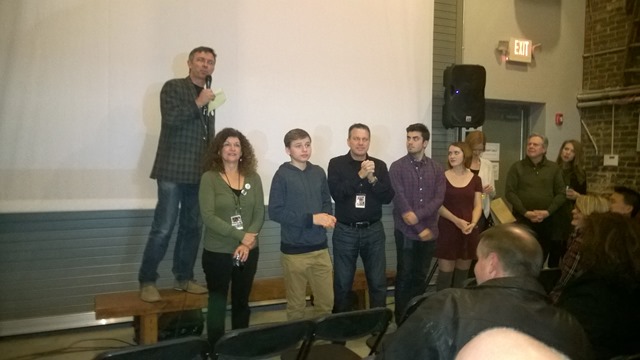
WP_20141107_20_48_06_Pro
Cramer, along with some of the cast and crew answer audience
questions after the Chicagoland debut viewing November 7

In 2009, Michael Cramer released his first movie - Dear Mr. Fidrych - about a kid who idolized Detroit Tigers Pitcher Mark "The Bird" Fidrych, then grew up to address his midlife crisis by taking his son across country to meet his boyhood idol Fidrych.

I liked Dear Mr. Fidrych. It reminded me of my own childhood - and not just because Cramer and I grew up together in a Detroit suburb during the 1970's when The Bird had his burst of fame. However, Dear Mr. Fidrych was an independent film created on a shoestring budget and there was no hiding these facts.  Technical aspects of the movie were lacking - in particular the sound was inconsistent throughout the film and nearly all the actors were amateurs, with the leading roles going to the director and his immediate family. The story, the energy, and the charm of Dear Mr. Fidrych were enough to more than make up for any technical weaknesses.

Teenage Ghost Punk is far more polished. One could easily believe it was produced and created by a Hollywood studio. The sound is better, the cinematography is better and the acting is better. But the script retains the humor and the humanness of Dear Mr. Fidrych. Even Jack Cramer (son of the director), who plays the title character, has grown into a solid actor. He has an engaging smile that resonates on screen as he charms both Amanda and the audience. I can't think of any aspect of moviemaking that did not improve between Cramer's first movie and this one.

Teenage Ghost Punk is filled with memorable characters. A bumbling Ghostbusters-like team fails to defeat any ghosts but end up being right about their supernatural presence; the neighborhood ghosts spend their days recreating moments from their lives and spend their evenings playing cards; The over-the-top gay neighbors bicker and cuddle shamelessly; Amanda's little brother Adam includes 4-syllable words in nearly every sentences; and Madame Lidnar has little success at her own séances, but relates as well as anyone to the ghosts when she encounters them.

The silliness of the characters adds to the story, rather than distracting from it. The theme of TGP comes together very well at the end. Ultimately, the movie is about letting go of the past and moving on. Most of the characters - living and dead - are unable to do so until the end of the movie. They grew and matured as time passed.

And so did Michael Cramer and his crew.


In my last article, I described how to use Visual Studio to create and deploy an Azure Mobile Service with server-side code written in a .NET language. I chose C# for that example. In this article, we will walk through the boilerplate C# code generated when you create a new Azure Mobile Services project.

Figure 1 shows the newly-created Azure Mobile Services project in Visual Studio’s Solution Explorer

Zumo9-Figure 01 - ZuMo Project
Figure 1

Let’s go through the key parts of the code.

Global.asax.cs

The Application_Start code runs at the very beginning of the application so any startup code goes here. In this case, we call the static method WebApiConfig.Register (Listing 1).

protected void Application_Start()
{
    WebApiConfig.Register();
}

Listing 1

WebApiConfig.cs

Let's take a look at the Register method in the WebApiConfig class.  WebApiConfig.cs is in App_Start folder.

This project uses the Entity Framework to interact read and write data. The most important line of the Register method (Listing 2) is

Database.SetInitializer(new MobileServiceInitializer());

which initializes Entity Framework settings. The new MobileServiceInitializer is found in the same file and it has the ability to seed the sample TodoItem table with a couple records (Listing 3)

public static void Register()
{
    // Use this class to set configuration options for your mobile service
    ConfigOptions options = new ConfigOptions(); 
 
    // Use this class to set WebAPI configuration options
    HttpConfiguration config = ServiceConfig.Initialize(new ConfigBuilder(options)); 
 
    // To display errors in the browser during development, uncomment the following
    // line. Comment it out again when you deploy your service for production use.
    // config.IncludeErrorDetailPolicy = IncludeErrorDetailPolicy.Always; 
 
    Database.SetInitializer(new MobileServiceInitializer());
} 


Listing 2

public class MobileServiceInitializer : DropCreateDatabaseIfModelChanges
{
    protected override void Seed(MobileServiceContext context)
    {
        List todoItems = new List
        {
            new TodoItem { Id = "1", Text = "First item", Complete = false },
            new TodoItem { Id = "2", Text = "Second item", Complete = false },
        }; 
 
        foreach (TodoItem todoItem in todoItems)
        {
            context.Set().Add(todoItem);
        } 
 
        base.Seed(context);
    }
}

Listing 3

TodoItem.cs

Next, we'll look at the TodoItem class (Listing 4), which can be found in DataObjects folder. This is the data model and will. It has 2 explicit properties - Text: the text of a Task that we need to complete; and Complete: a flag indicated whether or not we have completed this task. This object will will map to columns in the TodoItem table.
We don't need to explicitly provide an ID property because the class inherits this property from the EntityData class.

public class TodoItem : EntityData
{
    public string Text { get; set; } 
 
    public bool Complete { get; set; }
}
 

Listing 4

MobileServiceContext.cs

This is a Context used to manage database updates and retrievals via Entity Framework. It knows where to connect to the database and what model to send to the database. The Controller class will instantiate this to interact with the database table.

TodoItemController.cs

TodoItemController is the main controller class that maps HTTP Verbs (POST, PATCH, GET, and DELETE) to specific actions. It inherits from the TableController class, which has an IDomainManager named DomainManager that is used to retrieve and update data using Entity Framework. All the controller methods need to do is to call TableController methods, such as Lookup, UpdateAsync, InsertAsync, and DeleteAsync.

For example, if a client sends a request to our mobile service’s HTTP endpoint with the POST verb, the routing engine will run the PostTodItem method in TodoItemController (Listing 5).

public async Task PostTodoItem(TodoItem item)
{
    TodoItem current = await InsertAsync(item);
    return CreatedAtRoute("Tables", new { id = current.Id }, current);
}

To add business logic to your service, you will add code to the Controller methods (GetAllTodoItems, GetTodoItem, PatchTodoItem, PostTodoItem, and DeleteTodoItem.)

In this article, we covered the code that is automatically generated in a C# Azure Mobile Service.


In a previous article, I described how to create an Azure Mobile Service built on top of node.js - with all the server-side code written in JavaScript. You can also create a Mobile Service with server-side code written in C# or Visual Basic. You will probably prefer this method if you are more  proficient in .NET than in JavaScript.

This article will walk you through the creation of an Azure Mobile Service, written in C#.

Launch Visual Studio 2013 and select File | New | Project from the menu. The New Project dialog displays, as shown in Figure 1.

Zumo8-Figure 01 - FileNew
Figure 1

Under the Templates list at the left of the dialog, expand either Visual Basic or C#; then, select the Cloud template category. Select "Azure Mobile Service" from the Cloud templates listed at the center of the dialog. Give the project a Name and Location and click the [OK] button.

The New ASP.NET Project dialog displays, as shown in Figure 2.

Zumo8-Figure 02 - NewProject Template
Figure 2

The Azure Mobile Service template should be selected and the "Web API" checkbox should be checked. Leave these selected and check and check the Host in the cloud checkbox; then, click the [OK] button.

Because you elected to host this service in the cloud, the Create Mobile Service dialog displays next, as shown in Figure 3.

Zumo8-Figure 03 - Create Mobile Service
Figure 3

Select an Azure subscription to deploy the Mobile Service; enter a name for your Mobile Service (it must be unique);  select a Region; select a database; and enter login credentials for that database. Then click the [Create] button. This should create a project on your local machine and an empty Mobile Service in your Azure subscription.

The Mobile Service project is shown in Figure 4.

Zumo8-Figure 04 - ZuMo Project
Figure 4

To publish your Mobile Service, right-click the project in the Solution Explorer and select Publish from the context menu. The "Publish Web" wizard displays with the "Profile" page activated as shown in Figure 5.

Zumo8-Figure 05 - Publish Web
Figure 5

Under "Select a publish target", click "Microsoft Azure Mobile Service". The "Select Existing Mobile Service" dialog displays as shown in Figure 6.

Zumo8-Figure 06 - Publish Web-Profile
Figure 6

From the dropdown, select the Azure Mobile Service you created above and click the [Next] button.

The Profile page of the "Publish Web" wizard displays as shown in Figure 7.

Zumo8-Figure 07 - Publish Web-Connection
Figure 7

Verify the information on the Profile page is correct and click the [Next] button.

The "Settings" page of the "Publish Web" wizard displays as shown in Figure 8.

Zumo8-Figure 08 - Publish Web-Settings
Figure 8

Select "Release" from the Configuration dropdown and click the [Next] button.

The "Preview" page of the "Publish Web" wizard displays as shown in Figure 9.

Zumo8-Figure 09 - Publish Web-Publish
Figure 9

Click the [Publish] button to publish the Mobile Service to your Azure subscription.

Now, you should be able to log onto the portal and view your new mobile service (Figure 10). Its status may be listed as “Creating…” if you go to the portal too quickly; but, within a couple minutes, you will be able to manage the service from the Azure portal.

Zumo8-Figure 10 - Service in Portal
Figure 10

You can manage this service almost exactly the same way that you managed a JavaScript mobile service. The difference is that the .NET mobile service does not contain a DATA tab. Data configuration in a .NET service is done in the Visual Studio project.

In this article, we showed the steps to create and publish a new Azure Mobile Service with server-side code in a .NET language.


Azure Mobile Services provides a simple way to expose server-side data to clients. In previous articles, we exposed data via a REST service and we created a client application that called that service to retrieve or update data.

But what if we want our service to push data down from the server to a client device without that device making a call each time? For example, you may want to tell send a message telling your app to change the text displayed on its tile, displaying the total number of orders entered in your e-commerce app; or you may want a "toast" popup notification to display on the app's device whenever someone scores in the Top 10 on a game you wrote.

We can use Push Notifications to do these things.

Each mobile vendor has its own service to manage Push Notifications and each service exposes an API to manage those notifications. Apple offers a Push Notification service to send data to registered iPhones and iPads; Google offers a Push Notification service to send data to registered Android phones and tablets; and Microsoft offers two Push Notification services - one to send data to registered Windows Pones and another to send data to registered Windows 8 or 8.1 devices.

Each of these services has an API and we can call each one explicitly for every device that will receive a notification. But this requires passing the address of each device, which is tedious and error-prone. Plus, it requires our server-side application to maintain a list of every device to which we want to push messages.

We can simplify the process by configuring Push Notifications through Azure Mobile Services. Azure Mobile Services Push Notifications automatically works with Azure Notification hubs to manage these messages.

In this article, we will focus on sending a Toast Notification to Windows 8.1 clients, but the process is similar for all Push Notifications.

The steps for setting up Push Notifications to a Windows 8.1 client using Azure Mobile Services are:

1. Create an Azure Mobile Service
2. Create a Windows 8.1 Client App and modify it as follows
    a. Associate app with store
    b. Get Package SID and Client ID from Live Services. Copy these to Mobile Service.
    c. Register notifications channel in OnLaunched (App.xaml.cs)
    d. Enable Toast notifications (Package.appxmanifest)
3. Update the Mobile Service service to send Push Notifications.

Let's walk through an example.

1. Create an Azure Mobile Service

For our example, we'll use the Azure Mobile Service we created in a previous article. 

2. Create a Windows 8.1 Client App and modify it as follows

For this example, we'll use the Windows 8.1 project in the Universal App generated for us in a previous article.

2a. Associate app with store

You will need a Windows Store account to complete this step. You can register at http://dev.windows.com/. It cost $19 to register for both the Windows Store and the Windows Phone Store and there is no annual renewal fee.
Register your app with the store by opening the Visual Studio Solution; right-clicking on the Windows 8.1 project; and selecting Store | Associate App with the Store from the context menu.
The "Associate App with the Windows Store" dialog (Figure 1) displays. Click the [Next] button.

Zumo7-Figure 01 - Associate App 
Figure 1

If prompted, sign into the Windows Store (Figure 2)

Zumo7-Figure 02 - Sign In 
Figure 2

You may be prompted for your email address (Figure 3). If so, enter it and click [Next]; then check your email account for a Security Code that was sent from the Microsoft Account Team.

Zumo7-Figure 03 - Sign In 
Figure 3

Copy this code and paste it into Sign-In Wizard (Figure 4) and click the [Submit] button.

Zumo7-Figure 04 - Sign In 
Figure 4

The "Select an app name" dialog (Figure 5) displays.

Zumo7-Figure 05 - Select App Name 
Figure 5

Enter a name for your app and click the [Reserve] button; then, click the [Next] button to display the final step in the wizard (Figure 6). Click the [Associate] button.

Zumo7-Figure 06 - Associate App
Figure 6

2b. Get Package SID and Client ID from Live Services. Copy these to Mobile Service.

Connect to the store portal (http://dev.windows.com for Windows Store apps and http://dev.windowsphone.com for Windows Phone apps) and click Dashboard. You should see your app listed with "In Progress" below its listing. Figure 7 shows the listing for an app in the Windows Store dashboard

Zumo7-Figure 07 - DevCenter Dashboard 
Figure 7

Click the [Edit] link below your app to display the Submissions Details page (Figure 8).

Zumo7-Figure 08 - App Details
Figure 8

So far, you have only completed Step 1 (Reserve App Name) of the app submission process. Click step 2 (Services) to display the app's Services page (Figure 9)

Zumo7-Figure 09 - App Services 
Figure 9

Click the Live Services site link in the second paragraph to navigate to the Live Services page (Figure 10). You may be prompted to sign in again.

Zumo7-Figure 10 - Live Services
Figure 10

Note the Package SID and Client ID on the Live Services page. Copy each of these in turn and paste them into the appropriate fields of the "Windows Store" section of the "Push" page in the Azure Mobile Services page of the Azure portal. This is demonstrated in Figure 11.

 Zumo7-Figure 11 - Azure Push
Figure 11

Click the [Save] icon to save these values to your Mobile Service. 

Your service is now capable of sending notifications to Windows store client apps.

2c. Register notifications channel in OnLaunched (App.xaml.cs)

Return to your .NET client application and open App.xaml.cs from the Shared project. Add the following 2 lines (Listing 1) to the top of this file:

   1: using Windows.Networking.PushNotifications;
   2: using Windows.UI.Popups;

Listing 1

Add the InitNotificationsAsync method to the bottom of the class (Listing 2)

   1: private async void InitNotificationsAsync()
   2: {
   3:     // Request a push notification channel.
   4:     var channel = await PushNotificationChannelManager
   5:         .CreatePushNotificationChannelForApplicationAsync();
   6:  
   7:     // Register for notifications using the new channel
   8:     System.Exception exception = null;
   9:     try
  10:     {
  11:         await MobileService.GetPush().RegisterNativeAsync(channel.Uri);
  12:     }
  13:     catch (System.Exception ex)
  14:     {
  15:         exception = ex;
  16:     }
  17:     if (exception != null)
  18:     {
  19:         var dialog = new MessageDialog(exception.Message, "Registering Channel URI");
  20:         dialog.Commands.Add(new UICommand("OK"));
  21:         await dialog.ShowAsync();
  22:     }
  23: }

Listing 2

Your client application is now listening for push notifications.

2d. Enable Toast notifications (Package.appxmanifest)

In this example, the service will send a Toast notification, which will tell the client to popup a "Toast" message. A Toast message appears at the top-right of the Windows 8 screen and may contain 1 or more lines of text and an image.

To enable your application to accept Toast notifications, open the Package.appxmanifest file and select the "Application" tab. Under the Notifications section, select the "Toast capable" dropdown and set it to "Yes". (Figure 11)

Zumo7-Figure 12 - Enable Toast
Figure 12

Your client application is now listening for push notifications and capable of creating a Toast popup when it receives a notification.

3. Update the Mobile Service service to send Push Notifications.

The final step is to actually send Push Notifications from your Mobile Service. In this example, we will use the node.js mobile service we created in this article (link) and we'll send a Toast Notification to all Windows Store clients whenever a user enters a new ToDoItem.

In the Azure portal, open your Mobile Service and navigate to the todoitem table's SCRIPT page (Figure 12). 

Zumo7-Figure 13 - Insert Script
Figure 11

Select INSERT from the dropdown and replace the script with the code in Listing 3.

   1: request.execute({
   2:     success: function() {
   3:         // If the insert succeeds, send a notification.
   4:         push.wns.send(null, payload, 'wns/toast', {
   5:             success: function(pushResponse) {
   6:                 console.log("Sent push:", pushResponse);
   7:                 request.respond();
   8:                 },              
   9:                 error: function (pushResponse) {
  10:                     console.log("Error Sending push:", pushResponse);
  11:                     request.respond(500, { error: pushResponse });
  12:                     }
  13:                 });
  14:             }
  15:         });
  16:  
  17: }

Listing 3

Test It Out

Your app is now ready to accept Push Notifications and your Mobile Service is configured to send them each time a new "ToDoItem" is inserted.

To see it in action, launch the application and insert a new ToDo item. Within a few seconds, you should see a "Toast" popup in the top right of your screen, indicating that you entered this item. If other users were also using this same app, they would see the same message.

In this article, we discussed Azure Mobile Services Push Notifications and walked through an example of adding them to a JavaScript Push Notification service and a Windows 8.1 application.


I had always heard good things about the St. Louis Days of .NET http://stldodn.com/2014, but this year was the first chance I had to attend. It did not disappoint. I didn't hear the final count, but the hallways at the Ameristar Casino Conference Center in St. Charles, MO were packed for this event.

A commitment in Houston caused me to miss the half-day workshops held on Thursday; but I arrived in St. Charles late Friday and I had a chance to mingle with many of the speakers after dinner. I liked the fact that the event drew from areas where I had a lot of contacts (Illinois, Indiana, Michigan) but also from parts of the country where I don't travel as often (e.g., Missouri, Kansas, Nebraska). Any chance I have to expand my network of smart people is a good thing.

Most speakers were from all across the Central Region but a few travelled from as far away as Philadelphia and Ottawa.

Microsoft was well-represented at the St. Louis Day of .NET. From DX (the division where I work), Bill Fink, Jennifer Marsman, Donovan Brown, Kevin Remde, Randy Pagels, and I all spoke at the conference. Jeff Fatic and Matt Winkler of Microsoft also delivered presentations.

I attended sessions on JavaScript, Azure, and Design and I learned something in every session. I also had a long conversation about Azure Notification Hubs with Azhar Salahuddin and Charlie Chapman. I have used Notification Hubs indirectly through Azure Mobile Services, but they showed me how they work under the hood and how to work directly with notification hubs

I also spent some time with Angela Dugan of Polaris Solutions picking her brain about how organizations can become more agile and with Charlie Chapman and Gus Emery talking about universal apps.

I learned a lot at the St. Louis Days of .NET and I also got a chance to get to know the communities in the western Midwest a little bit better.

The organizers were already planning to reprise St. Louis Days of .NET in 2015. I recommend you check it out.


TAMUHack User Stories

Comments [0]


<< Older Posts | Newer Posts >>