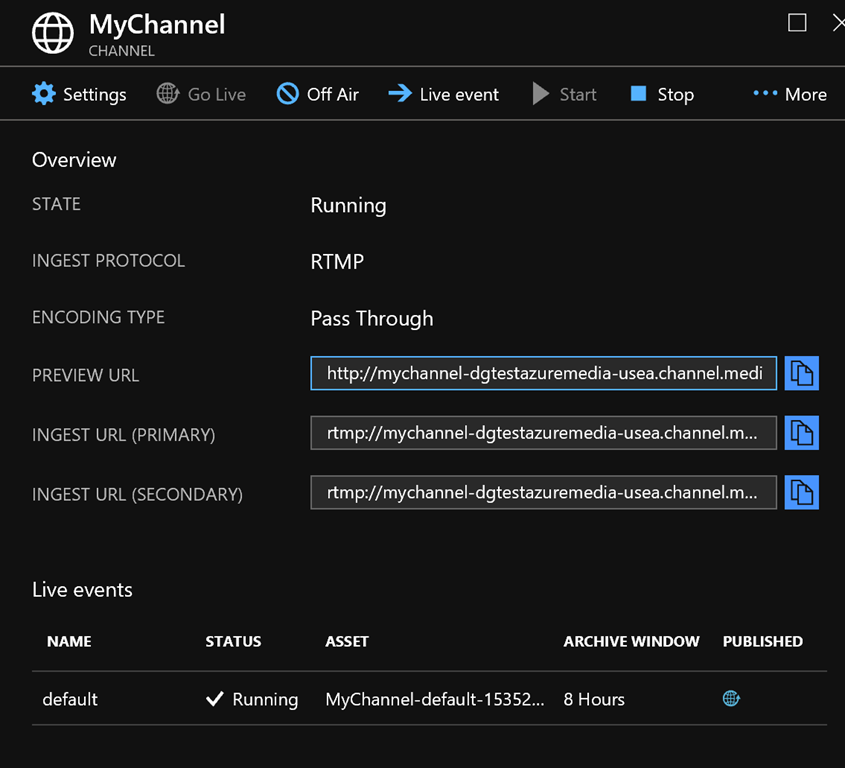
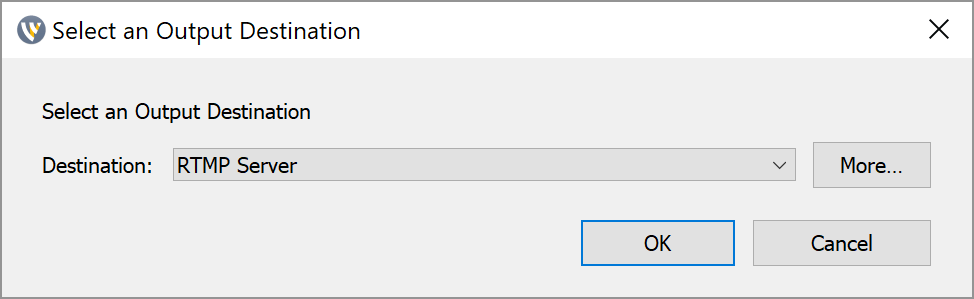
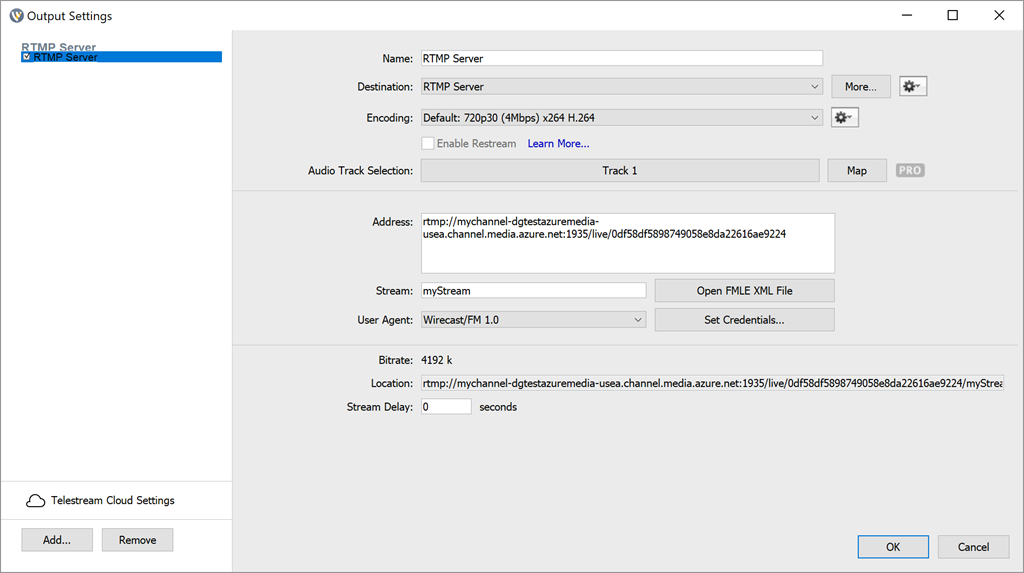
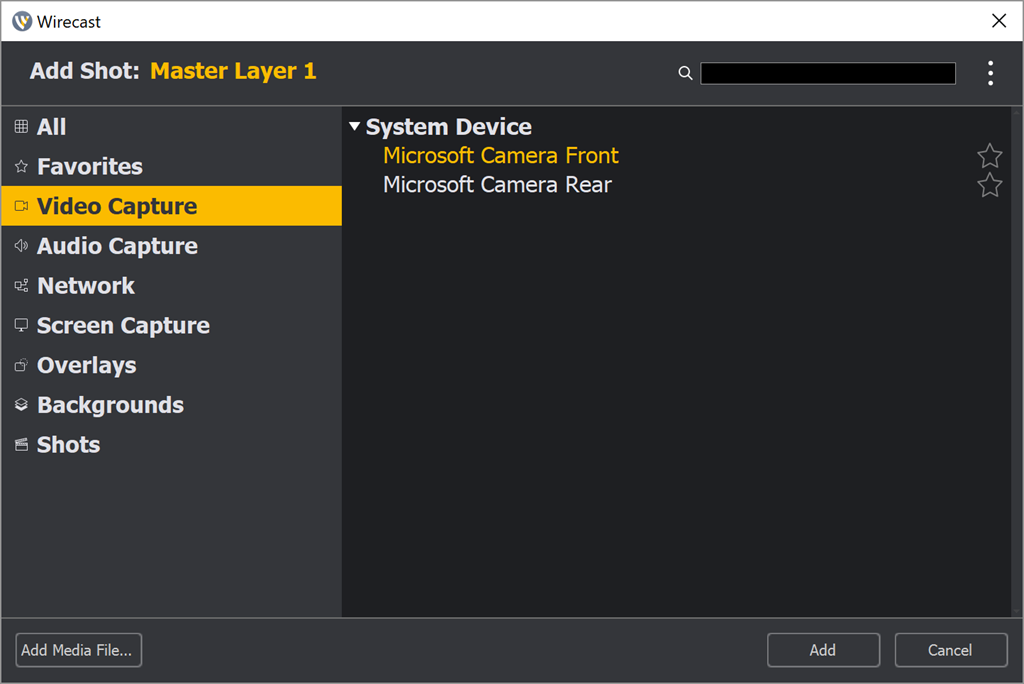
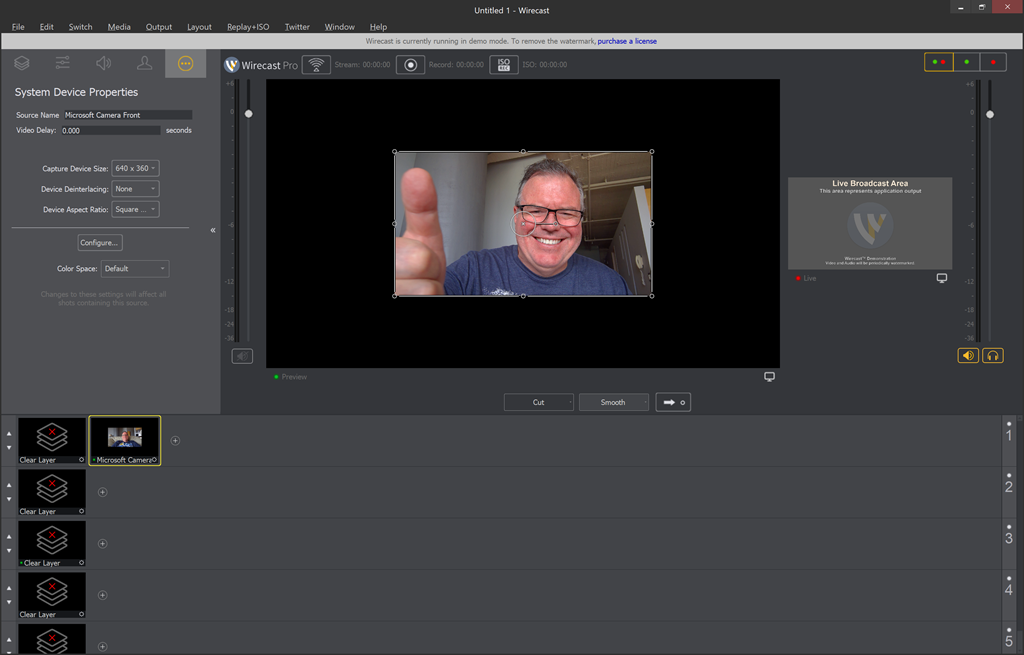
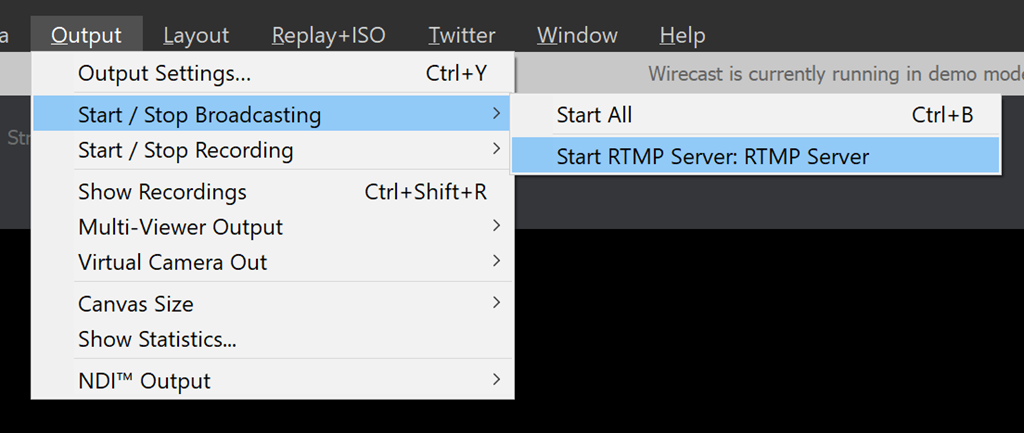
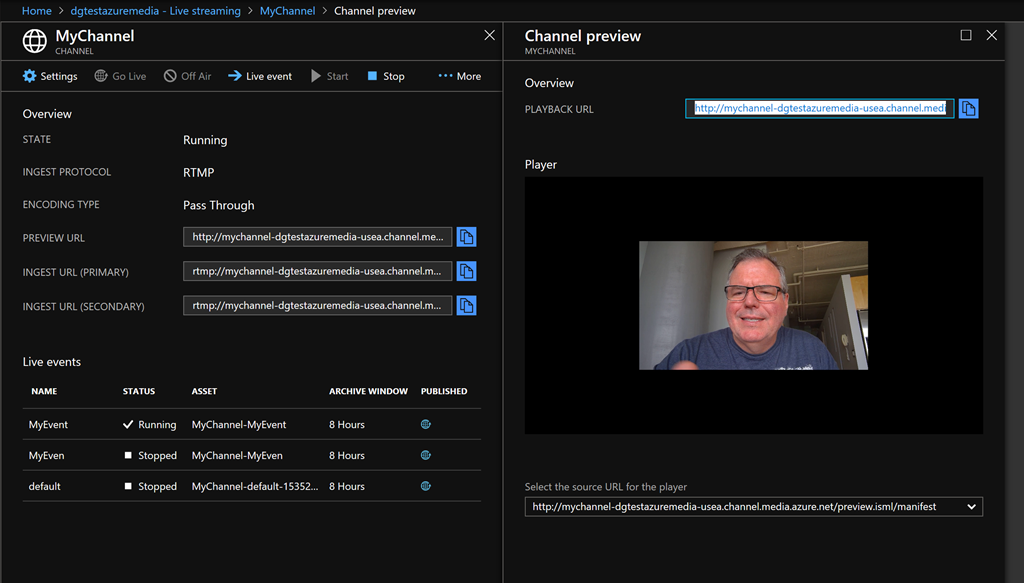
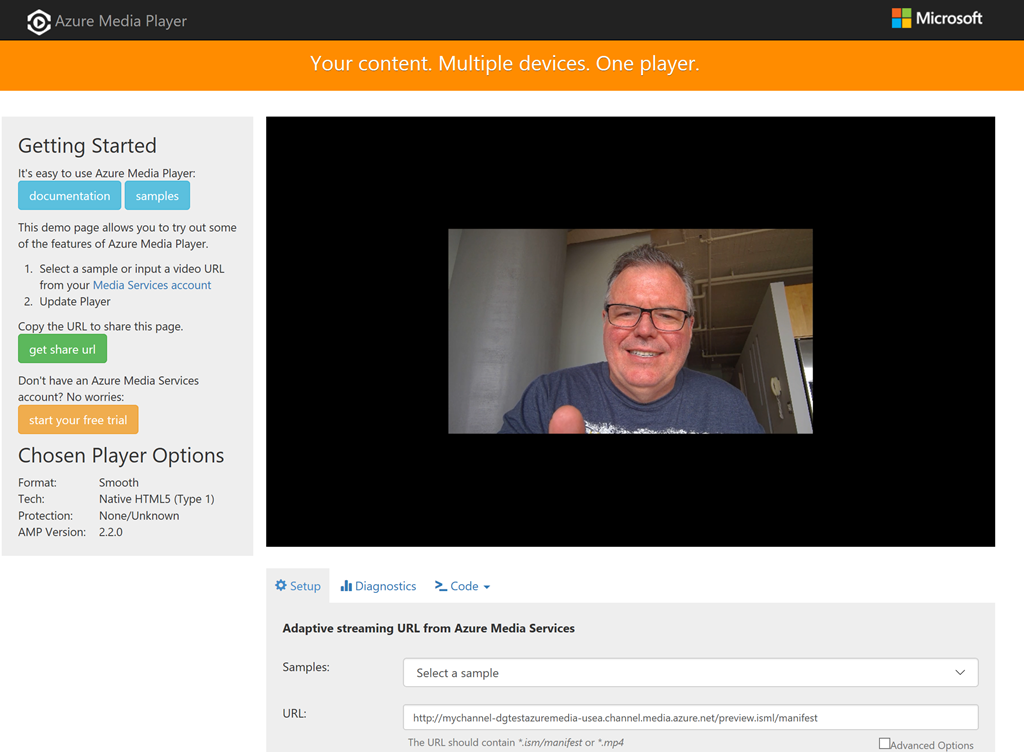
Azure Media Services allows you to manage video content in a highly-scalable, highly secure way.

Videos and associated files are saved as "Assets" and stored in Azure Blob Storage. You can live stream videos or upload video files from your local system.

In this article, I will walk through the steps to upload, encode, and share a video.

The steps are:

  1. Create a new Azure Media Service
  2. Upload a video
  3. Encode the video
  4. Play the encoded video in the Azure portal
  5. Share the video in another player

Create a new Azure Media Service

The first step is to create a new Azure Media Service. You will need an Azure account to do this.

Navigate to the Azure portal and log in.

Click the [Create a Resource] button (Fig. 1) at the top left of the portal.

Fig01-CreateNewResource
Fig. 1

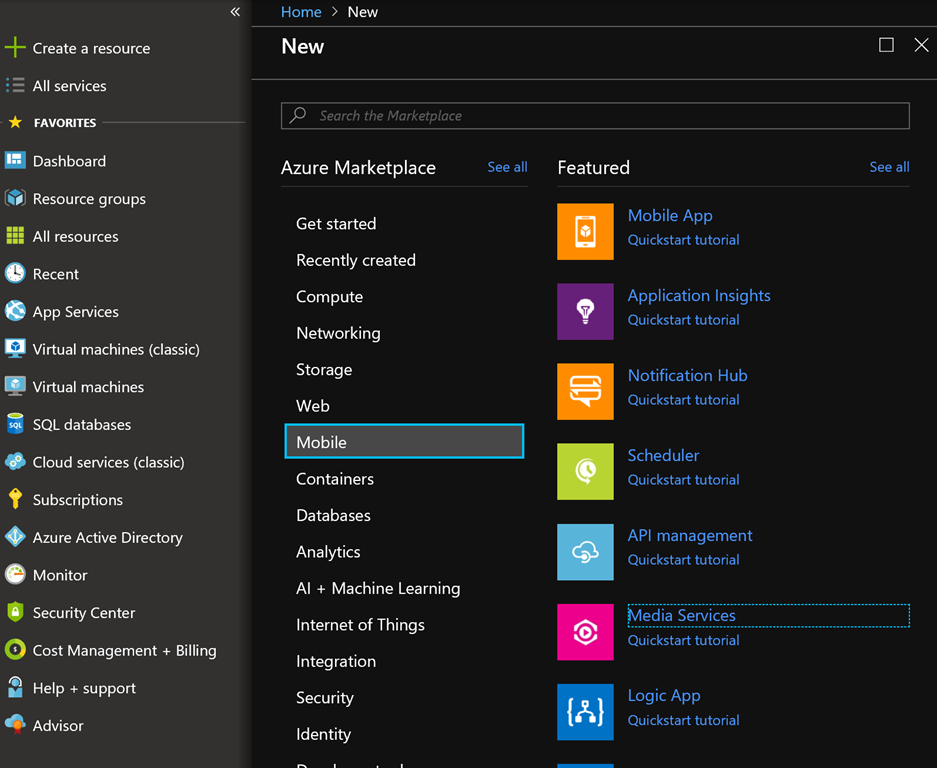
From the menu, select Mobile | Media Services, as shown in Fig. 2.

Fig02-MobileMediaServices
Fig. 2

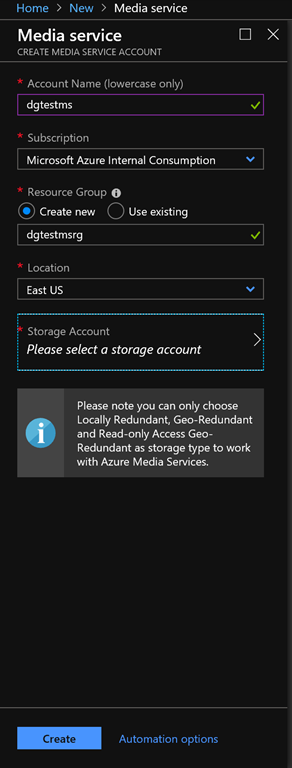
The "Create Media Service" blade displays, as shown in Fig. 3.

Fig03-CreateMediaServiceBlade
Fig. 3

At the "Account Name" field, enter a unique name for your Azure Media Service Account.

At the "Resource Group" field, select the "Create new" radio button and enter a unique name for the resource group in which to store this Media Service.
At the "Location" dropdown, select an Azure region that is close to you.

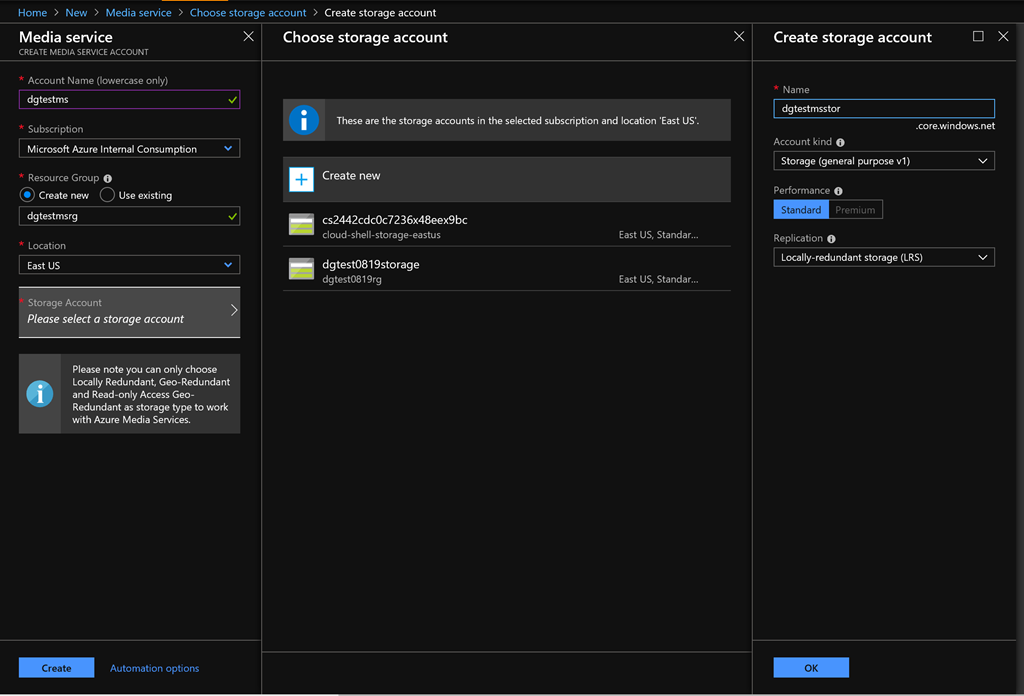
Click the arrow next to the "Storage Account" prompt to expand the "Choose storage account" blade; then, click "Create new" in this blade to display the "Create storage account" blade, as shown in Fig. 4.

Fig04-NewStorageAccount
Fig. 4

Enter a unique name for the storage account in which to store your media assets and click the [OK] button.

Click the [Create] button in the "Create Media Service" blade to begin creating the service. This may take a a minute or so.

Upload a video

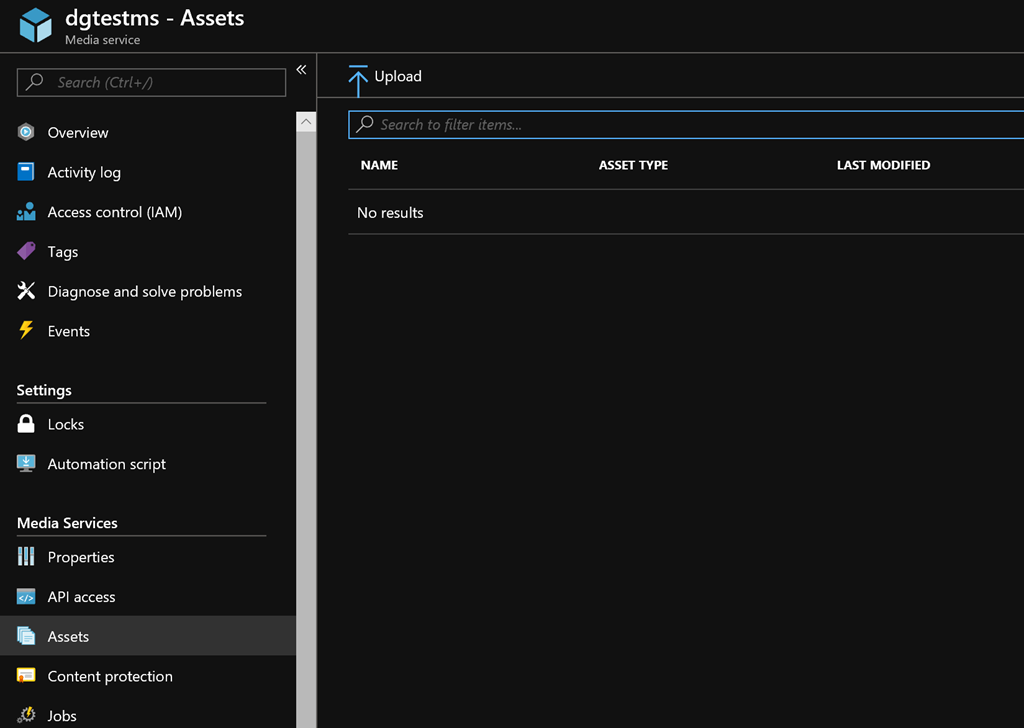
After the Media Service is created, open the service and select "Assets" to open the "Assets" blade, as shown in Fig. 5.

Fig05-AssetsBlade
Fig. 5

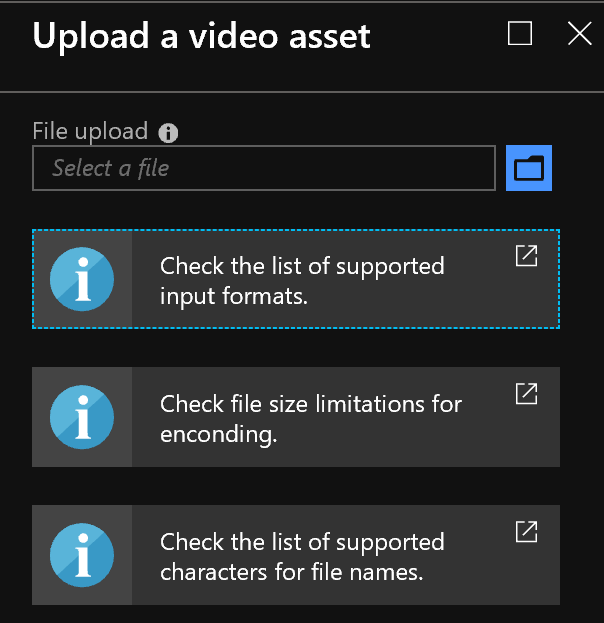
Click the [Upload] button (Fig. 6) to display the "Upload a video asset" blade, as shown in Fig. 7.

Fig06-UploadButton
Fig. 6

Fig07-UploadAVideoAssetBlade
Fig. 7

Click the Folder icon (Fig. 8) and select a video from your local computer.

Fig08-FolderIcon
Fig. 8

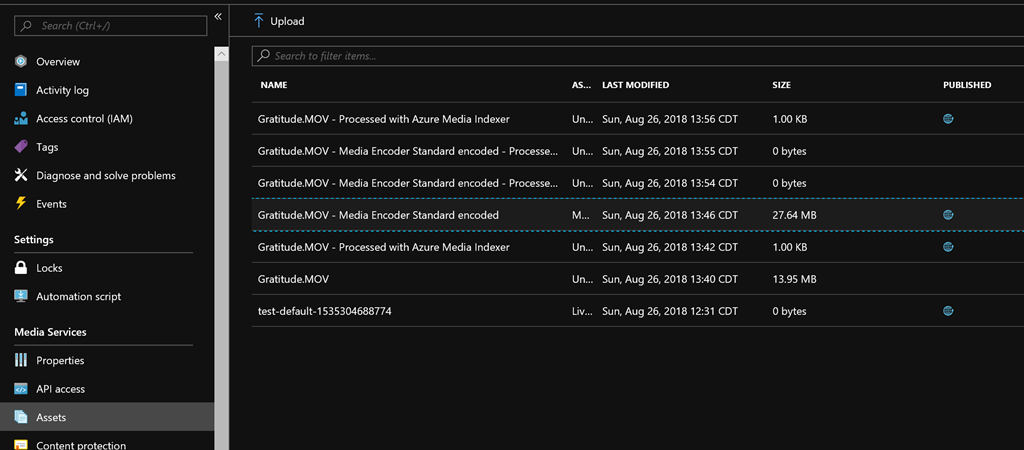
A progress bar indicates when the video has been uploaded. After your video is uploaded, close the "Upload a video asset" blade and  return to the "Assets" blade. The video should now appear in the Asset list, as shown in Fig. 9.

Fig09-AssetList
Fig. 9

Encode the video

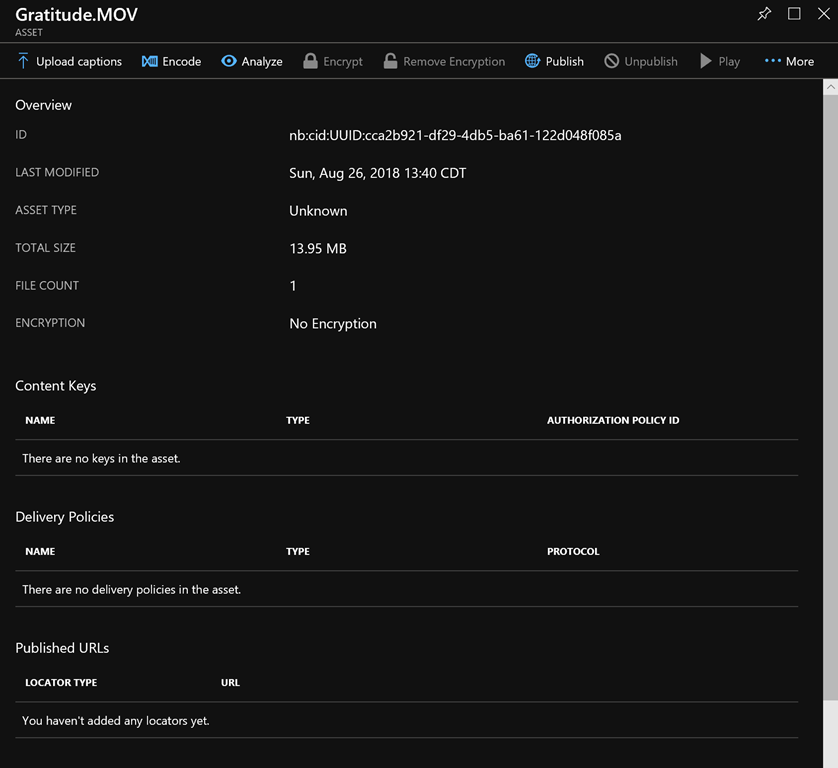
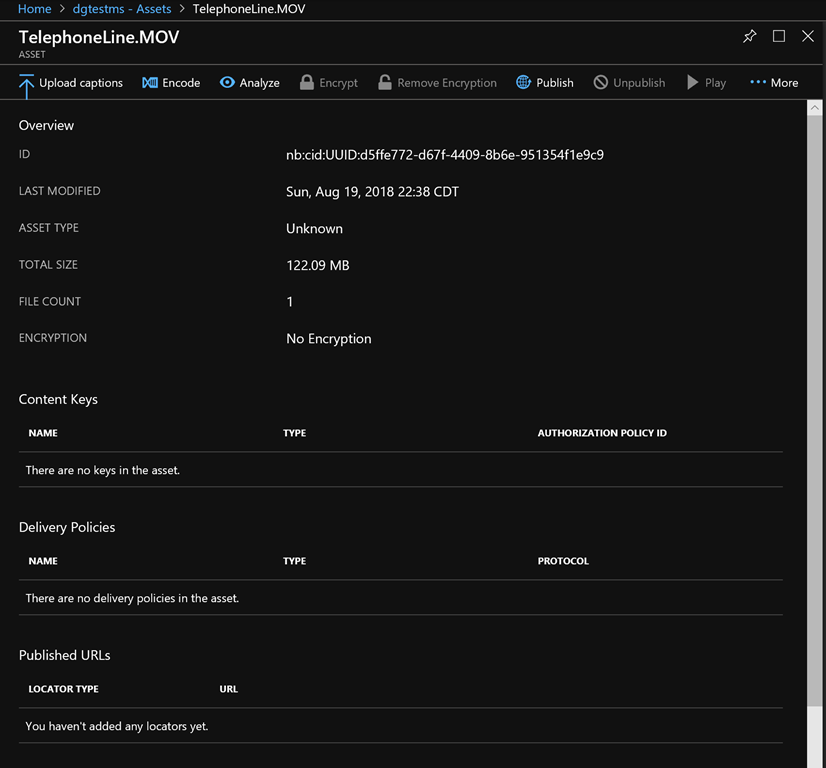
In the "Assets" blade list, click on the uploaded video asset to display a property blade for the video asset, as shown in Fig. 10.

Fig10-VideoAssetProperties
Fig. 10

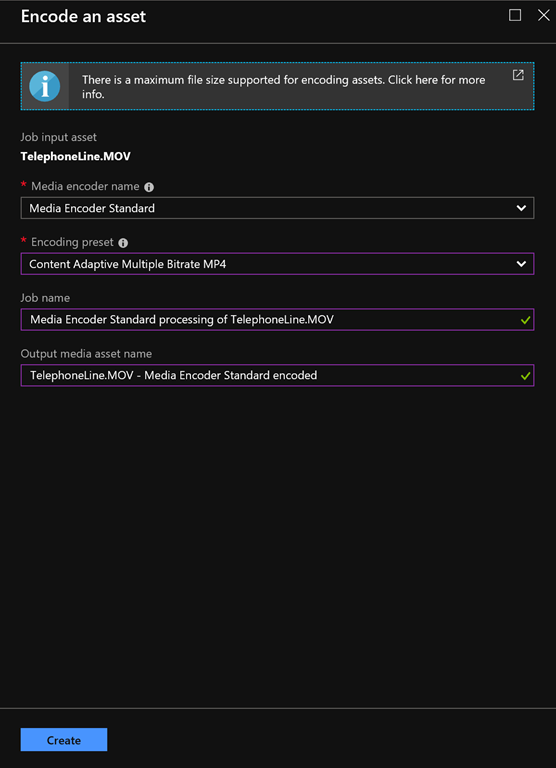
Click the [Encode] button (Fig. 11) to open the "Encode an asset" blade, as shown in Fig. 12.

Fig11-EncodeButton
Fig. 11

Fig12-EncodeAnAssetBlade
Fig. 12

In the "Encoding preset" dropdown, you may select the desired output format, but the default ("Content Adaptive Multiple Bitrate MP4") works well for this demo.

Click the [Create] button to begin encoding.

You can close the property asset blade now.

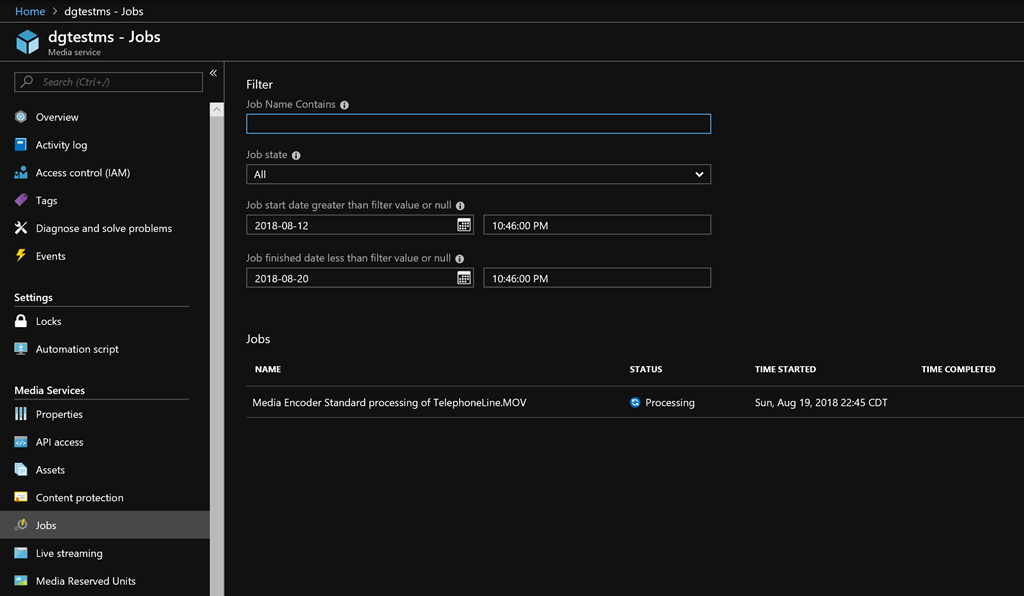
By staring encoding, you created a new Job for this media service. View this job by selecting "Jobs" in the Media Service blade, which displays the "Jobs" blade, as shown in Fig. 13.

Fig13-JobsBlade
Fig. 13

Note the status of the job you created, which will first be "Queued"; then "Processing"; then "Finished".

When the job is Finished (Fig. 14), close the "Jobs" blade and return to the "Assets" blade, where you should see a new Asset, representing the encoded video.

Fig14-FinishedJob
Fig. 14

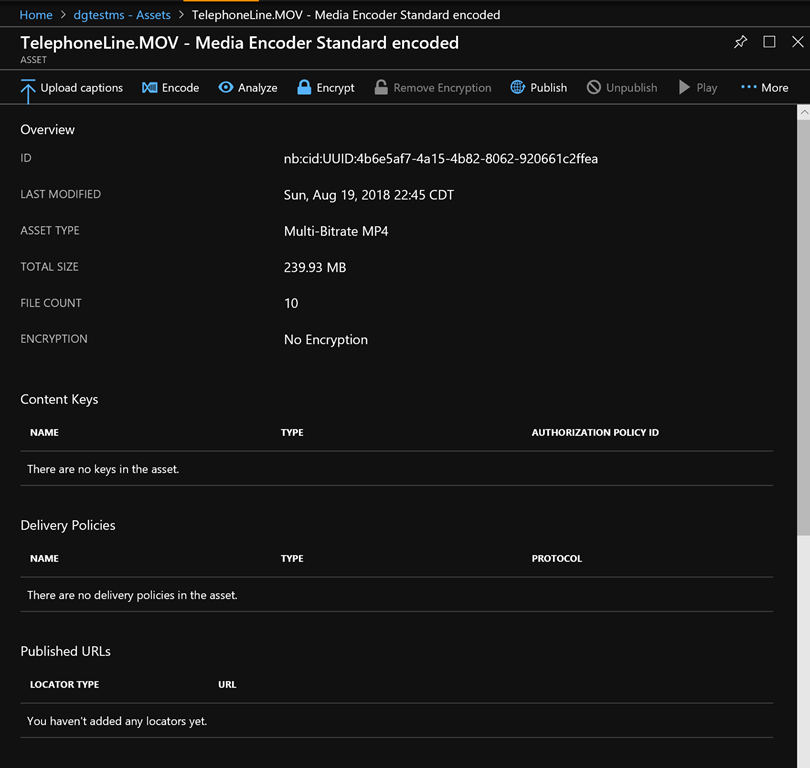
Click the encoded asset to open its property page, as shown in Fig. 15.

Fig15-EncodeAssetPropertyPage
Fig. 15

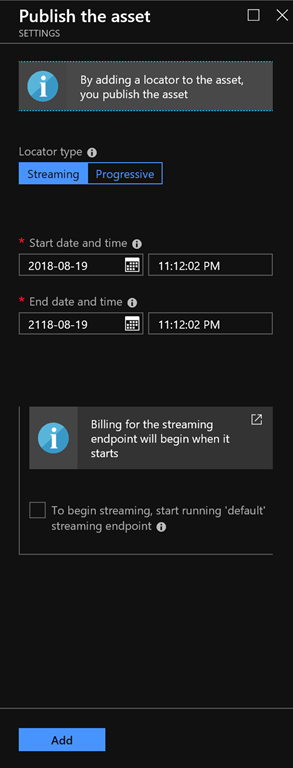
Click the [Publish] button to display the corresponding "Publish the asset" blade, as shown in Fig. 16.

Fig16-PublishTheAsset
Fig. 16

Check the checkbox next to "To begin streaming, start running 'default' streaming endpoint".

Click the [Add] button to publish the encoded video asset.

Play the encoded video in the Azure portal

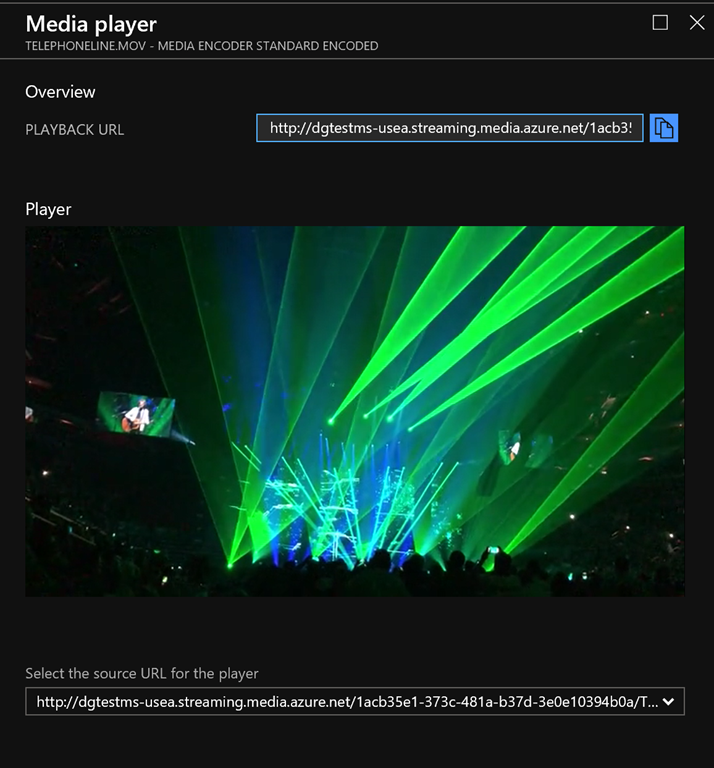
When the endpoint has started, the [Play] button in the encoded Asset property page is enabled (Fig. 17). Click the [Play] button to open the Media Player blade within the portal, as shown in Fig. 18.

Fig17-PlayButton
Fig. 17

Fig18-MediaPlayer
Fig. 18

Copy the PLAYBACK URL to use in the next step. It will look something like this:

http://dgtestms-usea.streaming.media.azure.net/1acb35e1-373c-481a-b37d-3e0e10394b0a/TelephoneLine.ism/manifest

Share the video in another player

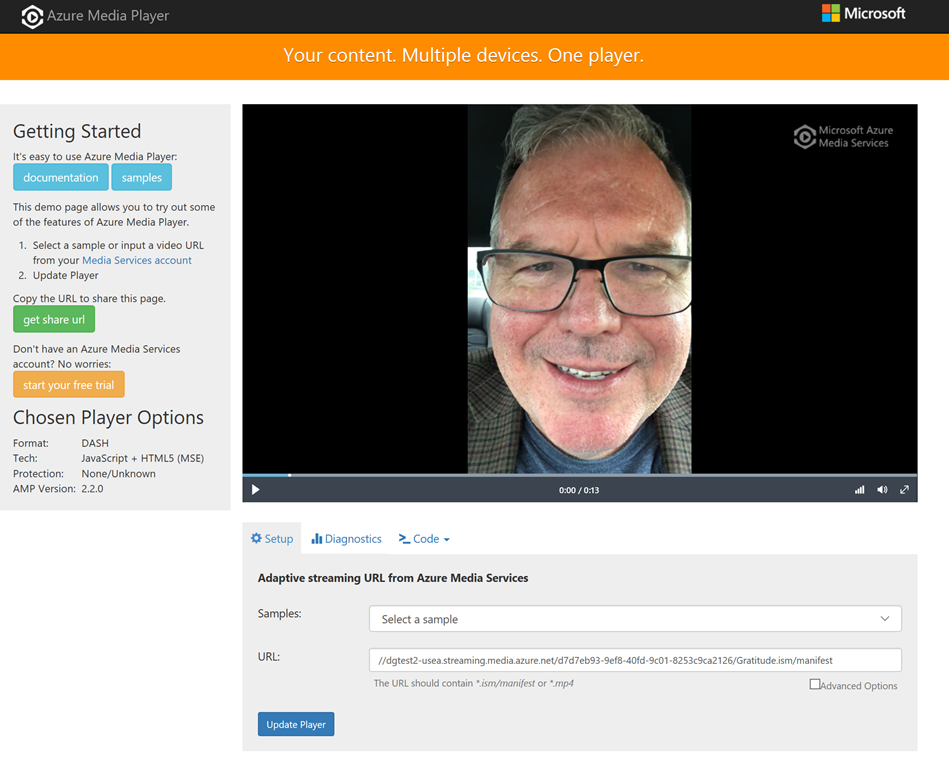
It is unlikely your users will have access to your Azure Portal, so you should send them a link with a player they can use. You can use the free Azure Media Player to share your video.

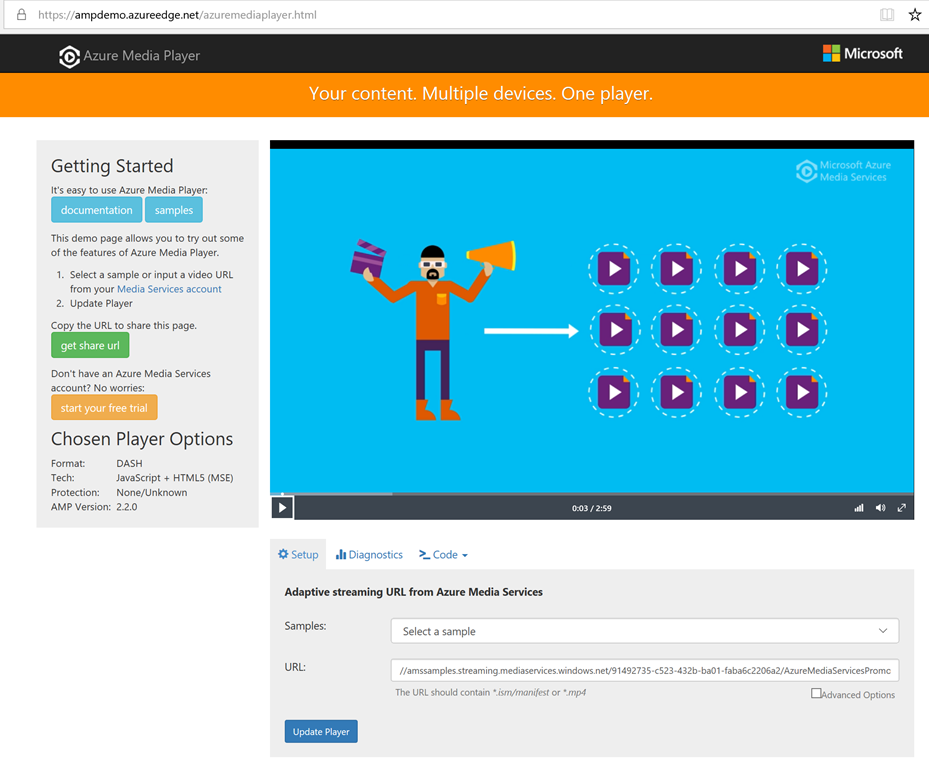
Navigate to https://ampdemo.azureedge.net/azuremediaplayer.html

The page in Fig. 19 displays.

Fig19-AzureMediaPlayer
Fig. 19

In the URL field, paste your PLAYBACK URL (without the "http://") that you copied from the Azure Portal. It should look something like this:

dgtestms-usea.streaming.media.azure.net/1acb35e1-373c-481a-b37d-3e0e10394b0a/TelephoneLine.ism/manifest

Click the [Update Player] button. Your video should start playing.

To share this video and its players with others, click the [get share url] button and the displayed code. It should look something like this:

https://aka.ms/azuremediaplayer?url=%2F%2Fdgtestms-usea.streaming.media.azure.net%2F1acb35e1-373c-481a-b37d-3e0e10394b0a%2FTelephoneLine.ism%2Fmanifest

You can email this link to others or create a link on your web page.

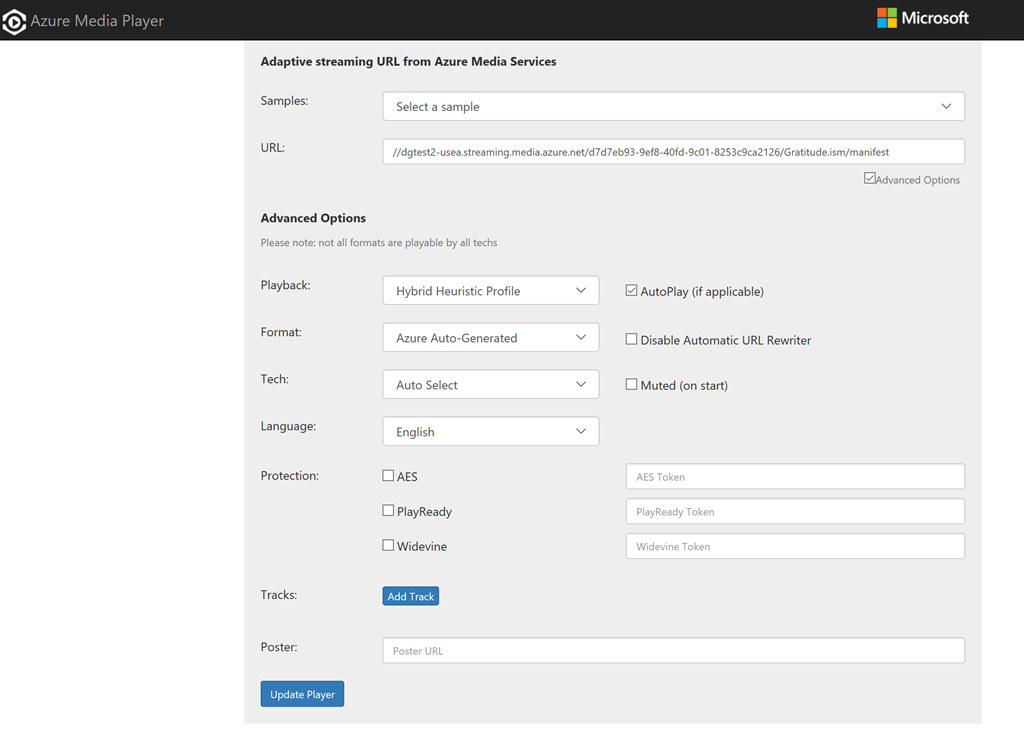
Click on the dropdown next to the "Code" tab to see other ways to share this video and player.

In this article, I showed you how to upload, encode, and share a video using Azure Media Services.


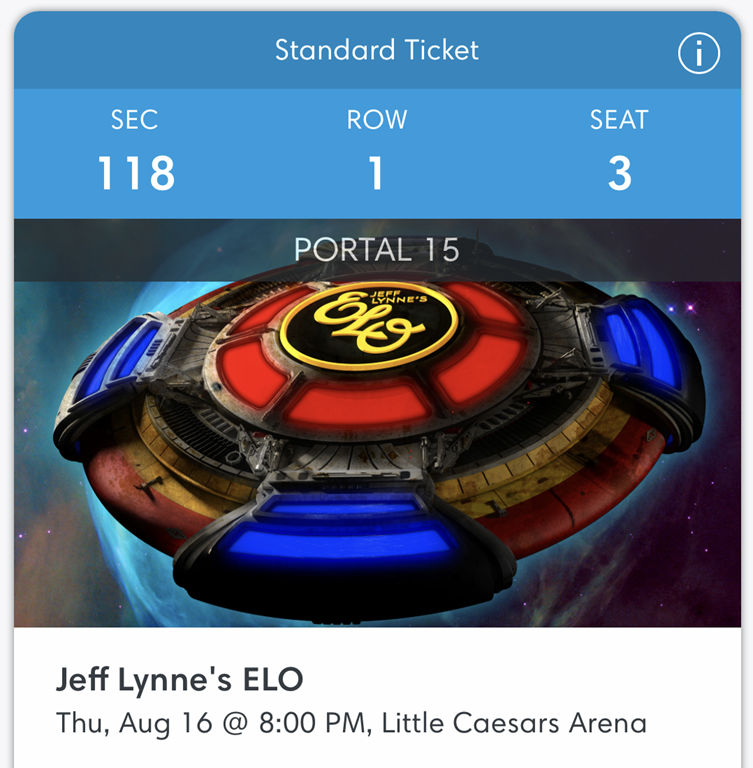
ELOticketIt has been a long time.

Electric Light Orchestra had not played a concert in Detroit in 37 years. And it has been about the same amount of time since an ELO single cracked the US top 40. 

But despite peaking in the studio in the 1970s, enough 50-something rock fans remembered them with enough fondness to pack Little Caesars Arena Thursday night in Detroit.

Only Jeff Lynne remains from the ELO of their heyday; but Lynne was always the face of the band, as the lead singer, songwriter, and producer of most of their songs and albums. At age 70, Lynne looks the same as he did decades ago, his aging face hiding behind long brown curls, a beard, and dark glasses, just as it did during the band's heyday. His voice is still strong, although he delegated some of the lead vocals to another singer.

I made the trek to Detroit from Chicago in large part to reunite with some old high school friends and enjoy a night of memories.

Mr. Lynne did not disappoint. Known for pop melodies over complex arrangements, he brought with him a string section and 4 keyboardists to accompany his rock band and backing vocalists.

ELOinconcertThe set list was strong on the hits of the late 70s. For about 90 minutes, he played songs like "Evil Woman", "Do Ya", "Rockaria", and "Sweet Talkin' Woman" took me back to my high school and junior high school days. The acoustics were surprisingly good for a hockey arena and the sellout crowd responded to each memory the band played. He even played "Handle With Care" from his days with the Traveling Wilburys supergroup, delighting the audience with videos of him recording with Tom Petty, Roy Orbison, George Harrison, and Bob Dylan. ELO closed the set with some of their biggest hits: "Don't Bring Me Down", "Turn to Stone", and "Mr. Blue Sky". They were gone from the stage for barely a minute before returning to play an extended version of Chuck Berry's "Roll Over Beethoven".

For me, it was a chance to reconnect with my past. Old memories, old friends, old songs, and my old home town made Thursday night a special memory.


By default, when I create and launch a UWP app in Visual Studio, a debugging toolbar displays, as shown in Fig. 1.

Fig 1-DebuggingToolbar
Fig. 1

This can be useful during development, but it also can get in the way. It hides elements on my form and it does not look good during a demo.

Suppressing this toolbar is simple, but it took me some time to find it.

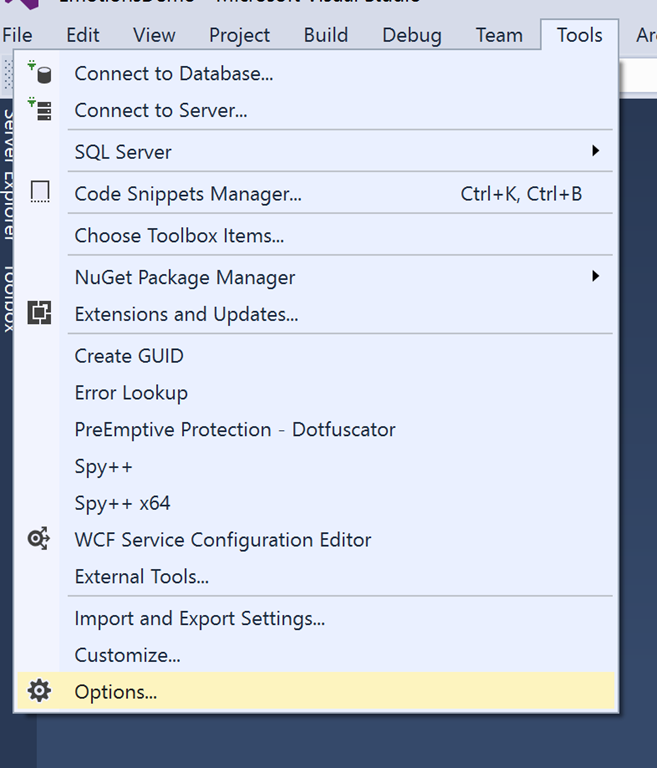
From the Visual Studio menu, select Tools | Options, as shown in Fig. 2.

Fig 2-ToolsOptions
Fig. 2

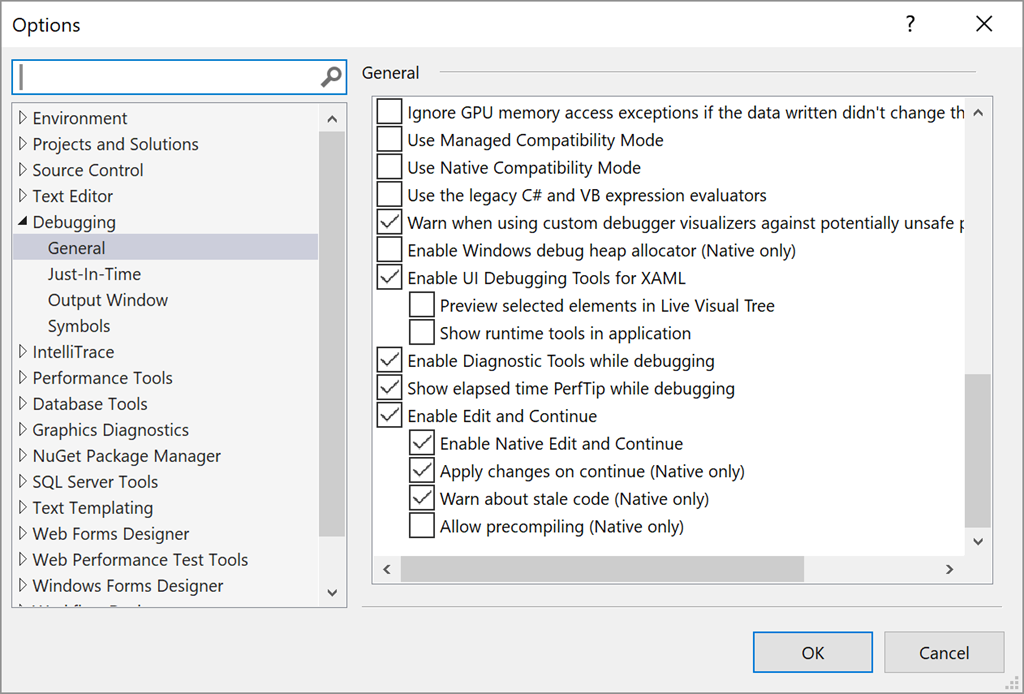
The Options dialog displays. Expand the "Debugging" section on the left and select "General", as shown in Fig. 3

Fig 3-DebugGeneralOptions
Fig. 3

Within the Debugging / General section, clear the checkbox next to "Show runtime tools in application"

Click the [OK] button to apply these changes. The toolbar will not display when you run your project from Visual Studio.

To re-enable this toolbar, open the Options dialog and check the checkbox and click [OK].


GCast 9:

Azure Linux Virtual Machines

Microsoft Azure supports many open source and non-Microsoft technologies, including Linux VMs. Learn how to create and connect to a Linux VM hosted in Azure.


Here is my presentation "Building and Training your own Custom Image Recognition AI" that I delivered in June at NDC-Oslo in Norway.

Building and Training your own Custom Image Recognition AI

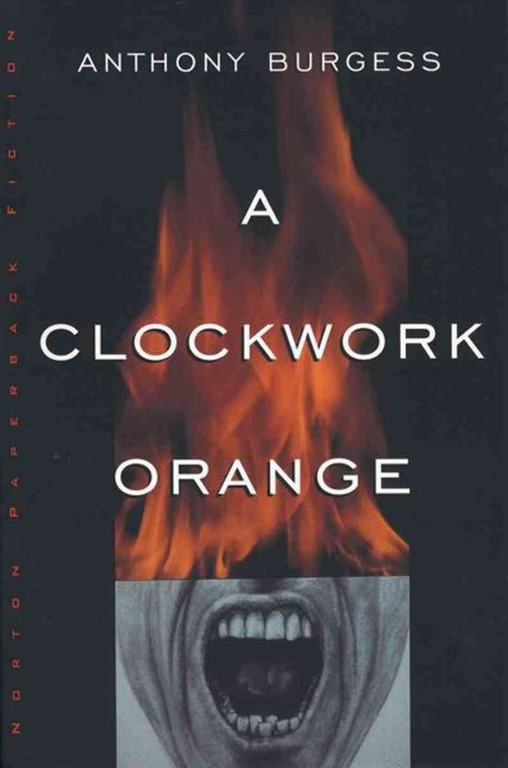
ClockworkOrangeA Clockwork Orange by Anthony Burgess is the story of Alex - a juvenile delinquent sociopath living in a dystopian society of the near future. Alex and his friends spend their days and nights  terrorizing anyone they can. Alex fills his life with rape, battery, robbery, and (eventually) murder. In prison, Alex becomes the subject of an experimental treatment that forces him to become violently ill at even the thought of violence or sex. He is released back into the violent society, where he is harmless, but has no way to defend himself.

This book is a morality play - primarily about whether removal of free will is justified if it results in greater lawfulness and whether the needs of society take precedence over the rights of individuals. The message is not subtle. Burgess fills the first third of the book with acts of extreme violence in order to emphasize Alex's corruption. When he is treated and released, his punishment comes quickly, harshly, and very violently.

One of the reasons I love this book is Burgess's creative use of language. It is told in the first person by Alex, who speaks in Nasdat, the slang of  his day. Burgess invented Nadsat by combining English and Russian words ("droog" for "friend"; "golova" for "head") with a bit of cockney rhyming ("pretty polly" for "money") and some childlike phrases ("appy polly loggy" for "apology"). This may slow down the reading as we must infer meaning of words from their context; but it adds a timeless quality to the book that it would not have had the author chosen an existing slang from a specific period. 

This book is not for everyone. The use of Nadsat makes it more difficult than most books of this length. Some readers will not be able to get past the violence. Some may think that, because of Alex's intelligence and charm, Burgess is glorifying him and his violence. But the author uses this violence as a setup for Alex's fall. Alex justifies his ultraviolent lifestyle because he lives in an ultraviolent society. But he takes this logic way too far, contributing mightily to the violence and blaming all his misfortunes on others. Still, he is proved right in a way, as he is completely unable to cope in a world when he becomes incapable of responding with any violence. Alex is a somewhat sympathetic anti-hero, but his soul is clearly corrupted - perhaps beyond redemption.

The book does not take a position on the moral questions it raises - particularly around the rights of individuals versus the safety of society. Clearly, Alex and his droogs were a great threat to their world and citizens feared even to go outside at night. But the government's solution was also a failure, causing them to re-think how they addressed crime.

Burgess himself did not count A Clockwork Orange among his best novels. He claimed he wrote it in just three weeks and he preferred stories with a subtler message.

But I loved it. I loved the language and the style. I loved the scenes that would mirror themselves in the beginning and end of the book. I loved the twisted sense of justice displayed in the story. And I loved how the beauty of the language contrasted so sharply with the ugliness of the actions it was describing. This tension kept me focused throughout the book.

It is a real horrorshow story that remains in the golova of me and my droogs.


Here is my presentation "How Cloud Computing Empowers a Data Scientist" that I delivered in June at IT Camp in Cluj-Napoca, Romania.

ITCamp 2018 - David Giard - How Cloud Computing Empowers a Data Scientist from ITCamp on Vimeo.


Here is my presentation “Own Your Own Career – Advice from a Veteran Consultant” that I delivered in June at IT Camp in Cluj-Napoca, Romania.

ITCamp 2018 - David Giard - Own Your Own Career – Advice from a Veteran Consultant from ITCamp on Vimeo.


I have a number of JavaScript projects that require an API key or other secret information that I don't wish to share with the outside world. This is a problem if I share the rest of the source code in a public GitHub repository.

Here is how I handle it.

  1. Create a getkey.js file with a single getKey function.
  2. Include getkey.js in my HTML document(s).
  3. Call getKey() from another JavaScript file, but wrap the call in a try/catch block. If an error occurs, warn the user that they must add this file / function.
  4. Add a .gitignore file to my project to exclude getkey.js
  5. Check the rest of the project into GitHub.

Create a getkey.js file

Here are the contents of my getkey.js file:

var getKey = function(){
    return "3899084ab2353243735944a95b0eba51";
}

Of course, the return value will be your appropriate key.

Include getkey.js in my HTML document(s)

JavaScript is called from script files referenced in my HTML documents. I typically have a file named "script.js", which contains the main functions for my page. So I include both that file and getkey.js within the tag as shown below.

<script src="scripts/script.js"></script>
<script src="scripts/getkey.js"></script>

Call getKey() from another JavaScript file

From script.js, I add code to call the getKey() function within a try/catch block. This will throw an exception if the script cannot find the getKey function (usually because it cannot find the getkey.js file). In this example, I output a useful error message in a DIV with an ID of "OutputDiv".

Here is the relevant code.

const missingKeyErrorMsg = `<div>No key found.<br>
	This demo will not work without a key.<br>
	Create a script.js file with the following code:.</div>
	<div style="color:red; padding-left: 20px;">
	var getKey = function(){<br>
		&nbsp; &nbsp; return "xxxxxxxxxxxxxxxxxxxxxxxxxxxxxxxxx";<br>
	}
	</div>
	<div>where xxxxxxxxxxxxxxxxxxxxxxxxxxxxxxxxx is your Azure Face API key</div>`

try {
	var subscriptionKey = getKey();
}
catch(err) {
	$("#OutputDiv).html(missingKeyErrorMsg);
	return;
}

Add a .gitignore file to my project to exclude getkey.js

I want to keep the getkey.js file locally, but I don't want to check it into GitHub. Adding a file named ".gitignore" in the root of my project allows me to list any files or folders that I don't want to include in my GitHub repository.

Add the following line to the .gitignore file

getkey.js

Check the rest of the project into GitHub.

Once the above steps are completed, it is safe to check it into GitHub. The getkey.js file will not be checked in. When another user checks it out, they will need to create this file. I recommend creating a read.me file and pointing this out.

Even if they forget, the error message should give them an idea why their code is not working.

There are other ways to address this issue, but this way works for me.


WatchmenWho watches the Watchmen?

I remember reading Watchmen by Alan Moore and Dave Gibbons 30 years ago, when it was originally released as a 12-issue series. I waited for each issue and it took me a year to get through the entire story. But this week, I read the complete saga as a single volume and I think this is how Moore and Gibbons intended it. The story is complex enough that mysteries are introduced in one chapter and resolved several chapters later.

Although published by DC Comics, the story takes place outside the DC superhero continuity.

The main difference from the DC universe is the impact that superheroes had on their world, since first appearing on the scene in the 1930s. Originally, they were a group of costumed people with excellent athletic abilities and desire to fight crime. But things changed when Dr. Manhattan appeared on the scene. Dr. Manhattan was a physicist caught in an atomic experiment that gave him nearly godlike powers of strength, invulnerability, the ability to transport himself and other people and objects; and the ability to see forward and backward in time.

Dr. Manhattan working for the U.S. government greatly shifted the balance of power during the Cold War. In this world, the U.S. won the Vietnam War and Richard Nixon remained president for decades (Woodward and Bernstein's bodies were found in a parking garage and the Watergate scandal never came to light).

Costumed heroes eventually lose favor among the general public, which distrusts their great power; and by the police, who are frustrated by them operating outside the law as vigilantes.

The story follows a number of costumed heroes and former heroes:

  • The aforementioned Dr. Manhattan
  • The cynical and amoral Comedian, who works for the government or whoever will pay him the most
  • Retired hero Nite Owl - the second of that name
  • Ozymandias, who hung up his costume to start a business and become a billionaire
  • Rorschach, a psychopath with a strong moral compass that justifies him murdering criminals.
  • The Silk Spectre, who inherited that name from her mother, who pressured her into the superhero business.

It's a fascinating story, made better by all the little details - the graffiti on the wall in the background; the minor subplots (Rorschach’s psychiatrist is so troubled by his interactions with the hero that his marriage begins to crumble); the easter eggs (The pages of Chapter 5 are symmetrical, such that the last page mirrors the first, page 2 mirrors the second last, and so on); and stories within stories (a minor character reads a pirate comic throughout the series, which tells a morality play, not dissimilar to the one acted out by the major characters). One gets the feeling that multiple readings would reveal even more layers to the story.

But the strength of Watchmen is in the conflicting morals of each of the characters and the conflict this causes among the group. Some, like Ozymandias and Rorschach are absolutely convinced of their moral high ground; Dr. Manhattan loses his connection with the human race as he loses his humanity, and this affects his morality; The Comedian and the first Silk Spectre are in the superhero business for the fun of it; while others, such as Nite Owl and the second Silk Spectre, wrestle with questions of right and wrong and how to respond to evil.

The reader is confronted with moral questions, most of which go unanswered:

  • Do the ends justify the means?
  • Is nuclear deterrent (or superhuman deterrent) enough to preserve peace?
  • Does the universe need humans? Is it better with or without them?
  • What obligations do the powerful have to protect the powerless?

It is the last question that drives this story forward.

Watchmen changed the perceptions many had about comic books and graphic novels in the 1980s. Its dark themes and complex plots and characters were more than other titles at the time. As a result, the entire industry was challenged to produce at least some more titles that were heavier and higher quality than their normal super hero fare.

3 decades later Watchmen still stands up - not just as a graphic novel, but as a novel.


July 2018 Gratitudes

Comments [0]

8/5
Today I am grateful to visit the American Writers Museum for the first time.

8/4
Today I am grateful to tour the Clarke House Museum yesterday.

8/3
Today I am grateful for my first visit to Rosa's Lounge for the Thursday night blues jam.

8/2
Today I am grateful for my first visit to Door County, WI.

8/1
Today I am grateful for a bike ride around Sturgeon Bay, WI yesterday.

7/31
Today I am grateful for my first visit to a Wisconsin Supper Club.

7/30
Today I am grateful for lunch yesterday with Tim, Natale, and Emilija.

7/29
Today I am grateful for the summer party at my condo building yesterday.

7/28
Today I am grateful for breakfast yesterday with Kevin and Dustin.

7/27
Today I am grateful for dinner last night with Brent, Carl, and Michael.

7/26
Today I am grateful for:
-an amazing week at the Imagine Cup World Finals
-Lunch with Becky at the Microsoft expo
-Coffee with Steve

7/25
Today I am grateful for dinner with Nino last night in Seattle.

7/24
Today I am grateful to chat with a couple members of my new team.

7/23
Today I am grateful for a party last night at the University of Washington.

7/22
Today I am grateful for my first Kindle.

7/21
Today I am grateful for a walk through the natural area of Winnemac Park last night.

7/20
Today I am grateful to have had Dan and Rowena and their family visit this week.

7/19
Today I am grateful to successfully rebuild my 2 laptops yesterday and for Sergiy's help with this.

7/18
Today I am grateful for a walk around Chinatown last night with Rowena.

7/17
Today I am grateful to Dan for cooking me a steak dinner last night.

7/16
Today I am grateful to go to B.L.U.E.S. Chicago last night with Nick, Tim, and Natale.

7/15
Today I am grateful for my first visit to the Upper Peninsula of Michigan.

7/14
‪Today I am grateful to spend the past 2 days with Dan and Rowena and their family. ‬

7/13
Today I am grateful for my first visit to Mackinac Island. .

7/12
Today I am grateful for dinner last night in Pellston, MI at the home of Patrick and Susan.

7/11
Today I am grateful to have Nick at my place last night and to Tim for picking us up and taking us to dinner last night.

7/10
Today I am grateful to work with some top Chicago high schools students yesterday through Northwestern Academy.

7/9
Today I am grateful for
-a visit to the National Museum of American History yesterday
-a weekend in Maryland and Washington, DC

7/8
Today I am grateful to attend a family reunion this weekend and re-connect with so many of my extended family.

7/7
Today I am grateful for a visit to the National Aquarium in Baltimore yesterday.

7/6
Today I am grateful for:
-a visit to the Smithsonian National Museum of Natural History
-my first visit to Nationals Park, where I saw the larges comeback in franchise history yesterday

7/5
Today I am grateful I managed to get these family photos organized before the reunion.

7/4
Today I am grateful to live in the United States of America.

7/3
Today I am grateful for:
-a tour of Southern Illinois University
-a drive through Crab Orchard National Wildlife Refuge

7/2
Today I am grateful for my first visit to Carbondale, IL.


TimeTravelersWifeHenry DeTamble has a genetic disorder that causes him to spontaneously be thrust backwards or forwards in time. This causes many problems. Henry often finds himself naked in unfamiliar surroundings where he must steal clothes, money and food to survive. He often returns to the same places - sometimes at a particular date and time; sometimes at varying points in time. For example, he has witnessed the death of his mother in a car crash dozens of times.

Henry is drawn repeatedly to a home near Grand Haven, MI, where he meets a little girl named Clare. Henry and Clare develop a friendship over the years as Henry appears in her life at random times and at random ages of Clare's childhood. Eventually, the two meet in real time, where they fall in love and marry.

When Henry and Clare meet in real time, it is Henry's first encounter with her; yet Clare has memories of a relationship with an older Henry that spans to her early childhood. 

The novel is written entirely in the first person, alternating between Henry and Clare's perspective - sometimes describing the same scene from each point of view. This gives us a good look at how Henry's disorder affects each of them differently and how they choose to deal with it.

The book is also written entirely in the present tense, as if they are narrating the events that are happening in their own timeline - wherever that happens to take them. This gives the story an immediacy and removes the certainty that either character will survive into old age.

Each chapter begins with the age of the characters who appear. Although Henry is 8 years older than Clare in real time, he is decades older in many of their encounters. Sometimes, Henry encounters a version of himself at different ages. The storytelling is necessarily far from linear. Often one character has memories of prior encounters that the other does not possess, which makes for an interesting dynamic.

The Time Traveler's Wife is one of the most imaginative novels I've read. In her first novel, Audrey Niffenegger has created both a science fiction story and a love story. As a time travel story, it covers the obligatory questions of free will, predestination, cause and effect, and the consequences of interacting with your own past. But those are secondary themes to the relationships of the people affected by Henry's sudden disappearances and appearances and the disruptions in their lives.

Much of the story covers how people deal with loss. Henry's father never recovers from the death of his wife; Henry deals with his disability by drowning in drugs, alcohol, and wanton sex - until he meets Clare, who inspires him to straighten himself out and live as normal a life as possible. Clare spends her life dedicated to and supporting Henry, even though he repeatedly disappears and she never knows if and when he will return.

I grew to care about this couple, who were blessed to be thrust together by destiny, but cursed by a unique affliction. Henry and Clare suffer through a relationship hampered by Henry's affliction and Clare's uncertainty; but they are held together by an honesty I found refreshing.

This was my second reading of The Time Traveler's Wife and it may not be my last.


OceanAtTheEndOfTheLaneThe narrator of The Ocean at the End of the Lane returns to his childhood home and is surprised by the return of repressed memories. He was a sad and lonely child; He preferred books over sports and no one came to his seventh birthday party and his parents mostly ignored him; He did manage to befriend his neighbor Lettie Hempstock and her mysterious family.

The story quickly turns much darker.

A family boarder steals the family car and commits suicide in it; then a monster uses the boy's body as a means to enter this universe and terrorize the local people. The monster takes on a human form, calling herself Ursula Monkton and injects herself into the boy's family, moving into the home and seducing the father.

Lettie's family proves to be more than they seem as they battle Ursula and protect the boy from her/its threats.

I really enjoyed this novella, which began as a childhood memory and turned into a horror / monster story. The characters could have come from the dark fairy tales of Roald Dahl and the creatures and magic could have been found in the fantasy animated films of Hayao Miyazaki

I liked the moral ambiguity Gaiman presented. Ursula arrives with good intentions. She wants to give people what they want; but when she discovers that people want money, she hurls coins at them and makes money appear in their throat. Lettie summons creatures to defeat Ursula, but they are all then threatened by these powerful creatures.

The Ocean at the End of the Lane is one of NeillGaiman's shortest novels, but he packs a lot into the story.


GCast 8:

Azure Virtual Machines

What is an Azure Virtual Machine? How do I create one?


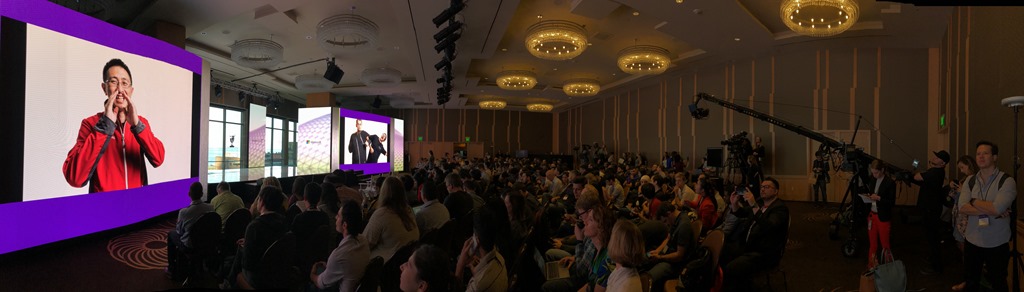
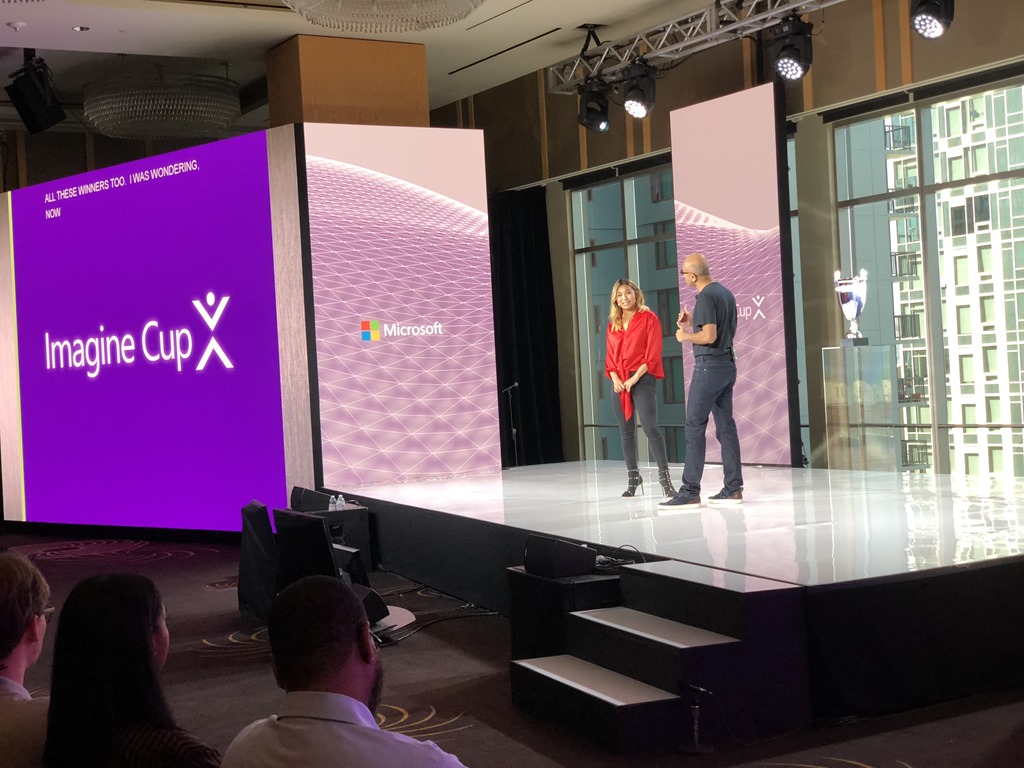
IMG_1666Hundreds of people packed the ballroom at the Four Seasons ballroom in downtown Seattle for the World Finals of the 2018 Imagine Cup competition.

Hosts Kate Yeager and Corey Sanders paused.

"And the winner is…"

The crowd leaned forward in anticipation.

They stomped their feet in a simulated drumroll.

They had met the judges; they had heard from Microsoft CEO Satya Nadella and Olympic Gold Medalist Chloe Kim; and they had seen presentations from the three finalists.

IMG_1678Over 40,000 students from almost 200 countries around the world had signed up for this competition, but only the top 40 teams were invited to the Seattle area for the finals. These teams represented 33 different countries, and each pitched their projects - a combination of hardware, software, and business ideas - to a panel of judges. The judges culled the field to 18 semi-finalists; then to 3 finalists and these 3 delivered their final pitches on Day 3.

The 3 finalists were

  • iCry2Talk, a team from Greece that developed a system to analyze the crying of babies,  determine what triggered the crying, and communicate that to parents via text, image, and voice messages.
  • Mediated Ear, a team from Japan that developed software to help hearing-impaired people listen to a single voice in a room full of other voices and noises.
  • SmartARM, a team from Canada that built a prosthetic arm with a camera in the palm, capable of recognizing images and positioning the fingers to pick up the item correctly on a muscle flex.

And now it was time to learn the winner.

And the winner was…

"SmartArm!"

IMG_0659A cheer erupted. Confetti flew from the ceiling. Music played.

SmartArm consisted of Hamayal Choudhry and Samin Khan, students at the University of Ontario Institute of Technology and the University of Toronto respectively.

I was especially pleased to see them take home the world championship. Months ago, I helped mentor them at a hackathon at the University of Toronto, where they won a prize for best use of Microsoft technology; and I've followed them as they put in countless hours of work and great ideas to advance their project to where it is today.

SmartArm took home the top prize - $85,000 cash, $50,000 Azure credits, and a mentoring session with Satya Nadella; but there were many winners beyond them and the other 2 Finalist teams. Many of the teams will return home to turn their projects into business. And many will inspire their classmates to compete next year.

It was an amazing week filled with energy and ideas.


TheLastEnchantmentThe Last Enchantment by Mary Stewart's concludes the Merlin Trilogy begun with The Crystal Cave and The Hollow Hills.

The story begins just after young Arthur's ascension to the throne of Britain. It covers Arthur's first decade as high king as he battles the Saxons and unites Britain.

But Arthur is a minor character in this novel, as Stewart focuses on Merlin, the king's cousin, mentor, advisor, prophet, and friend.

Arthur is betrayed by both his half-sisters; but we hear much more about Morgause, because she tries to poison Merlin than about Morgan, who steals the king's legendary sword.

In The Last Enchantment, as in the previous novels, Merlin's mystical abilities are never as powerful as in the familiar legend; his abilities limited to his education, his wisdom, and the ability to occasionally see visions of the present and future.  In this novel, he loses his clairvoyant power, yet retains his value to Arthur as a trusted advisor and mentor.

Despite Merlin's power and stature within the new kingdom, he shows considerable humanity. He confronts the loss of his mystical powers; He confronts his own mortality and how the kingdom will fare when he eventually passes; and he falls in love for the first time in his life. He even deals with his accidental entombment after an Morgause's assassination attempt leaves him in a deathlike state.

I loved this whole series.

I loved Stewart's ability to take a story as familiar as the Arthurian legend and make it fresh and make it her own.

I loved the way she combined the different versions  of the Arthurian legend into a coherent tale.

I loved the humanity with which she injects all her characters - even those with special abilities.

I loved the action and the politics and the romance.

I loved the relationship and loyalty between Arthur and Merlin.

I was fortunate to have discovered this series and I'm happy to have seen the trilogy through to its conclusion.


A package manager is a tool to install desired software and any other components on which that software depends. They do so by reading from a pre-configured package file, which lists dependencies, required configurations, where to retrieve binaries, and the order in which each step must occur.

Many software developers are familiar with package managers, such as NuGet (for Microsoft applications), PIP (for Python) and RubyGems (for Ruby). These are used to add components to a software project.

Chocolatey is a Package Manager designed specifically for installing desktop applications onto a Windows computer, outside of any software project.

You can get started using Chocolatey by navigating to https://chocolatey.org/. Chocolatey requires Windows and PowerShell (which comes pre-installed on current versions of Windows).

Install Chocolatey by opening a Command prompt and typing

@"%SystemRoot%\System32\WindowsPowerShell\v1.0\powershell.exe" -NoProfile -InputFormat None -ExecutionPolicy Bypass -Command "iex ((New-Object System.Net.WebClient).DownloadString('https://chocolatey.org/install.ps1'))" && SET "PATH=%PATH%;%ALLUSERSPROFILE%\chocolatey\bin"
  

or by opening a PowerShell prompt and typing

Set-ExecutionPolicy Bypass -Scope Process -Force; iex ((New-Object System.Net.WebClient).DownloadString('https://chocolatey.org/install.ps1'))
  

You will likely need to open those prompts as an Administrator. Close the prompt when you are done.

choco install openlivewriter -y choco install googlechrome -y choco install firefox -y choco install notepadplusplus -y choco install nodejs -y choco install git -y choco install putty -y choco install nodejs -y choco install visualstudiocode -y choco install paint.net -y choco install dropbox -y choco install fiddler -y choco install azure-cli -y choco install audacity -y choco install visualstudio2017enterprise -y choco install slack -y choco install filezilla -y choco install handbrake -y choco install gitkraken -y choco install camtasia -y choco install snagit -y choco install unity -y choco install azure-cli -y choco install curl -y choco install everything -y choco install spotify –y
choco install icloud -y choco install docker -y
choco install kindle –y
choco install microsoft-teams –y
choco install postman –y
choco install microsoftazurestorageexplorer -y

Once Chocolatey is installed, you can install software with the command "choco install ", followed by the name of the package. Uninstall software with the command "choco uninstall ", followed by the name of the package. You can find existing packages and their names at https://chocolatey.org/packages.

"choco install" and "choco uninstall" have a number of command line switches. I found "-y" to be the most useful, which answers "Yes" to any prompts to download or run software, saving you a lot of time and intervention.

My number 1 use case for Chocolatey is to re-install all my desktop applications after I reset a PC (delete all data and applications and re-install Windows). I have created a batch file named "ChocolateyInstallScript.bat" to install many of my favourite desktop applications.

The script is listed below:


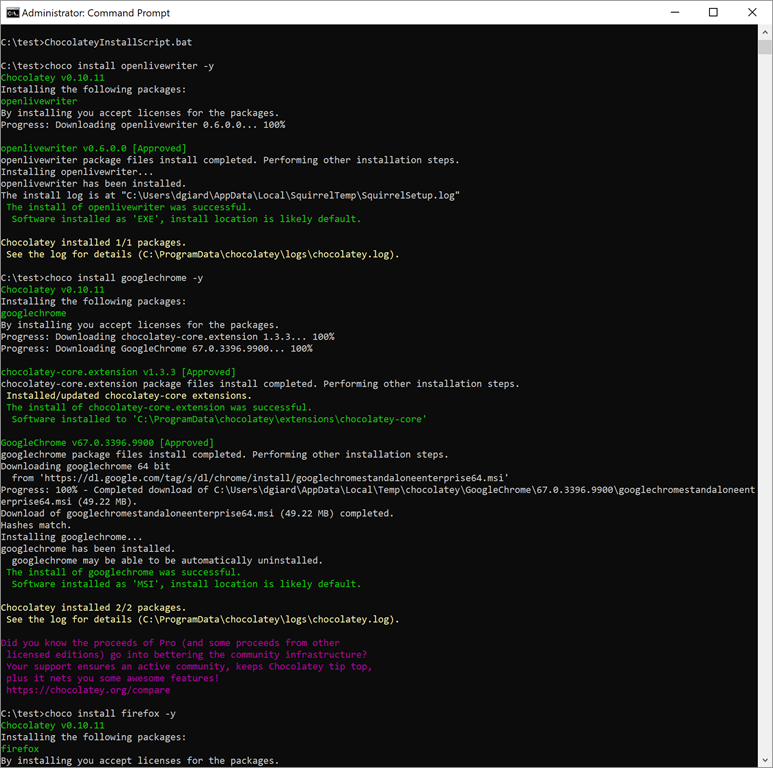
I ran this script this morning after resetting my laptop. It ran for about an hour with no intervention from me. After an hour, all the apps were installed.

Below is part of the output:

Ch01

The best part is that, for what I am doing, Chocolatey is completely free!

For more information, check out the the Chocolatey documentation here or watch my interview with Chocolatey creator Rob Reynolds here.

Chocolatey provides a a simple way to install and manage desktop applications. It saved me time and energy when I rebuilt my machine.


Azure blob storage is a good, inexpensive way to store files in the cloud.

Putting some thought into how you will use this data will save you some money.

Azure offers 3 tiers of blob storage access: Hot, Cold, and Archive. Your choice depends on how frequently you intend to access your data.

It is always free to upload data to Azure storage, but there may be a charge to retrieve data.

Hot storage and Cool storage each offers easy, quick access to your files if you want to read or download them. The difference is the price. There are 2 components of Azure storage pricing: storage and data transfer. Storage is the fee for using space on Azure hard drives. Data Transfer is the fee to access your data (for example, you may want to download a copy of a file or point to an image stored in blob storage). Hot storage has higher storage costs, but lower data access costs than cool storage. So, if you plan to access your data a lot, Hot storage makes more sense; for infrequently accessed data, cool storage is cheaper. 

There is a third Azure Storage tier called "Archive" that is designed for long-term storage data that is accessed very infrequently. Archive tier differs from the other two not only in price - but in how quickly you can access your data. The storage price is much lower, and the access price is much higher than the other two tiers. In addition, it may take hours between the time you request your data and the time you can access your data.

Hot and Cool tiers can be set at the storage account level, but Archive tier can only be set for individual blobs.

If you want to store 5TB data in Azure storage the cost per month (as of July 2018) would be:

Hot tier $104
Cool tier $76
Archive tier $10

The cost to retrieve 1 GB of data with each tier would be

Hot tier $0.00
Cool tier $0.01
Archive tier $0.02

To summarize:

Tier Monthly storage cost, 5TB Access cost / GB
Hot $104 $0.00
Cool $76 $0.01
Archive $10 $0.02

Of course, these prices can change over time. You can view the current prices at https://azure.microsoft.com/en-us/pricing/details/storage/blobs/ 

As you can see, the costs can vary significantly. Your choice depends on how frequently you plan to access your data. If you want to store images to display on your web site, the Hot Tier makes sense. If you want to store customer invoice PDFs and you expect people to only review them every month or two, Cool is probably the best choice. If you want to back up your video files just in case your local drive fails (like I did), Archive is more practical, because I might never retrieve those files.

As Azure evolves, these options become more and more driven by the demands of the customer.


HillbillyElegyJ.D. Vance was never a hillbilly. He isn't even from the hills. He was raised in the southwest Ohio city of Middletown - a rust belt town hit hard economically when a major employer left.

But his family migrated to Middletown from rural Kentucky and displays many of the attributes of the white working class of Appalachia. These people, Vance tells us, identify as "hillbillies". And in Hillbilly Elegy: A Memoir of a Family and Culture in Crisis, Vance describes the attributes of these hillbillies - sometimes through the stories of his own family and neighbors and sometimes through statistics drawn from studies and journals.

Most of those traits are not good. The undereducated, underemployed whites with roots in Appalachia (read "hillbillies) are verbally abusive and prone to violence and share a feeling of hopelessness. They tend to believe that they are not in control of their destiny - that those who succeed were born to better circumstances or were just born smarter. To make matters worse, hillbillies are often dishonest with themselves. They are convinced that they work harder than they actually do and that they attend church more often than they really do. They distrust outsiders; they distrust the government; they distrust the press. These factors combine to keep them poor and exclude them from the American Dream.

They do profess a fierce family loyalty, but only in the sense that they will attack any outsider who insults or otherwise threatens their family. They are generally not supportive of their own family and are often treat one another with cruelty. 

Hillbilly Elegy tells Vance's story of being raised by these folks, the effect it had on him and others like him, and how he was able to escape this culture and graduate from a prestigious law school.

Vance's mother was a drug-addicted single mother, who marched through a plethora of boyfriends and husbands as he was growing up. He nearly flunked out of high school while growing up and many of his friends and neighbors got into trouble and/or made nothing of their lives.

He was largely raised by his gun-toting, foul-mouthed grandmother (aka "Mamaw") and his grandfather (aka "Papaw").

Eventually, Vance graduated high school, enlisted in the US Marine Corps, earned a bachelor’s degree and a Yale law degree.

Three things contributed to Vance's eventual success.

Mamaw succeeded in instilling in him a willingness to work hard and improve himself.

He enlisted in the US Marines right after high school, where he learned discipline and many of the life skills not taught to him growing up.

He was accepted into Yale, where he learned the art of networking to achieve success.

Hillbilly Elegy is an interesting story, about a man who overcome adversity by taking control of his life and rejecting his circumstances.

But is also a social study of an American demographic that is often overlooked - the poor, white working class of Appalachia. These are people whose lifestyle is not well suited to adapting as the economy changed and felt left behind by the rest of America. This feeling of hopelessness may explain why so many of them shifted from the Democratic to the Republican party in less than a generation.

I cannot speak to the generalizations that Vance makes about his people. My ten years living in Kentucky were mostly not spent among the very poor. But I don't doubt his personal experiences and how he was able to overcome his own expectations and his perceived destiny. And I appreciate that he made me think about a group of people in a new light.


I decided I needed to re-image my laptop.

After more than two years, my laptop felt slow. Installing and uninstalling applications and forgotten / unneeded service that are still running made their presence felt in sluggish performance.

I was pleasantly surprised how easy it was do this on Windows 10.

Preparation

My goal was to completely wipe out everything on my PC and start fresh, so I wanted to know what I was removing and would have to add back.

Step 1 is to back up any data or documents on your laptop. If you are using tools like OneDrive, Dropbox, and GitHub, all your data might already be backed up. This was true for most of my files, but I found a few (most notably my PST email archive) that I needed to back up manually to an external hard drive.

Step 2 is to make note of the applications you will need to re-install after you reset the computer.

Reset PC

Once everything is backed up, you can reset your machine with a clean install.

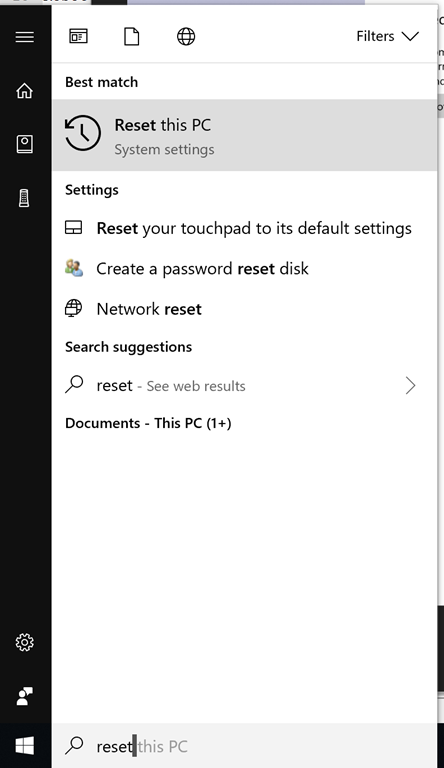
Click the START button in the bottom left and type "Reset this PC", as shown in Fig. 1.

Reset01
Fig. 1

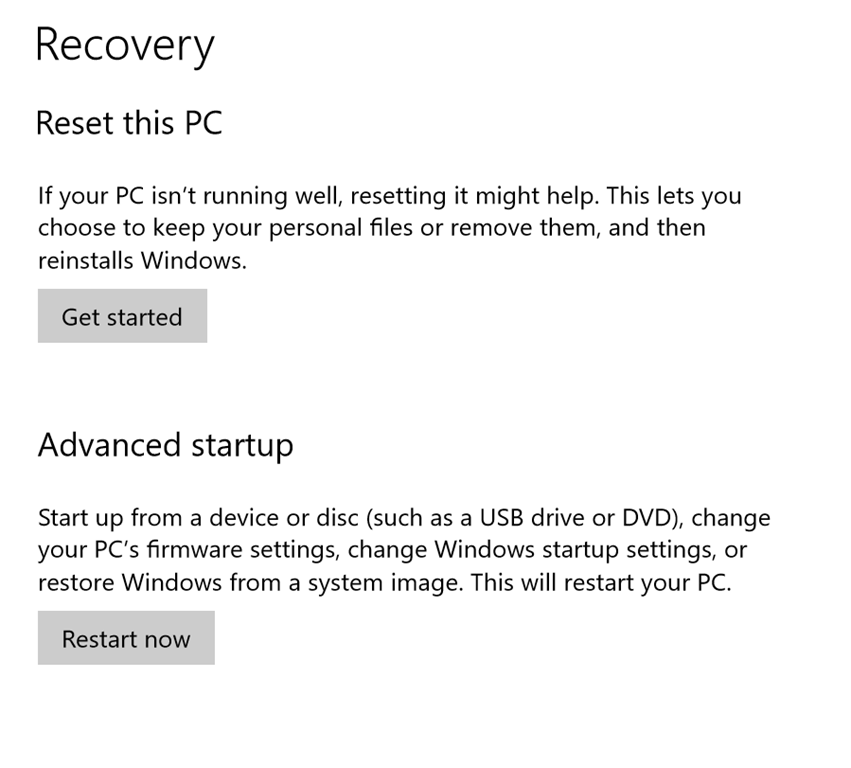
This should bring up the "Recovery" screen, as shown in Fig. 2. (Note: If this does not work, you can go to Windows Settings and search for "Reset this PC".)

Reset02
Fig. 2

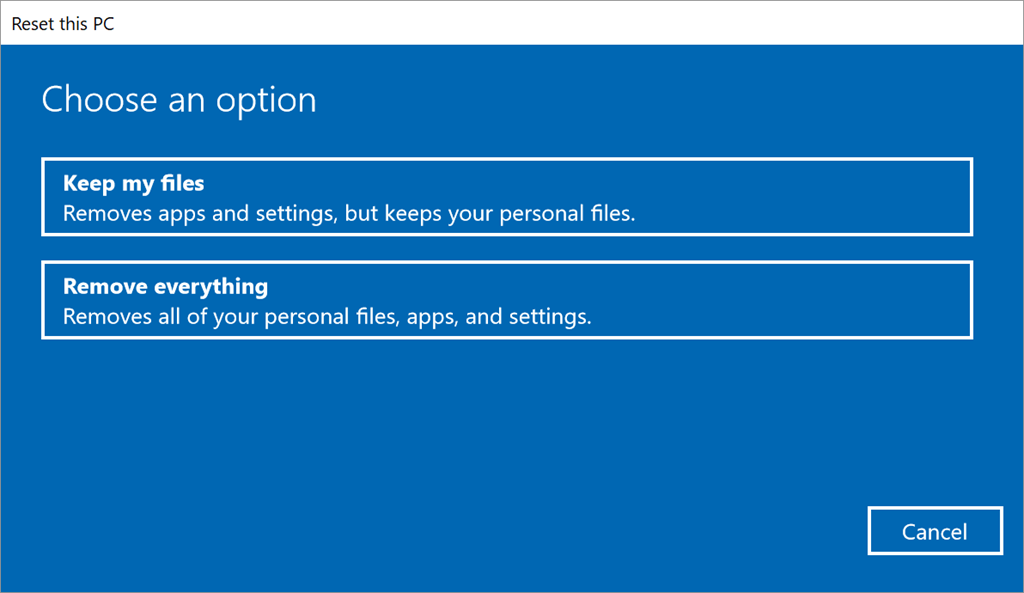
On the "Recovery" screen, click the [Get Started] button to launch the "Reset this PC" wizard. The first screen ("Choose an option") of the Wizard is shown in Fig. 3.

Reset03
Fig. 3

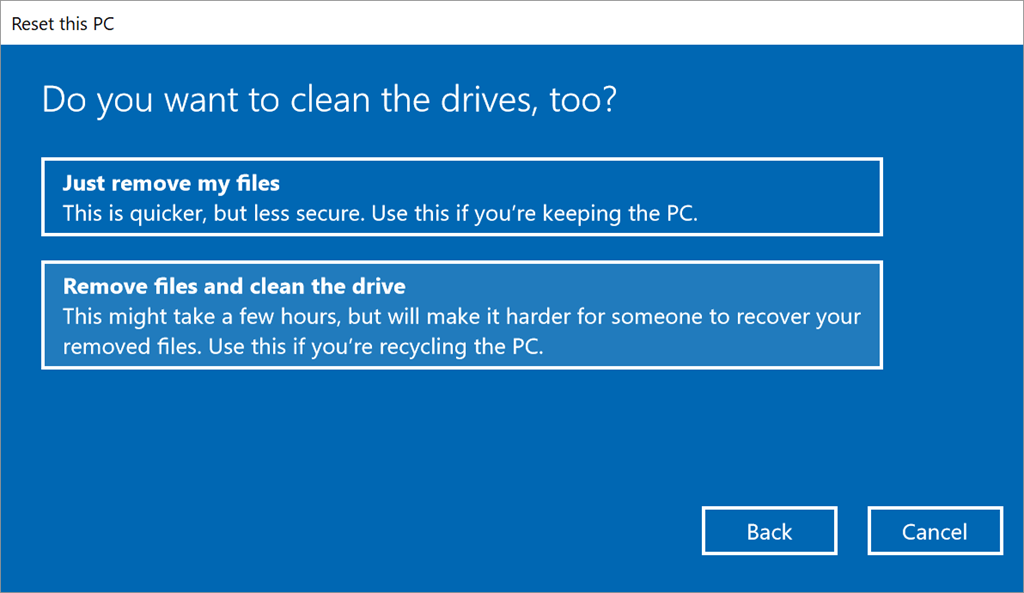
Click the [Remove everything] button to advance the "Do you want to clean the drives, too?" screen, as shown in Fig. 4.

Reset04
Fig. 4

On this screen, select [Remove files and clean the drive] button to advance to the "Ready to reset this PC" screen, as shown in Fig. 5.

Reset05
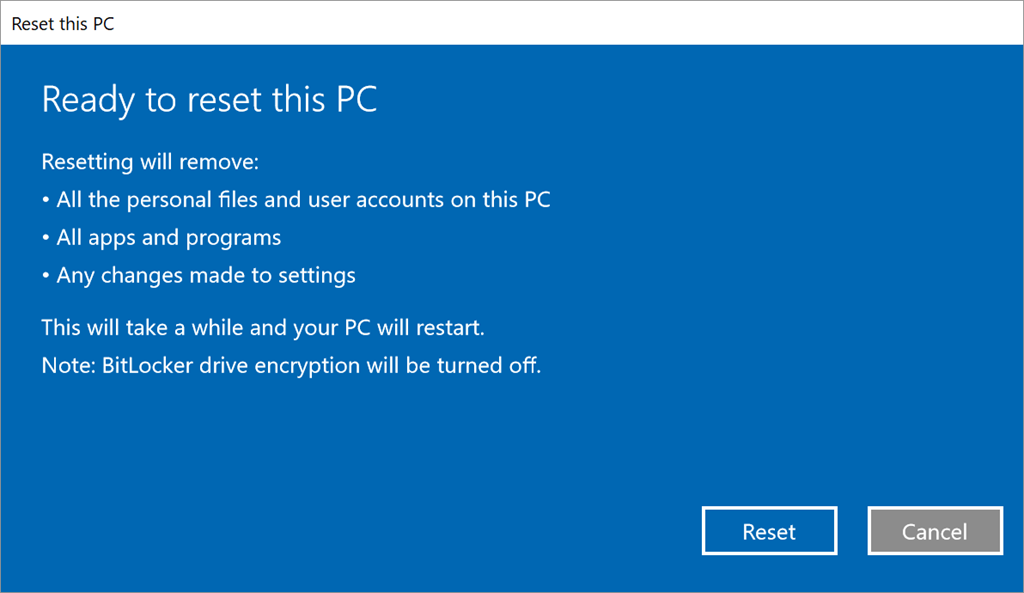
Fig. 5

On this final wizard screen, click the [Reset] button.

This will delete all files, re-install windows, and launch a startup wizard to ask you about things like preferred language and keyboard layout.

When finished, you will have a PC with Windows 10 installed and little else. At this point, you will want to re-install any applications you need and restore desired files from your backup. I used Chocolatey to automate re-installing my applications.

I did this for 2 different laptops. The whole process took about 90 minutes on my 2-year-old Surface Book and about 3 hours on my 4-year-old Surface Pro 3.

The most stressful part was backing up everything and hoping I did not forget an important file. My next project is to make sure everything is included in Dropbox, so I won't need to worry about this.


GCast 7:

Azure SQL Database

Azure MySQL Database


"Fahrenheit 451"

Comments [0]

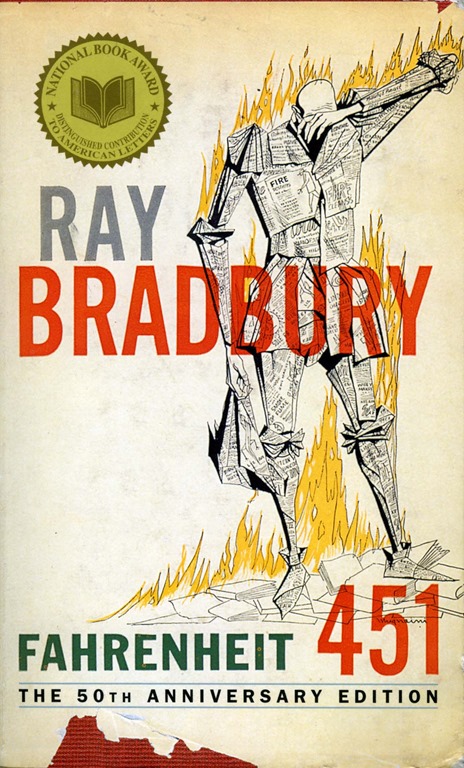
Fahrenheit451Guy Montag is a fireman. Unlike the world of today, firemen in Montag's dystopian near-future are charged with burning books. Books are illegal because books encourage free thought, which makes it difficult for the government to control its citizens.

One day, Montag meets Clarisse, a high school girl who is not afraid to think about the world and question what she sees. Montag enjoys his conversations with Clarisse and is jarred when she suddenly disappears - an apparent victim of an automobile accident. Montag begins to question his life and the morality of his job. He courts disaster when he steals a book he is supposed to burn.

Fahrenheit 451 is one of the great novels of  the twentieth century. Not only is it a compelling story; it is a warning against anti-intellectualism and those who mindlessly follow authority. It is a warning of choosing comfort and vapid entertainment over freedom; and allowing power to be too concentrated. 65 years after its publication, these issues are still relevant.

This is a book everyone should add to their reading list. It is a simple parable but packed with so much that I have read it three times.


TheJungleBrace yourself before reading Upton Sinclair's the The Jungle.

The Jungle tells the story of European immigrants lured to Chicago with promises of high-paying jobs in the meat packing industry. The promises of a good life turn out to be false - particularly for the family of Lithuanian immigrant Jurgis Rudkus. Jurgis arrives believing that he can handle the hard work and provide for his new wife and his extended family. He is strong and hard-working, and he quickly finds a job in the local stockyards.

But they have entered a world where the entire system conspires to keep down the poor. Wages are reduced downward and workers are not paid for time lost.

Even time lost to injury or illness.

Even injury or illness caused by unsafe and unsanitary working conditions, which is the norm in Chicago's meatpacking industry.

A dishonest realtor tricks the family into buying a home with hidden costs and his entire family must go to work to make ends meet. The meat trust exploits them all by keeping them in in unsafe and unhealthy conditions. Foremen, policemen, businessmen, judges, and politicians are all corrupt and use their power to prey on the powerless.

As time passes, the family falls farther into debt and deeper into despair. Some die, some are maimed, some are arrested, some are blacklisted by all the local companies, one is raped with impunity by her boss, and one disappears without a trace. Despite their best efforts, their fate seems almost inescapable. They work hard and play by society's rules but are cast aside anyway. Before long, the hope and optimism with which they arrived slips away.

Sinclair was a devout socialist and concludes the novel with a pitch for socialism as a cure for the dangers of unchecked capitalism. It's interesting to read this today over a hundred years after its publication and with the perspective of history. Socialism never took over the US and has produced mixed results in those nations where it was adopted.

But the novel did have an impact on society - mostly by calling attention to the unsanitary products sold by the meat packers. This led to increased regulation and the formation of what would become the Food and Drug Administration.

The preaching about socialism in the last few pages makes the ending feel a bit weak, but the story is a powerful one and I could not help but feel for the heartbreak experienced by Jurgis and his family. The reader feels both sympathy and outrage at the injustices they suffer.  There is a reason why this novel is considered an American classic.


GCast 6:

Azure SQL Database

How to create an Azure SQL database in the Azure portal.


I needed to convert a bunch of PDF files with pictures into image files.

I volunteered to create a slideshow for a family reunion and and one cousin sent me dozens of PDFs, which don't play nice with my editing software.

After playing around with several online converters, I settled on PDFtoPNG.

You don't need to install anything to use this tool.

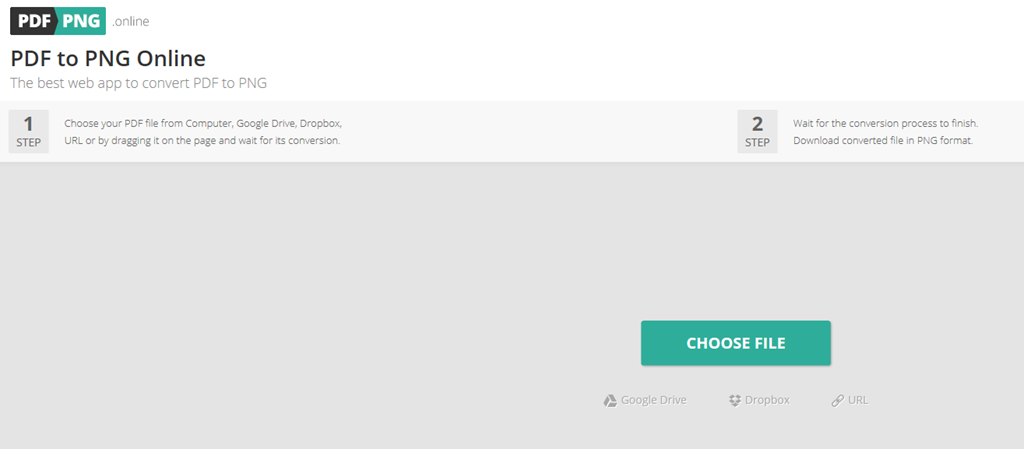
Open a browser and navigate to https://pdftopng.online/

The start page shown in Fig 1 is  pretty intuitive.

P2P01-StartPage
Fig 1

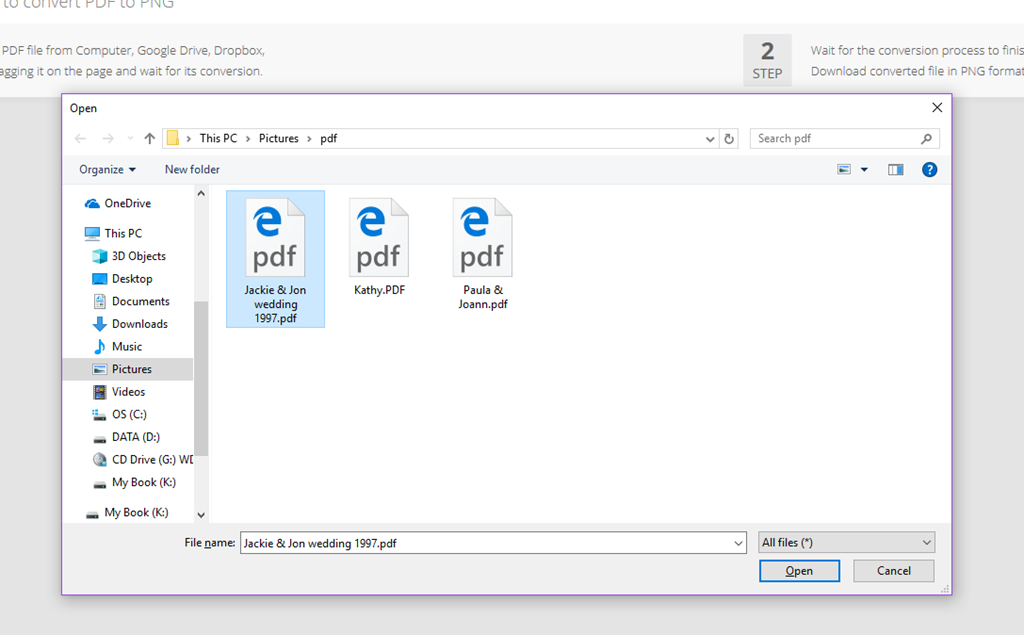
Click the large green [Choose File] button to open a "File Open" dialog, as shown in Fig. 2.

P2P02-SelectPdf
Fig 2

Select a file and click [Open]. You can only convert one file at a time, but each file takes only a few seconds.

A "Converting file" message (Fig 3) displays, while the system does its thing.

P2P03-Converting
Fig 3

When the conversion process is complete, a [Download] button displays, as shown in Fig 4.

P2P04-Done
Fig 4

Click this button to save your newly-created PNG file to disc. If the PDF file contains multiple images, a ZIP file containing all the images is created.

Using this tool, I was able to quickly convert dozens of PDFs to PNG files and add them to my slideshow. It was simple, free, and I did not need to install or uninstall any software.


GCast 5:

Azure Databricks

Learn how to create a free library and Jupyter notebooks hosted in Azure.


June 2018 Gratitudes

Comments [0]

7/1
Today I am grateful for:
-My first pair of prescription eyeglasses
-A visit yesterday to the Chicago Women's Park and Gardens

6/30
Today I am grateful for my first visit to IKEA.

6/29
Today I am grateful to David for taking time yesterday to answer all my questions.

6/28
Today I am grateful that I can binge-watch TV shows on demand.

6/27
Today I am grateful to hear Laretha Weathersby and the JW Williams Blues Band at Blue Chicago last night on my first visit to the venue.

6/26
Today I am grateful for a conversation with a financial adviser yesterday.

6/25
Today I am grateful to attend the Chicago Food Truck Festival yesterday.

6/24
Today I am grateful to the organizers of #BeerCityCode for an excellent conference.

6/23
Today I am grateful for:
-Drinks with J. Tower at Founder's last night
-The hospitality of Chris and Tracy last night

6/22
Today I am grateful for a nice Italian dinner with friends last night to celebrate the end of the school year.

6/21
Today I am grateful
-to go to an optometrist yesterday after years of neglect
-to go to the Art Institute of Chicago for the first time this year.

6/20
Today I am grateful to celebrate Father's Day last night with my son Tim.

6/19
Today I am grateful to spend a night in my own bed.

6/18
Today I am grateful for a week in Norway - my first visit to this country.

6/17
Today, I am grateful for:
-a walk around Bergen, Norway
-a visit to 2 art museums
-a chance to try some exotic Norwegian foods

6/16
Today I am grateful for a train ride across Norway and a boat ride through the fjords.

6/15
Today I am grateful for my first time speaking at and attending NDC-Oslo.

6/14
Today I am grateful for the #ndcoslo after-party.

6/13
Today I am grateful for a boat ride around Oslo.

6/12
Today I am grateful to work on a Machine Learning project this week with a train company in Oslo.

6/11
Today I am grateful for BBQ in Norway with Jimmy, Adam, and Dominick.

6/10
Today I am grateful for a few days in Romania

6/9
Today I am grateful to play Dungeons & Dragons in Transylvania.

6/8
Today I am grateful for another excellent #itcamp

6/7
Today I am grateful to Dan for picking me up at the CLJ airport and driving me to my hotel late last night.

6/6
Today I am grateful for free wine on European airlines.

6/5
Today I am grateful to finish a bunch of blog posts and screencasts yesterday.

6/4
Today I am grateful for dinner with Tim last night and to Adam and his daughter for stopping by.


DarknessAtSethanonA Darkness at Sethanon concludes Raymond Feist's Riftwar Saga - a trilogy that became a tetralogy when Feist decided to rewrite volume 1, splitting it into 2 books.

An invasion by the dark sorcerer Murmandamus threatens the world of Midkemia and ultimately all other worlds in the Riftwar universe. Murmandamus is determined to capture the city of Sethanon and the powerful lifestone buried beneath it. Our heroes from the previous novels (Pug, Tomas, Arutha, and others) gather the knowledge, weapons, and allies they need to try to defeat Murmandamus.

There are twists. Characters we thought dead are found alive, former foes become allies, and Murmandamus's motivation is not what it seems.

This book is larger in scope than its predecessor as the characters travel across dimensions and even travel backwards in time to the beginning of their universe. The time travel sequence gives the characters and the reader insights into the history of the universe and its many sentient and magical races.

Feist is better at action than at character development. Not that the characters are bad - it's just that he jumps them ahead abruptly, rather than letting us watch them mature and otherwise change. And this book has plenty of action, including several large battle scenes.

I'm glad I stuck with this series, as it got better as it went along.


The .NET framework provides the FtpWebRequest class to assist you in managing FTP commands.

A common use of this class is to upload a file to an FTP site.

To do this in C#, we create an FtpWebRequest object (the WebRequest object has a static factory method to do this) on the object, set our intended method, and specify the FTP site's login credentials, as shown below.

string ftpUrl = @"ftp://blah.ftp.blah.com";
ftpUrl = ConfigurationManager.AppSettings["ftpUri"];
string userName = ConfigurationManager.AppSettings["userName"];
string password = ConfigurationManager.AppSettings["password"];

string ftpDestinationFolder = "site/wwwroot/content/Giard";
string localFolderSource = @"C:\Test\_source";
string fileName = "testfile.txt";

string sourcePath = @"C:\Test\_source\testfile.txt";
string destinationPath = @"ftp://blah.ftp.blah.com/folder1/testfile.txt";

FtpWebRequest request = (FtpWebRequest)WebRequest.Create(destinationPath);
request.Method = WebRequestMethods.Ftp.UploadFile;
  

A common mistake is to set only the site and folder name (and skip the filename) in the destinationPath.

To send a file via FTP, we need to read the file from disk and convert it into a Stream.

byte[] fileContents;
using (StreamReader sourceStream = new StreamReader(sourcePath))
{
	fileContents = Encoding.UTF8.GetBytes(sourceStream.ReadToEnd());
}
  

We then write this StreamReader to the FTP request object

request.ContentLength = fileContents.Length;
using (Stream requestStream = request.GetRequestStream())
{
	requestStream.Write(fileContents, 0, fileContents.Length);
}
  

Finally, we retrieve the FTP response.

using (FtpWebResponse response = (FtpWebResponse)request.GetResponse())
{
	var responseText = response.StatusDescription;
	Console.WriteLine("Completed uploading file {0}!", fileName);
	Console.WriteLine("Status={0}", responseText);
}
  

The full code of my console app is here:

using System;
using System.Configuration;
using System.IO;
using System.Net;
using System.Text;

namespace DemoFtp
{
    class Program
    {
        static void Main(string[] args)
        {
            string ftpUrl = @"ftp://blah.ftp.blah.com";
            // Note: I stored some values in app.config
            // I had to set a reference to System.Configuration to read these values
            ftpUrl = ConfigurationManager.AppSettings["ftpUri"];
            string userName = ConfigurationManager.AppSettings["userName"];
            string password = ConfigurationManager.AppSettings["password"];

            string ftpDestinationFolder = "site/wwwroot/content/Giard";
            string localFolderSource = @"C:\Test\_source";
            string fileName = "testfile.txt";

            string sourcePath = Path.Combine(localFolderSource, fileName);
            string destinationPath = Path.Combine(ftpUrl, ftpDestinationFolder, fileName);

            FtpWebRequest request = (FtpWebRequest)WebRequest.Create(destinationPath);
            request.Method = WebRequestMethods.Ftp.UploadFile;

            request.Credentials = new NetworkCredential(userName, password);

            byte[] fileContents;
            using (StreamReader sourceStream = new StreamReader(sourcePath))
            {
                fileContents = Encoding.UTF8.GetBytes(sourceStream.ReadToEnd());
            }

            request.ContentLength = fileContents.Length;
            using (Stream requestStream = request.GetRequestStream())
            {
                requestStream.Write(fileContents, 0, fileContents.Length);
            }

            using (FtpWebResponse response = (FtpWebResponse)request.GetResponse())
            {
                var responseText = response.StatusDescription;
                Console.WriteLine("Completed uploading file {0}!", fileName);
                Console.WriteLine("Status={0}", responseText);
            }

            Console.ReadLine();
        }
    }
}
  

You can find this console app in my github repository at https://github.com/DavidGiard/Demo-FTP-CSharp


GCast 4:

Azure Notebooks

Learn how to create a free library and Jupyter notebooks hosted in Azure.


A T4 ("Text Template Transformation Toolkit") template is a text generation tool that mixes raw text and code to generate text as output.

In my last article, I showed how to create a Runtime Text Template and generate output from it via the following lines of C# code:

var tt = new myT4Template();
string outputText = tt.TransformText();
  

But sometimes, it is helpful to pass parameters from your C# code and use them in your template.

The steps to do this are:

Add a T4 Runtime Text Template to your Visual Studio project  In the T4 template:

    1. Add one or more parameter directives  
    2. Use the parameters in your template

In your C# code

  1. Instantiate your T4 template object
  2. Set the Session property to a new Dictionary
  3. Pass the parameters in the Session object
  4. Initialize the T4 template object
  5. Generate the output text with the T4 template object's TransformText() method.

An example will help illustrate this.

I have a T4 Runtime Text Template named "ParamTemplate1.tt" and I want to add 2 parameters: firstName and lastName (both strings) and use them in my template.

At the top of the template file, add the following directive:

<#@ parameter name="firstName" type="System.String" #>
<#@ parameter name="lastName" type="System.String" #>
  

Notice that we included the Namespace in the parameters' data types.

Now, use the parameters in your template, as in the following code:

Hello <#=firstName #> <#=lastName #>!
  

In your C# program, add the following code

var pt1 = new ParamTemplate1();
pt1.Session = new Dictionary<string, object>();
pt1.Session["firstName"] = "David";
pt1.Session["lastName"] = "Giard";
pt1.Initialize();
var outputText1 = pt1.TransformText();
  

This passes the values "David" and "Giard" to the firstName and lastName parameters, respectively.

We can even pass in a custom data type, based on a type we create.

Imagine I have created a Person class with a FirstName and a LastName properties (both strings) and I want to pass a parameter of this type into my T4 template named "ParamTemplate2.tt" and use that parameter inside the template.

Here is an example of my custom Person class:

namespace DemoT4Parameters
{
    public class Person
    {
        public string FirstName { get; set; }
        public string LastName { get; set; }
    }
}
  

In my T4 template, I again add a parameter directive, as shown below:

<#@ parameter name="person" type="DemoT4Parameters.Person" #>
  

Notice the custom namespace in the Type.

Now, I can use the parameter and its properties in my template, as shown below:

Hello <#=person.FirstName #> <#=person.LastName #>!
  

My C# code is very similar to the first example.

var pt2 = new ParamTemplate2();
pt2.Session = new Dictionary<string, object>();
var person = new Person()
{
	FirstName = "Satya",
	LastName = "Nadella"
};
pt2.Session["person"] = person;
pt2.Initialize();
var outputText2 = pt2.TransformText();
  

You can find this code in my GitHub repository at https://github.com/DavidGiard/Demo-T4-Parameters.

In this article, I showed how to pass parameters into a T4 Runtime Text Template.


A Text Template Transformation Toolkit (or "T4") template is a text generation tool that mixes raw text and code to generate text as output.

Visual Studio contains tools to assist with the creation and execution of T4 templates.

To add a T4 template to your project, right-click on the project, and select Add | New Item from the context menu.

In the "Add New Item" dialog, the T4 templates are listed under the General category; but you can find them quickly by typing "T4" in the "Search Installed Templates" textbox.

There are two kinds of T4 templates: a Text Template and a Runtime Text Template. Each of these starts with a file with ".tt" extension, but is designed to generate at least one other file.

The Text Template regenerates the final output file every time you save the ".tt" file. This is a quick way to generate simple files, but it lacks flexibility.

The Runtime Text Template generates a VB or C# class that you can call from your code to generate the output file. We will focus on the Runtime Text Template in this article.

A Runtime Text Template consists of raw text (which will be exactly duplicated in the output file) and executable code, which the template will run. Any output of that code will be included in the output file. Code is delimited from the raw text by placing it between the <# and #> symbols. If you just want to output the results of an expression, you can surround that expression with the <#= and #> symbols.

For example, to output the current date and time, include the following line in your template.

<#=System.DateTime.Now #>
  

You can combine this with text as in the following example:

(This file was generated at <#=System.DateTime.Now #>!)
  

which would output something like the following:

(This file was generated at 06/25/2018 20:33:14!)

You can include more complex code between the <# and #> symbols, as in the following example:

<#
for (System.Int32 I = 0; I < 5; I++)
{
	// WriteLine is a utility function that outputs text. 
	WriteLine(I);
}
#>
  

The result of the above code is:

0
1
2
3
4

When you save a Runtime Text Template, Visual Studio generates code for a public .NET class with the same name as your tt file. You can instantiate this class as you would any other public class and call the TransformText() method to generate the output as a string.

For example, if I created a Runtime Text Template named "myT4Template.tt", the following code would generate the output and save it to a variable named "outputText".

var tt = new myT4Template();
string outputText = tt.TransformText();
  

T4 templates give you the flexibility to generate text and text files quickly and the flexibility to change the template without worrying about the associated data.


MySQL is a popular relational database. Although the product is owned by Oracle, which offers several versions for purchase, it is an open source project and they offer a free "Community Edition.

There are several ways to install and start running MySQL.

You can download a copy from https://www.mysql.com/downloads/. The community edition offers install files for various platforms (an MSI file for Windows) that allows you install the database engine locally.

My preferred option is to install a database on Azure and store my data in the cloud. Because Azure offers MySQL as a service, I don't need to create a Virtual Machine or install the database engine anywhere. To create a MySQL service is Azure, navigate to the Azure portal and select Create a Resource | Databases | Azure Database for MySQL; then complete the blade that displays.

Whether using a cloud service or installing locally, you will be prompted to create an admin user and password. Remember these.

Once you have access to MySQL, you can use the command line to create and manage databases. On a local machine, open a command prompt; in Azure, you can click the "Cloud Shell" button at the top of the Azure portal.

To begin working with MySQL, you need to connect to the database engine with the following command:

mysql -h hostname -u username -p
  

where hostname is the name of the MySQL instance and username is the name of the admin user.

For example, if I have an Azure MySQL instance named "dgmysql" and a user named "dgiard", I would type the following:

mysql -h dgmysql.mysql.database.azure.com -u dgiard@dgmysql -p
  

When prompted, enter the appropriate password for the user.

The following commands are usfule for working with databases.

# Create a new database
CREATE DATABASE databasename;

# List all databases available
SHOW DATABASES;

# Switch to a specific database
USE publicspeaking;
  

Now you can start using standard SQL commands to work with database objects and data in the current database.

For example,

# Create a new database
CREATE DATABASE databasename;

# List all databases available
SHOW DATABASES;

# Switch to a specific database
USE publicspeaking;
  

For the most part, MySQL follows ANSI SQL syntax.

If you are familiar with another relational database, such as Microsoft SQL Server, working with MySQL will feel natural.


On May 19, I delivered a presentation titled "How Cloud Computing Empowers a Data Scientist" at the Chicago AI & Data Science Conference.

I described ways that the cloud has accelerated the fields of data science, machine learning, and artificial intelligence; and I gave examples of Azure tools that facilitate development in these fields.

You can watch the video below or at https://youtu.be/H19IW6nykZo


Often, I need to restart an ASP.NET web site. There are many reasons but the most common reason (for me) is that I have updated a page and ASP.NET is displaying a cached version of that page, which does not reflect my changes.

There are multiple ways to restart an ASP.NET site; but, I always found it easiest to copy any file into the site's "bin" folder. In fact, I typically keep an empty text file named "_a.txt" in my local Documents folder for just this purpose. It is a bit of a hassle to open my FTP client (I use Filezilla), just to copy 1 file; so I recently decided to automate this process.

The Windows command prompt has an "FTP" command that that takes a "-s" argument with which you can provide a file containing FTP commands.

So I created the following text file named "RestartBlog.ftp"

open blahblahblah.ftp.azurewebsites.windows.net
myusername
mypassword
put _a.txt /site/wwwroot/bin/_a.txt
close
quit
  

In my file, I replaced blahblahblah.ftp.azurewebsites.windows.net with the FTP Host Name of my site, myusername with the FTP User Name of my site, and mypassword with the password associated with that username.

This opens a connection to my FTP site, logsin in and copies a local file named "_a.txt" to the site's bin folder. It's possible that your site's "bin" folder is in a different path, so you may need to change this. Next, it closes the connection and exits FTP mode.

After saving this file, I created another file in the same folder containing the following text:

echo ".">_a.txt
ftp -s:RestartBlog.ftp
del _a.txt
pause
  

This creates a small text file named "_a.txt"; then calls my file with FTP commands. After executing the FTP commands, this batch deletes the text file it created.

I added the "pause" at the end so that the command window would not immediately close and I could view the results and any errors that occurred. This is optional.

While building these scripts, I found this FTP Comand reference very useful: http://www.nsftools.com/tips/MSFTP.htm.

Now, I have a shortuct on my start menu that I can click whenver I want to quickly restart my ASP.NET web site.


GCast 3:

Creating and Deploying a Predictive Web Services with Azure ML Studio

Building on Episode 2, I show you how to create, publish, and call a predictive web service from a trained model built with Azure ML Studio.


Parsing information from a web page is not a trivial task. Fortunately, HTML has a defined structure and libraries exist to help us navigate that structure.

One such library for C# is HTML Agility Pack or HAP.

You can add this library to a project via NuGet. Simply right-click your project in the Visual Studio Solution Explorer, select "Manage NuGet Packages" (Fig. 1); then search for "HTML Agility Pack" and install the package (Fig. 2).

hap01-MangeNuGet
Fig. 1

hap02-NuGet
Fig. 2

Once the package is installed, you can load your document into an HtmlAgilityPack.HtmlDocument and begin working with it.

There are 3 ways to load a web page into an HtmlDocument: from a file on disk; from a string of HTML, from a URL, and from whatever document is loaded in a browser.

Below are examples of each (taken from the HAP web site).

// From File
var doc = new HtmlDocument();
doc.Load(filePath);

// From String
var doc = new HtmlDocument();
doc.LoadHtml(html);

// From Web
var url = "http://html-agility-pack.net/";
var web = new HtmlWeb();
var doc = web.Load(url);

// From Browser
var web1 = new HtmlWeb();
var doc1 = web1.LoadFromBrowser(url, o =>
{
	var webBrowser = (WebBrowser) o;

	// WAIT until the dynamic text is set
	return !string.IsNullOrEmpty(webBrowser.Document.GetElementById("uiDynamicText").InnerText);
});
  

Listing 1

I am interested in this project because I have a web page that lists all my public presentations and I want to make this page data driven, so I won't have to update a text file every time I schedule a new presentation.

To populate a database with this information, I could either type in every presentation or grab it from my web page and parse out the relevant information in an HTML table. Since I have delivered nearly 500 presentations, re-typing each of these individually seemed like way too much work.

Here is a screenshot of my "Public Presentations" page:

image
Fig. 3

and here is a partial listing of the source HTML for that page.

 id="talklist">
  style="height:15.0pt">
   style="height:15.0pt;width:62pt" width="83">
   Date
   width="458">
   Topic
   width="311">
   Event
   width="64">
	Location
 
        
  style="height:15.0pt">
 
  Sep 20, 2018
 
 
  Adding Image and Voice Intelligence to Your Apps with Microsoft Cognitive Services
 
 
  VSLive
 
 
  Chicago, IL


  style="height:15.0pt">
 
  Sep 20, 2018
 
 
  Effective Data Visualization
 
 
  VSLive
 
 
  Chicago, IL


  style="height:15.0pt">
 
  Jun 22, 2018
 
 
  Effective Data Visualization
 
 
  Beer City Code
 
 
  Grand Rapids, MI


Listing 2

I used the following code to load the data into an HtmlDocument:

var url = "/Schedule.aspx";
Console.WriteLine("Getting data from {0}...", url);
var web = new HtmlWeb();
var doc = web.Load(url);
  

Listing 3

The HtmlDocument has a DocumentNode property, which returns the root element of the HTML document as a node. Most of the time, I found myself working with nodes and collections of nodes. Each node has a SelectSingleNode and a SelectNodes method which returns a node and a collection of nodes, respectively. These take an XPATH argument, with which I was familiar from my days working with XML documents.

The following code retrieves a nodelist of all the row nodes within the "talklist" table, shown in Listing 2.

var documentNode = doc.DocumentNode;
var tableNode = documentNode
			.SelectSingleNode("//table[@id='talklist']");
var rowsNodesList = tableNode.SelectNodes("tr");
  

Listing 4

Finally, because each node contains 4 nodes of cells, I can iterate through each node, find all the cells, and the innertext of each cell. For good measure, I stripped off any non-printing characters. Because the title row contains cells, instead of cells, I want to check for this before extracting information.

The code for this is in Listing 5.

var rowCount = 1;
foreach (var row in rowsNodesList)
{
	var cells = row.SelectNodes("td");
	if (cells != null && cells.Count > 0)
	{
		var date = cells[0].InnerText;
		date = date.Replace("\r\n", "").Trim();
		var topic = cells[1].InnerText;
		topic = topic.Replace("\r\n", "").Trim();
		var eventName = cells[2].InnerText;
		eventName = eventName.Replace("\r\n", "").Trim();
		var location = cells[3].InnerText;
		location = location.Replace("\r\n", "").Trim();

		Console.WriteLine("Row: {0}", rowCount);
		Console.WriteLine("Date: {0}", date);
		Console.WriteLine("Topic: {0}", topic);
		Console.WriteLine("Event: {0}", eventName);
		Console.WriteLine("Location: {0}", location);
		Console.WriteLine("--------------------");
		rowCount++;
	}
}
  

Listing 5

Here is the full code listing for my console app that retrieves the text of each cell.

using HtmlAgilityPack;
using System;

namespace TestHAP
{
    class Program
    {
        static void Main(string[] args)
        {
            var url = "/Schedule.aspx";
            Console.WriteLine("Getting data from {0}...", url);
            var web = new HtmlWeb();
            var doc = web.Load(url);

            var documentNode = doc.DocumentNode;
            var tableNode = documentNode
                        .SelectSingleNode("//table[@id='talklist']");
            var rowsNodesList = tableNode.SelectNodes("tr");

            var rowCount = 1;
            foreach (var row in rowsNodesList)
            {
                var cells = row.SelectNodes("td");
                if (cells != null && cells.Count > 0)
                {
                    var date = cells[0].InnerText;
                    date = date.Replace("\r\n", "").Trim();
                    var topic = cells[1].InnerText;
                    topic = topic.Replace("\r\n", "").Trim();
                    var eventName = cells[2].InnerText;
                    eventName = eventName.Replace("\r\n", "").Trim();
                    var location = cells[3].InnerText;
                    location = location.Replace("\r\n", "").Trim();

                    Console.WriteLine("Row: {0}", rowCount);
                    Console.WriteLine("Date: {0}", date);
                    Console.WriteLine("Topic: {0}", topic);
                    Console.WriteLine("Event: {0}", eventName);
                    Console.WriteLine("Location: {0}", location);
                    Console.WriteLine("--------------------");
                    rowCount++;
                }
            }

            Console.ReadLine();
        }
    }
}
  

Listing 6

You can download this solution from my GitHub repository.

Although I don’t intend to use it for this, HAP also supports modifying the HTML you select with node methods like AppendChild(), InsertAfter(), and RemoveChild().

This tool will help me to retrieve and parse the hundreds of rows of data from my web page and insert them into a database.


Years ago, I created a list of my public speaking. In order to make it more readable, I added a bit of jQuery to style alternating rows with a light gray color. I used jQuery because, at that time, CSS did not support the ability to apply a style to every other row in a table.

I liked the results, but the code always struck me as awkward.

image

Eventually, CSS3 provided this ability, but not every browser immediately supported this style. So I waited. And then, I forgot about it. It was slow, but it worked.

It has been a few years and I had a bit of time, so today I removed the jQuery reference and JavaScript from this page and achieved the same results using the CSS

Here is the table opening tag. I applied a style to it only to make it easy to find, in case there are other tables on the same page.

 class="tiger-stripe">
  

Each row has no background-color styling, because I applied that later. Here is a sample row.

  style="height:15.0pt">
  
   Jun 11, 2018
  
  
   Building and Training your own Custom Image Recognition AI
  
  
   Norwegian Developers Conference
  
  
   Oslo, Norway


Originally, I had all this within the page's :


I was able to accomplish the same results using the "even" argument of the "nth-child" selector. I replaced the code within the above with the following:


I decided to replace the table’s class (“tiger-stripe”) with an id (“presentationlist”), since the class only exists to identify this table. Strictly speaking, this was not necessary, but it felt cleaner this way. Here is the new table tag.

 id="presentationList">
  

Each row has no background-color styling, because I applied that later. Here is a sample row.

By eliminating the custom JavaScript and the jQuery reference, the code is much simpler and the page loads faster. I did not need to modify any HTML. CSS selectors take care of all the styling.

This is an example of using declarative programming, instead of imperative programming to accomplish a task. In other words, the new system tells the browser the results I want without explicitly specifying how I want it done.

You can see the results here. 


Angie Byron on Drupal

Comments [0]

Norwegian Good 2018

Comments [0]

IMG_0860Most of the Norway I saw is defined by towering cliffs, the result of glaciers gouging their way through the country thousands of years ago. Many of these filled with water to became the famous fjords of Norway.

This was the Norway I experienced when I made my first trip here this week.

I was invited to speak at the The Norwegian Developer Conference (“NDC”), so I flew to Oslo after speaking at IT Camp in Romania. I arrived in Oslo on a rainy Sunday night after a week in Romania.

IMG_0920The first 2 days in Oslo, I worked on a Machine Learning project for Bane Nor - the Norwegian national railway. This was a great experience for me, as Microsoft flew in engineers from all over the world and I had an experience to learn about the train industry from the customer and about data science from several experts.

NDC began on Wednesday, so I arrived bright and early to experience it all. The conference was amazing. Hundreds of speakers from all over the world come to Oslo each year for some high-quality sessions. I knew some of the speakers and I had the opportunity to meet many more.

IMG_0873Wednesday evening, the conference organizers treated all the speakers to a boat ride around the islands near Oslo, which was a great chance to meet new people.

IMG_0932My presentation - Building and Training your own Custom Image Recognition AI - was the last one of the day. I was happy to get it over with on Day 1, but I spent much of Wednesday preparing for it. In the end, it went very well. The bright stage lights prevented me from seeing the audience, but I received several good questions afterward, so I think the audience enjoyed it as much as I did.

IMG_0993The day after the conference, I booked a trip to Bergen. Oslo is near the eastern border of Norway and Bergen is on the west coast, so this all-day trip took me across the entire country. It consisted of 3 trains, a bus, and a boat. The boat ride was the most impressive as we traveled through the fjords of central Norway. The trip was designed to be more scenic than efficient and it took us from Oslo to Myrdal to Flåm to Gudvangen to Voss to Bergen. The fjord boat cruise took me to the northernmost point I have ever been, edging out my trip to Upsala, Sweden 3 years ago.

IMG_1028I only had one day in Bergen and I was exhausted from 2 weeks on the road. But I did a lot of walking around the city, and visited 2 art museums, and drank some local beers, and ate reindeer stew and whale steak, and sat by the harbor to watch the sun set at midnight. Scandinavian daylight last for over 20 hours this time of year, making it very difficult for me to pace myself.

IMG_1035I missed Father's Day in America (most European countries celebrate in March), but I will make time with my boys in the next few weeks.

IMG_1049In a few hours, I fly home, tired but content from 2 weeks abroad traveling thousands of miles. I feel like I need to return to Norway and see all the places I missed. Hopefully, NDC will make that happen next year.


There exists a competition in which a speaker must deliver a presentation in front of a slide deck that advances automatically every few seconds. The biggest challenge is knowing when the slide will change. Because most of us are not capable of simultaneously counting time and speaking, these talks often feature either awkward pauses waiting for the next slide or a rush to finish talking about a slide that disappeared a few seconds ago.

Prior to such a competition, one of the speakers asked me how to create a bar that would display across the bottom and gradually disappear as time expired. Here is how to do this:

Step 1: Create your slide

In PowerPoint, create your slides as you like each slide and set them to advance automatically. Fig. 1 shows an example of such a slide.

pp01-Slide
Fig. 1

Step 2: Draw a rectangle

Select one of your slides and insert a short wide rectangle shape at the bottom. From the Insert ribbon, select Shapes and click the rectangle shape, as shown in Fig. 1; then, drag your mouse along the bottom of the slide to draw the rectangle, as shown in Fig. 2. Make the rectangle exactly as wide as the slide.

pp02-InsertShape
Fig. 2

pp03-Shape
Fig. 3

Step 3: Animate the rectangle

Select the rectangle shape you just added. From the Animations ribbon, expand the list of animations and select "Wipe" from the "Exit" section, as shown in Fig. 4.

pp04-Animation
Fig. 4

By default, the "Wipe" animation will wipe the shape from the bottom. You want to wipe it from the right. Select the shape and, from the Animations ribbon, select Effect Options | From Right, as shown in Fig. 5.

pp05-EffectOptions
Fig. 5

Finally, set the timing of the animation. In the "Timing" section of the Animations ribbon, set the following:
Start: With Previous
Duration: Set to the same duration as the slide timing
Delay: 0

These are shown in Fig. 6.

pp06-Timing
Fig. 6

Step 4: Test your Transition

Press SHIFT+F5 to run this slide with the transition. You should see the rectangle slowly disappear from the right and completely disappear as the slide transitions to the next slide. Figures 7a, 7b, and 7c illustrate this.

pp07a-Results
Fig. 7a

pp07b-Results
Fig. 7b

pp07c-Results
Fig. 7c

Step 5: Copy Shape to Other Slides

When you are satisfied that the animation is working properly, copy / paste this shape to your other slides. The animations will copy along with the shape.


<< Older Posts | Newer Posts >>