
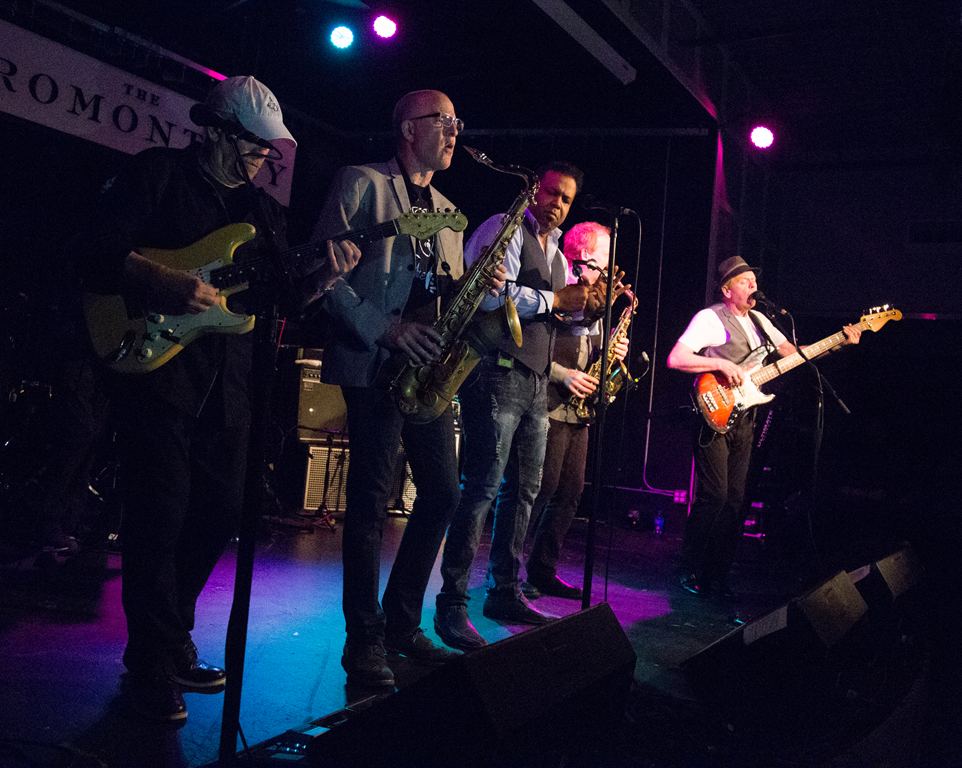
 The Average White Band are anything but average.
45 years ago, a group friends in Dundee, Scotland got together to play funky music, then moved to America to launch a recording career.
Saturday night at the Promontory in Hyde Park, two of those original Scottish band members - Alan Gorrie and Onnie McIntyre - joined with 5 newer band members to prove they still have the magic that launched an international career decades ago.
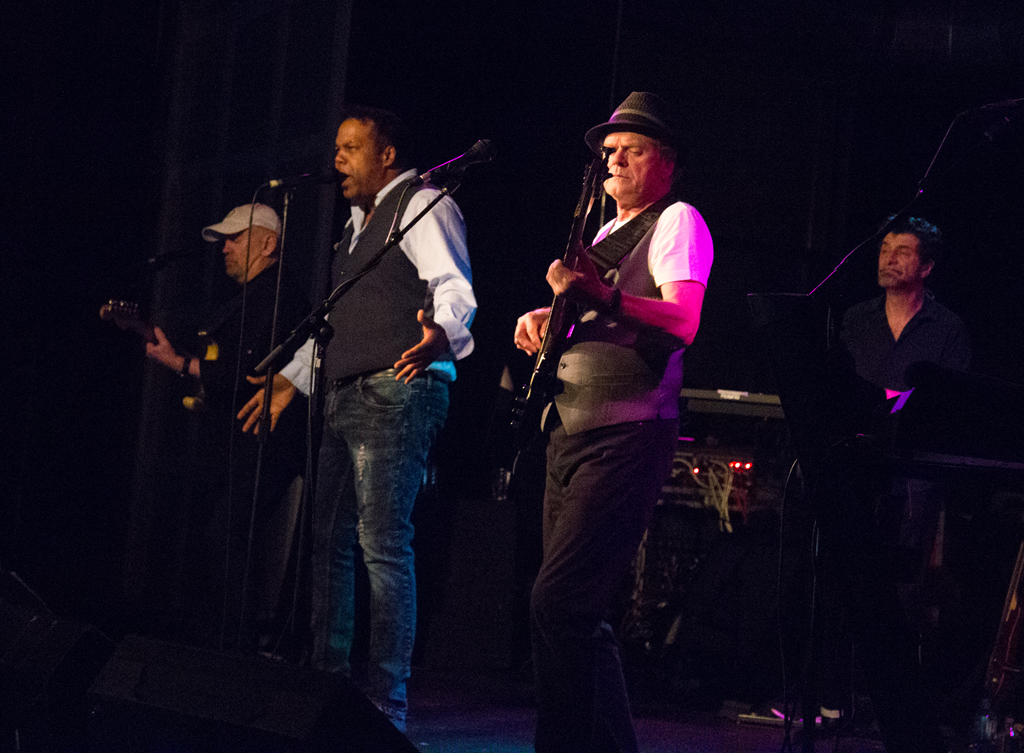 I attended the second of their two sets, where they played a few ballads mixed in with their signature funk. Vocalist Brent Carter, formerly of Tower of Power, showed impressive range for the band and tenor saxophonist Fred Vigdor led the 2-person horn section. They were helped along by alto saxophonist Cliff Lyons, drummer Rocky Bryant, and keyboardist Rob Aries. But it was Gorrie who led the way with excellent bass playing, backing vocals, and a charming persona for the audience.
They played many of their hits, such as "Cut the Cake", "Work to Do", and "Oh Maceo". The room was full and the level of energy rose as as the show went on. The band returned to the stage for a single encore - their only US #1 single "Pick Up the Pieces".
By the end of the evening, most of the audience was on their feet, including yours truly. It was a show I wish could have continued for longer into the night. Despite their name, Average White Band was exceptional. I find myself playing AWB and other funk bands as I write this on Sunday evening.
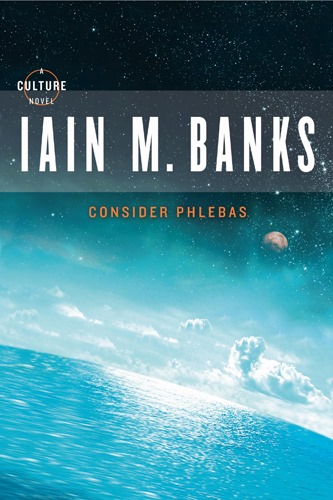 Bora Horza Gobuchul (aka "Horza") is a Changer - a shape-shifter, able to alter his appearance to look exactly like anyone else. He is also a mercenary working for the Indiran galactic empire.
"Consider Phlebas" begins with Horza imprisoned, tortured, and condemned to death by the Culture - a rival galactic Empire at war with the Idirans.
Horza is rescued by the Idirans and given a mission to travel to the planet Schar's World and capture a "Mind" - an advanced artificial intelligence designed by the Culture.
Along the way, he is attacked, ejected into space, rescued by space pirates, captured again, escapes, captures a spaceship, nearly arrested, and he meets other beings who follow him or subvert his mission or fall in love with him or try to eat him. Yes, it's a lot.
On Horza's journey, we encounter bizarre - sometimes hedonistic - societies. He is captured by a cult that worships a morbidly obese creature who eats people alive; and a card game in which the ultra-rich use the lives of poor people as the stakes in the game.
At times, the story seems disconnected as the players jump out of one predicament and into another.
The book's basic formula is a familiar one - a space opera set in the far future in which a lone mercenary takes on the might of an Empire. But there is plenty of action to keep the reader engaged. And plenty of dciverse characters to make the journey interesting.
But Banks does a good job of expressing the moral ambiguity of the universe - both in the main characters and in the two sides of the galactic war.
"Consider Phlebas" is the first of a 10-volume series. It was not enough to convince me to read the remaining 9 novels immediately. But it was good enough that I will consider returning to the series in the future.
4/1
Today I am grateful for a walk around the Alamo yesterday with Nick and Adriana.
3/31
Today I am grateful for:
-My first time attending a home Texas Rangers game at Globe Life Park in Arlington
-Lunch with Nik yesterday in Austin
3/30
Today I am grateful for:
-Coffee with Chander yesterday
-My first course lecture at the University of Texas
3/29
Today I am grateful for my first iPhone.
3/28
Today I am grateful for a busy day yesterday at the University of Illinois in Champaign.
3/27
Today I am grateful for a new pair of gym shoes from Tim
3/26
Today I am grateful I finally got my wireless Internet access set up in my new home.
3/25
Today I am grateful to deliver a keynote at the Global Integration Boot Camp yesterday.
3/24
Today I am grateful to return to Michigan for a couple days.
3/23
Today I am grateful to teach at Michigan State University for the first time.
3/22
Today I am grateful to return to #MIGANG last night.
3/21
Today I am grateful for a visit from Nick; and to spend time with him and Tim.
3/20
Today I am grateful for dinner with Nick and Tim last night.
3/19
Today I am grateful to live in a building with a good gym.
3/18
Today I am grateful to go to the movies last night for the first time this year.
3/17
Today I am grateful to spend this past week focused primarily on learning.
3/16
Today I am grateful for dinner with Becky last night.
3/15
Today I am grateful for my family.
3/14
Today I am grateful to write and deploy my first HoloLens app yesterday.
3/13
Today I am grateful to write my first Unity app yesterday.
3/12
Today I am grateful for dinner with Kent last night in downtown Seattle.
3/11
Today I am grateful to see C.J. Chenier in concert last night.
3/10
Today I am grateful to Christine for answering my questions yesterday.
3/9
Today I am grateful I had a chance to attend the Microsoft MVP Global Summit this week for the first time in years.
3/8
Today I am grateful
-to teach at the University of Washington yesterday for the first time ever;
-for an invitation to the MVP Summit attendee party
-to attend a MetaConference of community organizers
3/7
Today I am grateful for
-Dinner at Lot#3, courtesy of Sam and Ed
-The famous chezneward party at Ted and Charlotte's house
3/6
Today I am grateful to see so many old friends last night.
3/5
Today I am grateful for a week in Ontario.
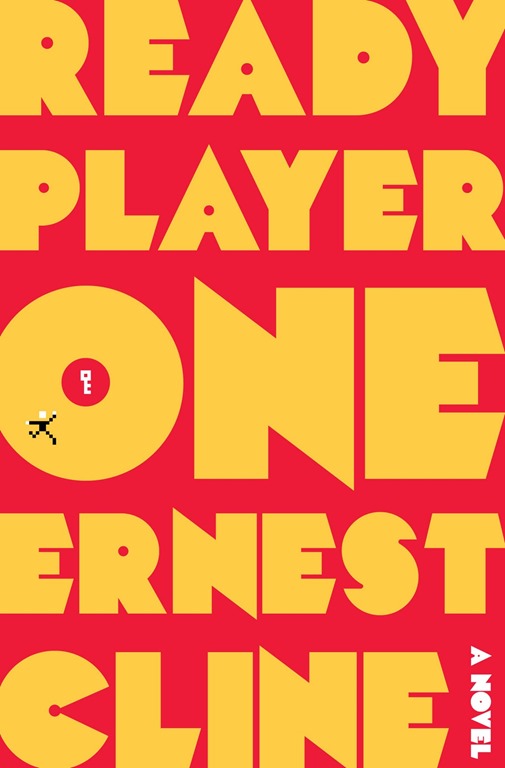 The world of 2044 kind of sucks.
Energy sources are depleted; cities are so overcrowded that people live in trailers stacked on top of other trailers; the economy is collapsing; and the police and media are controlled by a giant, evil corporation.
It's even tougher on Wade, an awkward teenage orphan living in a trailer stack in Oklahoma City. Wade, like most people in 2045, escapes harsh reality by spending most of his time in the Oasis - a virtual reality world with its own social structure and economy, created by the computer genius James Halliday. In the Oasis, Wade assumes the identity of Parzival and leaves his real-world problems behind.
When Halliday dies, his will promises his entire fortune (hundreds of billions of dollars) to the first person who can solve an elaborate scavenger hunt with clues left in the Oasis. Wade/Parzival devotes himself to finding the keys, gates, and egg in order to win the game. With so much at stake, just about everyone on Earth does the same. Including the evil multinational corporation IOI, which will stop at nothing to win.
Along his quest, Parzival is joined by friends that he knows only through their online Avatars.
Many of the game's clues are references to the pop-culture of the 1970s and 1980s that Halliday loved. As a result, the book is filled with references to books, video games, comics and movies from that era.
If you like non-stop action, you will enjoy this book. If you like, heavy-handed social commentary (unchecked greed is bad), you will like this book. If you like pop culture and nerd culture you will like this book. I got a kick out of knowing the relevant lyrics to a song before Parzival noted them as a clue to finding a key; or recognizing a Monty Python reference in the dialogue.
Ready Player One isn't perfect. Sometimes the list of nostalgia reads like product placement, rather than an attempt to build the culture or advance the story.
The book calls attention to social problems that exist today and, if left unchecked, may result in the dystopian future described therein. But it ignores the fact that the Oasis - a seeming Utopia created by the benevolent and altruistic Halliday - does nothing to address these problems. If anything, it makes the world worse by convincing everyone to spend their time in the virtual world, rather than working on re-building the real one. Halliday's contest intensifies this imbalance, leaving one to wonder if anyone is spending any time repairing roads, providing medical care, or extinguishing fires.
But, if you ignore this glaring weakness, the novel is great fun. Especially if you were a young nerd in the 1980s.
 In Mirror Dance, Lord Miles Vorkosigan was killed (or nearly-killed) in battle; then revived through the cryogenic technology of the future universe in which he lives.
Memory – the next novel chronologically in the Vorkosigan series - opens with the consequences of that resurrection. During a rescue operation, Miles has a seizure – a side effect of his revival treatments - which results in a serious injury to the target of his rescue. Miles increases his problems by lying about the incident in his report to his superior - Simon Illyan, which results in his discharge from both the Barryaran military and the mercenary band he led covertly under his Admiral Naismith alias.
Shortly afterward, Illyan suffers a mental breakdown and Miles suspects treachery. Miles has lost his military standing but gains an appointment from the Emperor to investigate.
Then, the detective story begins.
This is one of Bujold's stronger Vorkosigan novels.
It is a transition novel for Miles, the protagonist of this series, as he copes with the shattering of his dreams and transitions into post-military life. By doing so, Bujold sets up the characters to proceed in a new direction in this and future novels.
Bujold is masterful in her description of Miles's feelings after losing his lifelong dream of being a military leader. She excels also in her description of Illyan dealing with a similar forced transformation.
She explores themes of loyalty and duty in the face of weakness. Miles's relationship with those around him is complex - he is headstrong and often clashes with authority and with those who have injured him. But he grants respect even to those with whom he clashes. And his relationship with Illyan is especially well done.
And she introduces a subplot with the Emperor seeking a bride to be his Empress.
Memory is mostly a detective story. But the human elements and the evolution of familiar characters make it much more than this.
If you are interested in learning how to use the Cognitive Services APIs, I have created a set of exercises designed to take you through the basics of calling these services.
Lab 1 focuses on the Emotion API.
These exercises are open source and available here.
I have already used these materials at two university workshops this year.
You are free to use them – either for your own education or if you are hosting a workshop. I would appreciate any feedback you have. If you are very ambitious, you may do a pull request.
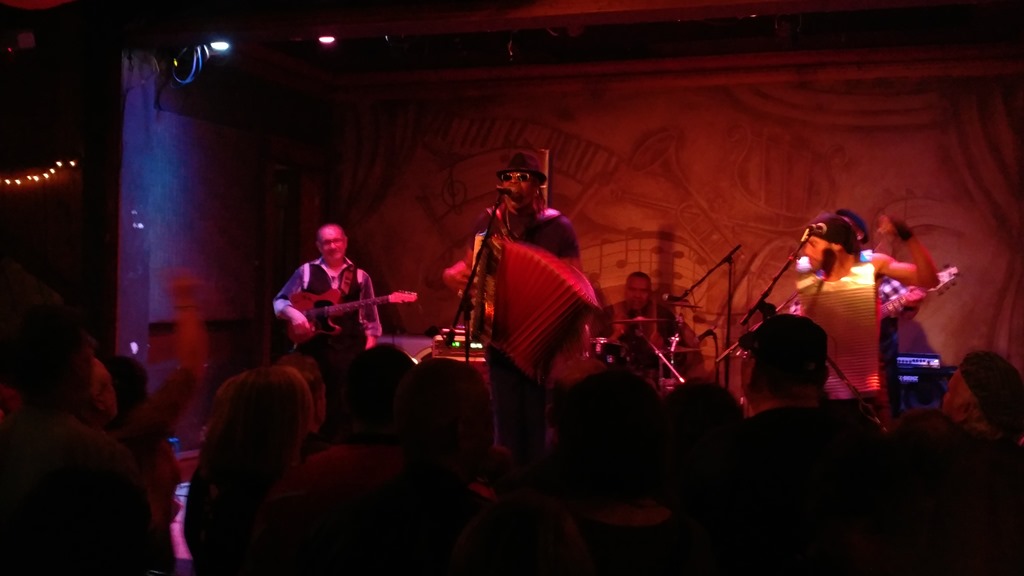 Although he was born and raised in Port Arthur, TX and raised on his father's Louisiana music, CJ Chenier has strong connections to Chicago. He recorded 3 albums for Chicago-based Alligator Records and he is a frequent performer at Fitzgerald's Night Club in the Chicago suburb of Berwyn.
It was in Berwyn that I saw CJ last night. The tickets were a birthday gift and one of the best I've received in a long time. Chenier played for hours, bringing the high energy I had come to know from his recordings, but had never seen in concert.
He was accompanied by drums, bass, an excellent guitarist, and someone playing the vest frottoir - a tin washboard that hangs from the chest, that was invented by CJ's legendary father Clifton and his uncle Cleveland.
The frottoir added some texture to the music; but it added more to the visuals of the concert, given its wearer's high energy dancing and playing.
CJ, of course, sang and played his signature accordion. His music kept the packed club bouncing all night. The high point came when he and 3 members of his band unplugged and wound their way through the crowd for an extended jam.
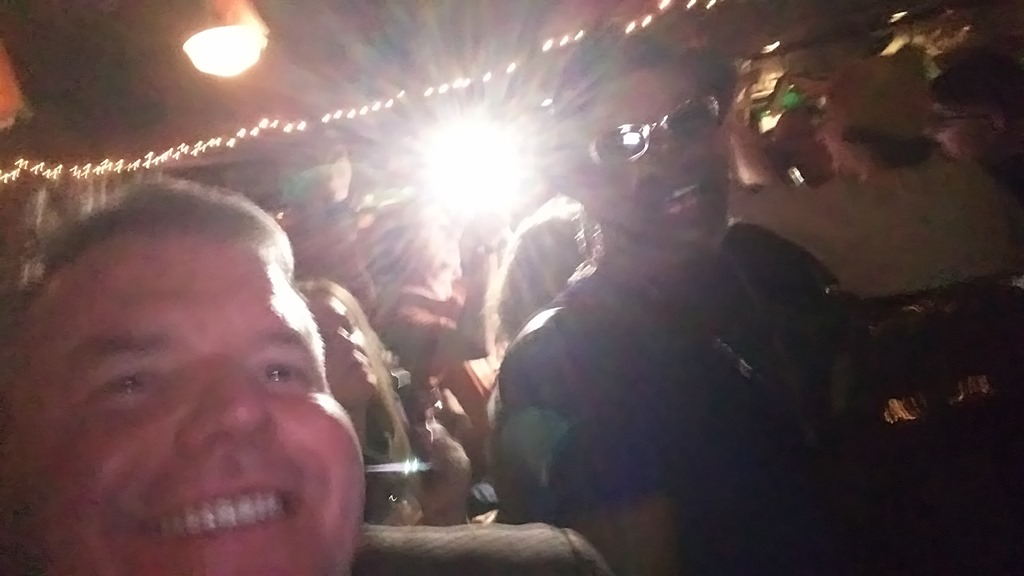
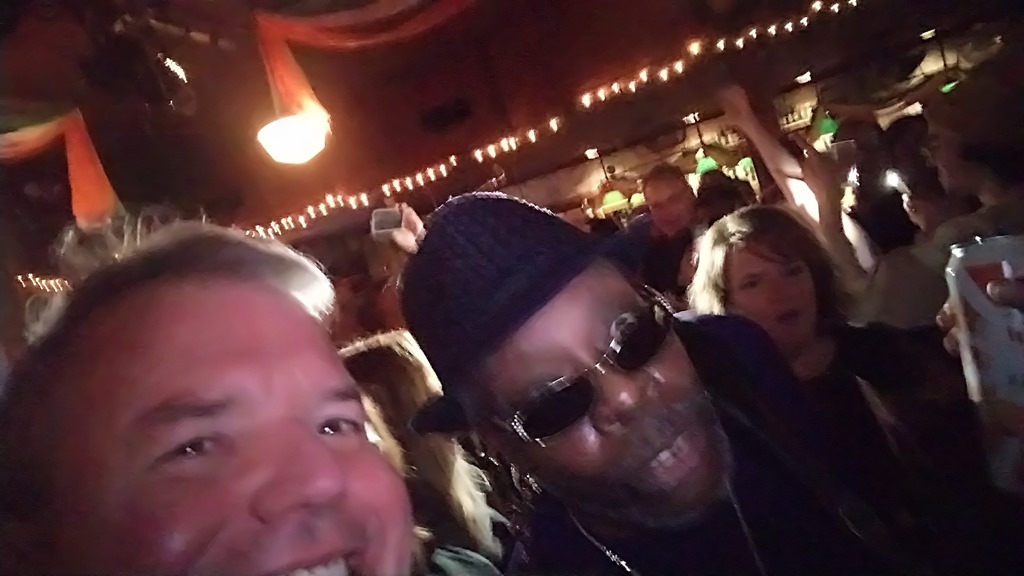
He continues the Zydeco tradition of his father's band (Clifton passed away in 1987), but CJ adds a funky sound all his own. The result kept the audience energized throughout the show.
If you are reading this and wondering what to get me on my birthday next year, check the local concert calendar around March 1. Be warned: It will have to be pretty darn good to top this one.
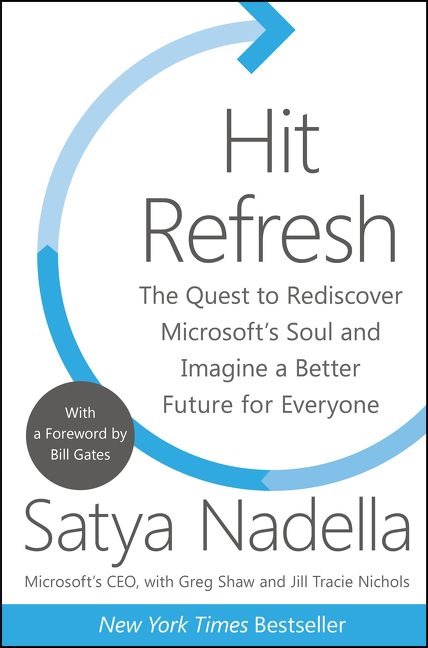 Satya Nadella became the third CEO of Microsoft in 2014 - a few months after I joined the company. There is no denying the impact he has had on Microsoft and on the tech industry since rising to CEO. He has changed the corporate culture significantly. Microsoft is more open and more agile today than it was 4 years ago.
In Hit Refresh, Nadella describes what he planned to do as leader of Microsoft, what has happened during his tenure as CEO, and his plans for the future of the company.
He begins with a short description of his life - growing up in India, moving around, his growing fascination with computers; he follows with a description of his early years at Microsoft, rising first to lead the cloud computing team; then to CEO.
But only a small part of this book is devoted to an autobiography. Mostly, this is a biography of Microsoft - the company where Nadella has spent nearly all of his adult life - and of the tech industry.
Nadella describes his vision for the future of Microsoft. He talks about its technology future (he sees AI and Mixed Reality as technologies poised to grow); about its business environment (Microsoft often partners with competitors when it makes sense for both parties), and about its ethical decisions (he discusses the importance of privacy to a global company and when it is time to fight for it).
Not all that Nadella writes is self-congratulatory. He talks about mistakes the company has made, such as the ill-fated Nokia acquisition; and mistakes he has personally made, as when he gave a poor answer to a question about women seeking equal consideration for a promotion.
This book had special meaning to me, as Satya and I work for the same company (He is my boss's boss's boss's boss's boss's boss) and share some of the same goals for that company. The copy I read was the "Employee Edition", which highlighted some of the text and included some notes in the margin to emphasize how a paragraph was particularly relevant to a Microsoft employee.
Although Hit Refresh provides some answers, it raises even more questions about the future of Microsoft and the global tech industry. We are in a period of great transition and Nadella does not pretend to have all the answers. But his message is clear: Microsoft and its employees must embrace a growth mindset in order to achieve the goal of empowering everyone to achieve more.
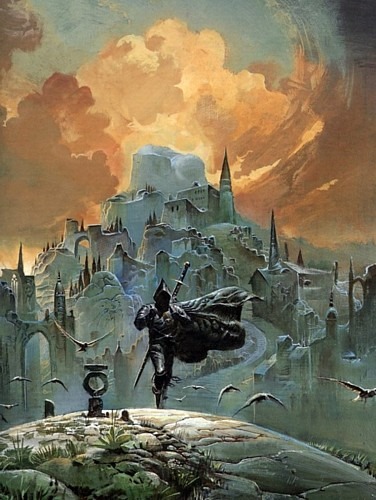 I finished this 4-volume set a couple weeks ago.
Since that time, I've been thinking about it and reading about it and I even listened to a podcast that analyzed each chapter of book 1.
The story takes place a million years in Earth's future. The sun is dying.
The Earth - now called "Urth" - has resorted to a medieval society, but it still retains remnants of its forgotten technology. For example, man no longer can travel between the stars, but old spaceships are repurposed as buildings and alien life forms exist on Urth.
Severian is an apprentice to the Torturers Guild, which is charged with carrying out punishment and interrogations ordered by the state. Early in volume 1, the Guild exiles Severian for the crime of showing mercy to one of the their prisoners.
This sets Severian on a long quest across Urth, to discover himself and his purpose in the world. He reveals early in his narrative that he ultimately becomes emperor of the planet.
Many of his companions meet tragic ends; but Severian ventures on.
I'm unclear if magic exists in this world or if technological advances of the previous millennia are indistinguishable from magic.
For example, Severian possesses a stone - The Claw of the Conciliator - that appears to have the power to raise the dead. But it's unclear of the risen dead were only in a long state of suspended animation and the stone has some healing attributes that won't be discovered for millennia after our time.
The story is narrated by Severian himself and, although he claims to have a perfect memory, we see enough evidence to the contrary that we begin to distrust his version of the events he relates.
Almost without exception, those who love The Book of the New Sun have read it multiple times. People who disliked the book found it confusing. And that is understandable, because it is confusing. The plot is complex and the action shifts quickly; questions arise and are not answered for hundreds of pages - sometimes without reference to the original question and sometimes not at all; many characters enter and exit the narrative and they may or may not re-appear much later in the story.
I think the tetralogy requires multiple readings to discover the nuances and symbolism of the story. I have only read it once, but I may return in a couple of years. At that time, I will also likely revisit this review.
3/4
Today I am grateful I was able to answer most of the students' Python and Machine Learning questions yesterday - topics on which I am still learning.
3/3
Today I am grateful to participate in Mentor Night at the University of Toronto DSCIL last night.
3/2
Today I am grateful for all the birthday wishes yesterday.
3/1
Today I am grateful for 2 days in Waterloo, ON.
2/28
Today I am grateful for an upgraded hotel room.
2/27
Today I am grateful to be interviewed yesterday by Matthew D. Groves for his excellent podcast.
2/26
Today I am grateful to spend a weekend with my old team - just like old times!
2/25
Today I am grateful to start recording interviews again after a long break.
2/24
Today I am grateful for a private demo in the UIUC VR lab yesterday.
2/23
Today I am grateful to spend a day and an excellent dinner with colleagues.
2/22
Today I am grateful to meet a lot of Microsoft folks at UIUC yesterday - many of whom I only knew via email and Skype.
2/21
Today I am grateful for the hospitality and generosity of Sharon and Greg and their family, who allowed me to stay with them this week in California.
2/20
Today I am grateful for:
-Breakfast with Uncle Bill and Aunt Jean
-Lunch with my cousins Sharon, Gail, and John
-A climb up Mount Tamalpais
2/19
Today I am grateful to attend my first #TreeHacks this weekend.
2/18
Today I am grateful for coffee with Sara last night.
2/17
Today I am grateful for my first visit to Palo Alto and Stanford.
2/16
Today I am grateful to see the Sharks-Canucks game last night - my first visit to the SAP Center.
2/15
Today I am grateful for 10 days between trips, so I had time to move and unpack most of my belongings.
2/14
Today I am grateful to cook last night for the first time in a long time. (The pot roast with marinated vegetables turned out great.)
2/13
Today I am grateful for:
-Help from Benjamin with my CSS questions
-Seeing Steve Earle in concert last night
2/12
Today I am grateful to see JD Souther in concert last night.
2/11
Today I am grateful to attend a Microsoft party at the Museum of Science and Industry last night.
2/10
Today I am grateful for 2 years in my last apartment and all the good memories I carry from that place.
2/9
Today I am grateful to see the play "Blind Date" at the Goodman Theatre last night - my first time at the Goodman in about 10 years!
2/8
Today I am grateful to move all my physical possessions to my new home yesterday.
2/7
Today I am grateful for Tim's help last night.
2/6
Today I am grateful for a weekend in Ontario.
2/5
Today I am grateful to Atley and all the MSPs who helped with our #QHacks mentorship this weekend.
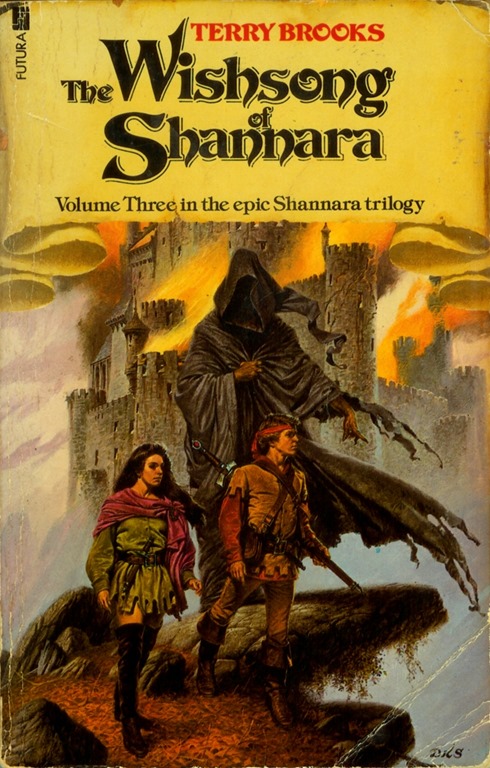 I don't think I am the target audience for the writings of Terry Brooks.
The plot lines and characters of his Shannara stories are borrowed almost whole from JRR Tolkien's Lord of the Rings and The Hobbit.
There are elves and dwarves and men living in Brooks's world; and there are magical talismans with the power to seduce those who possess them and to identify the possessor to the dark lords who covet them; and there are quests to save the world from evil, powerful sorcerer and his army of demonic beings; and there are at least 2 creatures who talk like Gollum.
In "The Wishsong of Shannara" - the third and final book of "The Shannara Trilogy", Brin and Jair - children of the hero of "The Elfstones of Shannara" and grandchildren of the hero of "The Sword of Shannara" - travel across the Four Lands to destroy an evil book. They armed with the power of the Wishsong - the ability to generate magic and illusion with their voice; and are joined by allies of other races.
I think Brooks's books are aimed at teens and young adults who have not yet experienced Tolkien and maybe aren't ready for something as heavy as Middle Earth. Brooks is not nearly as good a writer as writer as Tolkien (who is?); but his narrative is simpler and more straightforward, making it accessible to those who are new to high fantasy. It's a good gateway into this genre.
I enjoyed this trilogy enough to complete it, but not enough to read any more books that Brooks has set in this universe. This is a good introduction to high fantasy for those who want something light and easy to read. If you are already a fan of the genre and have read some of its masters, you are likely be disappointed.
Steve Earle has been writing and recording songs for over 4 decades. On Monday night, he brought those songs to the City Winery in Chicago's Fulton River district.
This was my second night in a row at the City Winery as I saw JD Souther the night before. Earle and Souther share a Texas upbringing and a talent for writing great music.
Steve Earle is as much a storyteller as he is a songwriter. Listening to his music you can hear the influences of his old friends Guy Clark and Townes Van Zandt. Between songs, Earle would talk about his life and his music and his romantic streak and his many failed marriages. He expressed a strong wit - in both his lyrics and his banter.
Every song was a joy to listen to as he moved effortlessly from blues to country to Irish folk songs. It was just him and his guitar or mandolin (and sometimes harmonica) but that was enough. A packed theater appreciated all he brought.
Now in his 60s, Earle continues to make music and to tour constantly.
And to make audiences happy.
JD Souther wrote the soundtrack to my youth. His songs were recorded by many of my favourite artists, including Bonnie Raitt, the Eagles, and Linda Ronstadt.
Sunday night at the City Winery I had a chance to return to those days when legendary songwriter performed. For over 2 hours, Souther sang songs he wrote and (mostly) others made famous. His tenor voice still sounds great and was accompanied only by himself playing acoustic guitar or baby grand piano.
He is mostly known for the songs he wrote and co-wrote for the Eagles and he played many of these, such as "Sad Café", "New Kid in Town", and "Best of My Love". He also played his composition "White Rhythm and Blues", one of my favourite Linda Ronstadt songs and "You're Only Lonely", the only top-40 hit recorded by Souther.
Souther spent most of the evening playing ballads, but changed it up for the encore, getting the audience clapping along to the catchy "Heartache Tonight."
The place was not full on a cold and snowy Sunday night. But Souther is a big baseball fan and announced before his last song that he planned to return to Chicago in the spring and take in a Cubs game. So you will have another chance to see him. And you should take it.
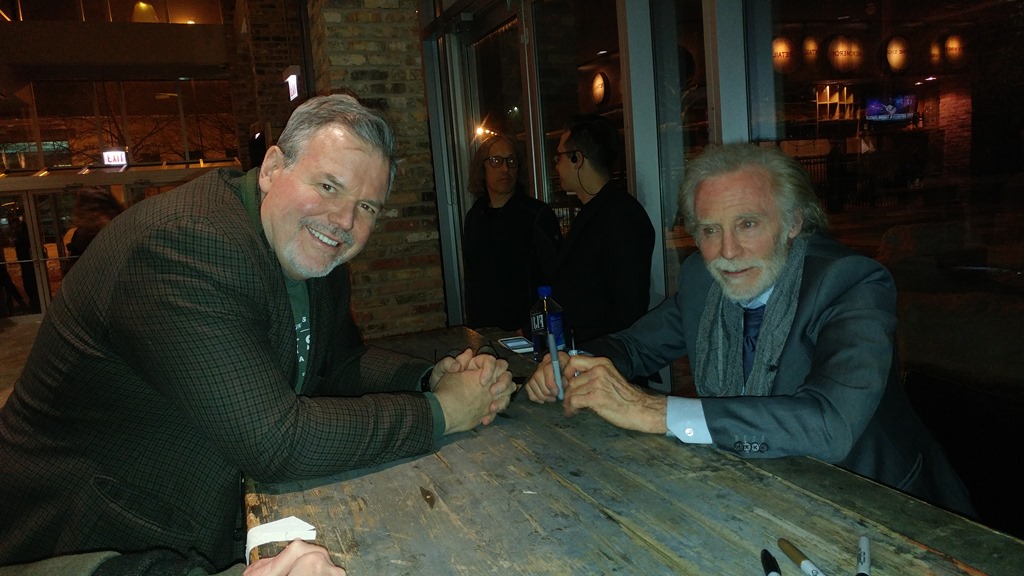
Me and JD after the show.
2/4
Today I am grateful for coffee.
2/3
Today I am grateful for my first visit to Kingston, ON and Queen's University.
2/2
Today I am grateful for my new condo.
2/1
Today I am grateful for dinner with Esteban last night.
1/31
Today I am grateful for a chance to deliver 2 guest lectures yesterday at the University of Illinois and for all the questions during and after each lecture.
1/30
Today I am grateful to be invited to speak at Illinois Pulse Week last night and for a great audience that stayed 45 minutes late asking questions.
1/29
Today I am grateful for a gift of a new pair of shoes.
1/28
Today I am grateful that I've lost 30 pounds in the last year.
1/27
Today I am grateful for coffee with Keith yesterday.
1/26
Today I am grateful that the professors I deal with are appreciative of the work I'm doing and the programs we are offering.
1/25
Today I am grateful for dinner last night with Stephen and Angel.
1/24
Today I am grateful to attend an exciting Spurs-Cavs game last night.
1/23
Today I am grateful to see MSU play basketball at Illinois last night - probably the only game I will see in-person this year.
1/22
Today I am grateful for
-my first time attending U of T Hacks
-an upgrade on my flight home last night
1/21
Today I am grateful for my first taste of sushi burrito yesterday.
1/20
Today I am grateful to all the students who stayed at my AI workshop past 1:30AM last night.
1/19
Today I am grateful to spend yesterday with my old team.
1/18
Today I am grateful for 2 years in my current apartment.
1/17
Today I am grateful that my work takes me to so many amazing places.
1/16
Today I am grateful for dinner with Josh last night.
1/15
Today I am grateful to Dr. Martin Luther King, Jr., who called out injustice where he saw it and advanced an important struggle that continues today.
1/14
Today I am grateful for my first visit to a Persian restaurant.
1/13
Today I am grateful to travel safely from Sandusky to Chicago to Dallas to Vancouver in less than 24 hours.
1/12
Today I am grateful for my 11th #CodeMash and all who worked hard to make it excellent.
1/11
Today I am grateful to Jennifer and Matt for answering my Machine Learning questions yesterday.
1/10
Today I am grateful to see so many old friends yesterday at #CodeMash.
1/9
Today I am grateful to attend an #MIGANG meeting last night in Michigan and drive to Ohio after with Jennifer, Ondrej, Jonathan, Gaines, and Seth.
1/8
Today I am grateful to watch Black Mirror last night with Ondrej, Desislava, Gaines, and Mary.
1/7
Today I am grateful I've made it to the gym every day I was home.
1/6
Today I am grateful for a birthday lunch yesterday with Shelly and Jason.
1/4
Today I am grateful for a good night sleep last night.
1/3
Today I am grateful for my slow cooker.
1/2
Today I am grateful to Brent for helping me with my Azure questions yesterday.
1/1
Today I am grateful for:
-a few days in California with my boys
-seeing the Chargers
-Raiders game yesterday at the StubHub Center
-An upgrade to First Class on my flight home last night
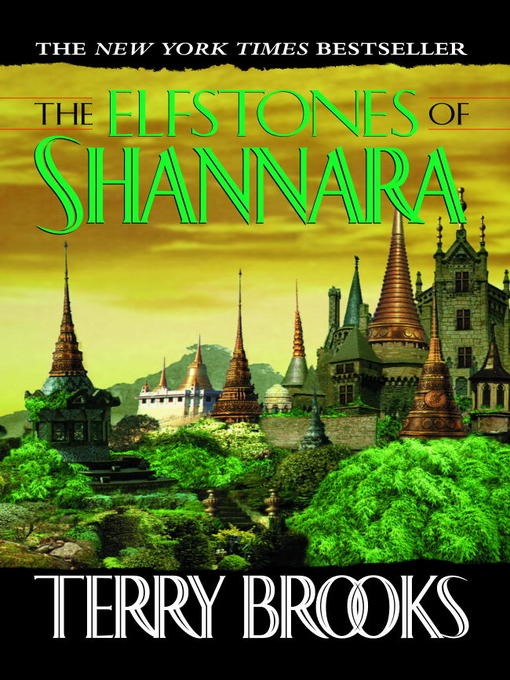 The Elfstones of Shannara is the second book of Terry Brooks’s Shannara series.
It begins years after The Sword of Shannara. The magical Ellcrys tree - created by the elves millennia earlier to imprison the evil demons - has begun to die, allowing the demons to regain their strength and attack men and elves.
Wil Ohmsford - grandson of Shea Ohmsford, hero of the first novel - is assigned the task of re-planting the Ellcrys. He needs the help of the elven princess Amberle, who is chosen to protect the magical tree, but has run away from her king and family. To protect her on his quest, he uses the power of the mystical elfstones left to him by his grandfather.
It becomes a race for Wil and Amberle to find the hidden Ellcrys seed and restore the Ellcrys before the emboldened demons attack and destroy men and elves of the Four Lands.
Terry Brooks knows how to tell a story, but it troubles me that he borrows so much from JRR Tolkien. It's not just that his world is populated with elves and dwarves. Major parts of the story are lifted directly from Tolkien. The young, reluctant hero goes on a quest to save the world from evil creatures, armed with a magical talisman that was left to him by an older relative, who went on a similar quest in an earlier book. We could easily substitute Bilbo, Frodo, and the Ring for Wil, Shea, and the Elfstones.
But, the stories are entertaining if not told with Tolkien's magic. It's a good introduction to the world of fantasy for those who want something more accessible than Lord of the Rings.
The Azure Cloud Shell Empowers You to run Scripts in Your Browser
January 09, 2018 10:43 Comments [0]Azure provides several ways of managing resources through scripting users. You can write scripts in either PowerShell (a popular Windows tool for managing servers and IAT resources) or CLI (a Bash-like scripting language that runs on Windows, Linux, and MacOS).
To use these tools, you need to have them installed locally, along with any support tools, such as the Azure PowerShell commandlets.
Until now.
Recently, Microsoft released the Azure Cloud Shell - a browser-based command-line interface built into the Azure portal. By opening a Cloud Shell from the Azure Portal, you can execute PowerShell or CLI scripts from within your browser, without installing anything.
To open Cloud Shell, navigate to the Azure portal and click the [Cloud Shell] button (Fig. 1) on the top tool bar.

Fig. 1
It may take a minute to retrieve and connect to a Cloud Shell environment (Fig. 2), but soon you will see a window with a command prompt, as Shown in Fig. 3.

Fig. 2
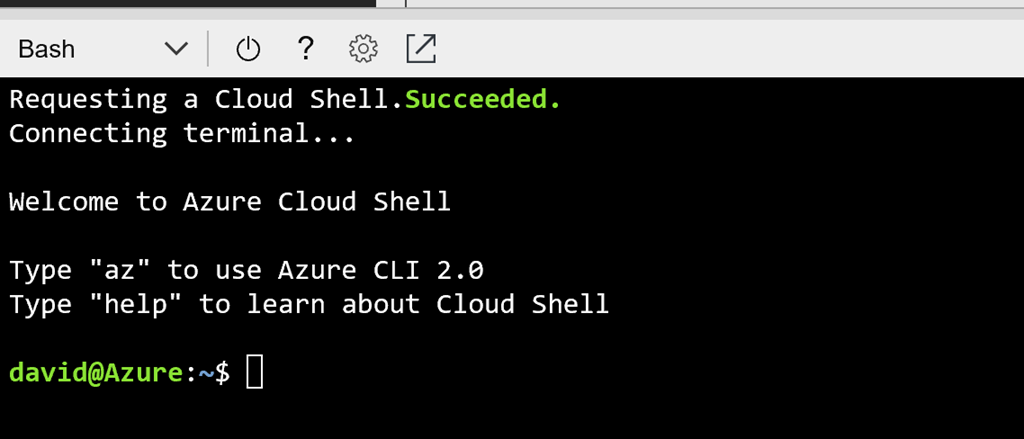
Fig. 3
The Cloud Shell in the image is configured to run CLI scripts. You can tell this by the dropdown in the window's top left corner. You can also run PowerShell scripts in a Cloud Shell window. To change the script types, click the top left dropdown and select your desired scripting language, as shown in Fig. 4.
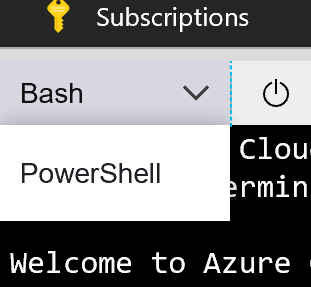
Fig. 4
Fig. 5 shows the Cloud Shell with PowerShell selected.
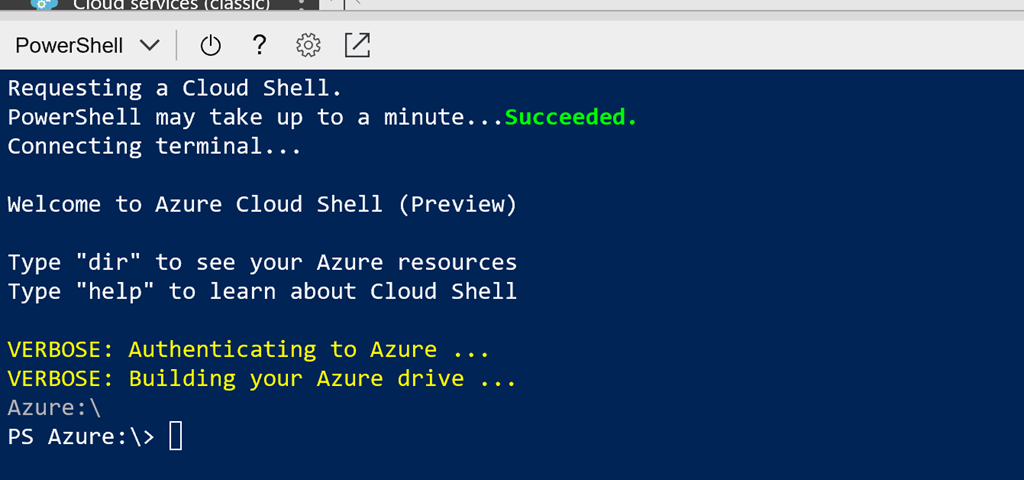
Fig. 5
You don't need to log into the Cloud Shell environment. It will assume the account from which it was launched.
But you can view, create, and manage Azure resources. For example, from the Bash shell, type
az group list -o table
To see a list of all Resource Groups
or
az group create -l southeastus -n myrg
to create a new resource group named "myrg" in the Southeast US region.
You can even do other bash commands, such as ssh into an Azure Linux VM.
Cloud Shell automatically creates a container within an Azure VM to host your session. Although this container is destroyed shortly after you disconnect, Cloud Shell also creates a storage account to persist files or settings you use when using this interface, so they will be there when you return.
Azure Cloud Shell provides an environment for you to execute automation scripts and other administrative functions.
Robert Martin on Structure and Interpretation of Computer Programming
January 08, 2018 10:11 Comments [0]12/1
Today I am grateful to see an exciting Hawks-Cavs game with
12/2
Today I am grateful for dinner last night with Shawn and Resa.
12/3
Today I am grateful to attend DataSciConf in Atlanta for the first time.
12/4
Today I am grateful for temperatures in the 50s in Chicago in December.
12/5
Today I am grateful for great seats at my second Atlanta Hawks home game in the past week.
12/6
Today I am grateful for an excellent dinner last night in midtown Atlanta with my team.
12/7
Today I am grateful for a meaningful and enjoyable offsite with my team in Atlanta this week.
12/8
Today I am grateful to attend the Chicago User Group Holiday Party last night.
12/9
Today I am grateful for a kind and completely unexpected email last night.
12/9
Today I am grateful for:
-The Uber driver who picked me up yesterday and took me to the airport when my Uber driver ran out of gas on the way.
-The "Lights in the Heights" festival last night in Houston.
12/10
Today I am grateful for:
-The hospitality and generosity of Paul
-Attending a home Texans game for the first time.
12/12
Today I am grateful to see an exciting Pelicans - Rockets game last night - my first time at the Toyota Center!
12/13
Today I am grateful to attend a home University of Texas basketball game for the first time.
12/14
Today I am grateful to spend a few days in Texas and meeting with folks at the University of Texas in Austin.
12/15
Today I am grateful for the holiday party hosted by my apartment building last night.
12/16
Today I am grateful to spend some time at home.
12/17
Today I am grateful to spend yesterday with my sons.
12/18
Today I am grateful to take Nick and Tim to a Black Hawks game last night - their first visit to the United Center.
12/19
Today I am grateful for an unseasonably warm Chicago December.
12/20
Today I am grateful for my first visit to the Argonne National Laboratory to attend a reception for David Danielson - clean energy entrepreneur and former Assistant Secretary of Energy.
12/21
Today I am grateful to everyone who helped me get to 500 episodes on #TechnologyAndFriends
https://youtu.be/SQf8WKKYqlM
12/22
Today I am grateful to see Roy Ayers in concert last night on my first visit to The Promontory in Hyde Park.
12/22
Today I am grateful for 3 Personal Training sessions this week - the last 3 of 2017!
12/24
Today I am grateful for a Christmas Eve snowfall; and the fact that I am not driving in it.
12/25
Today I am grateful that we still celebrate the birth of Jesus Christ after all these years.
12/26
Today I am grateful to spend Christmas with my family.
12/27
Today I am grateful to see an excellent Roy Hargrove concert last night at the Jazz Showcase in the South Loop.
12/28
Today I am grateful to see a Lakers-Grizzlies game last night on my first visit to the Staples Center.
12/29
Today I am grateful for:
-Lunch yesterday with my cousin Barbara in San Juan Capistrano
-Watching a Spartan victory in the Holiday Bowl from the 50-yard-line with my son Tim
12/30
Today I am grateful to see Nick's Williams College basketball team play for the first time last night in California.
12/31
Today I am grateful for lunch yesterday with my cousin Bob.
1/1
Today I am grateful for:
-a few days in California with my boys
-seeing the Chargers-Raiders game yesterday at the StubHub Center
-An upgrade to First Class on my flight home last night
1/2
Today I am grateful to Brent for helping me with my Azure questions yesterday.
1/3
Today I am grateful for my slow cooker.
1/4
Today I am grateful for a good night sleep last night.
1/6
Today I am grateful for a birthday lunch yesterday with Shelly and Jason.
1/7
Today I am grateful I've made it to the gym every day I was home.
2017 was a year of change. I started a new job; I traveled for the first time to South America, the Czech Republic, Iowa, Oregon, and Los Angeles; I returned to Canada for the first time in 10+ years; my son Tim graduated and began his professional career; and my son Nick accepted a new job in Massachusetts.
I'll start with me.
New Job
Microsoft went through a major reorganization last year and it greatly affected my department and my job. I moved to a new team that is focused on helping professors at Top Computer Science universities teach their students about cloud computing. This role involves even more travel than my last one. For the past few months, I've been visiting schools around North America and my calendar for the next 2 months is filled with campus visits for hackathons, guest lectures, workshops, and meetings with students, and professors. I won't be home much in January and February.
Travel
I traveled more and farther in 2017 than I have in a long time (if ever). I visited 7 different countries (Romania, Sweden, The Czech Republic, Uruguay, Argentina, Canada, and the US) and 17 states. It was my first visit to the Czech Republic, Uruguay, and Argentina.
Prague has long been on my list of places to visit so I was thrilled to finally get there and I enjoyed the hospitality of Gael Fraiteur and Brit King. Gael and I drove down to Český Krumlov - a small village in southern Bohemia preserved as it was in the 18th century - where we spent a night and explored castles, museums, and restaurants.
I was happy to accept an invitation to speak at .NET Conf UY, primarily because it was my first trip to South America. After a few days in Montevideo, Uruguay, I took a ferry to Buenos Aires, where I spent an afternoon exploring the city on foot. In May, I scheduled tour to speak at 4 different user groups in 3 days in Iowa. My friend Javier helped me plan the trip and I was excited for my first visit to the Hawkeye State.
In 2017, I got serious about my goal of seeing every home stadium and arena of the 4 major professional sports league. I visited 3 NFL stadiums, 4 NBA arenas, and 2 NHL arenas last year. With 55 places remaining, I will need to accelerate this process.
In January, I flew to San Francisco, where my friend Sara picked me up and together we drove 7 hours to a small town in southwest Oregon to attend the funeral of the wife of an old friend. The next day, we attended the funeral and a dinner and repeated the trip in reverse. We were fortunate to have flexible enough schedules to make this trip and I'm really glad we did. And I got to know Sara a lot better on the trip.
Live Music
I made it a point to see a lot of live music in 2017. Most of the shows (Stanley Clarke, Buddy Guy, Guy King, Ladysmith Black Mambazo, Booker T. Jones, Marcia Ball, Delbert McClinton, Kris Kristofferson, Al Stewart, Jean-Luc Ponty, Benny Golson, Paul Weller, and Roy Ayers) were at small clubs in Chicago (SPACE, Buddy Guy's Legends, Old Town School of Folk Music, SPACE, City Winery, Jazz Showcase, House of Blues, and The Promontory), but I also saw Eric Church and Tim McGraw / Faith Hill at the cavernous Allstate Arena.
My Two Sons
My two sons also had some major changes in their lives.
Shortly after graduating from Indiana University with a degree in Informatics, Tim accepted a job with Enkay Tech - an IT consulting company outside of Chicago. He lived with me for a few months before renting a house in Wrigleyville. Spending time with hi was one of the highlights of my summer.
After 2 years serving as Director of Basketball Operations at Southern Illinois University - Edwardsville, Nick accepted a position as an assistant coach at Williams College in Williamstown, MA. He moved in the fall and his team have been ranked as high as #5 in Division 3. In December, I was able to see Williams play 2 games at a tournament in Thousand Oaks CA.
Mostly Good, Some Bad
Although most of 2017 was good to me, not everything was awesome. My mother passed away in June. A few weeks later, I was diagnosed with skin cancer, which was successfully removed. Not long after, a relationship ended after over a year of dating. Each incident was magnified because they came in quick succession, but I've recovered from them. My family and I were somewhat prepared for our mother's passing. She was 85 and the death of my father and sister in the past few years forced us to consider the inevitable loss of other loved ones. I am left with fond memories of her and of the girl I lost and this helps. And my follow-up appointment showed no sign of skin cancer.
Looking Ahead
2017 was an amazing year of growth for me personally. The changes are accelerating into 2018. My calendar is already full for the first 2 months and I am looking forward to the future with optimism.
12/31
Today I am grateful for lunch yesterday with my cousin Bob.
12/30
Today I am grateful to see Nick's Williams College basketball team play for the first time last night in California.
12/29
Today I am grateful for:
-Lunch yesterday with my cousin Barbara in San Juan Capistrano
-Watching a Spartan victory in the Holiday from the 50-yard-line with my son Tim
12/28
Today I am grateful to see a Lakers-Grizzlies game last night on my first visit to the Staples Center.
12/27
Today I am grateful to see an excellent Roy Hargrove concert last night at the Jazz Showcase in the South Loop.
12/26
Today I am grateful to spend Christmas with my family.
12/25
Today I am grateful that we still celebrate the birth of Jesus Christ after all these years.
12/24
Today I am grateful for a Christmas Eve snowfall; and the fact that I am not driving in it.
12/23
Today I am grateful for 3 Personal Training sessions this week - the last 3 of 2017!
12/22
Today I am grateful to see Roy Ayers in concert last night on my first visit to The Promontory in Hyde Park.
12/21
Today I am grateful to everyone1 who helped me get to 500 episodes on #TechnologyAndFriends
12/20
Today I am grateful for my first visit to the Argonne National Laboratory to attend a reception for David Danielson - clean energy entrepreneur and former Assistant Secretary of Energy.
12/19
Today I am grateful for an unseasonably warm Chicago December.
12/18
Today I am grateful to take Nick and Tim to a Black Hawks game last night - their first visit to the United Center.
12/17
Today I am grateful to spend yesterday with my sons.
12/16
Today I am grateful to spend some time at home.
12/15
Today I am grateful for the holiday party hosted by my apartment building last night.
12/14
Today I am grateful to spend a few days in Texas and meeting with folks at the University of Texas in Austin.
12/13
Today I am grateful to attend a home University of Texas basketball game for the first time.
12/12
Today I am grateful to see an exciting Pelicans-Rockets game last night - my first time at the Toyota Center!
12/11
Today I am grateful for:
-The hospitality and generosity of Paul
-Attending a home Texans game for the first time.
12/10
Today I am grateful for:
-The Uber driver who picked me up yesterday and took me to the airport when my Uber driver ran out of gas on the way.
-The "Lights in the Heights" festival last night in Houston.
12/09
Today I am grateful for a kind and completely unexpected email last night.
12/08
Today I am grateful to attend the Chicago User Group Holiday Party last night.
12/07
Today I am grateful for a meaningful and enjoyable offsite with my team in Atlanta this week.
12/06
Today I am grateful for an excellent dinner last night in midtown Atlanta with my team.
12/05
Today I am grateful for great seats at my second Atlanta Hawks home game in the past week.
12/4
Today I am grateful for temperatures in the 50s in Chicago in December.
As I discussed in a previous article, Microsoft Cognitive Services includes a set of APIs that allow your applications to take advantage of Machine Learning in order to analyze, image, sound, video, and language. One of these APIs is a REST web service that can determine the words and punctuation contained in a picture. This is accomplished by a simple REST web service call.
The Cognitive Services Optical Character Recognition (OCR) service is part of the Custom Vision API. It takes as input a picture of text and returns the words found in the image.
To get started, you will need an Azure account and a Cognitive Services Vision API key.
If you don't have an Azure account, you can get a free one at https://azure.microsoft.com/free/.
Once you have an Azure Account, follow the instructions in this article to generate a Cognitive Services Computer Vision key.
To use this API, you simply have to make a POST request to the following URL:
https://[location].api.cognitive.microsoft.com/vision/v1.0/ocr
where [location] is the Azure location where you created your API key (above).
Optionally, you can add the following 2 querystring parameters to the URL:
- Language: the 2-digit language abbreviation abbreviation. Use “en” for English. Currently, 25 languages are supported. If omitted, the service will attempt to auto-detect the language
- detectOrientation: Set this to “true” if you want to support upside-down or rotated images.
The HTTP header of the request should include the following:
Ocp-Apim-Subscription-Key.
The Cognitive Services Computer Vision key you generated above.
Content-Type
This tells the service how you will send the image. The options are:
- application/json
- application/octet-stream
- multipart/form-data
If the image is accessible via a public URL, set the Content-Type to application/json and send JSON in the body of the HTTP request in the following format
{"url":"imageurl"}
where imageurl is a public URL pointing to the image. For example, to perform OCR on an image of an Edgar Allen Poe poem, submit the following JSON:
{"url": "http://media.tumblr.com/tumblr_lrbhs0RY2o1qaaiuh.png"}

If you plan to send the image itself to the web service, set the content type to either "application/octet-stream" or “multipart/form-data” and submit the binary image in the body of the HTTP request.
The full request looks something like:POST https://westus.api.cognitive.microsoft.com/vision/v1.0/ocr HTTP/1.1
Content-Type: application/json
Host: westus.api.cognitive.microsoft.com
Content-Length: 62
Ocp-Apim-Subscription-Key: xxxxxxxxxxxxxxxxxxxxxxxxxxxxxxxxx
{ "url": "http://media.tumblr.com/tumblr_lrbhs0RY2o1qaaiuh.png" }
For example, passing a URL with the following picture:
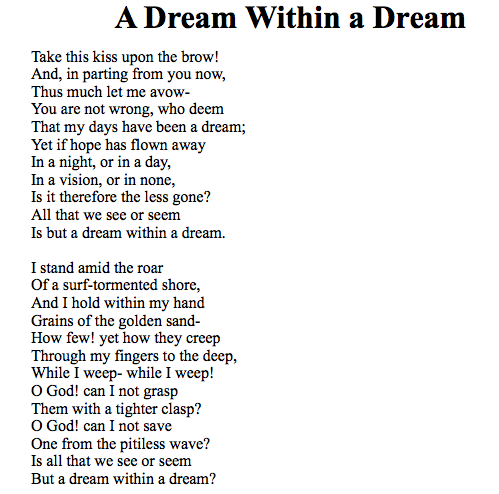
(found online at http://media.tumblr.com/tumblr_lrbhs0RY2o1qaaiuh.png)
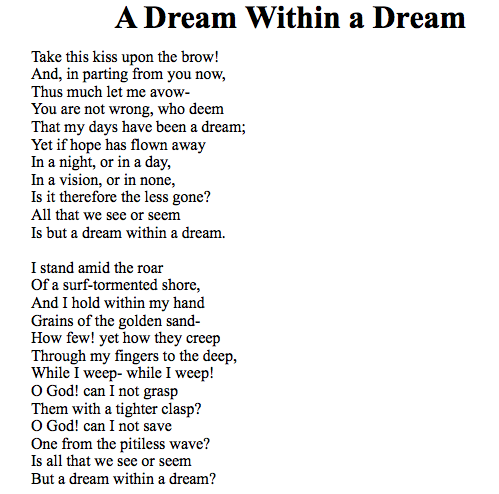
returned the following data:
{
"textAngle": 0.0,
"orientation": "NotDetected",
"language": "en",
"regions": [
{
"boundingBox": "31,6,435,478",
"lines": [
{
"boundingBox": "114,6,352,23",
"words": [
{
"boundingBox": "114,6,24,22",
"text": "A"
},
{
"boundingBox": "144,6,93,23",
"text": "Dream"
},
{
"boundingBox": "245,6,95,23",
"text": "Within"
},
{
"boundingBox": "350,12,14,16",
"text": "a"
},
{
"boundingBox": "373,6,93,23",
"text": "Dream"
}
]
},
{
"boundingBox": "31,50,187,16",
"words": [
{
"boundingBox": "31,50,31,12",
"text": "Take"
},
{
"boundingBox": "66,50,23,12",
"text": "this"
},
{
"boundingBox": "93,50,24,12",
"text": "kiss"
},
{
"boundingBox": "121,54,33,12",
"text": "upon"
},
{
"boundingBox": "158,50,19,12",
"text": "the"
},
{
"boundingBox": "181,50,37,12",
"text": "brow!"
}
]
},
{
"boundingBox": "31,67,194,16",
"words": [
{
"boundingBox": "31,67,31,15",
"text": "And,"
},
{
"boundingBox": "67,67,12,12",
"text": "in"
},
{
"boundingBox": "82,67,46,16",
"text": "parting"
},
{
"boundingBox": "132,67,31,12",
"text": "from"
},
{
"boundingBox": "167,71,25,12",
"text": "you"
},
{
"boundingBox": "195,71,30,11",
"text": "now,"
}
]
},
{
"boundingBox": "31,85,159,12",
"words": [
{
"boundingBox": "31,85,32,12",
"text": "Thus"
},
{
"boundingBox": "67,85,35,12",
"text": "much"
},
{
"boundingBox": "107,86,16,11",
"text": "let"
},
{
"boundingBox": "126,89,20,8",
"text": "me"
},
{
"boundingBox": "150,89,40,8",
"text": "avow-"
}
]
},
{
"boundingBox": "31,102,193,16",
"words": [
{
"boundingBox": "31,103,26,11",
"text": "You"
},
{
"boundingBox": "61,106,19,8",
"text": "are"
},
{
"boundingBox": "84,104,21,10",
"text": "not"
},
{
"boundingBox": "109,106,44,12",
"text": "wrong,"
},
{
"boundingBox": "158,102,27,12",
"text": "who"
},
{
"boundingBox": "189,102,35,12",
"text": "deem"
}
]
},
{
"boundingBox": "31,120,214,16",
"words": [
{
"boundingBox": "31,120,29,12",
"text": "That"
},
{
"boundingBox": "64,124,21,12",
"text": "my"
},
{
"boundingBox": "89,121,29,15",
"text": "days"
},
{
"boundingBox": "122,120,30,12",
"text": "have"
},
{
"boundingBox": "156,121,30,11",
"text": "been"
},
{
"boundingBox": "191,124,7,8",
"text": "a"
},
{
"boundingBox": "202,121,43,14",
"text": "dream;"
}
]
},
{
"boundingBox": "31,138,175,16",
"words": [
{
"boundingBox": "31,139,22,11",
"text": "Yet"
},
{
"boundingBox": "57,138,11,12",
"text": "if"
},
{
"boundingBox": "70,138,31,16",
"text": "hope"
},
{
"boundingBox": "105,138,21,12",
"text": "has"
},
{
"boundingBox": "131,138,37,12",
"text": "flown"
},
{
"boundingBox": "172,142,34,12",
"text": "away"
}
]
},
{
"boundingBox": "31,155,140,16",
"words": [
{
"boundingBox": "31,156,13,11",
"text": "In"
},
{
"boundingBox": "48,159,8,8",
"text": "a"
},
{
"boundingBox": "59,155,37,16",
"text": "night,"
},
{
"boundingBox": "100,159,14,8",
"text": "or"
},
{
"boundingBox": "118,155,12,12",
"text": "in"
},
{
"boundingBox": "134,159,7,8",
"text": "a"
},
{
"boundingBox": "145,155,26,16",
"text": "day,"
}
]
},
{
"boundingBox": "31,173,144,15",
"words": [
{
"boundingBox": "31,174,13,11",
"text": "In"
},
{
"boundingBox": "48,177,8,8",
"text": "a"
},
{
"boundingBox": "59,173,43,15",
"text": "vision,"
},
{
"boundingBox": "107,177,13,8",
"text": "or"
},
{
"boundingBox": "124,173,12,12",
"text": "in"
},
{
"boundingBox": "140,177,35,11",
"text": "none,"
}
]
},
{
"boundingBox": "31,190,180,16",
"words": [
{
"boundingBox": "31,191,11,11",
"text": "Is"
},
{
"boundingBox": "47,190,8,12",
"text": "it"
},
{
"boundingBox": "59,190,58,12",
"text": "therefore"
},
{
"boundingBox": "121,190,19,12",
"text": "the"
},
{
"boundingBox": "145,191,23,11",
"text": "less"
},
{
"boundingBox": "173,191,38,15",
"text": "gone?"
}
]
},
{
"boundingBox": "31,208,150,12",
"words": [
{
"boundingBox": "31,208,20,12",
"text": "All"
},
{
"boundingBox": "55,208,24,12",
"text": "that"
},
{
"boundingBox": "83,212,19,8",
"text": "we"
},
{
"boundingBox": "107,212,19,8",
"text": "see"
},
{
"boundingBox": "131,212,13,8",
"text": "or"
},
{
"boundingBox": "148,212,33,8",
"text": "seem"
}
]
},
{
"boundingBox": "31,226,194,12",
"words": [
{
"boundingBox": "31,227,11,11",
"text": "Is"
},
{
"boundingBox": "46,226,21,12",
"text": "but"
},
{
"boundingBox": "71,230,7,8",
"text": "a"
},
{
"boundingBox": "82,226,40,12",
"text": "dream"
},
{
"boundingBox": "126,226,41,12",
"text": "within"
},
{
"boundingBox": "171,230,7,8",
"text": "a"
},
{
"boundingBox": "182,226,43,12",
"text": "dream."
}
]
},
{
"boundingBox": "31,261,133,12",
"words": [
{
"boundingBox": "31,262,5,11",
"text": "I"
},
{
"boundingBox": "41,261,33,12",
"text": "stand"
},
{
"boundingBox": "78,261,32,12",
"text": "amid"
},
{
"boundingBox": "114,261,19,12",
"text": "the"
},
{
"boundingBox": "137,265,27,8",
"text": "roar"
}
]
},
{
"boundingBox": "31,278,169,15",
"words": [
{
"boundingBox": "31,278,18,12",
"text": "Of"
},
{
"boundingBox": "52,282,7,8",
"text": "a"
},
{
"boundingBox": "63,278,95,12",
"text": "surf-tormented"
},
{
"boundingBox": "162,278,38,15",
"text": "shore,"
}
]
},
{
"boundingBox": "31,296,174,15",
"words": [
{
"boundingBox": "31,296,28,12",
"text": "And"
},
{
"boundingBox": "63,297,4,11",
"text": "I"
},
{
"boundingBox": "72,296,28,12",
"text": "hold"
},
{
"boundingBox": "104,296,41,12",
"text": "within"
},
{
"boundingBox": "149,300,20,11",
"text": "my"
},
{
"boundingBox": "173,296,32,12",
"text": "hand"
}
]
},
{
"boundingBox": "31,314,169,16",
"words": [
{
"boundingBox": "31,314,42,12",
"text": "Grains"
},
{
"boundingBox": "78,314,15,12",
"text": "of"
},
{
"boundingBox": "95,314,19,12",
"text": "the"
},
{
"boundingBox": "119,315,43,15",
"text": "golden"
},
{
"boundingBox": "167,314,33,12",
"text": "sand-"
}
]
},
{
"boundingBox": "31,331,189,16",
"words": [
{
"boundingBox": "31,332,31,11",
"text": "How"
},
{
"boundingBox": "66,331,28,12",
"text": "few!"
},
{
"boundingBox": "99,333,20,14",
"text": "yet"
},
{
"boundingBox": "123,331,27,12",
"text": "how"
},
{
"boundingBox": "154,331,28,16",
"text": "they"
},
{
"boundingBox": "186,335,34,12",
"text": "creep"
}
]
},
{
"boundingBox": "31,349,206,16",
"words": [
{
"boundingBox": "31,349,55,16",
"text": "Through"
},
{
"boundingBox": "90,353,20,11",
"text": "my"
},
{
"boundingBox": "115,349,44,16",
"text": "fingers"
},
{
"boundingBox": "163,351,12,10",
"text": "to"
},
{
"boundingBox": "179,349,20,12",
"text": "the"
},
{
"boundingBox": "203,350,34,15",
"text": "deep,"
}
]
},
{
"boundingBox": "31,366,182,16",
"words": [
{
"boundingBox": "31,366,39,12",
"text": "While"
},
{
"boundingBox": "74,367,5,11",
"text": "I"
},
{
"boundingBox": "83,370,39,12",
"text": "weep-"
},
{
"boundingBox": "126,366,36,12",
"text": "while"
},
{
"boundingBox": "166,367,5,11",
"text": "I"
},
{
"boundingBox": "175,367,38,15",
"text": "weep!"
}
]
},
{
"boundingBox": "31,384,147,16",
"words": [
{
"boundingBox": "31,385,11,11",
"text": "O"
},
{
"boundingBox": "47,384,31,12",
"text": "God!"
},
{
"boundingBox": "84,388,21,8",
"text": "can"
},
{
"boundingBox": "110,385,4,11",
"text": "I"
},
{
"boundingBox": "119,386,20,10",
"text": "not"
},
{
"boundingBox": "144,388,34,12",
"text": "grasp"
}
]
},
{
"boundingBox": "31,402,170,16",
"words": [
{
"boundingBox": "31,402,37,12",
"text": "Them"
},
{
"boundingBox": "72,402,29,12",
"text": "with"
},
{
"boundingBox": "105,406,7,8",
"text": "a"
},
{
"boundingBox": "116,402,42,16",
"text": "tighter"
},
{
"boundingBox": "162,403,39,15",
"text": "clasp?"
}
]
},
{
"boundingBox": "31,419,141,12",
"words": [
{
"boundingBox": "31,420,11,11",
"text": "O"
},
{
"boundingBox": "47,419,31,12",
"text": "God!"
},
{
"boundingBox": "84,423,21,8",
"text": "can"
},
{
"boundingBox": "110,420,4,11",
"text": "I"
},
{
"boundingBox": "119,421,20,10",
"text": "not"
},
{
"boundingBox": "144,423,28,8",
"text": "save"
}
]
},
{
"boundingBox": "31,437,179,16",
"words": [
{
"boundingBox": "31,438,26,11",
"text": "One"
},
{
"boundingBox": "62,437,31,12",
"text": "from"
},
{
"boundingBox": "97,437,19,12",
"text": "the"
},
{
"boundingBox": "120,437,45,16",
"text": "pitiless"
},
{
"boundingBox": "169,438,41,11",
"text": "wave?"
}
]
},
{
"boundingBox": "31,454,161,12",
"words": [
{
"boundingBox": "31,455,11,11",
"text": "Is"
},
{
"boundingBox": "47,454,15,12",
"text": "all"
},
{
"boundingBox": "66,454,25,12",
"text": "that"
},
{
"boundingBox": "94,458,19,8",
"text": "we"
},
{
"boundingBox": "118,458,19,8",
"text": "see"
},
{
"boundingBox": "142,458,13,8",
"text": "or"
},
{
"boundingBox": "159,458,33,8",
"text": "seem"
}
]
},
{
"boundingBox": "31,472,185,12",
"words": [
{
"boundingBox": "31,473,23,11",
"text": "But"
},
{
"boundingBox": "58,476,7,8",
"text": "a"
},
{
"boundingBox": "69,472,40,12",
"text": "dream"
},
{
"boundingBox": "113,472,41,12",
"text": "within"
},
{
"boundingBox": "158,476,7,8",
"text": "a"
},
{
"boundingBox": "169,472,47,12",
"text": "dream?"
}
]
}
]
}
]
}
Note that the image is split into an array of regions; each region contains an array of lines; and each line contains an array of words. This is done so that you can replace or block out one or more specific words, lines, or regions.
Below is a jQuery code snippet making a request to this service to perform OCR on images of text. You can download the full application at https://github.com/DavidGiard/CognitiveSvcsDemos.
var language = $("#LanguageDropdown").val();
var computerVisionKey = getKey() || "Copy your Subscription key here";
var webSvcUrl = "https://westcentralus.api.cognitive.microsoft.com/vision/v1.0/ocr";
webSvcUrl = webSvcUrl + "?language=" + language;
$.ajax({
type: "POST",
url: webSvcUrl,
headers: { "Ocp-Apim-Subscription-Key": computerVisionKey },
contentType: "application/json",
data: '{ "Url": "' + url + '" }'
}).done(function (data) {
outputDiv.text("");var regionsOfText = data.regions;
for (var h = 0; h < regionsOfText.length; h++) {
var linesOfText = data.regions[h].lines;
for (var i = 0; i < linesOfText.length; i++) {
var output = "";var thisLine = linesOfText[i];
var words = thisLine.words;
for (var j = 0; j < words.length; j++) {
var thisWord = words[j];
output += thisWord.text;
output += " ";}
var newDiv = "" + output + "";
outputDiv.append(newDiv);}
outputDiv.append("
");
}
}).fail(function (err) {
$("#OutputDiv").text("ERROR!" + err.responseText);
});
You can find the full documentation – including an in-browser testing tool - for this API here.
Sending requests to the Cognitive Services OCR API makes it simple to convert a picture of text into text.
It's difficult enough for humans to recognize emotions in the faces of other humans. Can a computer accomplish this task? It can if we train it to and if we give it enough examples of different faces with different emotions.
When we supply data to a computer with the objective of training that computer to recognize patterns and predict new data, we call that Machine Learning. And Microsoft has done a lot of Machine Learning with a lot of faces and a lot of data and they are exposing the results for you to use.
As I discussed in a previous article, Microsoft Cognitive Services includes a set of APIs that allow your applications to take advantage of Machine Learning in order to analyze, image, sound, video, and language.
The Cognitive Services Emotions API looks at photographs of people and determines the emotion of each person in the photo. Supported emotions are anger, contempt, disgust, fear, happiness, neutral, sadness, and surprise. Each emotion is assigned a score between 0 and 1 - higher numbers indicate a high confidence that this is the emotion expressed in the face. If a picture contains multiple faces, the emotion of each face is returned.
To get started, you will need an Azure account and a Cognitive Services Vision API key.
If you don't have an Azure account, you can get a free one at https://azure.microsoft.com/free/.
Once you have an Azure Account, follow the instructions in this article to generate a Cognitive Services Computer Vision key.
To use this API, you simply have to make a POST request to the following URL:
https://[location].api.cognitive.microsoft.com/vision/v1.0/recognize
where [location] is the Azure location where you created your API key (above).
The HTTP header of the request should include the following:
Ocp-Apim-Subscription-Key.
This is the Cognitive Services Computer Vision key you generated above.
Content-Type
This tells the service how you will send the image. The options are:
- application/json
- application/octet-stream
If the image is accessible via a public URL, set the Content-Type to application/json and send JSON in the body of the HTTP request in the following format
{"url":"imageurl"}
where imageurl is a public URL pointing to the image. For example, to generate a thumbnail of this picture of a happy face and a not happy face,

submit the following JSON:
{"url":"/content/binary/Open-Live-Writer/Using-the-Cognitive-Services-Emotion-API_14A56/TwoEmotions_2.jpg"}
If you plan to send the image itself to the web service, set the content type to "application/octet-stream" and submit the binary image in the body of the HTTP request.
A full request looks something like this:
The full request looks something like:
POST https://westus.api.cognitive.microsoft.com/emotion/v1.0/recognize HTTP/1.1
Content-Type: application/json
Host: westus.api.cognitive.microsoft.com
Content-Length: 62
Ocp-Apim-Subscription-Key: xxxxxxxxxxxxxxxxxxxxxxxxxxxxxxxxx
{ "url": "http://xxxx.com/xxxx.jpg" }
For example, passing a URL with a picture below of 3 attractive, smiling people
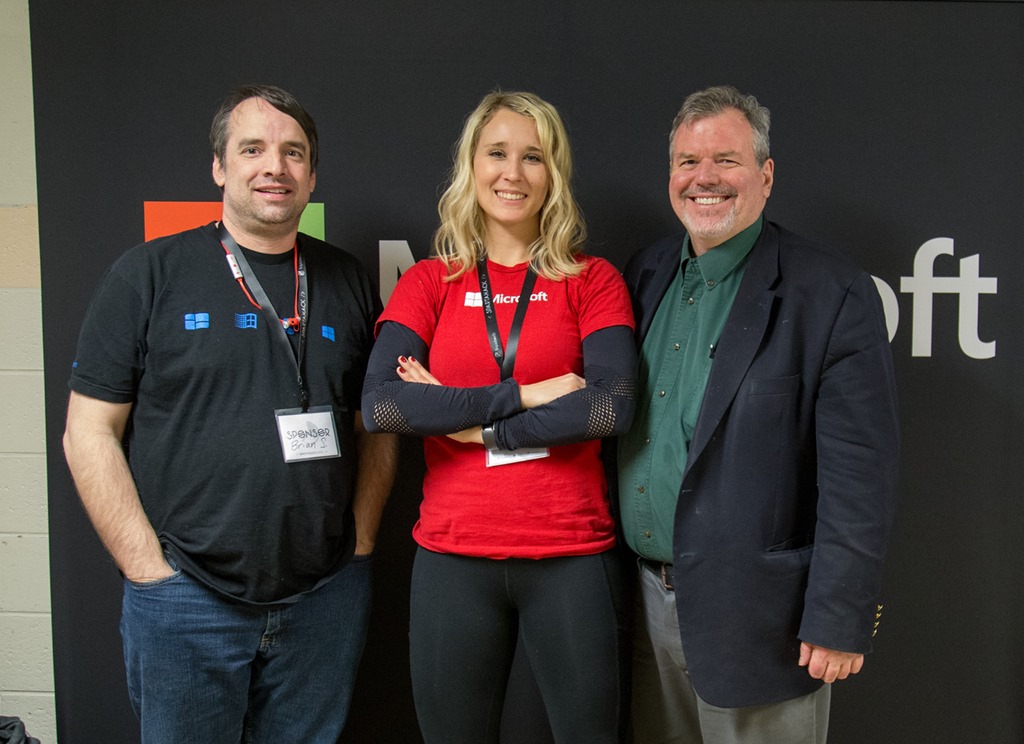
(found online at https://giard.smugmug.com/Tech-Community/SpartaHack-2016/i-4FPV9bf/0/X2/SpartaHack-068-X2.jpg)

returned the following data:
[
{
"faceRectangle": {
"height": 113,
"left": 285,
"top": 156,
"width": 113
},
"scores": {
"anger": 1.97831262E-09,
"contempt": 9.096525E-05,
"disgust": 3.86221245E-07,
"fear": 4.26409547E-10,
"happiness": 0.998336,
"neutral": 0.00156954059,
"sadness": 8.370223E-09,
"surprise": 3.06117772E-06
}
},
{
"faceRectangle": {
"height": 108,
"left": 831,
"top": 169,
"width": 108
},
"scores": {
"anger": 2.63808062E-07,
"contempt": 5.387114E-08,
"disgust": 1.3360991E-06,
"fear": 1.407629E-10,
"happiness": 0.9999967,
"neutral": 1.63170478E-06,
"sadness": 2.52861843E-09,
"surprise": 1.91028926E-09
}
},
{
"faceRectangle": {
"height": 100,
"left": 591,
"top": 168,
"width": 100
},
"scores": {
"anger": 3.24157673E-10,
"contempt": 4.90155344E-06,
"disgust": 6.54665473E-06,
"fear": 1.73284559E-06,
"happiness": 0.9999156,
"neutral": 6.42121E-05,
"sadness": 7.02297257E-06,
"surprise": 5.53670576E-09
}
}
]
A high value for the 3 happiness scores and the very low values for all the other scores suggest a very high degree of confidence that each person in this photo happy. is
Here is the request in the popular HTTP analysis tool Fiddler [http://www.telerik.com/fiddler]:
Request
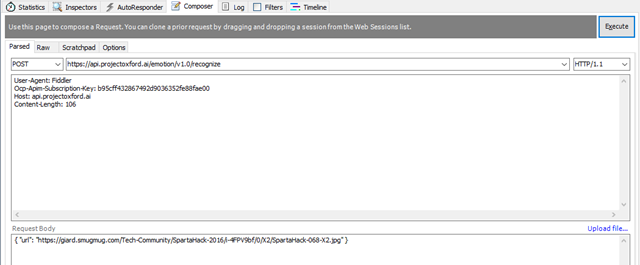
Response: 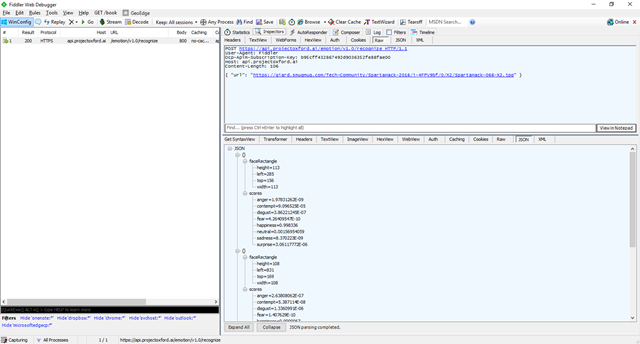
Below is a C# code snippet making a request to this service to analyze the emotions of the people in an online photograph. You can download the full application at https://github.com/DavidGiard/CognitiveSvcsDemos.
string emotionApiKey = "XXXXXXXXXXXXXXXXXXXXXXX";
var client = new HttpClient();
client.DefaultRequestHeaders.Add("Ocp-Apim-Subscription-Key", emotionApiKey);
string uri = "https://westus.api.cognitive.microsoft.com/emotion/v1.0/recognize";
HttpResponseMessage response;
var json = "{'url': '" + imageUrl + "'}";
byte[] byteData = Encoding.UTF8.GetBytes(json);
using (var content = new ByteArrayContent(byteData))
{
content.Headers.ContentType = new MediaTypeHeaderValue("application/json");
response = await client.PostAsync(uri, content);
}if (response.IsSuccessStatusCode)
{
var data = await response.Content.ReadAsStringAsync();
}
You can find the full documentation – including an in-browser testing tool - for this API here.
Sending requests to the Cognitive Services Emotion API makes it simple to analyze the emotions of people in a photograph.
Generating a thumbnail image from a larger image sounds easy – just shrink the dimensions of the original, right? But it becomes more complicated if the thumbnail image is a different shape than the original. For example, the original image may be rectangular but we need the new image to be a square. Or we may need to generate a portrait-oriented thumbnail from a landscape-oriented original image. In these cases, we will need to crop or distort the original image when we create the thumbnail. Distorting the image tends to look very bad; and when we crop an image, we want ensure that the primary subject of the image remains in the generated thumbnail. To do this, we need to identify the primary subject of the image. That's easy enough for a human observer to do, but a difficult thing for a computer to do. But if we want to automate this process, we will have to ask the computer to do exactly that.
This is where machine learning can help. By analyzing many images, Machine Learning can figure out what parts of a picture are likely to be the main subject. Once this is known, it becomes a simpler matter to crop the picture in such a way that the main subject remains in the generated thumbnail.
As I discussed in a previous article, Microsoft Cognitive Services includes a set of APIs that allow your applications to take advantage of Machine Learning in order to analyze, image, sound, video, and language.
The Cognitive Services Vision API uses Machine Learning so that you don't have to. It exposes a web service to return an intelligent thumbnail image from any picture.
You can see this in action here.
Scroll down the the section titled "Generate a thumbnail" to see the Thumbnail generator as shown in Figure 1.

Figure 1
With this live, in-browser demo, you can either select an image from the gallery and view the generated thumbnails; or provide your own image - either from your local computer or from a public URL. The page uses the Thumbnail API to create thumbnails of 6 different dimensions.
For your own application, you can either call the REST Web Service directly or (for a .NET application) use a custom library. The library simplifies development by abstracting away HTTP calls via strongly-typed objects.
To get started, you will need an Azure account and a Cognitive Services Vision API key.
If you don't have an Azure account, you can get a free one at https://azure.microsoft.com/free/.
Once you have an Azure Account, follow the instructions in this article to generate a Cognitive Services Computer Vision key.
To use this API, you simply have to make a POST request to the following URL:
https://[location].api.cognitive.microsoft.com/vision/v1.0/generateThumbnail?width=ww&height=hh&smartCropping=true
where [location] is the Azure location where you created your API key (above) and ww and hh are the desired width and height of the thumbnail to generate.
The “smartCropping” parameter tells the service to determine the main subject of the photo and to try keep it in the thumbnail while cropping.
The HTTP header of the request should include the following:
Ocp-Apim-Subscription-Key.
The Cognitive Services Computer Vision key you generated above.
Content-Type
This tells the service how you will send the image. The options are:
- application/json
- application/octet-stream
- multipart/form-data
If the image is accessible via a public URL, set the Content-Type to application/json and send JSON in the body of the HTTP request in the following format
{"url":"imageurl"}
where imageurl is a public URL pointing to the image. For example, to generate a thumbnail of this picture of a skier, submit the following JSON:
{"url":"http://mezzotint.de/wp-content/uploads/2014/12/2013-skier-edge-01-Kopie.jpg"}

If you plan to send the image itself to the web service, set the content type to either "application/octet-stream" or "multipart/form-data" and submit the binary image in the body of the HTTP request.
Here is a sample console application that uses the service to generate a thumbnail from a file on disc. You can download the full source code at
https://github.com/DavidGiard/CognitiveSvcsDemos
Note: You will need to create the folder "c:\test" to store the generated thumbnail.
// TODO: Replace this value with your Computer Vision API Key
string computerVisionKey = "XXXXXXXXXXXXXXXX"var client = new HttpClient();
var queryString = HttpUtility.ParseQueryString(string.Empty);client.DefaultRequestHeaders.Add("Ocp-Apim-Subscription-Key", computerVisionKey);
queryString["width"] = "300";
queryString["height"] = "300";
queryString["smartCropping"] = "true";
var uri = "https://westcentralus.api.cognitive.microsoft.com/vision/v1.0/generateThumbnail?" + queryString;HttpResponseMessage response;
string originalPicture = "/content/Giard/_DGInAppleton.png";
var jsonBody = "{'url': '" + originalPicture + "'}";
byte[] byteData = Encoding.UTF8.GetBytes(jsonBody);using (var content = new ByteArrayContent(byteData))
{
content.Headers.ContentType = new MediaTypeHeaderValue("application/json");
response = await client.PostAsync(uri, content);
}
if (response.StatusCode == System.Net.HttpStatusCode.OK)
{
// Write thumbnail to file
var responseContent = await response.Content.ReadAsByteArrayAsync();
string folder = @"c:\test";
string thumbnaileFullPath = string.Format("{0}\\thumbnailResult_{1:yyyMMddhhmmss}.jpg", folder, DateTime.Now);
using (BinaryWriter binaryWrite = new BinaryWriter(new FileStream(thumbnaileFullPath, FileMode.Create, FileAccess.Write)))
{
binaryWrite.Write(responseContent);
}
// Show BEFORE and AFTER to user
Process.Start(thumbnaileFullPath);
Process.Start(originalPicture);
Console.WriteLine("Done! Thumbnail is at {0}!", thumbnaileFullPath);
}
else
{
Console.WriteLine("Error occurred. Thumbnail not created");
}}
The result is shown in Figure 2 below. 
Figure 2
One thing to note. The Thumbnail API is part of the Computer Vision API. As of this writing, the free version of the Computer Vision API is limited to 5,000 transactions per month. If you want more than that, you will need to upgrade to the Standard version, which charges $1.50 per 1000 transactions.
But this should be plenty for you to learn this API for free and build and test your applications until you need to put them into production.
The code above can be found on GitHub.
You can find the full documentation – including an in-browser testing tool - for this API here.
The Cognitive Services Custom Vision API provides a simple way to generate thumbnail images from pictures.
As I discussed in a previous article, Microsoft Cognitive Services includes a set of APIs that allow your applications to take advantage of Machine Learning in order to analyze, image, sound, video, and language.
Your application uses Cognitive Services by calling one or more RESTful web services. These services require you to pass a key in the header of each HTTP call. You can generate this key from the Azure portal.
If you don't have an Azure account, you can get a free one at https://azure.microsoft.com/free/.
Once you have an Azure Account, navigate to the Azure Portal.
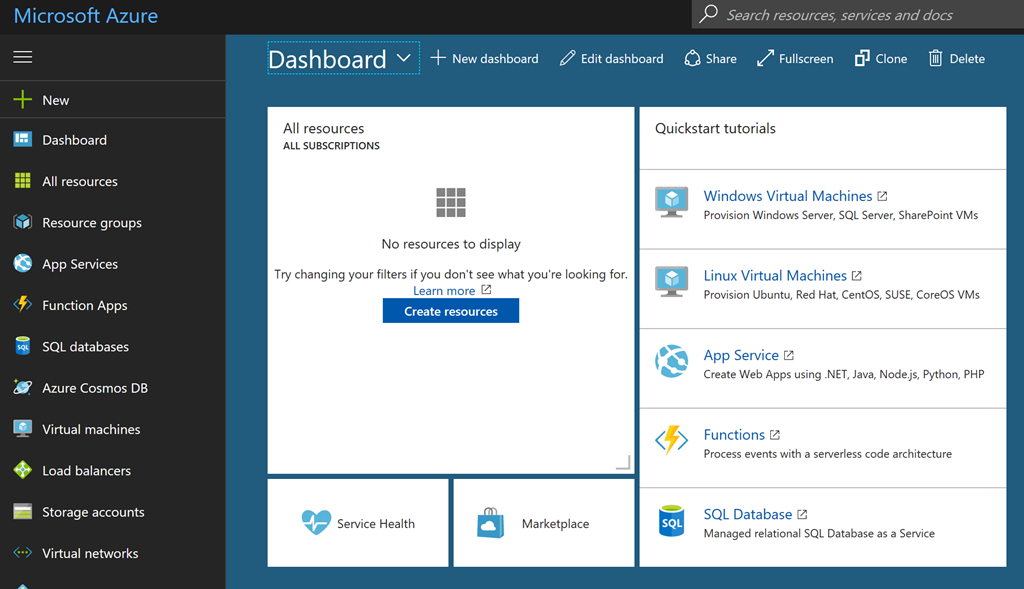
Figure 1
Here you can create a Cognitive Services API key. Click the button in the top left of the portal (Figure 2)
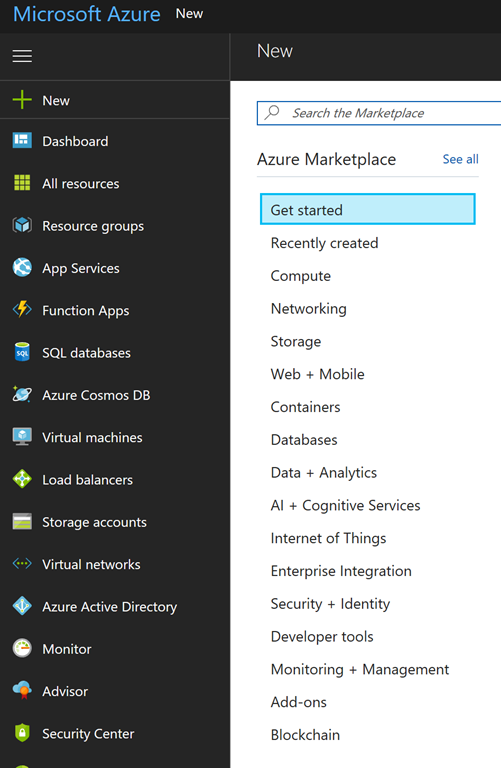
Figure 2
It’s worth noting that the “New” button caption sometimes changes to “Create a Resource” (Figure 2a)

Figure 2a
From the flyout menu, select AI+Cognitive Services. A list of Cognitive Services displays. Select the service you want to call. For this demo,I will select Computer Vision API, as shown in Figure 3.
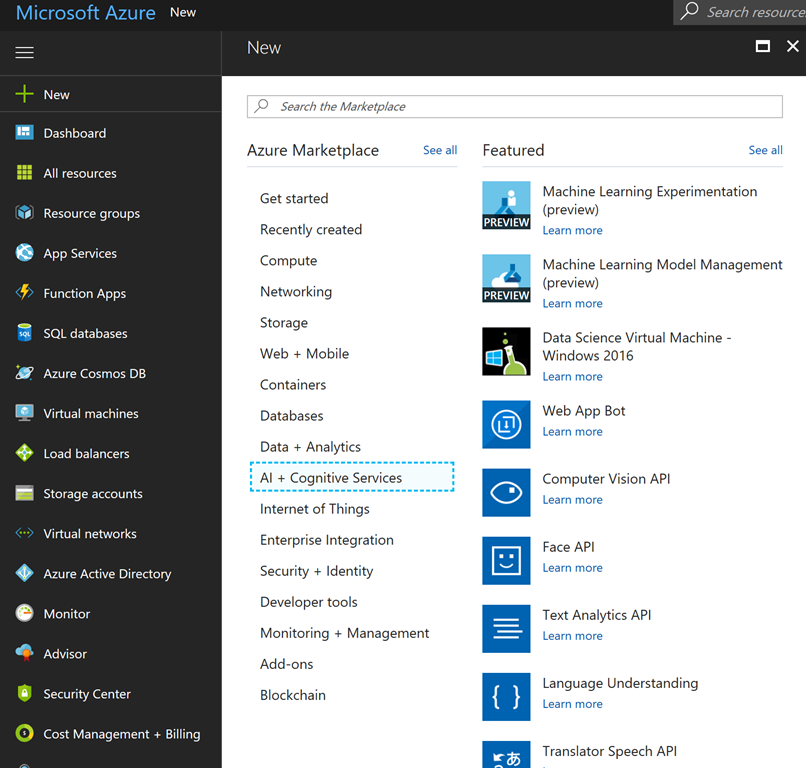
Figure 3
The Face API blade displays as shown in Figure 4.
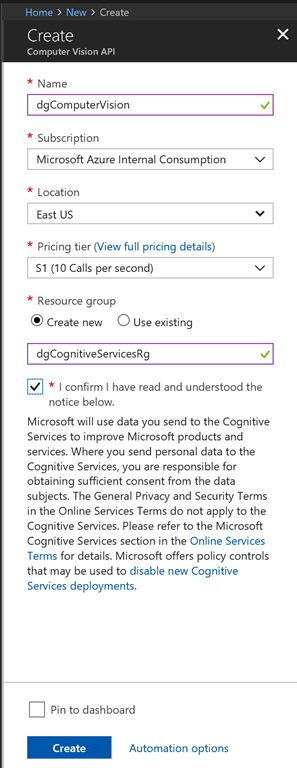
Figure 4
At the Name textbox, enter a name for this service account.
At the Subscription dropdown, select the Azure subscription to associate with this service.
At the Location dropdown, select the region in which you want to host this service. You should select a region close to those who will be consuming the service. Make note of the region you selected.
At the Pricing Tier dropdown, select the pricing tier you want to use. Currently, the choices are F0 (which is free, but limited to 20 calls per minute); and S1 (which is not free, but allows more calls.) Click the View full pricing details link to see how much S1 will cost.
At the Resource Group field, select or create an Azure Resource Group. Resource Groups allow you to logically group different Azure resources, so you can manage them together.
Click the [Create] button to create the account. The creation typically takes less than a minute and a message displays when the service is created, as shown in Figure 5.

Figure 5
Click the [Go to resource] button to open a blade to configure the newly-created service. Alternatively, you can select "All Resources" on the left menu and search for your service by name. Either way, the service blade displays, as as shown in Figure 6.

Figure 6
The important pieces of information in this blade are the Endpoint (on the Overview tab, Figure 7) and the Access Keys (on the Keys tab, as shown in Figure 8). Within this blade, you also have the opportunity to view log files and other tools to help troubleshoot your service. And you can set authorization and other restrictions to your service.
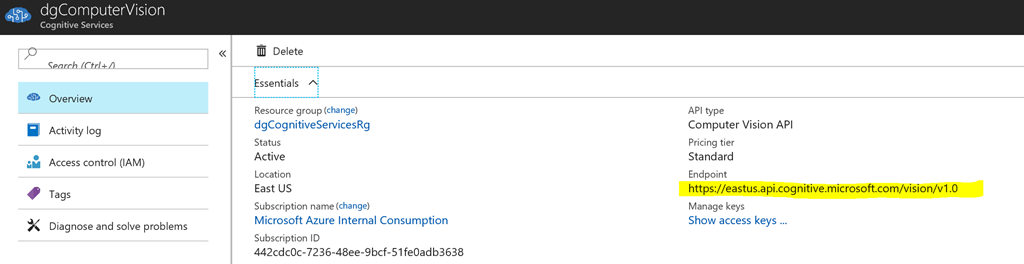
Figure 7
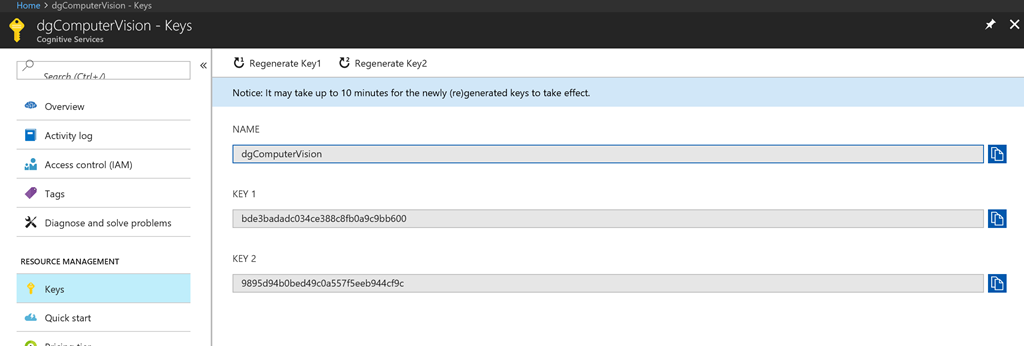
Figure 8
The process is almost identical when you create a key for any other Cognitive Service. The only difference is that you will select a different service set in the AI+Cognitive Services flyout.
Cognitive Services Make It Easy to Use Machine Learning in Your Application
December 26, 2017 10:25 Comments [0]Microsoft Cognitive Services is a set of APIs that take advantage of Machine Learning to provide developers with an easy way to analyze images, speech, language, and others.
If you have worked with or studied Machine Learning, you know that you can accomplish a lot, but that it requires a lot of computing power, a lot of time, and a lot of data. Since most of us have a limited amount of each of these, we can take advantage of the fact that Microsoft has data, time, and the computing power of Azure. They have used this power to analyze large data sets and expose the results via a set of web services, collectively known as Cognitive Services.
The APIs of Cognitive Services are divided into 5 broad categories: Vision, Speech, Language, Knowledge, and Search.
Vision APIs
The Vision APIs provide information about a given photograph or video. For example, several Vision APIs are capable of recognizing faces in an image. One analyzes each face and deduces that person's emotion; another can compare 2 pictures and decide whether or not 2 photographs are the same person; a third guesses the age of each person in a photo.
Speech APIs
The Speech APIs can convert speech to text or text to speech. It can also recognize the voice of a given speaker (You might use this to authenticate users, for example) and infer the intent of the speaker from his words and tone. The Translator Speech API supports translations between 10 different spoken languages.
Language
The Language APIs include a variety of services. A spell checker is smart enough to recognize common proper names and homonyms. And the Translator Text API can detect the language in which a text is written and translate that text into another language. The Text Analytics API analyzes a document for the sentiment expressed, returning a score based on how positive or negative is the wording and tone of the document. The most interesting API in this group is the Language Understanding Intelligence Service (LUIS) that allows you to build custom language models so that your application can understand questions and statements from your users in a variety of formats.
Knowledge
Knowledge includes a variety of APIs - from customer recommendations to smart querying and information about the context of text. Many of these services take advantage of natural language processing. As of this writing, all of these services are in preview.
Search
The Search APIs allow you to retrieve Bing search results with a single web service call.
You can use these APIs. To get started, you need an Azure account. You can get a free Azure trial at https://azure.microsoft.com/.
Each API offers a free option that restricts the number and/or frequency of calls, but you can break through that boundary for a charge. Because they are hosted in Azure, the paid services can scale out to meet increased demand.
You call most of these APIs by passing and receiving JSON to a RESTful web service. Some of the more complex services offer configuration and setup beforehand.
These APIs are capable of analyzing pictures, text, and speech because each service draws on the knowledge learned from parsing countless photos, documents, etc. beforehand.
You can find documentation, sample code, and even a place to try out each API live in your browser at https://azure.microsoft.com/en-us/services/cognitive-services/
A couple of fun applications of Cognitive Services are how-old.net (which guesses the ages of people in photographs) and what-dog.net (which identifies the breed of dog in a photo).
Below is a screenshot from the Azure documentation page, listing the sets of services. But keep checking back, because this list grows and each set contains one or more services.
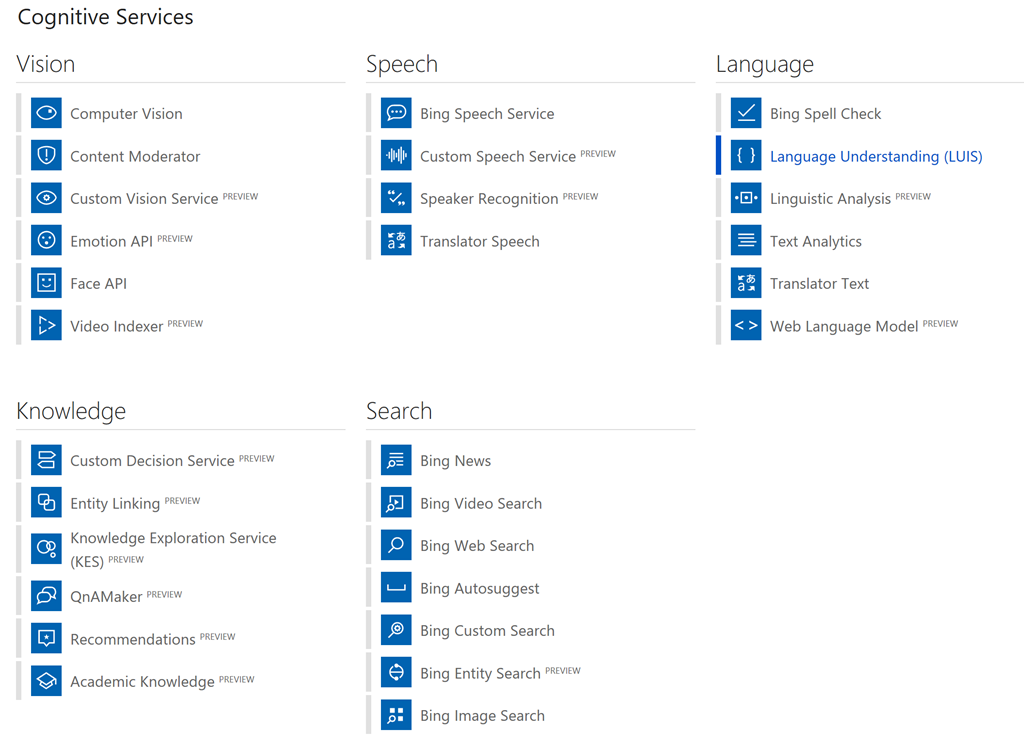
Sign up today and start building apps. It’s fun, it's useful, and it’s free!
I have been recording my online TV show - Technology and Friends - for 9 years. I recently passed episode #500.
The show has evolved over the years and so has the recording equipment I use.
Below is a description of the hardware I use to record Technology and Friends.
Camera: Canon EOS6D
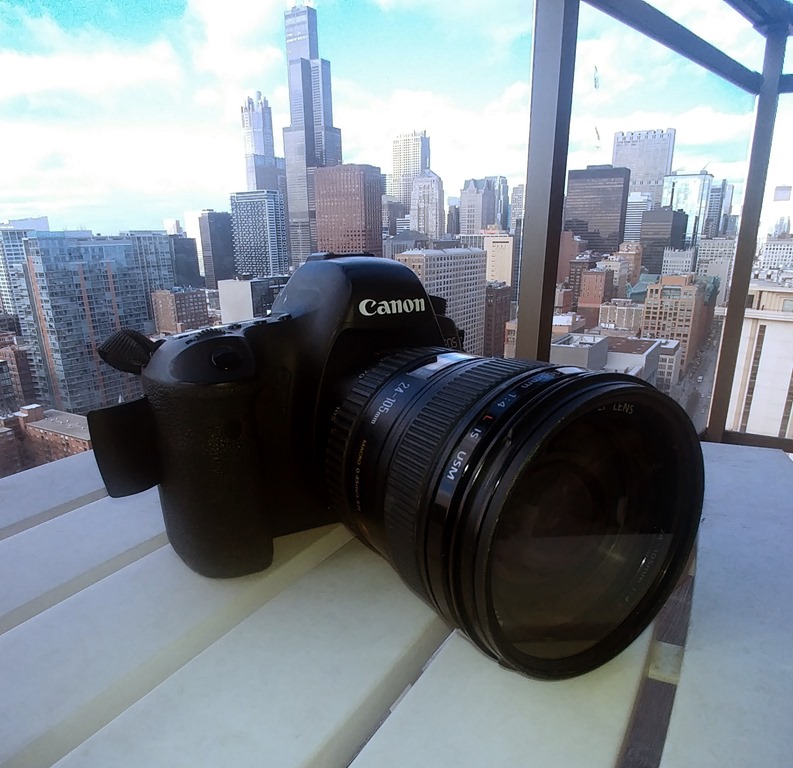 This is the second Canon SLR I’ve purchased. My EOS 30D lasted over 10 years, so I returned to a similar, but updated model when it finally began to fail. The EOS 6D is primarily a still camera, but it can record up to 30 minutes of high-resolution video. The image quality is outstanding, particularly with the 24-105mm Canon lens I bought with it. This setup is overkill (read: "expensive") for a show that most people view in a browser, but I also use this camera for still photography and I have been happy with the results. The main downside for video is the 30-minute limit. After this time, someone needs to re-start the recording.
Audio Recorder: Xoom H6 Handy Recorder
 I bought a Xoom recorder a few years ago on the recommendation of Carl Franklin, who is the co-host and the audio expert of the excellent .NET Rocks podcast. It served me well for years, so I bought the H6 when it was time to replace it. This device contains 2 built-in microphones, but I almost always plug in 2 external microphones, so I can get closer to a speakers mouth. I can plug in up to 4 external microphones. Using these microphones eliminates most of the background noise, allowing me to record in crowded areas. Each microphone can record to a separate audio file, which is convenient if one speaker is much louder than another.
Microphones: Shure SM58
 I went with Shure based on popularity and Amazon reviews. I bought these mid-level models. I have been happy with the results. I strongly recommend external microphones (either lapel or handheld) when recording audio. My show is much better since I began using them. Switching to a separate microphone and the resulting increase in audio quality is probably the technical change resulting in the single biggest jump in quality for my show.
Tripod: Vanguard Lite1
 This is a cheap tripod, but it has lasted me for years. I have a larger tripod, but seldom use it because I can throw the vanguard is small enough to keep in a backpack, carry on a plane, and carry around a conference. I also like the fact that I can set it on a tabletop, which is what I usually do. It is not quite tall enough to stand on the ground and hold the camera as high as the face of a standing adult.
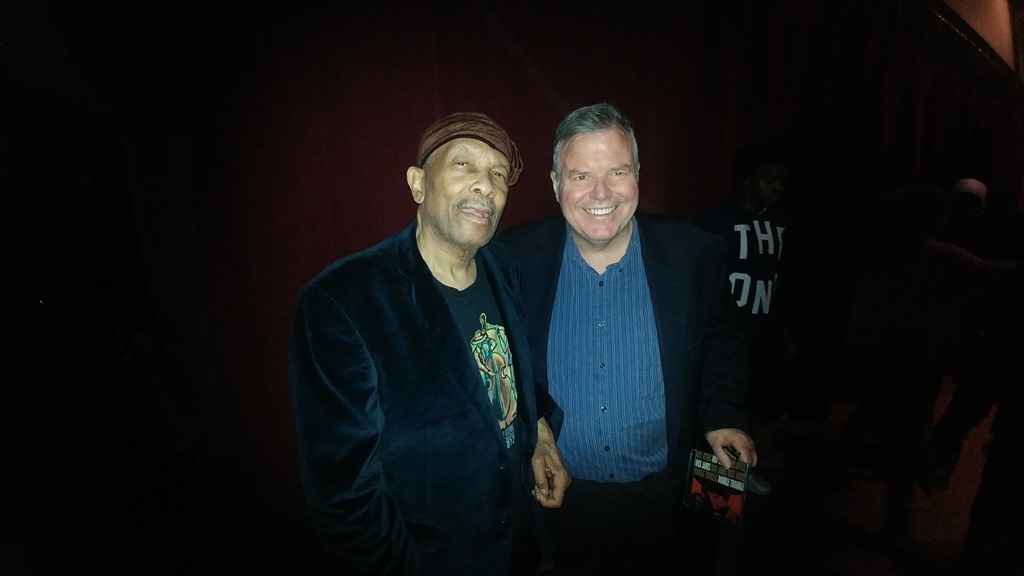 Roy Ayers is 77 years old and stutters when he talks. But not when he sings. And definitely not when he plays the vibraphone. And play he did last night in front of a packed house at The Promontory in Hyde Park.
Ayers mixed a few ballads with the jazz-funk that he helped define. Backed by a band consisting of bass, drums, keyboard, and another vocalist, Ayers played for about 90 minutes, drawing on his 99 albums with such songs as "Red, Black & Green", "Don't Stop the Feeling", and his interpretation of Sam Cooke's "You Send Me".
The keyboardist was the best of the bunch, coaxing a variety of sounds from his instrument during his many solos. I wondered why the stage setup hid so much of him from the audience's view.
And then there was Roy and his vibraphone. Ayers still sounds great when he does his thing with his vibes.
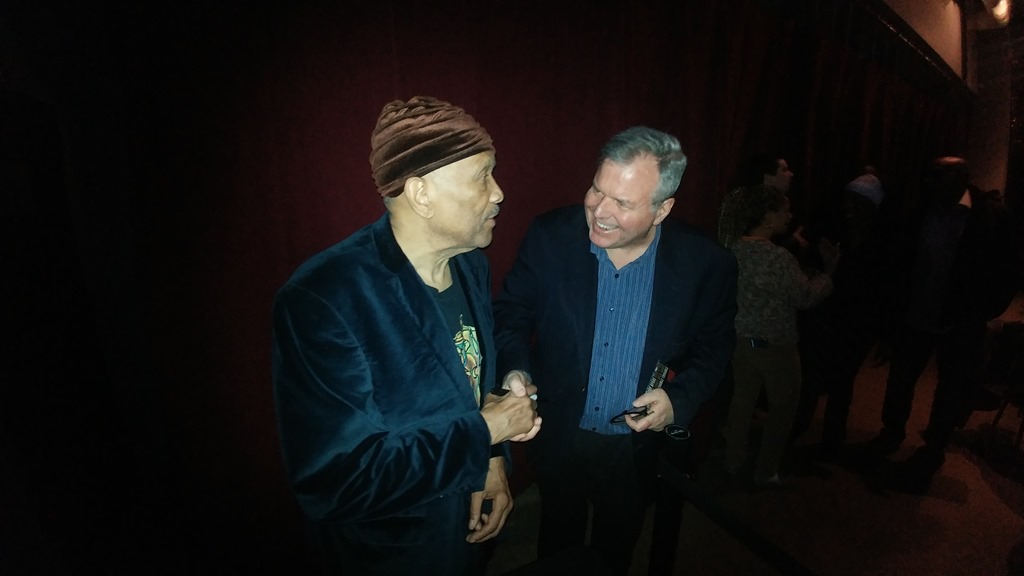 I bought a ticket at the door and had to stand in the back with some folks who decided it was ok to engage in loud conversation at the concert. But I had a chance to shake the hand of Mr. Ayers after the show and tell him how much I enjoyed his music.
And to wish him luck on his next 99 albums.
"Mirror Dance" by Lois McMaster Bujold is the sequel to "Brothers In Arms", the novel that introduced Miles Vorkosigan's clone / brother Mark.
 Following Miles's rescue of Mark in the previous novel, the brothers return to Miles's home planet of Barrayar, where Mark decides to launch a rescue mission to liberate clones who are intended to be used as replacement parts for their genetic donors. Miles follows and is gravely wounded in the ensuing battle. His body is cryogenically frozen and then disappears. Mark returns to Barrayar to deliver the news to their parents - Lord Aral and Lady Cordelia. Arel and Cordelia accept Mark as their son and a potential heir to the Vorkosigan line. Ultimately, Mark launches another rescue mission, this one to find and save Miles, who has been revived by scientists on an enemy planet.
This is one of Bujold's strongest novels. She not only tells a complex story, but she dives further into the emotions of her characters - particularly the clone Mark.
The definition of humanity and the rights that go with it are common themes of Bujold's books and this one delves into it very well, if a little heavy-handed. Interwoven with this general question is Mark’s personal struggle to define his own identity. He desperately wants to define himself outside of just the clone of a heroic Lord. But, his struggle to do so often leads to failure. Others help him with the struggle. He was raised to assassinate Miles's father, but ends up being accepted by his potential victim and his new family.
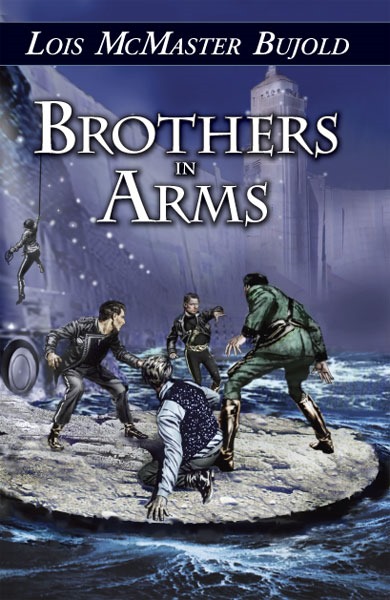 For years, Miles has been leading a double life - he was born Lord Miles Vorkosigan who became a lieutenant in the army of the Barryaran empire; but he sometimes assumes the role of Admiral Naismith, leader of the Dendarii Free Mercenary Fleet.
One day, Miles is forced to appear on the same planet as both of his persona on the same day. Fearing his cover will be blown, he invents a story that Naismith is actually Miles's clone.
Shortly afterward, Miles discovers that he actually does have a clone and that this clone is being used by his enemies in a plot to assasinate Miles.
The book is a good adventure story. It advances the relationship between Miles and Elli (his bodyguard / lover); and it addresses a glaring plot problem - Miles disguises himself as a mercenary Admiral despite his unique physique. It also takes place on future Earth, which is a bonus for those of us who call Earth home today.
12/3
Today I am grateful to attend DataSciConf in Atlanta for the first time.
12/2
Today I am grateful for dinner last night with Shawn and Resa.
12/1
Today I am grateful to see an exciting Hawks-Cavs game with Dave at Philips Arena last night.
11/30
Today I am grateful for:
-Arriving safely in Atlanta after some delays.
-The Data Sci conference speaker dinner last night
11/29
Today I am grateful to the Greater Chicago Food Depository for letting me help yesterday.
11/28
Today I am grateful to Lisa and Betsy for taking over the Midwest Geeks call, after my 4 years facilitating it.
11/27
Today I am grateful for the public library.
11/26
Today I am grateful for a weekend in Michigan visiting friends and family.
11/25
Today I am grateful to Desi and Ondrej for a home-cooked meal and a place to stay last night.
11/24
Today I am grateful to celebrate Thanksgiving dinner with family in Michigan.
11/23
Today I am grateful that most of my family lives within driving distance.
11/22
Today I am grateful to see Mark Colby in concert at the Jazz Showcase last night.
11/21
Today I am grateful for the cabinets I cleaned out last night and all the crap I threw away.
11/20
Today I am grateful for the man who watched my car at the airport terminal yesterday while I ran in to check a bag.
11/19
Today I am grateful to deliver the keynote at GangConf yesterday and to remain a part of #MIGANG after all these years.
11/18
Today I am grateful for:
-Attending a home Raptors game for the first time;
-My first visit to Canada in 10 years
11/17
Today I am grateful for:
-My first visit to the University of Toronto
-An exciting overtime NHL game at Air Canada Arena
-My first time attending a Maple Leafs home game.
11/16
Today I am grateful for my first visit to the University of Waterloo.
11/15
Today I am grateful for my first visit to the Massachusetts Institute of Technology.
11/14
Today I am grateful to arrive safely in Boston on a difficult travel day.
11/13
Today I am grateful for:
-a walk around downtown Princeton, NJ yesterday afternoon
-a tour of Princeton University by Mihaela Friday afternoon
11/12
Today I am grateful to get to bed early last night.
11/11
Today I am grateful for my first visit to Princeton, NJ and Princeton University.
11/10
Today I am grateful to attend an exciting Philadelphia Flyers game last night at the Wells Fargo Arena with Jeffrey.
11/9
Today I am grateful to Sarah for making me look good at UIUC yesterday.
11/8
Today I am grateful to the Uber driver who stopped by my home to drop off the lens cap I left in his car last week.
11/7
Today I am grateful to speak at PyData Chicago for the first time.
11/6
Today I am grateful that the weather here is still nice enough that I can walk to church.
Outlander, the first novel by American author Diana Gabaldon, was originally published in 1991. It has since inspired 7 sequels (so far), a TV series, and a graphic novel.
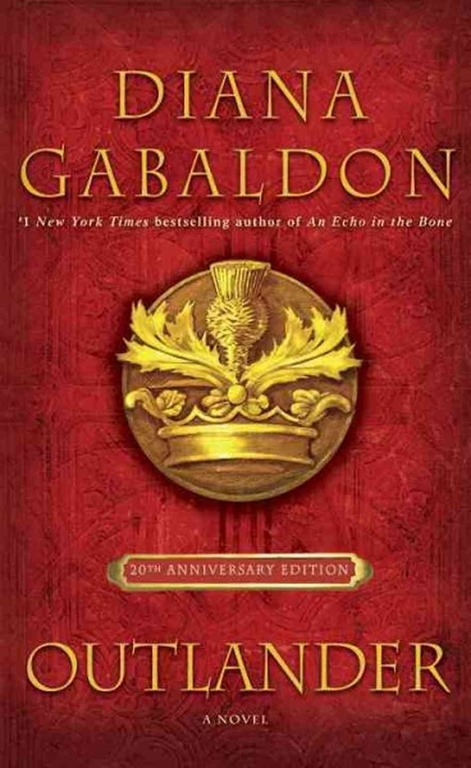 The story focuses on Claire, a World War II combat nurse. The war kept Claire and her husband Frank apart; so, when it ended, they traveled to Inverness, Scotland for a second honeymoon and to allow Frank to research his ancestors.
While in Scotland, Claire encounters an ancient Druid shrine that magically transports her to the mid-18th century. Almost immediately after entering the past, Claire is attacked by the sadistic British Captain Jack Randall. It turns out that Randall is the direct ancestor of Claire's 20th century husband. She is rescued by Scottish clansmen and caught in the struggle between the English army and the Scottish clans.
Although often classified as a science fiction novel (I first learned of Outlander on NPR's Top 100 Science Fiction & Fantasy Books, this book is primarily an historical romance. The time travel incident serves mostly as a MacGuffin to thrust together Claire and Jamie.
Despite Claire's 20th century marriage, she falls in love with Jamie Fraser, the handsome, rugged Scottish warrior. Their marriage is initial one of convenience (Claire can escape English arrest by becoming a Scottish citizen), but a passion soon ignites between the two and the subsequent sex scenes are frequent and racy enough to make a Scotsman blush.
Outlander is also an adventure story. Jamie and Claire are pursued across Scotland by the English army and the vengeful Captain Randall. Claire is captured and rescued, and Frank is captured and rescued, and they travel and fight the English and have sex with each other and fight each other and have sex with the English and travel some more.
Outlander is not for everyone. Some readers will take issue with the patriarchal nature of 18th century marriages - particularly a scene where Jamie beats his wife for disobeying him and Claire is quick to forgive him. Others may be turned off by a prolonged description of male-on-male rape and torture near the end of the book.
But if you can get past these, it is a pretty good story. And enough readers think so that Gabaldon continues to extend this series today.
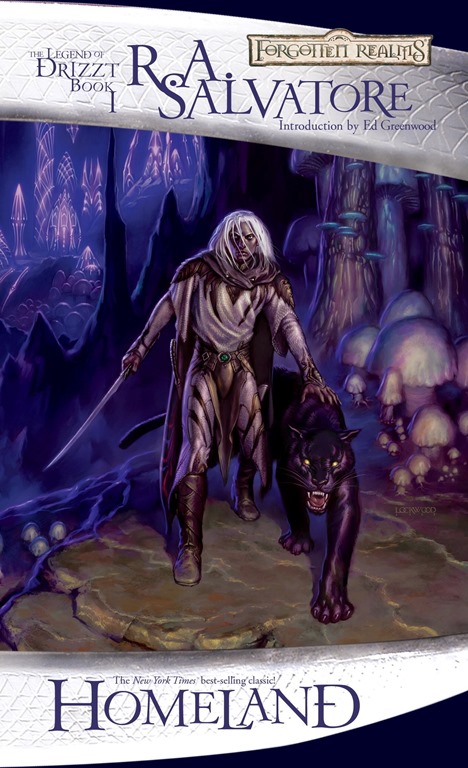 Drizzt Do'Urden was born into the underworld of Mgnzoberranzan, home of The Drow or Dark Elves. The city is ruled by the tyrannical Matrons, who worship the malevolent spider god Lolth. Theirs is a world in which violence and treachery are praised and rewarded, while empathy and sympathy are perceived as weaknesses to be severely punished. Mgnzoberranzan is divided into Great Houses, that often clash violently with one another to improve their standing within this city's hierarchy.
Drizzt is the most gifted warrior of his people. He is trained by the great Weapon Master Zaknafein and he surpasses all his classmates at the Academy.
But Drizzt is unlucky enough to be born with a conscience in this sadistic, society. He questions the ethics of the Menzoberranzan society and their worship of the malevolent spider-god Lolth.
Drizzt joins in the drow attacks against his people's enemies. His fighting prowess increases his reputation, but he begins to see that his family and people have been dishonest about the character and motivations of their enemies.
Homeland is the first book in R. A. Salvatore's Dark Elf Trilogy, which is chronologically the first trilogy of his Legend of Drizzt series. These series and many of Salvatore's other books take place in the Forgotten Realms universe, made popular by the Dungeons and Dragons fantasy role-playing game.
The novel is an adventure story and Drizzt is never certain who (if anyone) is his ally. He hopes, but does not know if he can count on Zaknafein and the pan-dimensional panther Guenhwyvar as allies. Each of the great houses uses deception to plot against rival houses in their quest for revenge and power in this dysfunctional world.
Homeland explores the conflict between personal principles and our natural desire to belong to a family and social order. Drizzt's conflicts are extreme (he is good, and his family and people are evil), but we all suffer this same internal battle at times.
The characters don't have a lot of depth and the writing is a bit heavy handed at times. But the story is good fun. And I enjoyed it.
 Callie's childhood was tougher than most. She was abandoned by her parents at a young age and raised by her aunt and uncle, which is when I met her. They lived next door to us and befriended my boys, who were a few years younger than her and her brother.
As an adult, she tried to help her younger brother, who was in and out of trouble much of his life and died young. She was a single mother. She was as a teacher and social worker. She had a beautiful smile.
She died last week of a brain aneurism.
She was 32 years old.
She will be buried on Saturday.
Borders of Infinity by Lois McMaster Bujold is a collection of 3 previously published novellas: Mountains of Mourning, Labyrinth, and The Borders of Infinity. All 3 feature Bujold's hero Miles Vorkosigan, the handicapped royal soldier from the planet Barayar.
In Mountains of Mourning, Miles travels to the back country of Barayar to investigate the murder of a baby, who was killed because she was born with a cleft pallet.
In Labyrinth, Miles attempts to recruit a geneticist to the Barayaran cause, but ends up bonding with a genetically-engineered female super soldier.
In The Borders of Infinity, Miles is taken prisoner by the Cetagandans. He hopes to rescue a prisoner, but ends up planning a massive prison break.
When I read the first 2 stories, I was optimistic that they would be joined by a common theme - Miles's protection of others who were punished for being handicapped at birth. But the third story did not continue this theme. So, the 3 stories are tied together only by a brief narration in which Miles relates his activity to a superior officer.
As a result, this is little more than an omnibus of loosely related stories, each of which is good, but not great.

At first, the unicorn was happy, living alone in a magical wood. Her magic kept her eternally young and kept the wood eternally in spring.
But one day, she overheard 2 hunters saying that all unicorns had gone from this world. Fearing she might be the last, the unicorn set out on a journey to find others of her kind.
Along the way, she is captured by a witch for display in her circus; then, rescued by a third-rate wizard, who accompanies her on her journey.
Ultimately, she makes her way to a kingdom guarded by the mystical Red Bull, that is rumoured to have captured all the other unicorns.
With The Last Unicorn, Peter S. Beagle weaves a wonderful fairy tale about the adventures of a unicorn on a quest to find others and to find herself. It is a story of adventure and it is a story of companionship and loyalty.
But mostly, it is the telling of the story that sets it apart. Beagle's prose is almost like poetry. The beauty of the unicorn is reflected in the beauty of his words.
This book was a joy to read - from start to finish.
 Perdido Street Station is an enormous train station in the city of New Crobuzon in the world of Bas-Lag. It is also the title of China Miéville's novel about the the station, the city, and the world.
The problems of industrialized societies in our world are magnified a hundred times in the city state of New Crobuzon: Pollution, Poverty, Political corruption, an Inequitable distribution of wealth and power, and Racial division make this place a miserable home for nearly all who dwell in it.
The races of Bas-Lag are not simply people of different skin tones and nose shapes; they are a bizarre assortment of creatures - mostly humanoid, but some not. We see bird-men (Garuda), intelligent plants (Cactacae), aquatic humanoids (Grindylow), parasites shaped like disembodied hands that grasp the throats of their victims (Handlingers), humans with the head of a beetle (Khepri), and sentient machines (Constructs), among others.
A common form of punishment in New Crobuzon is to surgically alter people by attaching mechanical or organic body parts to their bodies, creating a separate race of "Remades" and further increasing the collection of creatures found in this world.
Creatures from other dimensions also sometimes visit Bas-Lag, such as The Weaver a giant spider-like creature, who seeks to add his own version of order to the world. In this novel, Hell is a tangible place that sends an official Ambassador to New Crobuzon.
Isaac is a scientist living and working in New Crobuzon. He is in love with the Lin - a Khepri artist who is estranged from her own people. One day the Garuda Yagharek approaches Isaac asking him to restore to him the power of flight. Yagharek's wings were removed by his tribe as punishment for an unidentified crime. Isaac accepts and begins by studying the biology of hundreds of flying creatures. His studies inadvertently unleash the Slake-Moths - deadly, interdimensional creatures with the power to hypnotize their prey before devouring their consciousness.
The slake-moths terrorize the city, leaving behind mindless shells of people wherever they attack. The government and numerous vigilante groups are unable to stop the slake-moths, so Isaac - feeling responsible - organizes a group of warriors to hunt them down and destroy them.
This world is powered by magic and by technology. But it's an old technology. Blimps are the most common form of air transportation and computers are programmed via punch cards. These punch-card-programs are powerful enough to make some computers self-aware.
I loved the moral ambiguity of this story. Our heroes often must make difficult choices - such as sacrificing the lives of innocent bystanders - in an effort to stop the monsters terrorizing the city.
I loved the complexity of the plot. Most storylines are not resolved until the very end and many are not happy resolutions.
I loved Miéville's attention to detail. We can see the massive bulk of the weaver as he fades into our dimension; we feel the terror inspired by the slake-moths.
The reader experiences the feeling of dread that hangs over the protagonists. Miéville gives us a real sense of the despair felt by so many in this awful world he created. Citizens live in a police state, controlled by a secret militia, controlled by the mayor and a few powerful businessmen.
Perdido Street Station is a fantasy story, a steampunk story, a horror story, a monster story, an adventure story, a detective story, a cyberpunk story, and a love story. Some have described it as Weird Fantasy in the tradition of H.P. Lovecraft and some of the pulp writers of the 1930s.
However, you choose to classify it, Perdido Street Station is one of the most imaginative stories I've read in years.
11/5
Today I am grateful to see my nephew Dylan play ice hockey in Glenview, IL yesterday.
11/4
Today I am grateful that so many people traveled so far to come to the Community Connections event yesterday.
11/3
Today I am grateful to visit the Chicago Museum of Science and Industry yesterday with Ondrej and Gaines.
11/2
Today I am grateful that I accomplished everything I wanted to accomplish yesterday.
11/1
Today I am grateful that I actually lost weight while in Uruguay, despite all the beef that I ate.
10/31
Today I am grateful for my first visit to South America, to Fabian for inviting me, and to Rachel for recommending me.
10/30
Today I am grateful for my first visit to Buenos Aires.
10/29
Today I am grateful for a private tour around Montevideo by the #NETConfUY organizers.
10/28
Today I am grateful to attend and speak at .NET Conf UY for the first time.
10/27
Today I am grateful for the speaker dinner last night, featuring carne asada.
10/26
Today I am grateful for a late-night walk along the Rio de la Plata last night.
10/25
Today I am grateful for a walk around downtown Montevideo last night.
10/24
Today I am grateful to arrive safely in Uruguay.
10/23
Today I am grateful for a good day at the gym yesterday.
10/22
Today I am grateful to attend my first Chicago Wolves hockey game last night.
10/21
Today I am grateful I was able to consolidate my Azure web apps and delete a bunch of costly resources yesterday.
10/20
Today I am grateful for good news from the doctor yesterday.
10/19
Today I am grateful to hang out in downtown St. Louis yesterday with Ondrej, Brian, Gaines, and Mary.
10/18
Today I am grateful to speak again at the #DevUp conference.
10/17
Today I am grateful to attend the Red Shirt Tour in Chicago yesterday and learn more about Azure.
10/16
Today I am grateful
-to see an exciting Falcons-Dolphins game yesterday at my first visit to Mercedes Benz Stadium;
-to Tim for picking me up at the airport last night.
10/15
Today I am grateful to help Jason and Claire celebrate their wedding yesterday.
10/14
Today I am grateful for 4 years at Microsoft and all that I have learned here and all the people I've met and all the places I've gone because of this job.
10/13
Today I am grateful to David for a ticket to see Paul Weller in concert last night at the House of Blues.
10/12
Today I am grateful I was able to recover data from my laptop after it died yesterday.
10/11
Today I am grateful for a chance to teach at DePaul last night.
10/10
Today I am grateful for dinner last night with my new teammate Christine while she was in Chicago.
10/9
Today I am grateful for dinner with Emilija and Larissa last night.
10/8
Today I am grateful for
-spending the day with my son, helping him move;
-the 8th football victory over um in the last 10 years.
10/7
Today I am grateful for:
-A chance to work with Julie for the first time since our days on the INETA board.
-Seeing The Church in concert last night at Park West.
10/6
Today I am grateful to hang out with J. yesterday.
10/5
Today I am grateful to stream music online.
10/4
Today I am grateful to the Building Maintenance staff for fixing a bunch of stuff in my apartment yesterday.
10/3
Today I am grateful to those who find what I do useful and tell me so.
10/2
Today I am grateful for:
-the company of Tim these past few months
-the opportunity to try 2 new cuisines for the first time yesterday.